RadarBox24.com is a flight data aggregation service similar to sites like FlightAware.com and FlightRadar24.com. They aggregate ADS-B aircraft data obtained from (mostly) volunteer RTL-SDR based feeders based all over the world and use this to power their flight tracking map and flight information database.
Last year RadarBox24 came out with a specialty ADS-B RTL-SDR dongle. This is a custom RTL-SDR which contains a built in 1090 MHz tuned amplifier and filter. We have not tested this dongle yet, but we expect that the design and performance would be very similar to the FlightAware ADS-B dongles. A network analyzer report from RB24 is provided here.
These dongles can only receive 1090 MHz and do so better than a standard RTL-SDR due to the built in LNA and filter. The LNA reduces the noise figure of the dongle leading to greater sensitivity, and the filter removes any strong out of band signals that could overload and desensitize the dongle. This results in greater reception range, and more flights tracked. Please note that these dongles cannot be used as wideband general purpose RTL-SDRs due to the filtering.
ADS-B data can easily be shared to RadarBox24 with their Raspberry Pi image and RadarBox24 write that if you share data to their site, you will receive the following kickbacks:
Free Business Account while sharing (worth $39.95 /mo). This allows you to access RAW and historic flight data as well as enabling other features such as more advanced data filtering, and a weather layer.
Strong and enthusiastic Community on Whatsapp
Track your own station's flights in real-time not only on website but also on RadarBox apps
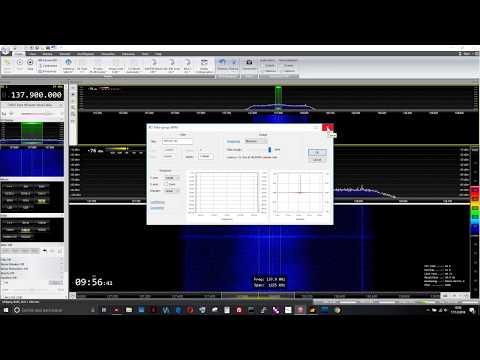
Thanks to "Lolo sdr" for submitting his videos that show his process for receiving and decoding Meteor M2 weather satellite images in Windows with an SDRplay and SDR-Console V3. Since the SDRplay is not supported by SDR#, it is not possible to use Vasilli's excellent Meteor Demodulator plugin (site in Russian, please use the Google Translate option) which is only available for SDR#.
Lolo's method gets around this limitation by initially recording an IQ file of the satellite pass in SDR-Console V3, then opening that IQ file in SDR# via the Fileplayer plugin, which is also by Vasilli and available here. The process is a bit of extra work, and the image isn't live, but the image comes out clearly in the end.
The videos are shown below, and subtitles are available in English, French and Italian via the YouTube player options.
Recibir y decodificar Satélite Meteor M2 con SDRplay, parte 1 de 2, grabar el pase, con subtitulos.
Recibir y decodificar Satélite Meteor M2 con SDRplay, parte 2 de 2, decodificar imagen y corrección.
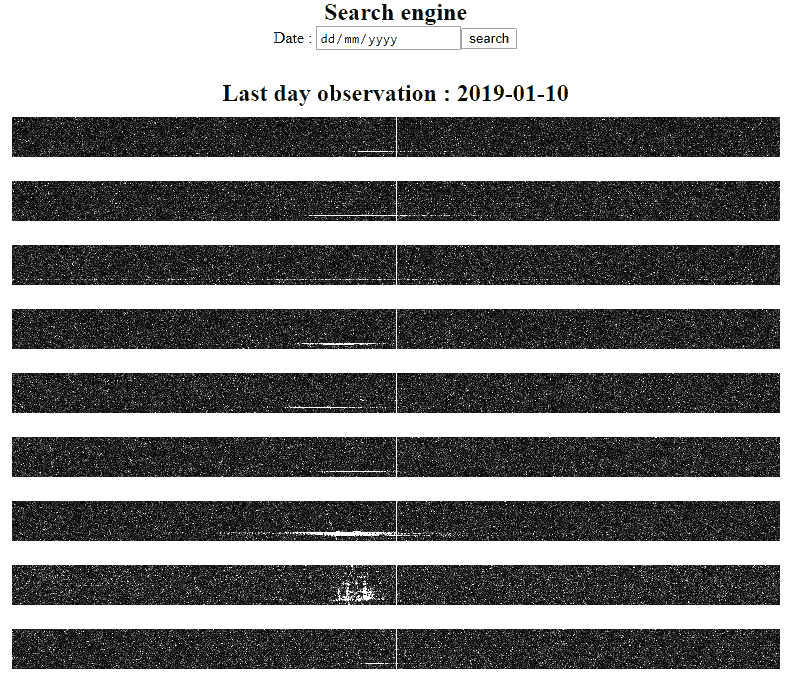
Thank you to Florent for submitting his website which contains a live log of his meteor scatter observations. Meteor scatter occurs when radio signals reflect off the ionized trail left behind by meteors when they enter the atmosphere. This trail is highly RF reflective, so it can allow distant radio stations to be briefly received.
His set up consists of an RTL-SDR dongle running on a Raspberry Pi 3. His antenna is a homemade 6 element Yagi. Florent is based in France and listens for reflections from the Graves radar at 143.05 MHz. His software captures 768 Hz worth of bandwidth every 0.5s, and then uploads and displays the spectrum plot on his website. When the Graves radar signal is visible on the spectrum, it is an indication of a meteor having entered the atmosphere (or possibly an aircraft).
If you are interested in other peoples live meteor scatter streams, then there is another site at livemeteors.com which displays a live video of an SDR# screen looking for meteor echoes.
Some Meteor Scatter Logs displayed on Florents website
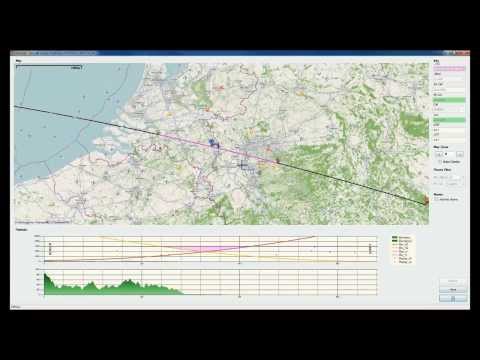
Over on the SWLing post, Thomas has shared an interesting video showing aircraft scatter reception in action. Alps DX [FR] shows on his YouTube channel a broadcast FM signal coming in clearly as a plane passes by, then fading away to nothing as it leaves. This effect is due to the scattering of radio waves that occurs when radio waves reflect off aircraft.
In order to predict when the scattering occurs he uses the free AirScout software which allows you to do the following:
Calculate a propagation path as a cross circle path between two QSO – partners
Calculate a path profile between both QSO – partners using a Digital Elevation Model
(DEM)
Calculate the mutual visibility of an aircraft from both QSO – partners for each point on the path using their elevation and any possible obstruction between them
Calculate a “hot area” in which an aircraft is mutually visible from both QSO –
partners where a reflection is theoretically possible
Show calculated path and aircrafts in real time on a map
Predict Aircraft Scatter potential for each single aircraft according to position, track and altitude
GNU Radio is a very powerful open source platform for implementing various digital signal processing (DSP) algorithms. It is very commonly used with software defined radios like the RTL-SDR, as well as much higher end units. The community that uses GNU Radio is very large, and so every year they hold a conference that highlights some of the most interesting applications and developments related to GNU Radio. The 2018 GNU Radio conference was held in Las Vegas during September 2018. Recently they have uploaded the talks to YouTube, and below we're posting some of our favorites. The full list can be found on their YouTube channel.
Keynote Talk: SatNOGs
In this keynote talk Manolis Surligas discusses the SatNOGs project. SatNOGs is a non-profit organization creating an open source and volunteer based satellite ground station network.
GRCon18 - Keynote: SatNOGs
Open Source Radio Telescopes
John L. Makous discusses his work in creating low cost and home made horn antenna radio telescopes designed to receive the 21cm hydrogen line and other astronomical objects and phenomena. The idea is to provide a low cost solution and easy to build telescope to use in schools.
GRCon18 - Open Source Radio Telescopes
Enter the Electromagic Spectrum with the USRP
Nate Temple gives us an overview of several signals that have been decoded with GNU Radio flowgraphs.
GRCon18 - Enter the Electromagic Spectrum with the USRP
Software Defined Radar Remote Sensing and Space Physics
Juha Vierinen discusses using a USRP to measure propagation conditions with ionospheric chip sounders, and improvements to chirp sounders by using spread spectrum noise. He also discusses various other radar techniques and applications.
GRCon18 - Software Defined Radar Remote Sensing and Space Physics
If you weren't already aware, over the past few months we've been working with the engineering team at Othernet.is to create a 4x Coherent RTL-SDR that we're calling KerberosSDR. A coherent RTL-SDR allows you to perform interesting experiments such as RF direction finding, passive radar and beam forming. In conjunction with developer Tamas Peto, we have also had developed open source demo software for the board, which allows you to test direction finding and passive radar. The open source software also provides a good DSP base for extension.
If you're interested and missed out in the early campaign, don't worry we still have about 250 units left from this batch for sale at a price of $140 + shipping over on our Indiegogo Campaign.
Demo Program Updates
Over the past few weeks we've been working on a few code speed improvements to the demo software, and we now believe that it should be fast enough to run on a Pi 3 B+ at decent update rates. In particular the passive radar display frame rate has been improved and we're able to get about 1 FPS on a Tinkerboard now.
We will soon release the full code, but for now you can see the main two libraries developed by Tamas' that are used in the KerberosSDR code. These libraries contain the direction finding and passive radar processing algorithms.
pyAPRIL - Python Advanced Passive Radar Library. Available on PyPi and GitHub
pyArgus - Python Beamforming and Direction Finding Algorithms. Available on PyPi and GitHub.
Android Direction Finding Companion App Updates
Over the holidays we've been working on a simple companion Android app for the direction finding feature. Using the GPS and/or compass sensors on the Android phone, and the transmitter bearing given by the KerberosSDR we can plot a bearing towards the transmitter that we are tuned to.
The phone connects to a laptop/SBC WiFi hotspot running the KerberosSDR Linux software, and reads the bearing via a simple php HTML server.
Driving around with the KerberosSDR gives better results than when stationary as we can take multiple readings at different points which helps to average out multipath distortions.
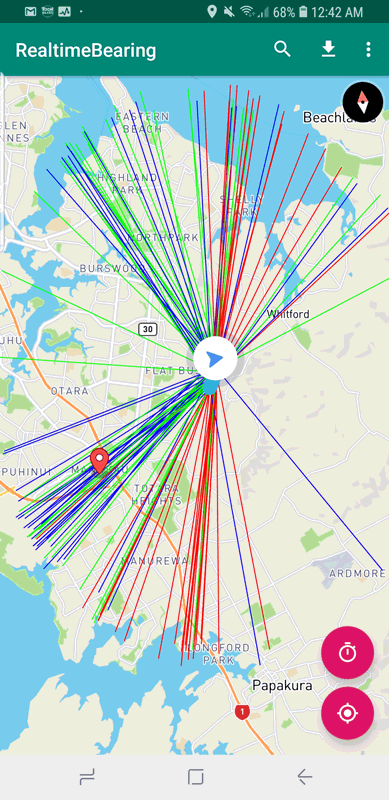
In the image below we used a linear antenna array of four dipoles attached to the windscreen of a car. KerberosSDR was tuned to a TETRA transmitter at 858 MHz.
We drove down a street and then back up it. The red lines indicate the direction of the car as determined by GPS, the blue lines indicate the forward direction towards the transmitter, and the green lines the reverse direction. (a linear antenna array won't know if the transmitter is in front or behind it).
You can see that the majority of blue/green lines point towards the TETRA transmitter which we've marked with a red location marker at the known location.
KerberosSDR Results from a Linear Antenna Array of Dipoles
Getting a bearing from GPS requires that you are moving. However if you are stationary it is also possible to use the compass sensor in the Android app, but Android compass sensors are not particularly accurate.
We also tested the app with a circular array of antennas and found it to work well too. A circular array has the benefit over a linear array of providing only one direction towards the detected signal, but may be more susceptible to multipath issues. In our test the circular array was simply four magnetic whips placed on top of a car.
KerberosSDR using Whip Antennas in a Circular Array on a Vehicle
This time we then drove around for a longer time while logging the data in the Android app. We can see that the majority of blue lines point towards the known transmitter location. Blue lines pointing away from the transmitter may be due to multipath or a briefly incorrect GPS heading (e.g. during a turn). Sometimes reflections or refractions of the signal can be more likely to be picked up if the direct path to the transmitter is really blocked. However if you have enough data points from driving around, it becomes much more clear where the actual transmitter is.
KerberosSDR Results from the Circular Array
Manufacturing Updates
We now have some pictures of the boards being manufactured at the factory. Unfortunately we are behind our initial shipping target of mid-Jan due to the previous unexpected payment delays from Indiegogo, and because of this we may hit the Chinese New Year holidays which could delay us further as factories take a 2 week holiday starting late Jan. We're really hoping to have them shipped off just before then, but we don't know if we can beat the clock. I know some of you are anxious to get started with KerberosSDR, and so I do apologize for the delay.
KerberosSDR in it's metal case (no screen printing yet)
Over on his YouTube channel ModernHam has created a video showing him using an RTL-SDR and Raspberry Pi with RPiTX to record and replay the signal generated by the remote of a wireless power plug. A wireless power plug allows you to turn an AC wall outlet on/of remotely via a remote control. Controlling them with a Raspberry Pi can be a simple way to add home automation. One example ModernHam gives is that he hopes to use RPiTX and the wireless power plugs to create a smart coffee pot that will automatically turn on at 7 am, and turn off at 9 am.
In the past we have created a similar tutorial here, but new updates to RPiTX now make this process much easier and more reliable and ModernHam's video shows the new procedure. The new process is simply to look up the FCC frequency of the remote control transmitter, record an IQ file of the transmissions for the ON and OFF buttons, and then use the RPiTX sendiq command to replay the signal. You can then use simple Linux shell scripts to create automation.
Replay Attack with Remote Plugs for Home Automation with the Raspberry PI
Over on YouTube Corrosive has uploaded a new tutorial video showing us how we can demodulate DVB-S DATV (Digital Amateur TV) on a Windows PC with SDRAngel. DATV is a mode used by hams to transmit and receive digital video, and SDRAngel is a multiplatform SDR software platform that supports multiple SDRs such as the RTL-SDR, HackRF, PlutoSDR, LimeSDR and more.
SDRAngel comes with a built in DATV demodulator, but it is necessary to install the FFMPEG video decoder yourself. Corrosive's tutorial shows where to download the decoder, and how to install it into SDRAngel. He then goes on to show how to use SDRAngel to begin receiving and demodulating a DATV signal.
We note that in a previous post Corrosive also showed in another video how to transmit and receive DATV with a LimeSDR and a modified $20 DVB-S receiver.