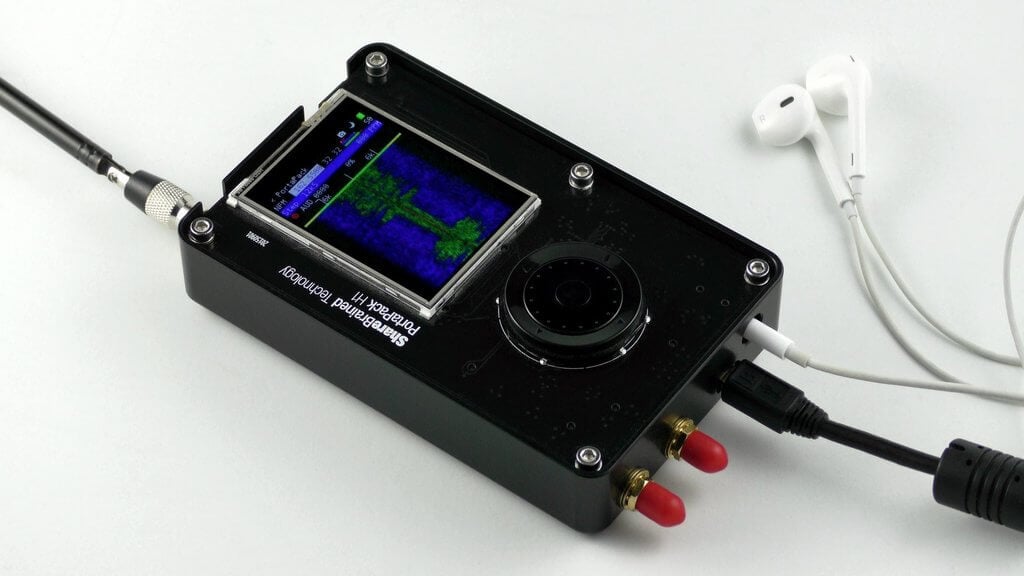
Over on the Wireless LAN Professional Podcast Keith and Blake Krone discuss the HackRF, PortaPack and the Havoc firmware in episode 138. The HackRF is a US$299 transmit capable SDR which has been very popular in the past as it was one of the first affordable TX capable SDRs to hit the market. The PortaPack is a US$220 add on which allows you to go portable with the HackRF. And finally Havoc is a third party firmware for the HackRF+PortaPack which enables multiple RX and TX capable features.
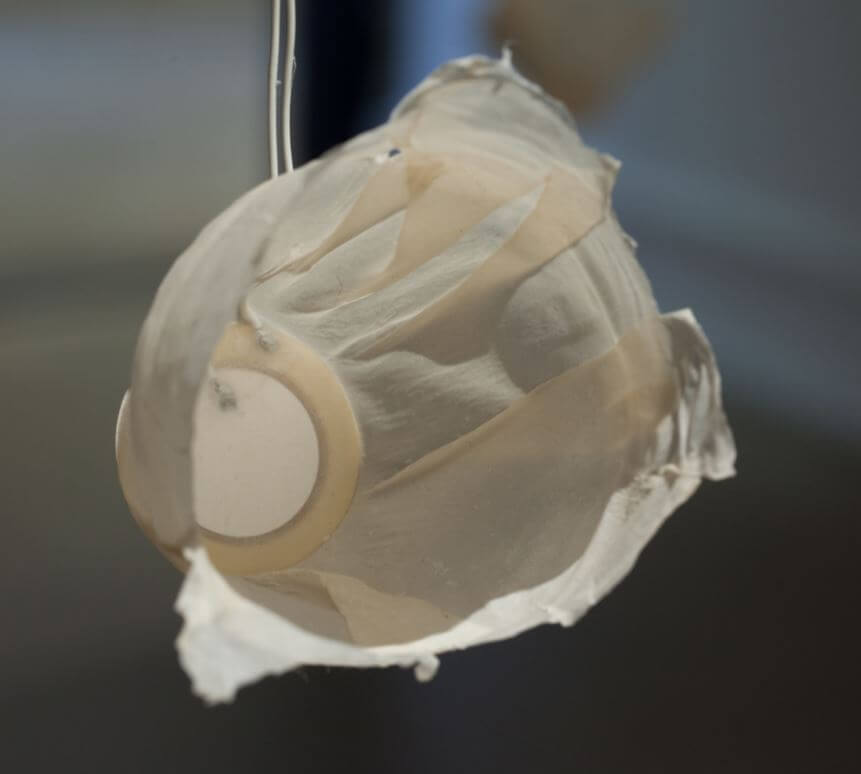
One of the piezo speakers playing the satellite transmissions.
In the past we've seen software defined radio's like the HackRF use to create art installations such as the 'Holypager', which was an art project that aimed to draw attention to the breach of privacy caused by pagers used by doctors and staff at hospitals.
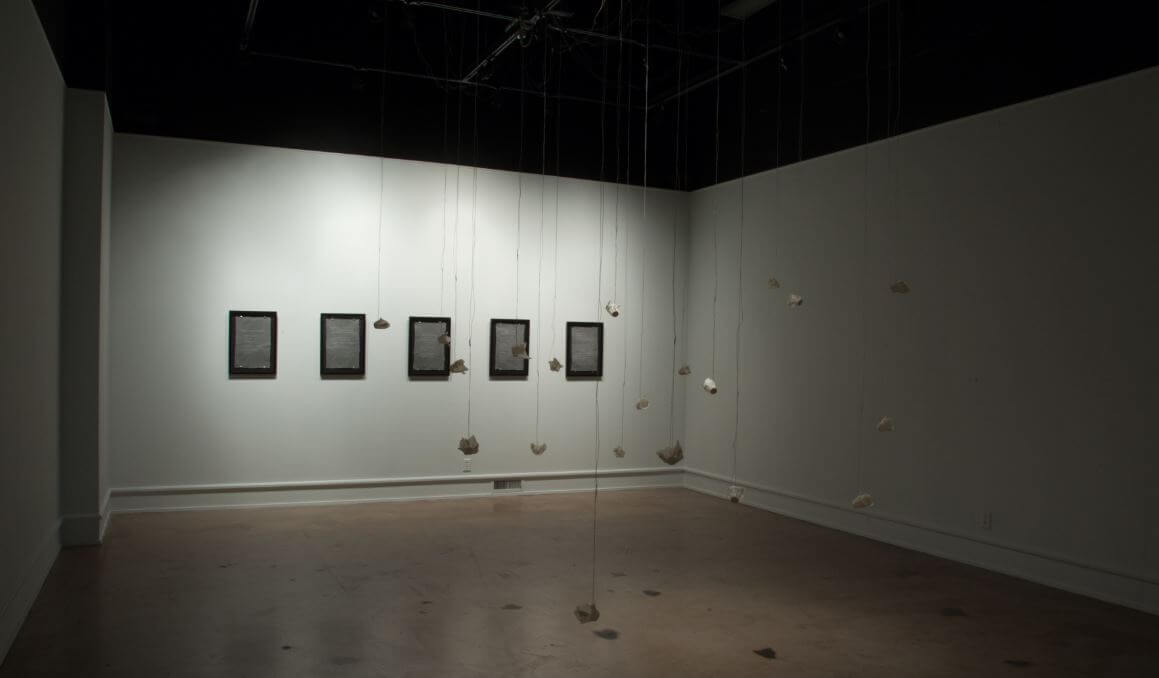
Recently another art installation involving a software defined radio was exhibited at Wichita State University. The project by artist Nicholas A. Knouf is called "they transmitted continuously / but our times rarely aligned / and their signals dissipated in the æther" and it aims to collect the sounds of various satellite transmissions, and play them back using small piezo speakers in the art gallery. To do this he built a SatNOGS receiver and used a software defined radio to capture the audio. He doesn't mention which SDR was used, but most commonly RTL-SDR's are used with the SatNOGS project. Nicholas describes the project below:
This 20-channel sound installation represents the results of collecting hundreds of transmissions from satellites orbiting the earth. Using custom antennas that I built from scratch, I tracked the orbits and frequencies of satellites using specialized software. This software then allows me to collect the radio frequency signals and translate them into sound.
The open source software and hardware, called SatNOGS and developed by a world-wide group of satellite enthusiasts, enables anyone to build a ground station for tracking satellites and their transmissions, which are then uploaded to a publicly accessable database. Data received by my ground stations can be found here. These transmissions are mostly from weather satellites, CubeSats (small satellites launched by universities world-wide for short-term research), or amateur radio repeaters (satellites designed for ham radio operators to experiment with communication over long distances).
I made the speakers hanging from the grid from a piezoelectric element embedded between two sheets of handmade abaca paper that was then air dried over a form.
The project was also discussed over on the SatNOGS forum.
A question that comes up often is how to combine an RTL-SDR, or any other RX only SDR with a transmit capable amateur radio. It's not possible to connect the RX only SDR together with the TX radio via a standard splitter because the TX radio's power will most likely blow up the SDR with it's powerful output. To solve this problem you need either a manual switch that will switch out the SDR when transmitting which requires absolute discipline to not accidentally transmit in the wrong switch position, or an automatic relay switch.
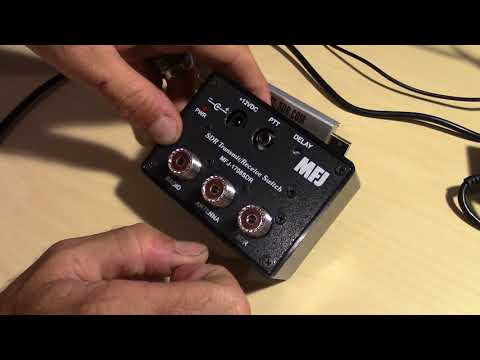
Over on YouTube channel HamRadioConcepts has given a good overview and demonstration of the MFJ-1708SDR Transmit/Receive automatic relay switch, which is a good product that solves this issue. It is also a fairly budget friendly option, coming in at only US$79.95 over on the MFJ website. HamRadioConcepts notes that the switch automatically grounds out the SDR whenever the PTT on the radio is pressed, and also has a fail safe that will automatically detect a transmission and ground the SDR if PTT is disconnected.
MFJ-1708SDR Transmit/Receive Switch For SDR Receivers
The PortaPack is a US$220 add-on for the HackRF software defined radio (HackRF + PortaPack + Accessory Amazon bundle) which allows you to go portable with the HackRF and a battery pack. It features a small touchscreen LCD and an iPod like control wheel that is used to control custom HackRF firmware which includes an audio receiver, several built in digital decoders and transmitters too. With the PortaPack no PC is required to receive or transmit with the HackRF.
Of course as you are fixed to custom firmware, it's not possible to run any software that has already been developed for Windows or Linux systems in the past. The official firmware created by the PortaPack developer Jared Boone has several decoders and transmitters built into it, but the third party 'Havoc' firmware by 'furrtek' is really what you'll want to use with it since it contains many more decoders and transmit options.
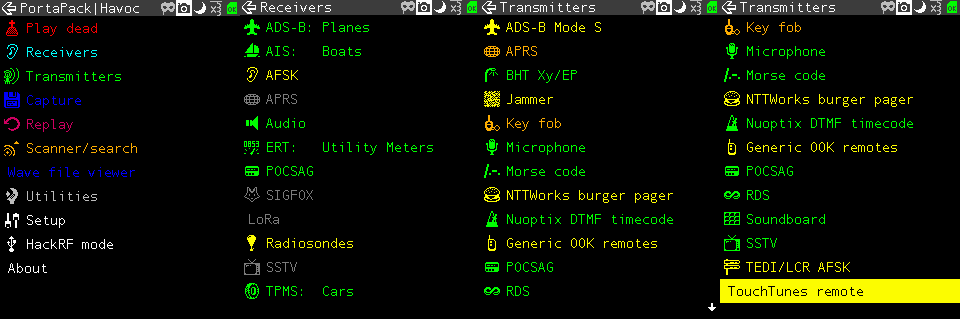
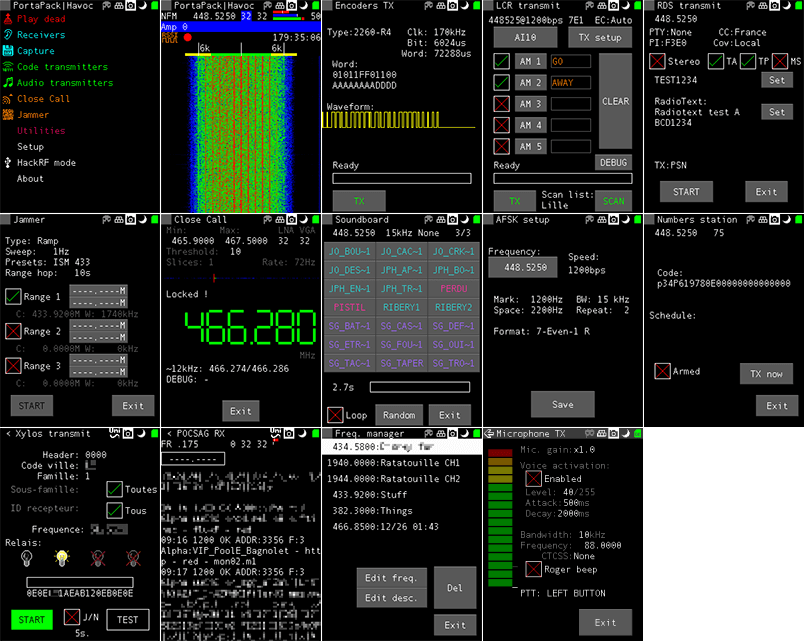
As of the time of this post the currently available decoders and transmit options can be seen in the screenshots below. The ones in green are almost fully implemented, the ones in yellow are working with some features missing, and the ones in grey are planned to be implemented in the future. Note that for the transmitter options, there are some there that could really land you in trouble with the law so be very careful to exercise caution and only transmit what you are legally allowed to.
Some screenshots from the HackRF Portapack Havoc FirmwareMore Havoc firmware screenshots from the GitHub page.
Although the PortaPack was released several years ago we never did a review on it as the firmware was not developed very far beyond listening to audio and implementing a few transmitters. But over time the Havok firmware, as well as the official firmware has been developed further, opening up many new interesting applications for the PortaPack.
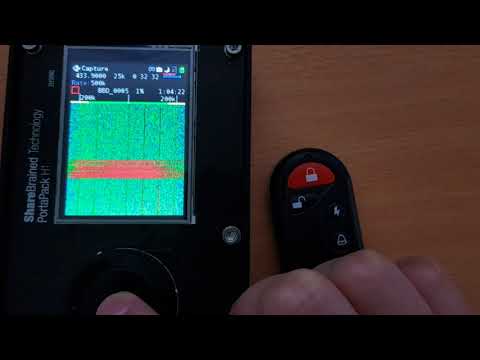
Doing a replay attack on a wireless keyfob using the PortaPack.
Testing the PortaPack with the Havoc Firmware
Capture and Replay
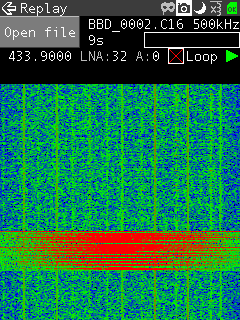
One of the best things about the PortaPack is that it makes capture and replay of wireless signals like those from ISM band remote controls extremely easy. To create a capture we just need to enter the "Capture" menu, set the frequency of the remote key, press the red 'R' Record button and then press the key on the remote. Then stop the recording to save it to the SD Card.
Now you can go into the Replay menu, select the file that you just recorded and hit play. The exact same signal will be transmitted over the air, effectively replacing your remote key.
We tested this using a simple remote alarm system and it worked flawlessly first time. The video below shows how easy the whole process is.
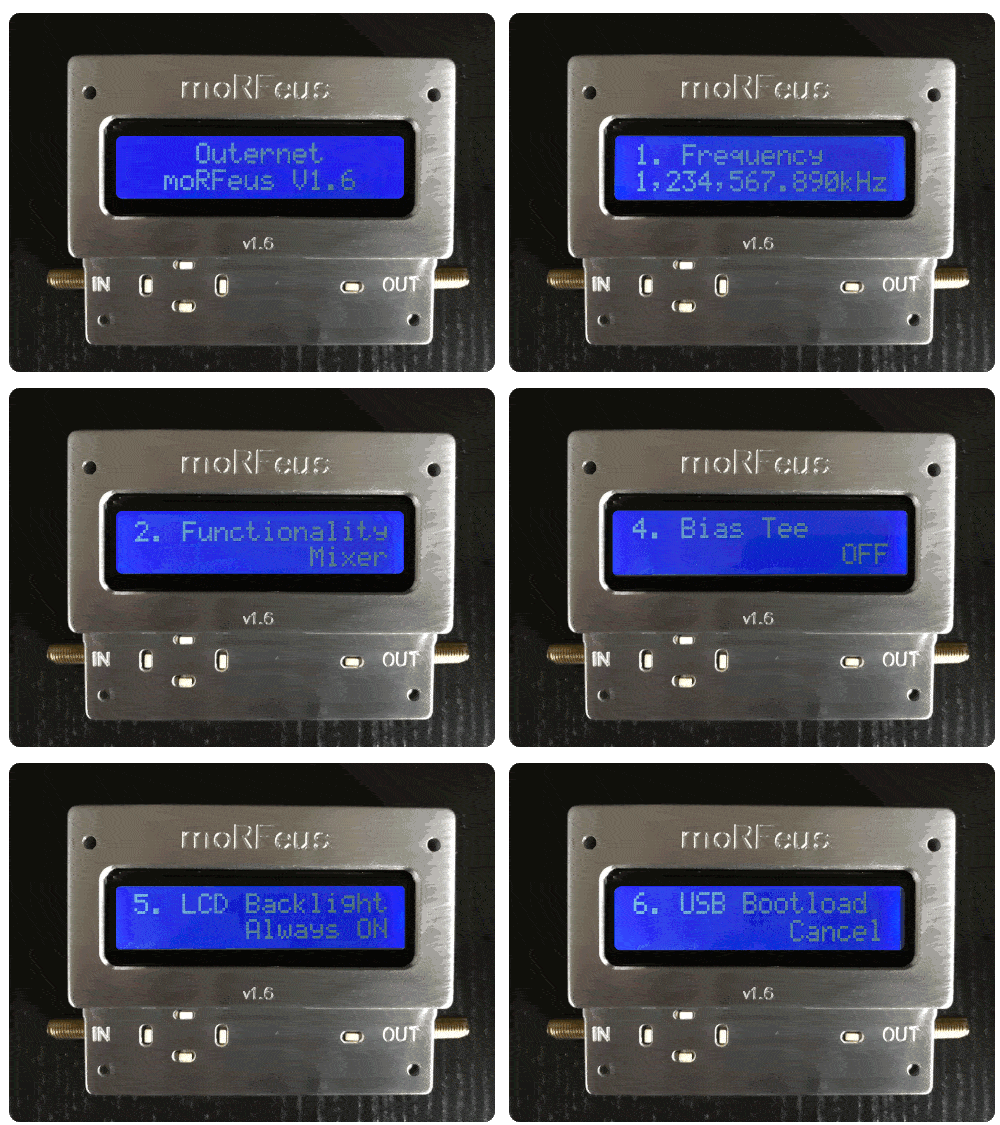
During development of the Outernet project the engineering team developed several tools to help them in their RF testing. One tool that they created has now been developed further into a commercial product that they are calling 'moRFeus'. moRFeus is a small handheld RF signal generator and frequency mixer. It can be used to generate an RF tone at any frequency between 85 MHz - 6 GHz and to upconvert or downconvert signals via the mixer with an input/output frequency range between 30 MHz - 6 GHz. This type of tool is useful for people working with RF hardware as it can be used for testing and prototyping.
morRFeus is currently selling for US$149 over on CrowdSupply, and the units are ready to ship out soon. They note that the current price is a special, and that it may be increased in the future. We think that this is a fairly good deal considering that similar products can cost much more. If you are interested in the technical details the datasheet includes figures on phase noise and conversion losses. There is also a user guide that explains how the buttons work, and what each screen on the menu is for. The morRFeus press release reads:
Outernet launches sales for wideband frequency converter and signal generator with complete field-level configuration.
Today, Outernet announced the launch of moRFeus - a wideband (30MHz - 6GHz) frequency converter and signal generator with complete field-level configurability. The product is available on Crowd Supply for $149. The price will increase after the 30-day launch campaign.
The device has an LCD display and button interface for complete field-level configuration - from setting the LO frequency to toggling between mixer and generator mode, and more. It’s in a precision-milled all-aluminum enclosure for durability and aesthetics.
moRFeus was built for hams and hackers, people with a traditional amateur radio background, as well as a makers and researchers that are interested in RF experimentation. It was designed for easy integration into a wide variety of RF projects.
In mixer mode, moRFeus enables dynamic frequency up- and down-conversion. In generator mode, it is one of the most, if not the most, affordable tools to generate a stable +/-2.5 ppm CW signal. Additional information on features, specifications, and performance metrics can be found in the datasheet.
The team already has 100 units in stock and another 900 are going through final assembly and quality assurance in Chicago. The first 100 units will ship one week after launch and orders beyond the initial stock will ship within 30 days of the close of the campaign, or earlier.
Outernet has been working on novel RF projects since the founding of the company in 2014. moRFeus was developed because from an internal need for a wideband field-configurable frequency converter for testing purposes. The company identified a huge gap in the market for a solution that met the needs of others with similar problems add their own. Outernet’s founder describes the development process:
“The idea was hatched about a year ago because we needed an easy, quick way to dynamically up-and down-convert the various radios we were experimenting with for a new product. By the summer of 2017, we had our first prototype and functional firmware. The design still required some slight tweaking. The current version of moRFeus is its third iteration. Oddly enough, the last phase of the project, industrial design, ended up being the most time-consuming. We worked with a local designer/machinist with decades of experience to come up with a custom-made all-aluminum enclosure.”
For more information and to purchase moRFeus, visit Crowd Supply.
Furthermore the product features, description, and also some of the applications and use cases for moRFeus are quoted below:
Features
RF Input Frequency: 30MHz–6GHz
RF Output Frequency: 30MHz–6GHz
LO Frequency: 85MHz–5400MHz
Fractional-N Synthesizer
LO Step Size: 1.5–3Hz1
2.5 ppm precision TCXO
USB programmable
Generator/Mixer Function Toggle
Input IP3 +23dBm
Small, Portable Form Factor
Adjustable Mixer Bias Current
LCD Display With Backlight Feature
Button Control Interface
Dimensions: 88mm x 38mm x 68mm
Weight: 7.4 oz
Product Description
moRFeus is a 30MHz–6GHz programmable Fractional-N wideband frequency converter and generator designed for low spurious emissions and dynamic configuring of the LO frequency. moRFeus is designed for easy integration into popular RF environments using SMA connectors and is powered using an external micro-USB 5V supply. The LCD display and button interface provide a dynamic way to program the mixer LO frequency in the field with a step size of 1.5–3Hz.1 The device is USB programmable, enabling automatic operation from a PC (must be running Linux). Dynamic toggling between mixer and generator modes adds to field-level functionality. An optional bias voltage of 5V is available via RF choke to the mixer input to supply active antenna systems.
Applications
Wideband Radios
Distributed Antenna Systems
Diversity Receivers
Software Defined Radios
Frequency Band Shifters
Point-to-Point Radios
WiMax/LTE Infrastructure
Satellite Communications
Wideband Jammers
Remote Radio Heads
Frequency Up/Down Conversion
Automated Test Equipment (ATE)
Wireless Communication Systems
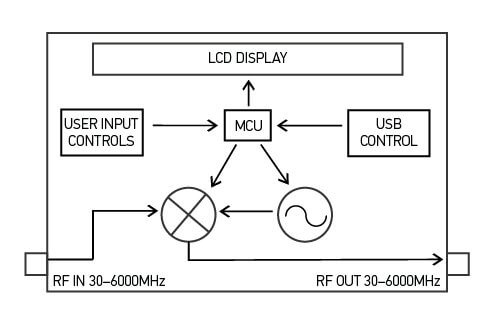
moRFeus Block Diagram
Review and Testing
The Outernet team sent us a moRFeus unit for testing a few days ago. It comes in a portable 3.5 x 2.7 x 1.5 inch (8.9 x 6.9 x 3.8 cm) conductive milled aluminum enclosure and weighs 7.4 ounces (210 grams). The construction is very solid, and should easily survive being thrown around in a carry bag, although we'd still advise caution as the LCD screen is not protected by a window.
The unit is powered via a standard micro USB port. After connecting a USB cable the unit immediately powers up shows a frequency selection screen on the LCD display. Five small buttons are used to control the interface, and we found it very easy to adjust the output frequency using these buttons.
Using the interface the unit can be switched between the "Generator" and "Mixer" modes. In the generator mode moRFeus simply generates a CW tone at the desired frequency. In the mixer mode moRFeus takes an input signal, mixes it with the generated tone and puts the result on the out port. Mixing a signal with a tone is the core concept behind devices like upconverters, downconverters and tuners. For example, by generating a mixing tone at 2 GHz with the moRFeus, we are able to view 2.4 GHz WiFi signals at 2.4 GHz - 2 GHz = 400 MHz.
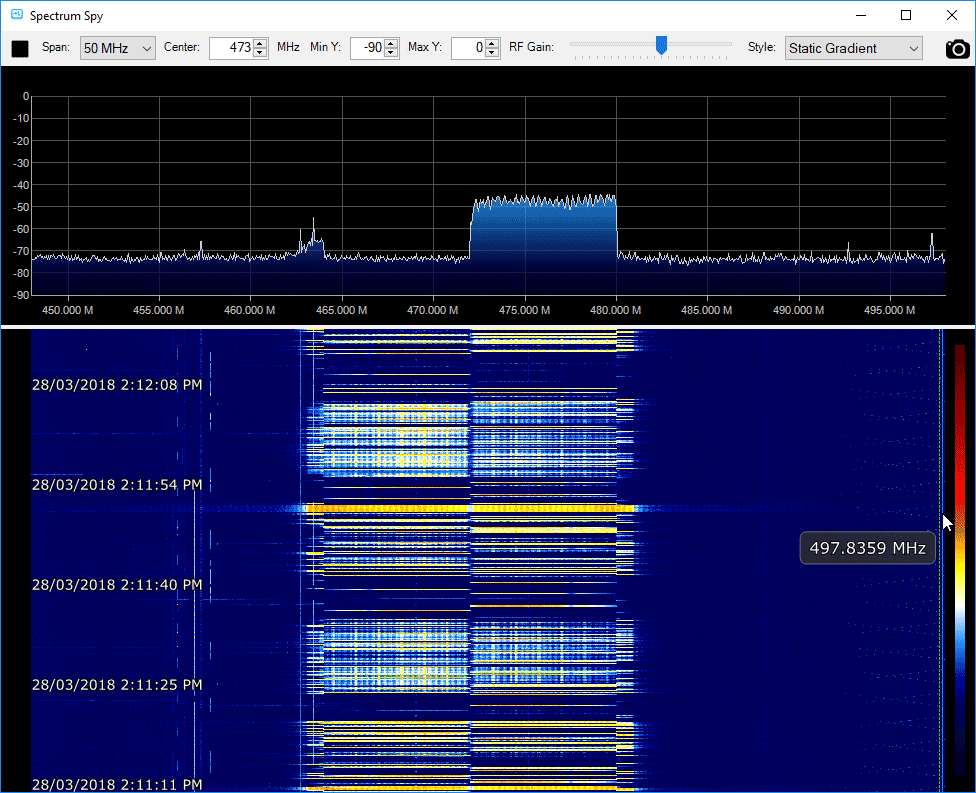
In the screenshot below we set moRFeus to run in mixer mode with the LO frequency set at 2 GHz. This allows us to view an active WiFi signal at 2.475 GHz using an Airspy and the SpectrumSpy software. The Airspy can only tune up to 1.8 GHz by itself, so it can't view the WiFi band directly. Of course to use as a proper downconverter filtering is required to remove any images and interfering signals, but by being able to easily change the LO frequency you are able to move the signals around quite easily to avoid images or interference.
Unfortunately one limitation is that moRFeus' lowest input frequency is 30 MHz, so it can't be used to upconvert HF signals.
Viewing a 2.4 GHz WiFi signal on an Airspy by using moRFeus as a downconverter with LO set to 2 GHz.
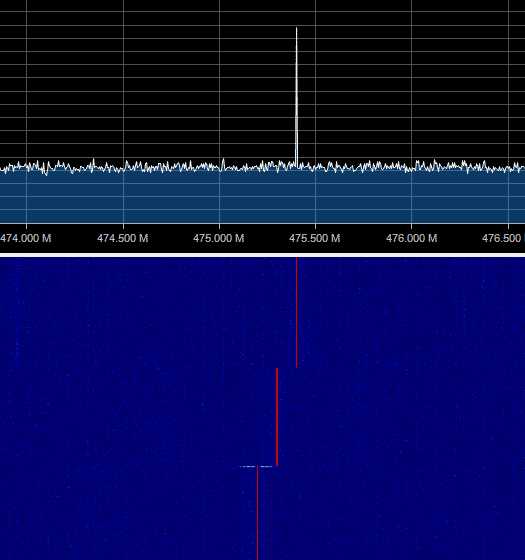
moRFeus also works well as a standard RF signal generator, and we were able to get a clean CW tone on any frequency between 85 MHz - 6 GHz.
moRFeus as a RF signal generator
moRFeus also shows up a a device on the PC, and the team write that it is possible to control it programatically via Linux, however documentation for this does not exist yet although it is scheduled to be released later. We would love to see a sweep feature which should be possible with PC control.
In conclusion if you are looking for a low cost signal generator or mixer to use in your experimental RF projects, then moRFeus certainly does seem like a good deal. A tool like this is very handy to have in your RF kit.
Thank you to Christopher for submitting to us an article that he's written for a project of his that demonstrates how vulnerable vehicle keyless entry systems are to jam and replay attacks. In the article he explains what a jam and replay attack is, the different types of keyless entry security protocols, and how an attack can be performed with low cost off the shelf hardware. He explains a jam and replay attack as follows:
The attacker utilises a device with full-duplex RF capabilities (simultaneous transmit and receive) to produce a jamming signal, in order to prevent the car from receiving the valid code from the key fob. This is possible as RKEs are often designed with a receive band that is wider than the bandwidth of the key fob signal (refer Figure 3, right). The device simultaneously intercepts the rolling code by using a tighter receive band, and stores it for later use. When the user presses the key fob again, the device captures the second code, and transmits the first code, so that the user’s required action is performed (lock or unlock) (Kamkar, 2015). This results in the attacker possessing the next valid rolling code, providing them with access to the vehicle. The process can be repeated indefinitely by placing the device in the vicinity of the car. Note that if the user unlocks the car using the mechanical key after the first try, the second code capture is not required, and the first code can be used to unlock the vehicle.
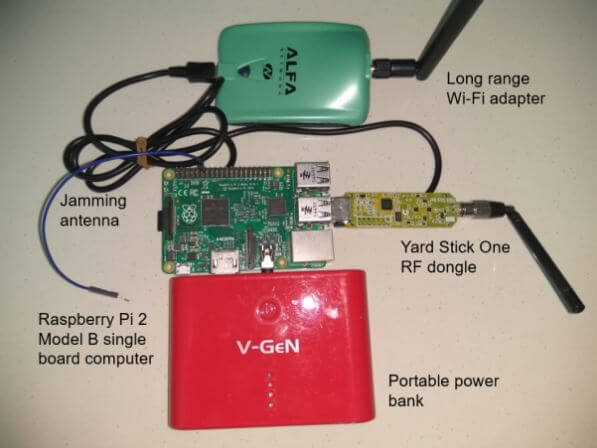
In his demonstrating the attack he uses the RTL-SDR to initially find the frequency that they keyfob operates at and to analyze the signal and determine some of it's properties. He then uses a Raspberry Pi running RPiTX to generate a jamming signal, and the YardStick One to capture and replay the car keyfob signal.
Jam and Replay Hardware: Raspberry Pi running RpiTX for the Jamming and a Yardstick One for Capture and Replay.
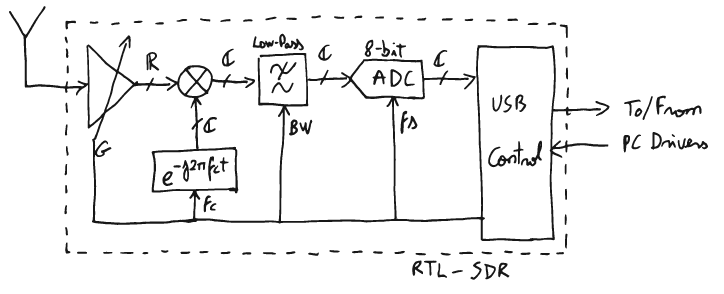
Over on his blog Ajoo has posted a very comprehensive introduction to the technical concepts behind RTL-SDR, as well as any other SDR in existence. His post first goes through the basic communications theory and mathematical concepts required to understand the technical concepts behind software defined radio. He then goes on to specifically discuss the RTL-SDR and how it works internally, mentioning what the major components do and providing useful block diagrams.
In part II of his introduction he moves on to the software. Here he starts to explain a bit about librtlsdr and how the RTL-SDR drivers and codebase is put together. Further on he explains higher level software such as rtl_test, rtl_fm, rtl_sdr, the pyrtlsdr wrapper and how it could be used to demodulate FM.
If you're looking at diving deeper into SDR theory then Ajoo's posts are excellent starting points. Note that the theory explanations come at about an undergraduate University level of complexity, and thus these posts are mostly for people wanting a deeper understanding of SDR. To simply use an RTL-SDR to receive signals such a deep level of understanding is not required.
In a future post which is not yet available, Ajoo will introduce GNU Radio and show how to demodulate FM signals. It appears his goal is to work his way to an understanding of how GPS L1 signals work.
One of Ajoo's block diagrams explaining the RTL-SDR behavioral model.
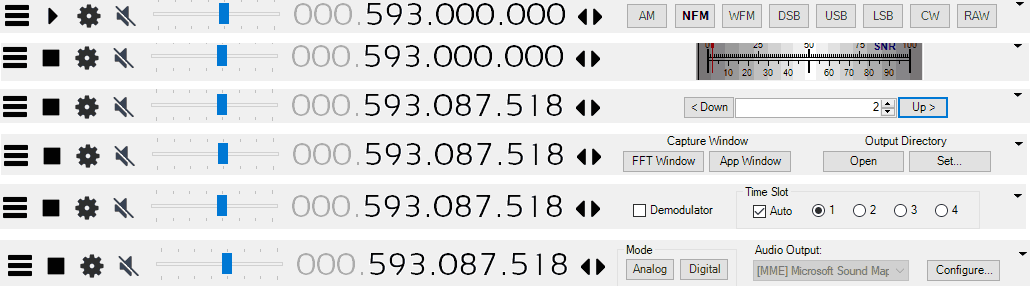
Eddie Mac has just released another useful plugin for SDR# called "Toolbar Plugin". This is an accessibility improvement plugin that simply puts many of the plugin controls on the SDR# toolbar. This eliminates the need to constantly open and close plugin panels on the left.
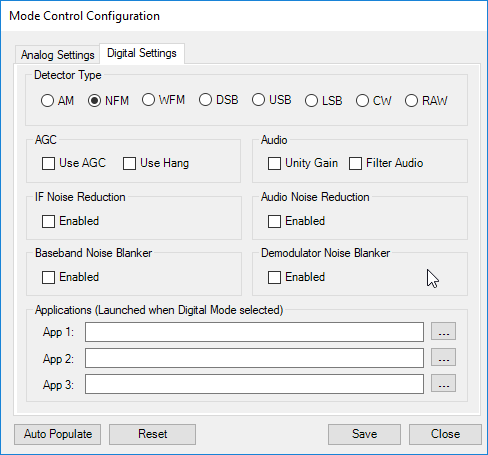
The plugin includes controls for setting the demodulation mode, changing the FFT display settings, a direct frequency entry text box, frequency stepper buttons, an SNR level meter, squelch controls, analog/digital preset buttons, screen grabber controls, and time slot selectors for the TETRA decoder plugin. The analog/digital preset buttons are quite interesting as they allow you to set presets for either analog or digital signals. For example for a digital signal you could set the preset to use NFM demodulation, and to launch the DSD+ application automatically.
More information about this and Eddie's other plugins can be found on his site, and on this forum post.
Some toolbar plugin selections.Analog/Digital Preset Settings