RTL-SDR Running ADS-B on a Quadrocopter

Blogger John Wiseman has managed to get ADS-B decoding using an rtl-sdr stick working on his AR.Drone quadrocopter. The AR.Drones run on the Linux operating system, so he was able to compile and install the Linux ADS-B decoder dump1090 on his drone.

Although the reception was hampered by RF interference from the drones electric motors, it was still able to pick up a number of ADS-B signals.

ADSB Drone

RTL-SDR Direct Sampling Mode

The RTL-SDR software defined radio can be told to run in a mode called "direct sampling mode", which with a small hardware mod allows the dongle to tune to the HF frequencies where ham radio and many other interesting signals are found. This means that no upconverter circuit is required.

However, the difficulty with direct sampling is that a hardware modification to the dongle is required. Also, the performance can not be expected to be as good as an upconverter without the addition of extra filtering circuits. RTL-SDR Blog V3 Note: Note that our RTL-SDR Blog V3 already has the direct samping mod done and built in, so no hardware modifications are required for those units! Just see the V3 users guide for information on activating direct sampling mode.

The direct sampling mode was originally discovered and discussed in this Google groups thread.

Examples

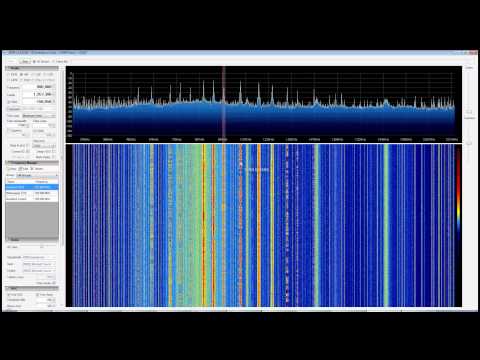
YouTube user Superphish was able to receive HF AM broadcast radio, and a decode a HF weather fax signal at 5.8MHz using the direct sampling mod.

HF AM Radio with RTL SDR (RTL2832) in Direct Sampling Mode with SDR Sharp

Continue reading

SDR Touch Updated to Version 1.4

SDR Touch, the popular software defined radio android app for rtl-sdr has been updated to version 1.4.

This version brings improvements to the LSB, USB and AM reception capabilities, some GUI tweaks, and pinch to zoom capabilities for fine tuning.

The latest version of SDR Touch can be downloaded here, and a discussion on the new improvements can be found here.

RTL-SDR Tutorial: Cheap ADS-B Aircraft RADAR

The RTL-SDR can be used as a super cheap real time air radar. Modern planes use something called an ADS-B (Automatic Dependent Surveillance-Broadcast) Mode-S transponder, which periodically broadcasts location and altitude information to air traffic controllers. The RTL-SDR can be used to listen to these ADS-B signals, which can then be used to create your very own home aircraft radar system. Compared to dedicated commercial ADS-B receivers which can go for between $200 - $1000, the $20 RTL-SDR is very attractive for the hobbyist in terms of price. However, note that the RTL-SDR probably shouldn't be used for ADS-B navigation in a real aircraft for safety reasons. 

ADS-B broadcasts at a frequency of 1090 MHz. It has been discovered by the RTL-SDR community, that the RTL-SDR with R820T tuner has the best sensitivity at this frequency. The E4000 and other tuners perform poorly in comparison. So it is recommended that you obtain an R820T tuner if you want to set up ADS-B decoding with the RTL-SDR. Recently there has also been talk about the R820T2 tuner, which seems to have slightly better performance too. See the Buy RTL-SDR dongles page for more information on where to purchase.

We also now note that recently new higher end SDR's like the $199 Airspy have developed very good ADS-B receivers that are several times more sensitive that the RTL-SDR.

Examples of RTL-SDR used as an ADS-B air radar

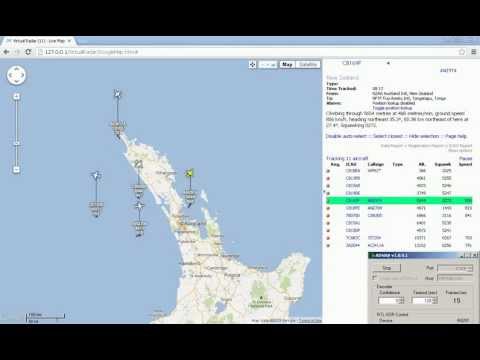
In this video, YouTube user Superphish shows a timelapse of air traffic over New Zealand using RTL-SDR, ADSB# and Virtual Radar Server.

ADSB Virtual Air RADAR with RTL SDR (RTL2832), ADSB Sharp and Virtual Radar Server

Continue reading

RTL-SDR Upconverter Options

Upconverters give the rtl-sdr the ability to receive frequencies below it’s minimum frequency. This allows reception of things like AM broadcasts, ham radio signals, weatherfax, international radio and much more.

There are dozens of upconverter designs and commercial products that work with the rtl-sdr. Luckily to help you choose one, blogger and amateur radio hobbyist KF7LZE has posted a rather extensive review of all the upconverter options available for the rtl-sdr.

The article can be found here.

RTL-SDR used as a Cheap Real Time Spectrum Analyzer

The rtl-sdr dongle can be been used as a super cheap $20 real-time spectrum analyzer. This is great as commercial spectrum analyzers can run from hundreds to thousands of dollars.

First of all, SDRSharp and other SDR software packages are essentially spectrum analyzers themselves. They all have real time frequency spectrum and waterfall viewers. They are however, not exactly portable.

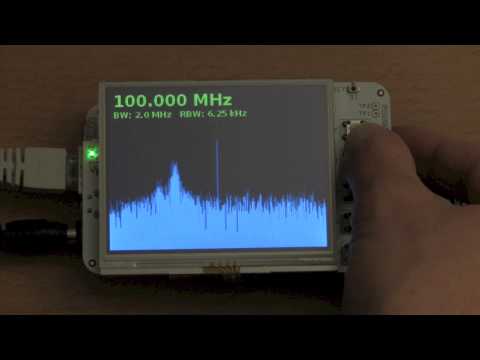
A portable spectrum analyzer is shown by amateur radio hobbyist and blogger OZ9AEC. He has combined an rtl-sdr dongle, a low cost portable Linux computer known as Beaglebone, and an LCD screen, and turned them into a portable spectrum analyzer. OZ9AEC shows a video demo of his project in this video.

A cheap spectrum analyzer can be useful in many situations. For example, Marek Wodzinski uses the rtl-sdr as a spectrum analyzer for optimizing his FPV radio transmissions. Many other people seem to be interested in a rtl-sdr for this purpose too.

A Google groups post discussing use of the rtl-sdr dongle as a spectrum analyzer is here.


SDR Touch brings RTL-SDR to Android

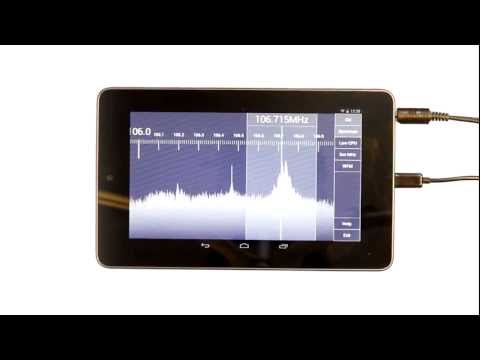
SDR Touch is an Android app which allows the rtl-sdr dongle to be used on an Android device. A USB OTG (on-the-go) cable is required to connect the android device to the tv dongle. The blurb on the app authors website reads

(SDR Touch) Turns your mobile phone or tablet into an affordable and portable software defined radio scanner. Allows you to listen to live on air FM radio stations, weather reports, police, fire department and emergency stations, taxi traffic, airplane communications, audio of analogue TV broadcasts, HAM radio amateurs, digital broadcasts and many more! Depending on the hardware used, its radio frequency coverage could span between 50 MHz and 2.2 GHz. It currently demodulates WFM, AM, NFM, USB, LSB, DSB, CWU and CLW signals.

SDR Touch - Live radio on your Android device

Continue reading

RTL-SDR Tutorial: Decoding Digital Voice (P25, DMR, NXDN, D-STAR) with DSD

The RTL-SDR software defined radio combined with SDRSharp and a program called “digital speech decoder” (DSD) can be used as a radio scanner to easily and cheaply listen to unencrypted digital radio voice conversations.

Digital radio voice communications are becoming more commonly used in the radio spectrum. This is due to the various improvements offered over traditional analogue voice radio systems. Unfortunately for radio scanner hobbyists, digital radio is difficult to receive, as special radio scanners which can be expensive are required to decode the digital signal. Additionally, digital radio systems can be encrypted making it impossible for communications to be decoded by a hobbyist. However, most users of digital radio do not bother to encrypt their systems as it can introduce lag, monetary expense and extra battery drain in portable radios.

The most common digital speech codec is APCO P25, which DSD is able to decode. DSD is also capable of decoding other common digital codecs such as DMR/MOTOTRBO, NXDN, D-STAR and ProVoice.

Super cheap software defined radios such as the RTL-SDR can be used to decode these digital voice communication signals instead of expensive radio scanners. While this tutorial is aimed at the RTL-SDR, other software radios such as the Funcube dongle, Airspy, HackRF and BladeRF will also work. Hardware radios with discriminator taps connected to a PC may also work.

Examples of DSD Decoding Digital Voice with RTL-SDR as a Radio Scanner

YouTube user Geoff Wolf shows a video where he uses RTL-SDR as a police scanner to listen to public safety P25 digital radio using DSD, SDRSharp and virtual audio cable.

RTL-SDR: Decoding P25 Phase I QPSK with DSD and SDR#

Continue reading