Tagged: rtl-sdr

A Physical LED Vehicle HUD for KerberosSDR Radio Fox Hunting

Mark Jessop (@vk5qi) has recently been experimenting with a LED based hardware vehicle heads up display (HUD) that he has created to be used together with our KerberosSDR. The KerberosSDR combined with four antennas in a circular array determines the bearing towards a transmitter, and then the HUD displays this bearing visually on a circle.  

The HUD is cleverly designed so that the LEDs reflect on the windshield of the car, allowing for the lights to be safely seen on the windshield while driving. More videos of the HUD being developed and used can be seen on his Twitter feed.

In the video below Mark also shows how he combines KerberosSDR bearing data with his Chase Mapper software, which he uses for tracking down radiosonde weather balloons.

Mark's custom KerberosSDR HUD seen on Twitter

Mark writes:

For the last few months I've been piecing together a radio direction finding (also known as 'fox-hunting') system using a RTLSDR-Blog Kerberos-SDR, a custom-made antenna array, and my 'ChaseMapper' software. I have also recently added a 'heads up display' (HUD) box which displays the direction-of-arrival and SNR data from the Kerberos-SDR software.

I hope to put together a longer video showing how the system goes together sometime in the future, but this short clip shows how the system is used in the final approach to a radio transmitter (in this case, a 144 MHz transmitter from one of the Amateur Radio Experimenters Group organised night fox-hunts).

The antenna array consists of two 4-element nested arrays, one with 200mm antenna spacing for the 70cm band, and another with 425mm antenna spacing for the 2m band. The array is mounted to my car roof-racks, with phase-matched coax entering the car through a window-mounted bulkhead.

The red lines on the map indicate a bearing line produced by the Kerberos-SDR software. As we drive around the fox location, bearings are plotted, and we look for where they cross. There are always some inaccurate bearings due to multi-path issues, and misalignment between bearing acquisition time and the position/heading of the car, but it works well enough to be able to allow navigation to the transmitter location. The display can get fairly busy, so there are options to threshold by signal quality, and to 'age out' bearings over time.

The beeping noise you hear in the video is the signal from the radio transmitter, in this case a 144.390 MHz beacon which transmits short CW 'pips'. We were listening to the signal with an Icom IC-705 attached to an omnidirectional antenna so we knew when the transmitter started and stopped (and hence when to trust any bearings produced by the DoA system).

Towards the end of the video you can see the HUD in action, with the blue lights showing the estimated signal arrival direction, relative to the front of the car. As I slowly drive past the transmitter location (which I could see out the side of the car), the bearings swing to the right, and the SNR shows as being very strong. This is exactly what the display was intended for - it's not about getting hyper-accurate bearings, but more knowing when you need to turn left/right, or get out of the car!

Thanks to Will Anthony for capturing the video while I was driving!

Software used:

AREG Fox-hunt Activities: https://www.areg.org.au/archives/category/activities/fox-hunting
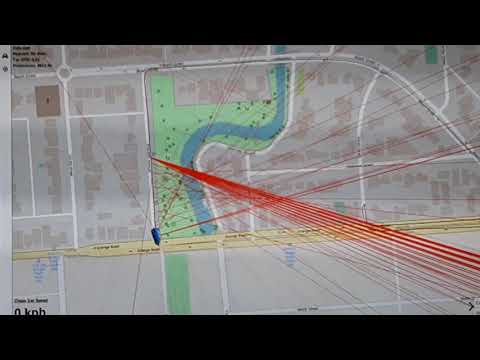
Finding a Radio Fox using a Kerberos-SDR + ChaseMapper

KerberosSDR is our 4-channel phase coherent capable RTL-SDR unit that we previously crowdfunded back in 2018. With a 4-channel phase coherent RTL-SDR interesting applications like radio direction finding (RDF), passive radar and beam forming become possible. It can also be used as four separate RTL-SDRs for multichannel monitoring.

KerberosSDR is soon to be replaced with the upgraded KrakenSDR, which will begin crowd funding on Crowd Supply later this year. Be sure to sign up on the Crowd Supply page to be updated once the campaign releases as due to long supply chain crisis related lead times, only a limited amount of stock will be initially available.
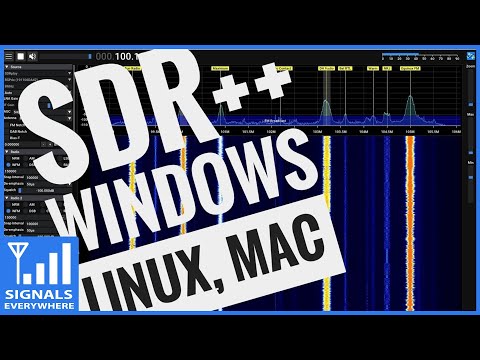
SignalsEverywhere: Testing SDR++ A Hands on Overview

On on YouTube on the SignalsEverywhere channel Sarah has uploaded a new video where she gives a hands on overview of the SDR++ software. Last week we posted about the release of SDR++ V1.0.0, which is an open source, cross platform, C++ based GUI general receiver program for various SDRs including the RTL-SDR.

In the video Sarah shows it's basic usage in action and highlights many of the great features that SDR++ has. Overall Sarah notes that she is very impressed with SDR++, praising it as one of the best SDR applications released in a while, and we agree.

SDR++, The Cross-Platform bloat-free SDR software | A Hands on Overview

OpenWebRX Updated to V1.1.0

Thank you to Jason for writing in and letting us know that OpenWebRX Version 1.1.0 has been released on August 03. OpenWebRX is an open source program that allows users to make RTL-SDRs, KiwiSDRs and other SDRs accessible over the internet via a web browser. It is is currently available as a Raspberry Pi SD card image, in the Debian + Ubuntu repositories, as a docker image, or for manual installation. 

The latest version adds an AMBE voice data decoder, new decoders and metadata displays for NXDN and D-Star, and crisper SVG graphics.

Since we last posted about OpenWebRX updates in early 2020, there has also been support added for the Perseus-SDR, RadioBerry 2, Hermes HPSDR, Funcube Dongle Pro+ software defined radios. New decoders and support for external decoders such as JS8Call, FreeDV, Wideband FM, DREAM DRM,  FST4, FST4W, Q65 and M17 digital voice have been added.

There is also now a site called Receiverbook.de that aggregates a list of publicly available OpenWebRX receivers.

OpenWebRX Interface

Layering Geo-Spatial Fire Data onto GOES Satellite Imagery

Thank you to Carl Reinemann (aka usradioguy) for writing in and sharing with us how he has developed a script to layer FIRMS data (Fire Information for Resource Management System US / Canada) onto GOES satellite images (usradioguy blog post) that can be received with an RTL-SDR. We have a tutorial on GOES reception here.

The script is a Windows batch file that downloads FIRMS data from the internet every 12 hours, then converts that data into a format that can be processed by goestools. Once converted the resulting JSON file is uploaded to the Raspberry Pi running goestools. A custom goestool process is then used to layer the data onto the received images.

The result is accurate red polygons on the satellite image in areas where fires have been recorded. With this data visualized it is easy to see where smoke seen on the satellite images is coming from. For example, the image below shows the location of wildfires in the Western USA and the resulting smoke trailing across the continent.

Carl has also tested the fire data layer with GK-2A and Himawari-8 and notes that it works well with images from those satellites as well. 

Fires data in Western USA layered on top of received GOES satellite images.

Running an RTL-SDR on a QNAP NAS

Thankyou to M.Khanfar for submitting news about his latest project which involves running an RTL-SDR dongle on a QNAP NAS (network attached storage). Running a dongle on a NAS machine might be useful if you need to record large amounts of IQ data, or need fast network speeds. Khanfar writes:

In this video , I will show you step by step how to make QNAP NAS Recognize and Running SDR Dongle and connected directly via USB and then launching rtl-sdr tools by installing dependencies tool to run like rtl_tcp.

The tools we need to install its calling QPKG. QNap Nas has it's own operating system called QTS, and NAS it mean ( Network Attached storage ) and I'm successfully implementing dependencies and make QNAP Recognize my SDR Dongle Stand alone. 

The QPKG it's like. exe in windows, but its special extensions for qnap operating system QTS .

The two qpkg (software) we will install them from third party delevopper for qnap , not from official qnap store, and I will install them inside my QNAP and you will see step by step how it's easy to turn your QNAP NAS to SDR Server without any pc needed ! 

And the advantage is the qnap is stand alone, and it has a high speed gigabit LAN speed, and it have SSL certificate that I buy it from qnap store for secure connection from outside and it has like fix up adrress it's called qnap Id.

So I can easy running my sdr# from my work directly TCP to my SDR dongle ! using qnap Id with plus port number for TCP like 1234.

If you have +3mbps internet speed for uploading in your home, you can easy access and making connection to rtl_tcp from different country, and secured with ssl and qnap I'd ! I will post in future video for WAN Access secure and fast to rtl_tcp from outside.

The two QPKG we need : 

1-Entware-3x-std: its install many dependencies packages to use in terminal like OPKG tool that we need it to install rtl-sdr package! .
2-Gotty : its terminal emulator I use it inside qnap to install commands. 
follow my video for understanding!

My qnap model in this video: QNAP TS-228 

The command I use after install all dependencies:
opkg install git rtl-sdr

Command for update opkg :
opkg update

Resources:

https://www.qnap.com/en/
https://www.qnapclub.eu/en

Implementing SDR Dongle Under QNAP NAS - QTS os

SDR++ Version 1.0.0 Released

SDR++ is an open source, cross platform, C++ based GUI general receiver program for various SDRs including the RTL-SDR. Since it's alpha release in mid 2020, it has undergone huge amount of development, and is quickly becoming the main program of choice for many users due to it's efficiency, cross platform and multi-SDR hardware support and increasing feature set. And with an easy GUI very similar to that of SDR#, it's easy for most users to learn.

Recently version 1.0.0 of the SDR++ software has recently been released. This is the first non-beta stable version, so represents a major milestone in development. Over on Reddit programmer u/xX_WhatsTheGeek_Xx summarizes the latest developments.

After over a year of work, I'm proud to released version 1.0.0 of SDR++!

For those who don't know, SDR++ is a crossplatform (Windows, Linux, MacOS, BSD) and open-source (https://github.com/AlexandreRouma/SDRPlusPlus/releases) general purpose receiver software meant to be simple and easy to use. It has advances features like multi-vfo and uses a fully custom DSP making it very efficient.

Here are the following additions compared to the last version:

  • Support for the SpyServer protocol
  • Support for all SDRplay devices
  • Support for all BladeRF devices
  • Support for all LimeSDR devices
  • Optional IQ correction
  • Optional Decimation
  • Broadcast FM Stereo
  • Frequency manager to create lists of frequency and optionally display them directly on the FFT/Waterfall
  • Network sink to stream the audio output via TCP or UDP
  • Options to set the FFT framerate, FFT size and FFT window.
  • Theming with Dark and Light themes supplied by default
  • RigCTL server module to control SDR++ from, for example, gpredict.
  • A bunch of keyboard shortcuts (see wiki on the github page)
  • SNR meter
  • More info when hovering a VFO
  • Colored VFOs to easily identify which is which at a glance
  • Meteor M2 demodulator compatible with LRPTOfflineDecoder and Satdump
  • Ability to resize VFOs by directly dragging the sides on the FFT and waterfall
  • Module manager to easily add or remove any module on the fly without having to restart or edit the config manually
  • File dialogs to select directories in the recorder or files in the file source (instead of having to type in the path)
  • Ability to disable modules that support it (Radio and Meteor M2 demodulator) with one click (to save CPU power or just if they're not needed)
  • Lots of performance improvements
  • Ludicrous amounts of bugfix :)

I'd like to thank the many contributors, patrons and companies (SDRplay, Airspy, Nuand, LimeMicro) who helped make this project possible!

If you have any issue with the software, please open a github issue or contact me directly on the SDR++ discord (see readme on github)

I hope this software comes in useful to at least some of you ;)

We also wanted to highlight the fact that SDR++ runs smoothly with about 50% CPU usage on a Raspberry Pi 4 with an RTL-SDR.

Also according to @cemaxecuter who created DragonOS, if rtaudio is installed on Linux , then an easy to use virtual audio sink becomes usable from SDR++, allowing audio to be easily passed to other programs such as WSJT-X just like on Windows.

A ready to use zip file for Windows is available on the GitHub Releases page, as well as amd64 .deb and .pkg install files for Ubuntu, Debian and MacOS systems. For other systems the compilation instructions are available on the readme or Git main page.

SDR++ V1.0.0 Screenshot

BSides Talk: Hacking RF Breaking what we can’t see

Over on YouTube the BSides Halifax channel has uploaded a recent talk given by Security Engineer Grant Colgan titled "Hacking RF Breaking what we can't see". In the talk Grant first shows the various bits of wireless devices that he tests, as well as the receiver equipment that he uses which includes a HackRF and RTL-SDR dongles. He goes on to show various live demos.

An often overlooked aspect of security is what happens when information is moving magically from one device to another with no wires. We know this as (usually) Wifi or Bluetooth and any attacks are usually based on these technologies. However when you widen the scope to RF wireless communication, A lot more tools become available. In this talk I will be talking about the attack and doing live demos.

Elektro-L3 Geostationary Weather Satellite: Easy to Receive LRIT Signal Being Tested

Back in September 2020 we posted about the release of an X-Band decoder for the Elektro-L2 and Elektro-L3 Russian geostationary satellites. These satellites are receivable from Europe, the Middle East, Asia, Africa, South America and Australia. Unlike the HRIT and LRIT L-band transmissions from other geosynchronous satellites like GOES and GK-2A, the X-band Elektro signal is quite difficult to receive, requiring a large dish and more expensive hardware.

However we've recently seen exciting news on Twitter that a new L-band LRIT transmission has been activated on Elektro-L3. Like the Korean GK-2A satellite, this L-band LRIT transmission at 1691 MHz should be much easier to receive requiring only a WiFi dish, SAWBird GOES LNA and an RTL-SDR. We haven't yet confirmed if like GK-2A, the smaller 600 x 400 mm WiFi dish is sufficient, or if Elektro requires the larger 600 x 1000 mm dish size. (See our GOES satellite and GK-2A tutorial for information about the hardware being discussed in this paragraph.)

We note that the Elektro-L3 signal appears to be in testing, and the transmission could be turned on and off, or even turned off permanently. The transmission schedule is also not yet clear although in this recent tweet @HRPTEgor has mapped out some current transmission times for Eletro-L3.

It is hoped that LRIT will also eventually be activated on Elektro-L2, and perhaps even HRIT will be activated too. It is also exciting that more Elektro-L satellites are planned to be launched from 2022 onwards and we expect those to have hopefully LRIT and HRIT transmissions as well. To add further excitement, it is hoped that the L3 LRIT activation means that a LRIT or HRIT signal will be activated on the high elliptical orbit (HEO) northern hemisphere Arctic monitoring ARKTIKA-M1 satellite launched in Feb 2021, as this satellite is derived from the Elektro-L design.

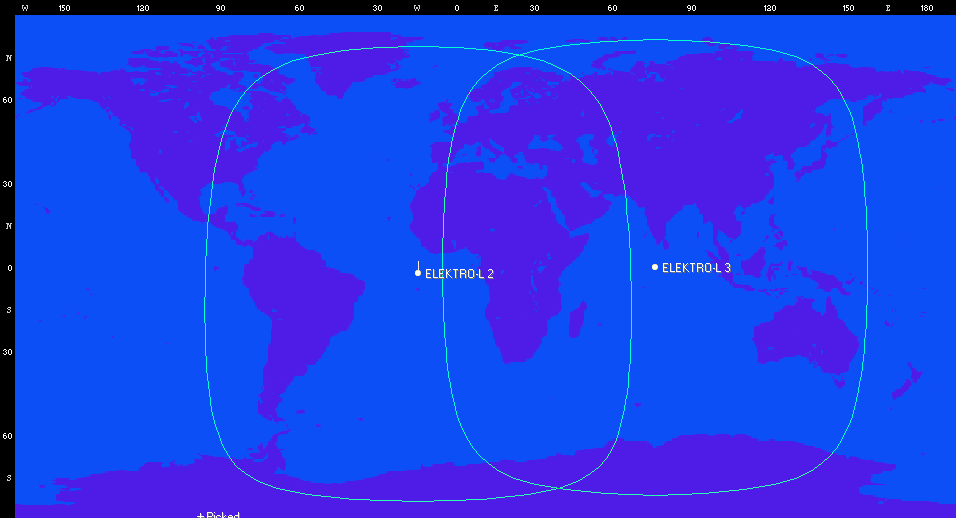
The LRIT activation of Elektro-L3 hopefully means that Europeans should finally have access to a geostationary weather satellite that can be easily received with modest low cost hardware. The current coverage map from Orbitron of the two Elektro satellites is shown below (note that Elektro-L2 LRIT does not appear to have been activated yet).

Elektro-L2 and Elektro-L3 Coverage (Currently only Elektro-L3 LRIT transmissions have been discovered)

Over on Twitter @aang254 has noted that he has already updated his satdump software, adding support for Elektro LRIT decoding, and adding support for all of the available channels and for color. Satdump is available as a binary for Windows, and on Linux can be built from source. Experimentally, Satdump can also be built and run on Android.

The Tweet from @aang254 provides a nice sample image of what can be received.