Tagged: rtl2832u

SkyLight Ceiling: Projecting Live ADS-B Aircraft Positions Onto your Ceiling

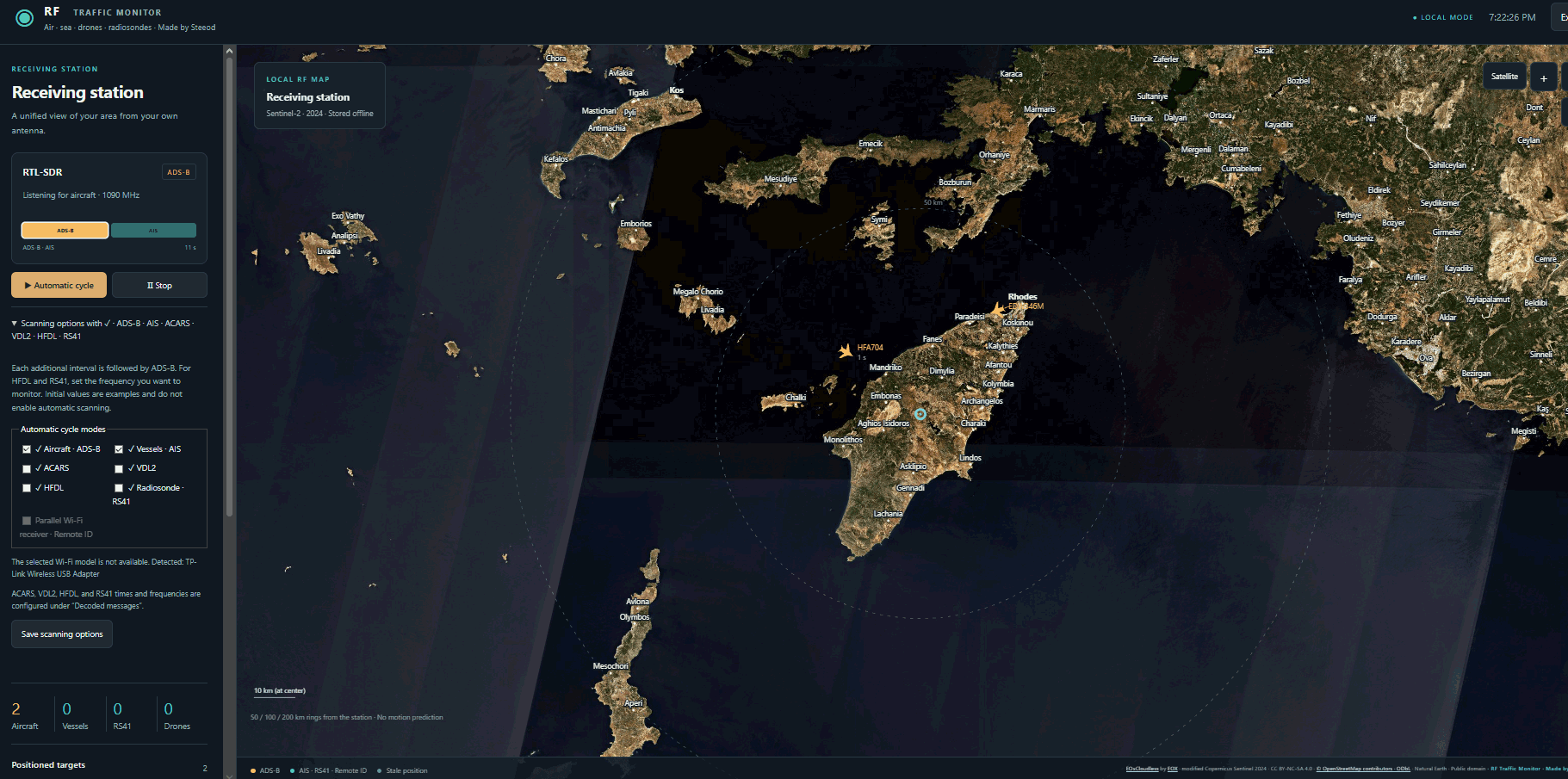
Recently, Cameron Paczek has created a new project called SkyLight, where art meets technical implementation by displaying a live view of aircraft flying overhead on your ceiling. SkyLight consists of a projector, Raspberry Pi 5, RTL-SDR dongle, and some custom software.

The Raspberry Pi 5 and RTL-SDR receive live ADS-B data from local aircraft, and the projector points up at the ceiling and displays the live locations of aircraft as they fly overhead, effectively giving you a simulated X-ray through your roof. The projections also include the sun, moon, bright stars and constellations, and live satellites. 

This project reminds us of a British Airways billboard in 2014 that used live ADS-B data to have a child on the screen point directly at incoming aircraft. We note that these SkyLight and billboard projects would not be possible without live ADS-B data, as ADS-B aggregation sites like ADSB-Exchange and Flightradar24 typically have a few-minute delay and require payment for their APIs.

Cameron aims to productize his idea into a ready-made kit and crowd-fund it in the near future. If you are interested, you can sign up for his notification mailing list over at skylightceiling.com.

AI Disclaimer: We note that this project appears to have been coded with the help of AI tools.

Skylight Ceiling Projecting Live Aircraft via ADS-B data on the Ceiling

Dump1090 For Android Updated to V2

Thank you to Christian from ebcTech for writing in and sharing with us that their Dump1090 app for Android has recently been completely redesigned. We first posted about this app back in 2021. The developer notes that the V2 redesign is faster and has an improved UI.

The app allowes users to use an RTL-SDR dongle connected to an Android device to receive ADS-B signals from aircraft and plot their locations on a map. When selecting an aircraft, the app also shows the aircraft's live flight data and a picture of the aircraft.

Screenshots of the new UI
RTL-SDR ADS-B Dump1090 Android

ITCMON: Interoperable Train Control Monitoring Software Released

Interoperable Train Control (ITC) is a radio protocol operating at 220 MHz that is used by most railroads in the United States. ITC is a safety system designed to help prevent train-to-train collisions, derailments caused by excessive speed, incursions into work zones where maintenance crews are present, and movement of a train through a switch left in the wrong position. It runs in the background as a safety mechanism to apply the brakes if the crew makes a mistake.

Recently, Katso Juna wrote in to us to let us know that they have created a new program for Windows called "ITCMON:  Interoperable Train Control Monitoring software". Katso writes:

I will first address the obvious concerns: ITC/PTC is much safer than ATCS ever was. Due to the HMAC (Hashed Message Authentication Code) attached to every important message, it is not possible for anyone to spoof data without knowing a secret key.

Anyways, this first release runs on Windows (tested on Win 11) and needs an RTL-SDR, a 220mhz antenna, and the regular Windows Zadig RTL/USB drivers installed.

To make the most use of the software, you'll have to figure out the signal vs switch bits for each Wayside (not too hard), and also figure out where those Waysides are located to give them names. If its found to be useful then a next step might be to feed this data to a dispatcher type display. There is a lot of other interesting data that could be used.

So it seems that while the data messaging is encrypted, once you've matched the signal/switch bits for each wayside, you can still infer local train movements and activity from the wayside status beacons.

Katso has also mentioned that there is a groups.io page called PTCTalk where the program is being discussed.

ITCMON Screenshot
ITCMON Screenshot

RTL-SDR Now Runs on iPad M-Series Devices Directly via USB Without Jailbreak

Thank you to Arved (DK5AV/M0KDS) for writing in and sharing with us some exciting news. Arved has just announced his USBDriverKit extension for RTL-SDRs over on X and released it as open-source code on GitHub.

This is an unofficial port of librtlsdr, created using USBDriverKit instead of libusb, which is not available on iOS. This now allows RTL-SDRs to run directly on iPad iOS devices via USB without any jailbreak requirements. Previously, RTL-SDRs were unable to run on iOS devices directly. The only way around this was to run an RTL-SDR remotely and connect to it over a network via rtl_tcp.

The one caveat at this stage is that this currently only supports iPads with an M-Series SoC. At this time, only iPads use M-series chips, whereas iPhones currently use A-series chips. It also appears that the Blog V4 is not yet compatible with this driver due to the required EEPROM strings not being read by the drivers yet. 

In the video embedded below Arved shows an RTL-SDR running on his M1 iPad, and demonstrates CoronaSDR, welle.io, SatDump and rtl_tcp running.

RTL-SDR Running Directly on iPad via USB — Demo with CoronaSDR, welle.io, SatDump & rtl_tcp (no JB)

Arved has also released a video (embedded below), demonstrating SatDump connecting to an RTL-SDR and receiving a signal from a Meteor M2 LRPT weather satellite. He first records the IQ data with SatDump, then uses SatDump to decode the recorded data into an image.

Meteor-M2 4 LRPT Reception on iPad with RTL-SDR via USB — SatDump Demo

iq_tool: A Command Line Tool for Resampling, Filtering, Shifting and Correcting IQ Data Streams

Thank you to Eric Inloes for submitting to the blog his new tool called "iq_tool". This is a tool designed to "provide an easy, fast, and lightweight command-line utility for converting I/Q data from files or SDRs to a specific sample rate and format, and then either piping it to other programs or writing it to a file". Or in other words have a "neutral ffmpeg like converter tool but for IQ data".

Many SDR software tools are written for specific SDR hardware, such as RTL-SDRs, and may only accept a specific sample rate, type, or bit depth, meaning other SDRs cannot use these tools. The goal of iq_tool is to easily allow the IQ data stream from any SDR to be converted into a compatible format. 

Eric gives some examples. For example, if you wanted to use rtl_433 with an Airspy you could run the command:

iq_tool --input airspy  --airspy-gain-mode linearity --airspy-gain-value 15 --output stdout  --sdr-rf-freq 433.92e6 --output-sample-rate 250e3 --output-sample-format cu8 --output-agc | rtl_433 -r -

Similarly, for an SDRplay, you could run:

iq_tool --input sdrplay   --sdrplay-lna-state 15 --sdrplay-antenna b --sdrplay-if-gain -50 --output stdout  --sdr-rf-freq 433.92e6 --output-sample-rate 250e3 --output-sample-format cu8 --output-agc | rtl_433 -r -

We note that Eric released this tool with the caveat that it is experimental and was written with heavy AI assistance.

iq_tool example converting from a networked Airspy and piping into rtl_433

Further Tutorials on SatDump Map Projections

Thank you to Paul Maine, who has submitted to us two new SatDump tutorials that he has uploaded to his YouTube channel. These two tutorials follow on from his previous tutorials that we posted a month ago.

His SatDump V2.x Part 5 video demonstrates Recording and Processing. Paul shows his hardware setup and then shows GUI Live Processing, CLI Live Processing, CLI Recording and how to use the GUI to process recorded files.

E28 SatDump v2.x Part5 Recording & Processing

His SatDump V2.x Part 6 video on Projections introduces Map Projections. Paul uses things covered in earlier SatDump videos and builds upon them to create very interesting map projections. For his first example, he uses the Load First Party feature to download a GOES-19 CONUS image. Next, he shows how to add a shape file and a Severe Storms image expression. Lastly, he shows how to create an equirectangular map projection. In the video, Paul also shows how to create three other types of projections.

Before SatDump Projection
After SatDump Projection
E29 SatDump v2.x Part 6 Projections

OpenWXSDR: A Streamlined Automated Multi-Sonde Decoder for Raspberry Pi with RTL-SDR or Airspy

Thank you to Mike (DL2MF) for writing in about the release of OpenWXSDR, a new open-source Python framework that turns one or more RTL-SDR dongles or Airspy SDRs into a fully automated radiosonde ground station running on a Raspberry Pi 4/5 or Linux x86 machine.

If you are unaware, a radiosonde is a lightweight instrument package typically carried by a weather balloon to collect atmospheric data, including temperature, humidity, pressure, and GPS position. It transmits this data back to the ground via radio signals. Using an RTL-SDR or another software-defined radio (SDR) along with appropriate decoding software, hobbyists or researchers can receive, decode, and visualize these signals. Radiosondes are typically launched by local meteorological agencies in many cities worldwide at least twice per day.

OpenWXSDR continuously scans the 400-406 MHz meteorological band, automatically identifies balloon transmissions using DFT correlation analysis, and spawns dedicated rs1729 decoder subprocesses. Supported sonde types include RS41, RS92, DFM06/09/17, M10, M20, iMet-54, LMS6, and MRZ.

The software also supports multi-sonde and multi-SDR. While one dongle scans for new signals, others simultaneously handle active decoding sessions. Decoded telemetry can be submitted in parallel to SondeHub v2 and to OpenWX.de via MQTT (with optional TLS), and as Horus-compatible UDP JSON datagrams for local tools like SondeMonitor. A built-in Flask and Leaflet web interface shows live positions, flight tracks up to 20,000 points, PTU sensor readings, and signal metrics, with most settings editable from the WebUI during operation.

OpenWXSDR Web Interface

No-SDR: A New Open Source Multi-User WebSDR for RTL-SDR

Thank you to George (gbozo), who has just released no-sdr (named from No(de)-sdr), a new open source multi-user WebSDR for the RTL-SDR written in Go and node JS. A WebSDR allows users to run an SDR remotely and access it over a local or internet network connection. This is useful for bringing an SDR closer to an antenna, instead of running a long, lossy coax cable, and for sharing SDRs among multiple networked users.

The no-SDR software runs on x86 or Raspberry Pi, is Dockerized, and supports multiple RTL-SDR dongles being connected at the same time. On the DSP side, it currently implements WFM (stereo + RDS), NFM, AM, AM Stereo (experimental stereo C-QUAM), USB, LSB, CW, and raw IQ, with digital decoders like ADS-B, AIS, APRS, POCSAG, FT8, and WSPR planned. There is also an "Identify Song" button that uses the Audd API to ID currently playing tracks on WFM, NFM, and AM.

George also points out that he's implemented an innovative lossless FFT codec with a very high ~10:1 compression ratio, as well as the Opus codec for audio. The result is a 12-15 kB/s transmission rate with a 12 FPS FFT with 8192 bins and AM demodulation compressed audio. 

The no-sdr Web Interface