Tagged: sdrplay

Radio-Sky Spectrograph now supports the SDRPlay

Radio-Sky Spectrograph is a radio astronomy software program that integrates data over long periods of time and displays it as a waterfall. It is described by the author:

Radio-Sky Spectrograph displays a waterfall spectrum. It is not so different from other programs that produce these displays except that it saves the spectra at a manageable data rate and provides channel widths that are consistent with many natural radio signal bandwidths. For terrestrial , solar flare, Jupiter decametric, or emission/absorption observations you might want to use RSS.

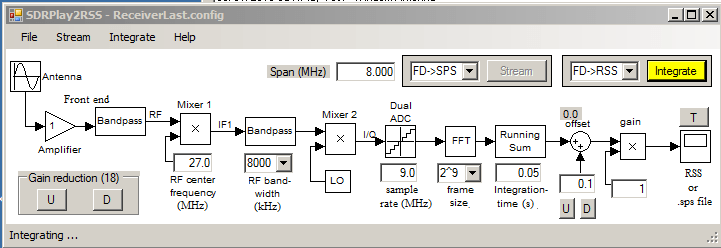
Radio Sky Spectograph is compatible with the RTL-SDR via an intermediary program called RTL Bridge, and now it is also compatible with the SDRplay via another intermediary program written by Nathan Towne called SDRplay2RSS

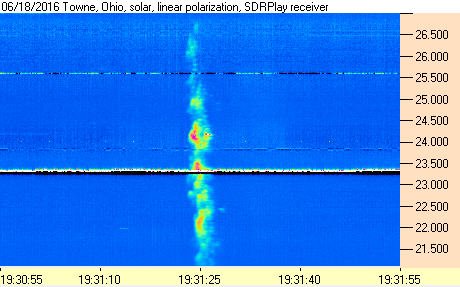
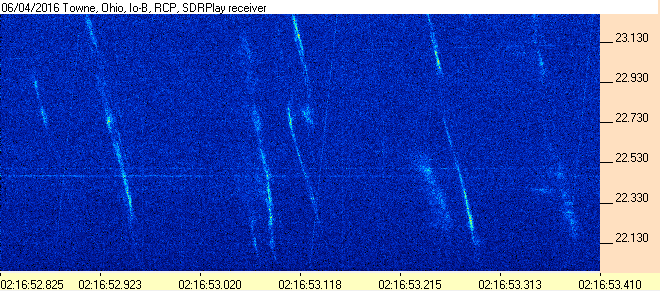
In previous posts we showed how some amateur radio astronomers were able to capture noise bursts from the sun and from Jupiter with an RTL-SDR. In the SDRplay software release post and documentation that comes with the software Nathan shows how he was able to capture solar emissions and Jupiter bursts with the SDRplay.

SDRPlay2RSS
SDRPlay2RSS
Solar emissions received with the SDRplay and Radio-Sky Spectograph.
Jupiter Noise Bursts with the SDRPlay and Radio-Sky Spectrograph.

rx_tools: RTL-SDR Command Line Tools (rtl_power, rtl_fm, rtl_sdr) Now Compatible With Almost Any SDR

Developer R. X. Seger has recently released rx_tools which provides SDR independent ports for the popular command line RTL-SDR tools rtl_power, rtl_fm and rtl_sdr. This means that these tools can now be used on almost any SDR, such as the bladeRF, HackRF, SDRplay, Airspy and LimeSDR. If you don’t know what the tools do, then here is a quick break down:

rtl_fm / rx_fm: Allows you to decode and listen to FM/AM/SSB radio.
rtl_sdr / rx_sdr: Allows you to record raw samples for future processing.
rtl_power / rx_power: Allows you to do wideband scans over arbitrarily wide swaths of bandwidth by hopping over and recording signal power levels over multiple chunks of spectrum.

rx_tools is based on SoapySDR which is an SDR abstraction layer. If software is developed with SoapySDR, then the software can be more easily used with any SDR, assuming a Soapy plugin for that particular SDR is written. This stops the need for software to be re-written many times for different SDR’s as instead the plugin only needs to be written once.

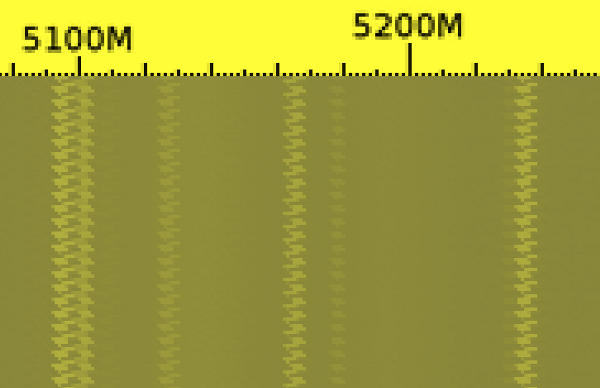
rx_power scan with the HackRF at 5 GHz over 9 hours.

SDRplay API Updated

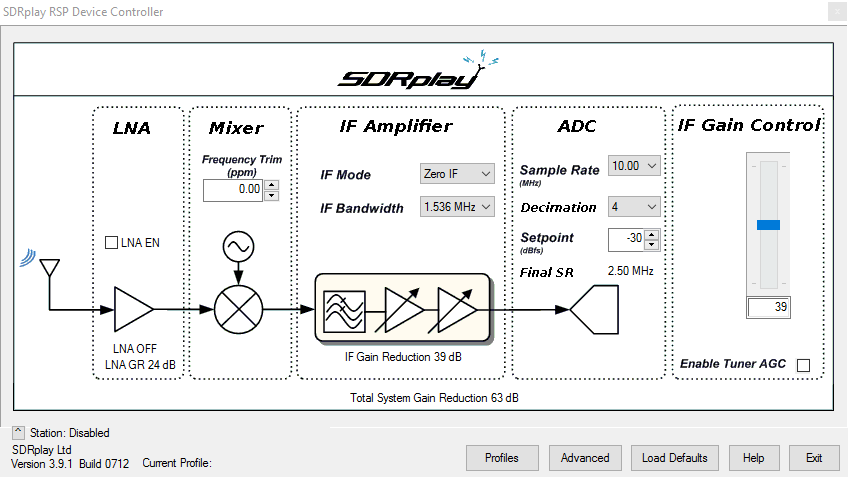
The SDRplay API has recently been updated to version 1.94. They have also released version 3.9 of their EXTIO plugin. The changes include

  • 10kHz lower limit frequency support
  • 10MHz sample rate
  • Decimation of the sample rate for improved noise performance
  • Improved performance
  • Better function support for developers
  • Callbacks used for stream data and gain updates
  • Tuner AGC function moved to the API

The major changes for users appears to be the the 10 MHz sampling rate and the addition of decimation. The 10 MHz sample rate increases the visible spectrum, however it appears that the maximum IF Bandwidth is still only 8 MHz, meaning that the outer edges of the spectrum won’t show any signals. However,. but the IF filter roll off is not super sharp, meaning that the full 10 MHz should still be usable, with only minor attenuation at the edges. However, we note that in our testing we noticed some roll off at the edges, giving us about 9 MHz of usable spectrum. There should also be an improvement in SNR by using the higher sampling rate thanks to decimation.

Edit: Jon Hudson from SDRplay wrote in to let us know that our assumption of the outer edges being useless was incorrect (the crossed out text). He writes:

I noted one error in what you wrote there…..you suggest that the 10 MHz of visible B-W is worthless because the IF bandwidth is only 8 MHz max and hence you can’t see any signals beyond that 8 MHz window. This isn’t true. The IF filters start to roll off at 8 MHz, but they are not brick wall filters. The actual roll off is at +/- 5 MHz (10 MHz of bandwidth) so within that 10 MHz, at the edges, there are only a few dB of attenuation, and because the CNR has been defined by the front end circuits ahead of the IF filter, any filter attenuation will be applied equally to the signal and the noise leaving the Carrier to Noise ratio unaffected. As a consequence, whilst the user may seem some roll off, the ability to see and receive signals that may lie at the outer edges of the 10 MHz bandwidth is unaffected.

In this update they also added visual decimation controls. This is useful as this allows you to zoom into a signal without loosing resolution whilst maintaining a high sample rate. The decimation controls only appear to activate in the lower IF Bandwidth settings.

The SDRplay RSP is a $149 USD software defined radio with 10 kHz to 2 GHz tuning range, 12 bit ADC and up to 8 MHz of visible bandwidth.

The new RSP EXTIO control panel showing decimation and 10 MHz sample rate.

Receiving the SAQ VLF Signal with an Airspy + Spyverter and SDRplay RSP

Over on YouTube user Mile Kokotov has uploaded a video showing his reception of the SAQ very low frequency (VLF) signal. The SAQ transmitter is based in Grimeton, Sweden and transmits at 17.2 kHz, which is well below the frequency of most radio communications. SAQ only transmits its beacon on certain days, and last Sunday July 3rd 2016 the SAQ beacon activated to celebrate Alexanderson day, which is named after Swedish radio pioneer Ernst Frederick Werner Alexanderson.

In the video both the Airspy + Spyverter and the SDRplay RSP appear to receive the SAQ VLF signal equally well. In the video description Mile writes:

“SAQ”- Radio Station at Grimeton is a VLF transmission facility at Grimeton, Sweden. It has the only working Alexanderson alternator rotating armature radio transmitter in the world and is classified as a World Heritage Site.

The transmitter was built in 1922 to 1924 to operate at 17.2 kHz. The antenna is a 1.9 km wire aerial consisting of eight horizontal wires suspended on six 127-metre high freestanding steel pylons in a line, that function as a capacitive top-load to feed energy to six grounded vertical wire radiating elements.

Until the 1950s, the Grimeton VLF transmitter was used for transatlantic radio telegraphy to Radio Central in Long Island, New York, USA. From the 1960s until 1996 it transmitted orders to submarines in the Swedish Navy.

The Alexanderson transmitter became obsolete in 1996 and went out of service. However, because it was still in good condition it was declared a national monument and can be visited during the summer.

On July 2, 2004, the Grimeton VLF transmitter was declared a World Cultural Heritage site by UNESCO. It continues to be used on special occasions such as Alexanderson Day to transmit Morse messages on 17.2 kHz. Its call sign is SAQ.

Recent transmissions from SAQ on 17.2 kHz with Alexaderson 200 kW alternator, was on Alexanderson day (Sunday, July 3rd 2016) at 09:00 UTC.

Distance between SAQ transmitter in Grimeton, Sweeden and Macedonia where the signal was received is about 1850 km.

Receiving with:
1. AIRSPY R2 – SDR + Spyverter and SDRsharp software.
2. SDRplay RSP1 and SDRuno software.

Both SDR receivers settings were previously set for maximum S/N ratio.

Antenna is Mini-Whip 10cm homemade active antenna on 6.5 meter plastic pole.

The LPF filter (fc=535 kHz) is used also.
SAQ VLF Receiving with Airspy+Spyverter and SDRplay

SDR4Everyone: Getting Started with the RTL-SDR and SDRUno

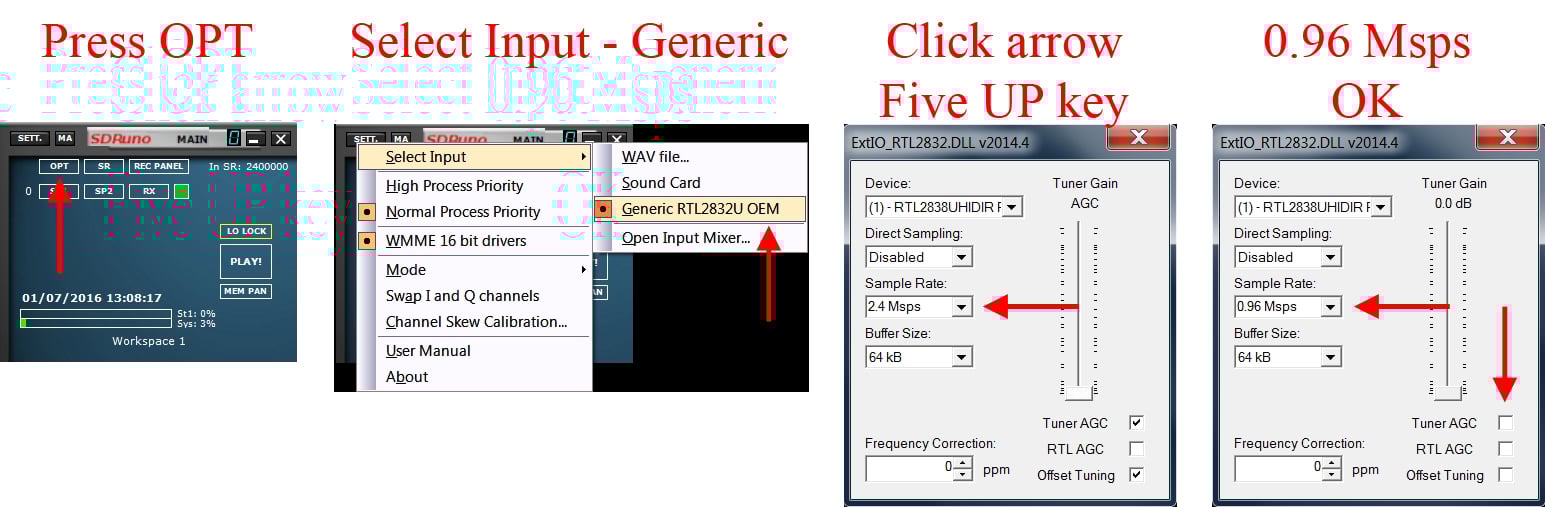
Over on his sdr4everyone blog author Akos has uploaded a tutorial that shows how to set up the recently released SDRUno with the RTL-SDR. SDRuno is a spin-off of the (recently acquired by SDRplay) Studio1 software. Although designed and tailored for the SDRplay, SDRuno also supports any radio with an ExtIO interface available, such as the RTL-SDR. The one limitation is that the maximum bandwidth of radios other than the SDRplay is locked to 1 MHz at most.

Akos’ post shows where to download and add the required ExtIO file (it’s the same one used for HDSDR) and how to start the RTL-SDR in SDRuno, as well as a quick tutorial on changing some settings and tuning.

We note that the fact that you need to install the ExtIO dll file to the documents folder seems to be a bug in the latest version at the moment. In future updates they may fix this, and then the ExtIO dll will go back to needing to be added to the C:\Program Files (x86)\SDRplay\SDRuno folder, as it was in previous versions. We’ve also heard one or two reports of users stating that they needed to add in the libusb-1.0.dll file as well, but we can’t confirm if this is actually required as none of our test PC’s have needed it.

Also, a recent post on Nobu’s blog shows how to get rid of the center DC spike in SDRuno by adjusting the Channel Skew Calibration. The post is in Japanese, but the gist of it is that you just need to adjust the fine tuning DC offset slider in the Channel Skew Calibration settings. Nobu also points out that a handy shortcut to getting the ExtIO window to display is to simply press the ‘H’ key.

Setting up the RTL-SDR for use in SDRuno.

SDR4Everyone: Review of the HackRF

Over on his ‘SDR4Everyone’ blog author Akos has recently uploaded a new post that reviews the HackRF One, and also compares it against the SDRplay RSP and RTL-SDR. In his review he discusses his first impressions of the HackRF, his concerns about it being labelled as a transceiver, and some of its various features. He also does a screenshot comparison of the HackRF, RSP and RTL-SDR on shortwave reception and image rejection performance. Akos also notes that there are not many applications in the high gigahertz range that cannot be done with cheaper or more specialized equipment. Finally he concludes that the HackRF is not very sensitive or good at RX in general, but still has enough features to make it a worthwhile purchase for some people.

If you are interested in the HackRF, we also have our own review that compares the HackRF, SDRplay RSP and Airspy.

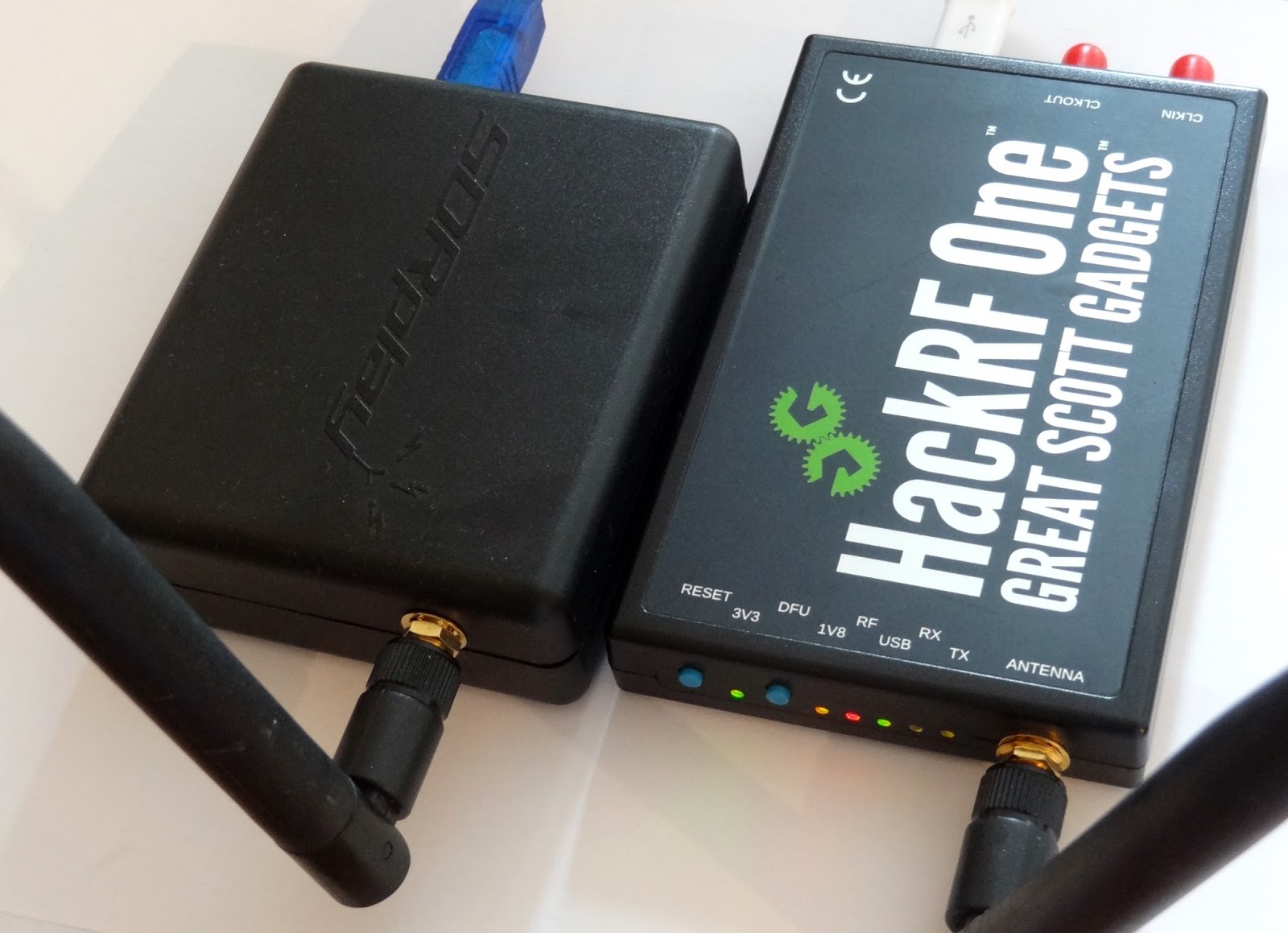
The SDRplay and HackRF One.

Testing out the SDRplay with SDRuno and Characterizing RF HF Filters

Over on YouTube user Mile Kokotov has uploaded a video showing him using the SDRplay on the recently released official software SDRuno. In the video he first shows reception of some HF signals, then goes on to show how he can characterize some HF filters using a noise source.

Mile also wrote in to use to expand on his video. We quote:

“SDRuno” is new specialized software for SDRplay – RSP1 receiver. Besides many others excellent features, the new one is 10 MHz spectrum span on the window screen. The 10 MHz frequency span you can use it for characterize the HF Band-pass, Low-pass, High-pass or Notch filters. All you need is one noise source (noise generator) which you can find on eBay for about 20 USD.

With addition of directional coupler (for another 20$ USD), you can using SDRplay and SDRuno for HF antenna analyzer, measuring SWR like poore-man`s HF Vector Network Analyzer!

An RF filter is an electrical circuit designed to have specific characteristics with respect to the transmission or attenuation of various frequencies that may be applied to it.

There are three general types of RF filters:

1. A high-pass filter (HPF) similarly has a cut-off frequency, above which there is little or no loss in transmission, but below which there is considerable attenuation. Its behavior is the opposite of that of the low-pass filter.

2. A low-pass filter (LPF) is one that will permit all frequencies below a specified one called the cut-off frequency to be transmitted with little or no loss, but that will attenuate all frequencies above the cut-off frequency.

3. A band-pass filter (BPF) is one that will transmit a selected band of frequencies with substantially no loss, but that will attenuate all frequencies either higher or lower than the desired band.

The Filter connected in the front end of the receiver can be very much useful and it can improve the reception of the weak signals rejecting all others unwanted signals that can produces interference, intermodulation and as a results, the weak signals can not be copied !

With bandpass filter for particular frequency band, Receiving weak signals on that band is much easier, without problems from out of band strong sugnals.

73,
Mile Kokotov

SDRplay with SDRuno Using to characterize RF HF filters

SDRplay Releases SDRuno: Free SDR Software for the RSP

The SDRplay is a $149 USD RX only software defined radio with a 12-bit ADC and up to 8 MHz of bandwidth that can tune from 10 kHz – 2 GHz. We consider it and it’s competitors the Airspy R2/Mini to be the best next step up from an RTL-SDR. See our previous post for a review comparing the Airspy and RSP.

One of the main drawbacks of the RSP has been that it does not have any official software associated with it. The closest competitor, the Airspy has the free official SDR# software, but the RSP relied only on third party programs like HDSDR and SDR-Console.

That is set to change today as SDRplay have announced the release of their SDRuno software, a free general purpose software defined radio program for the RSP. SDRuno is a customized version of the Studio1 software which SDRplay acquired the rights to last April. The full press release is quoted below:

SDRplay is pleased to announce the official release of SDRuno for the RSP. SDRuno is the new name for the RSP compatible version of Studio1, the rights to which we obtained and announced on 28th April. SDRuno contains native support for the SDRplay RSP and no extra plugins are required. Third party hardware can also be supported via the ExtIO interface, but with reduced functionality.

SDRuno provides a rugged and flexible, high performance SDR receiver capability and boasts some excellent features:

  • Multiple ‘Virtual Receivers’ which allow for simultaneous reception and demodulation of different types of signals within the same receiver bandwidth.
  • A selectivity filter with an ultimate rejection greater than 140 dB.
  • A unique distortion-free double stage AGC with fully adjustable parameters.
  • Multiple notch filters with BW adjustable down to 1 Hz, Notch Lock feature.
  • A unique synchronous AM mode with selectable/adjustable sidebands, dedicated PLL input filter, and selectable PLL time constants.
  • SNR (stereo noise reduction), featuring a proprietary noise reduction algorithm for stereo broadcast.
  • AFC for FM signals.
  • Calibration for receiver frequency errors.

Over time, we plan to add many more features to SDRuno to enhance the user’s experience of this very powerful piece of software. This software runs on Windows and we don’t yet know how easy it will be to migrate it to other platforms but this is something we will be investigating.

SDRuno will be made freely available to all current and future users of the RSP – to download a copy – simply go to http://www.sdrplay.com/windows.html

Our support for SDRuno in no way lessens our commitment to support HDSDR, SDR Console, Cubic SDR or ANY other software solution where the authors are willing to work with us. We fully recognise that many people have strong preferences for particular pieces of software and we do not want to do anything to undermine the options that people have to use their favoured software packages. Indeed, our view is quite the opposite. Our objective remains aim to have our hardware platforms support any and every SDR package out there. This of course may not be possible, but it is our philosophy and part of the ethos of our company.

About Studio 1:

Studio1 was developed in Italy by SDR Applications S.a.s. and has hundreds of happy customers around the world.

Studio 1 is known for its user friendly stylish GUI, CPU efficiency and advanced DSP capabilities, including features not available on other SDR software packages.

www.sdrapplications.it

About SDRplay:

SDRplay limited is a UK company and consists of a small group of engineers with strong connections to the UK Wireless semiconductor industry. SDRplay announced its first product, the RSP1 in August 2014

www.sdrplay.com

Email: [email protected]

The software can be downloaded at http://www.sdrplay.com/windows.html. SDRuno comes with a full manual (pdf) and SDRplay fans and beta testers of SDRuno have also released a free SDRuno cookbook guide (pdf). From the cookbook it appears that SDRuno is also compatible with any SDR that supports ExtIO modules, like the RTL-SDR, although as noted in the press release functionality for other radios may be reduced. We look forward to being able to test the software out, and post a review within the next few days.

sdruno_announcement