Category: Applications

RadioTranscriber: Real-Time Public Safety Radio Transcription with Whisper AI

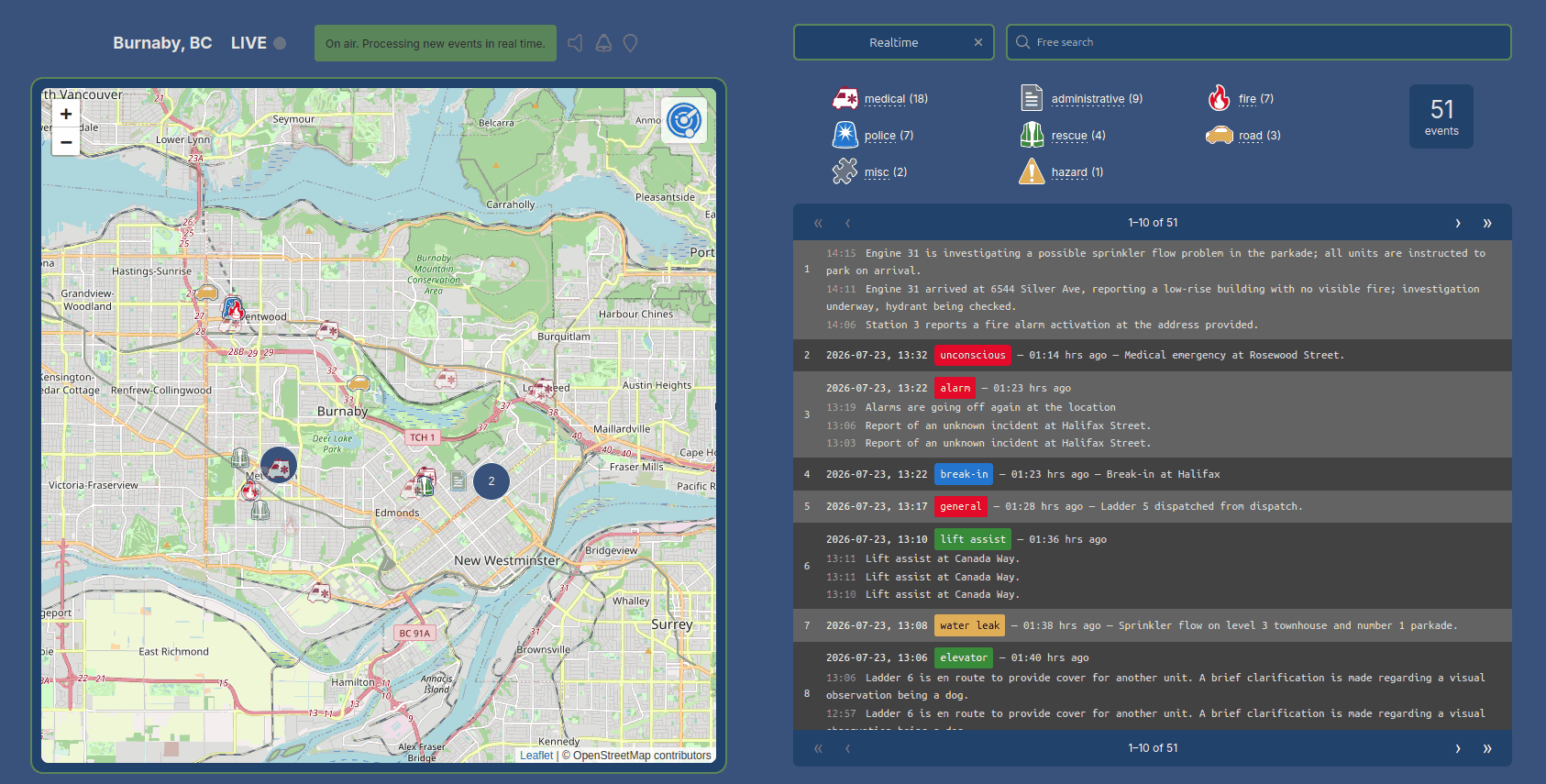
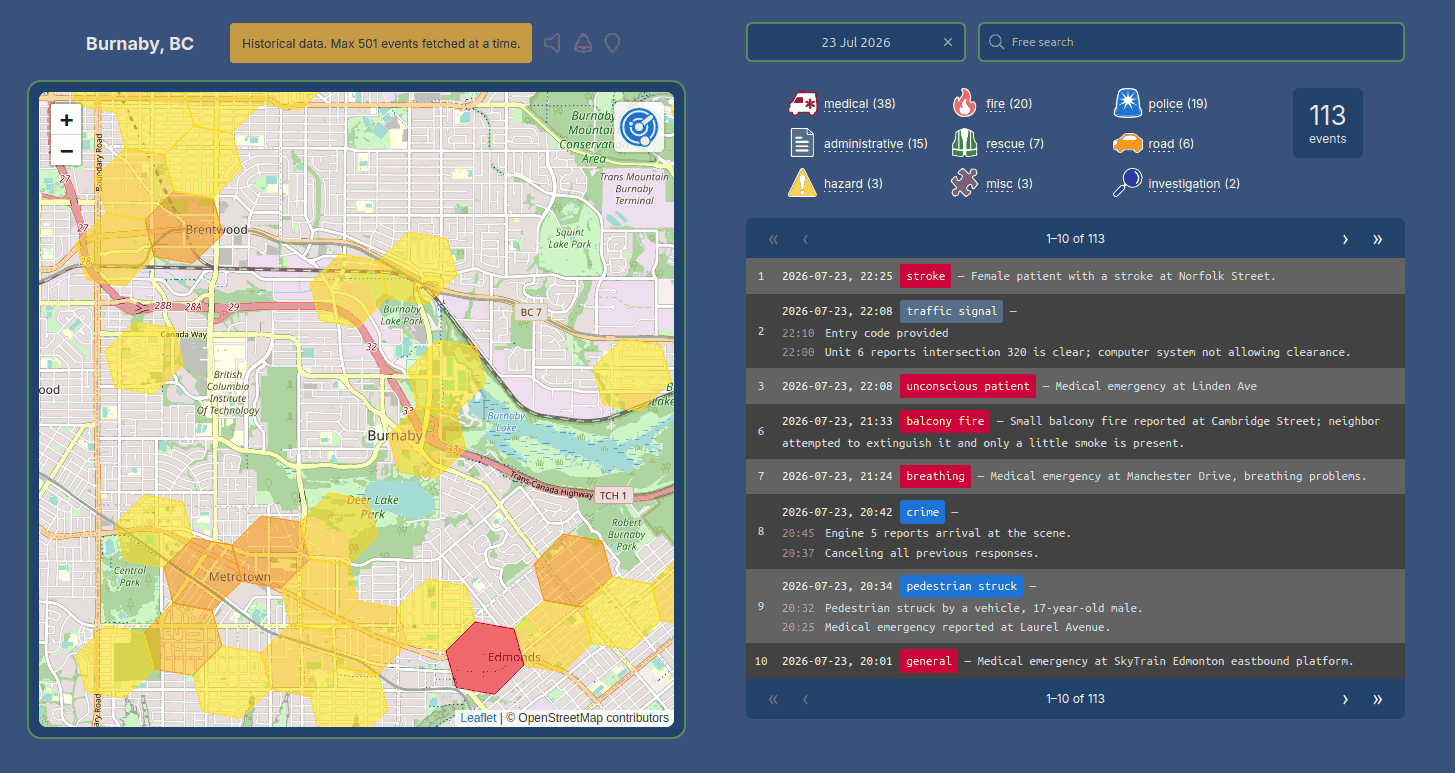
Over in our new forums, user Nite has shared a new open-source project that he's created called RadioTranscriber, a real-time speech-to-text tool for public safety radio feeds using OpenAI’s Whisper large-v3 model. The idea is to take live scanner audio, such as authenticated streams from Broadcastify, and continuously turn it into readable text with minimal babysitting. The project grew out of earlier experiments with Radio Transcriptor, which we posted about back in June, but quickly evolved into a more robust, long-running setup with better audio conditioning and fewer of Whisper’s common hallucinations.

Under the hood, RadioTranscriber is a Python script that pulls in a live stream, cleans it up with filtering, normalization, and WebRTC VAD, then runs Whisper large-v3 with beam search for transcription. A set of custom “hallucination guards” strips out common junk text and replaces alert tones with simple markers, while daily log rotation and basic memory management let it run unattended for long periods, even on a modest CPU-only machine. Although it’s tuned to the author’s local dispatch style, the config and prompt are easy to adapt, and the full code is available on GitHub for anyone who wants to experiment or build on it.

How OpenAI's Whisper Works

Discovery Dish 1420 MHz Hydrogen Line Feed Tested with a WiFi Grid Dish

Thank you to Alex P for writing in and sharing with us his detailed evaluation of the Discovery Dish 1420 MHz hydrogen line feed when paired with a low-cost 1m WiFi grid dish. The goal was to see how well this near off-the-shelf setup performs as a hydrogen line radio telescope. The Discovery Dish feed integrates the dipole very close to the internal LNA and filters to minimize losses, uses a weather-sealed enclosure, and is built around a low-noise Qorvo QPL9547 amplifier, which has a very low noise figure at 1420 MHz.

Alex used 4NEC2 with a simple geometry approximation to analyze the beam pattern and also experimentally determined the optimal feed-to-dish spacing for the WiFi grid. The results show that the Discovery Dish feed significantly outperformed a more standard feed + external LNA setup.

Alex also shows how he uses aluminum foil, or conductive foam, to shield the feed from all signals during a background correction scan. Generally, for background correction scans, we recommend pointing towards a cold area of the sky (any area far away from the Milky Way with little to no hydrogen), but Alex prefers this method.

Discovery Dish 1420 MHz Hydrogen Line Feed Tested on a WiFi Grid Dish

A Discussion on How WiFi Can Be Used To See Through Walls

Earlier in the year on YouTube, Yaniv Hoffman and Occupy The Web haved discussed research showing how Wi-Fi signals can be used to detect and track people through walls. The idea is simple from an RF point of view. Wi-Fi is just radio, and when those signals pass through a room they reflect and scatter off walls, furniture, and human bodies. By analyzing these reflections, it is possible to infer movement and even rough human outlines without placing any hardware inside the room.

Using low-cost SDRs, a standard PC, an NVIDIA GPU, and open-source AI tools like DensePose, researchers can reconstruct basic 3D human shapes in real time. In some cases, the system does not even need to transmit its own signal. It can passively analyze reflections from an existing Wi-Fi router already operating in the home.

The speakers note that this raises obvious privacy concerns. While there are some benign uses like motion-based home security or monitoring breathing in elderly care, the same techniques could be misused. Countermeasures are limited, as Wi-Fi uses spread spectrum techniques that make jamming difficult. 

If you're interested, we posted about something similar in 2015, where USRP radios were being used to detect the presence of people behind walls.

They’re Watching You Through Wi-Fi… And You Have No Idea

DSDPlus Public Release Updated & Fast Lane Changes

The team behind DSDPlus has recently uploaded a new public release version 2.547. The last public release was version 1.101, released several years ago. Up until now, only DSD+ Fastlane customers have had access to the new version.

The new version adds new programs like FMP, which can be used to receive the FM signal from an RTL-SDR, Airspy or SDRplay SDR and transfer it to DSD+ over TCP. Previously, a program like SDR#, or SDR++ would have to be used along with audio piping software like VB Cable. 

Also introduced are numerous enhancements, including a single-receiver trunk-tracking mode that eliminates the need for dual SDR setups, a site loader GUI for rapid tuning and system selection, significantly expanded digital protocol support such as full P25 Phase II TDMA voice following, encryption algorithm and key ID detection, and GPS/AVL location and mapping capabilities. Hardware integration has also improved with features like bias-tee control for RTL-SDR Blog dongles, serial-targeted device selection, and smoother TCP-linked operation between DSD+ and FMP components.

The full list of changes can be found in the "Notes.txt" file in the DSDPlus zip file. The Radio Reference Wiki also has a summarized changelog.

The team also notes that they are now closing new signups to the DSD Fastlane program. FastLane was a program that allowed users to pay a small fee to receive the latest updates. They note that the program will remain active for users who have already signed up.

DSD Plus V2 Public Release with FMP24

rtl_haos: An rtl_433 to Home Assistant Bridge

Thank you to Jaron McDaniel for writing in and sharing with us the release of his open source software called "rtl_haos". rtl_haos is a 'drop-in' bridge that turns one or more RTL-SDR dongles into Home Assistant friendly sensors via rtl_433 and MQTT. Jaron writes:

I just finished a tool that that bridges data received from rtl_433 into Home Assistant friendly entities. Basically allowing you to integrate anything rtl_433 can see into Home Assistant.

Basically you clone the git to a Rasberry PI, configure it for your MQTT server, plug in a RTL-SDR or two and you'll see entities with icons and units automatically assigned to whatever rtl_433 discovers.

This tool allows you to connect older and cheap non-Wi-Fi connected sensors to Home Assistant, which typically communicate to a base station via wireless ISM band signals. Home Assistant is an open-source home automation platform that integrates and controls household devices such as lights, sensors, and actuators.

rtl_haos Overview
rtl_haos Overview

Using the Don’t Look Up Tool to Eavesdrop on Insecure Private Satellite Communications

Over on YouTube, Rob VK8FOES has uploaded a video showing how to install and use the "dontlookup" open-source Linux Python research tool for evaluating satellite IP link security. Back in October, we posted about a new Wired article that discussed how many geostationary satellites are broadcasting sensitive, unencrypted data in the clear and how a cheap DVB-S2 receiver and satellite dish can be used to eavesdrop on them.

In the video, Rob discusses the new dontlookup tool, which is an excellent one-stop shop open-source tool for parsing IP data from these satellites. He goes on to show the full steps on how to install and use the tool in Linux. The end result is private internet satellite data being visible in Wireshark (blurred in the video for legal reasons). In the video description, Rob writes:

I thought I would make a video showcasing this new open-source Python tool for Linux. 'Don't look up' is the result of a research campaign conducted by a group of cyber security researchers from the USA for decoding DVB-S2 satellite data transponders.

Geostationary communications satellites are somewhat of a 'perfect target' to malicious threat actors, due to their downlink signals covering large portions of earth surface. This gives attackers are large attack surface to intercept IP traffic being transmitted from space. To most peoples surprise, little-to-no security, such as encryption, are being used on these data transponders!

This is all old news to myself, and the fans of my YouTube channel that have been following my TV-satellite hobby for the past couple of years. Most of this was already possible with consumer-grade satellite equipment and a Python application called GSExtract. However, the scope of GSExtract was a lot more narrower than that of DontLookUp, with the developers claiming to have achieved an exponential packet recovery rate compared to GSExtract.

Join me in this video today where I will be showing my users how to patch and build the TBS5927 USB satellite receiver drivers for RAW data capturing. I'll also be showcasing the software application called 'DVBV5-Zap' which interfaces with our satellite receiver to capture RAW data from a satellite. And finally, I will finish-off the video by demonstrating the actual usage of DontLookUp itself. To make the tutorial as accessible as possible, I'm doing the entire process inside a Linux virtual machine!

This tutorial will probably only work in DragonOS FocalX R37 Linux by the wonderful @cemaxecuter. You are welcome to try on other Linux distributions, but your mileage will vary! Also, due to the TBS5927 using something called a 'Isochronous Endpoint', it's only possible to use this satellite receiver via USB Passthrough in VMWare versions 17.5 and above. VirtualBox does not support Isochronous USB Endpoints in any version. It's always best to run Linux on 'bare-metal' by installing it directly to your PC's internal SSD, or running it from a bootable USB thumb drive.

Please understand that if you own an internal PCI-E satellite receiver card from TBS, it is not possible to 'pass it through' to Linux running inside in a Type-2 Hypervisor (VMware, VirtualBox etc.) Installing Linux on bare-metal is the only hope for PCI-E card owners. Thanks very much for watching!

HARDWARE:
TBS5927 USB Satellite Receiver
90cm 'Foxtel' Satellite Dish
Golden Media GM202+ LNB
Hills RG-6 Coaxial Cable (F-Type Connectors, 75 Ohm)

SOFTWARE:
VMWare Workstation 17.6.2
DragonOS FocalX R37 Linux
TBS 'Linux_Media' Drivers
'RAW Data Handling' Patch
DVBV5-Zap
DontLookUp

If you're interested in this topic, Rob's YouTube channel has many videos on this topic that are worth checking out.

Don't Look Up (No, Not The Movie): A New Research Tool To Evaluate Satellite IP Link Security!

Receiving DAB and FM Signals with an RTL-SDR and Engima2 on OpenPLi 9.0

Thank you to "Radioto bg" from DXing.org for writing in and sharing with us his latest YouTube video showing how to receive DAB and FM signals with an RTL-SDR and the Enigma2 application running on OpenPLi. OpenPLi is an open-source Linux distribution for TV set-top boxes and Engima2 is a TV reception application used within the distribution.

RADIOTO shows how an RTL-SDR can be added to the system, allowing it to also receive DAB+ and FM radio.  In a previous post RADIOTO also showed how the RTL-SDR could be used as a DVB-T receive in Enigma2 and OpenPLi.

Turn Your Enigma2 Receiver into a DAB+ & FM Radio with RTL-SDR v.3! 🔥 Full Tutorial with OpenPli 9.0

SDR-Hub: A New RTL-SDR Scanner and Audio Recorder with Web Interface

Over on GitHub, user shajen has recently released a new open source program called "sdr-hub," which combines his two prior programs, called rtl-sdr-scanner-cpp and sdr-monitor, into one easy-to-launch project. The result is a powerful RTL-SDR scanner and audio recorder, with a web interface. In the past, we posted about rtl-sdr-scanner-cpp when Tech Minds made a video on it.

The scanner feature allows users to scan for active frequencies across a wide spectrum by rapidly retuning the RTL-SDR. If the transmissions are all within the same instantaneous bandwidth, the user can also record the audio.

The web interface then allows users to easily browse any created spectrum graphs and play back any audio recordings.

The software is available as a Docker image, making it easy to install and run.

SDR-Hub: RTL-SDR Scanner, Recorder and Web UI all in one.