Category: Digital Signals

dumpvdl2: A Lightweight VDL2 Decoder

The VHF Data Link mode 2 (VDL2) is a relatively new wireless transmission mode used on aircraft for sending short messages, position data (similar to ADS-B) and also for allowing traffic controllers to communicate to pilots via text and data. VDL2 is an evolution of ACARS and is eventually supposed to replace it entirely. The advantage over ACARS is that VDL2 can transmit data 10 times faster, and supports a much wider range of services. The main default channel is at 136.975 MHz, but channels could exist on other air band frequencies too.

Over on GitHub Tomasz Lemiech (szpajder – also the author of RTL-Airband) has uploaded a new VDL2 decoder called dumpvdl2. This is a lightweight command line Linux based VDL2 decoder and protocol analyzer. The features include:

  • Runs under Linux (tested on: x86, x86-64, Raspberry Pi)
  • Supports following SDR hardware:
    • RTLSDR (via rtl-sdr library)
    • Mirics SDR (via libmirisdr-4)
    • reads prerecorded IQ data from file
  • Decodes up to 8 VDL2 channels simultaneously
  • Outputs messages to standard output or to a file (with optional daily or hourly file rotation)
  • Outputs ACARS messages to PlanePlotter over UDP/IP socket
  • Supports message filtering by type or direction (uplink, downlink)
  • Outputs decoding statistics using Etsy StatsD protocol

In a previous post we showed how VDL2 could be decoded with MultiPSK on Windows. But the advantage of dumpvdl2 is that it allows you to set up a lightweight monitoring station on something like a Raspberry Pi. dumpvdl2 can also be interfaced with PlanePlotter, and statistics can be graphed with another program such as Grafana.

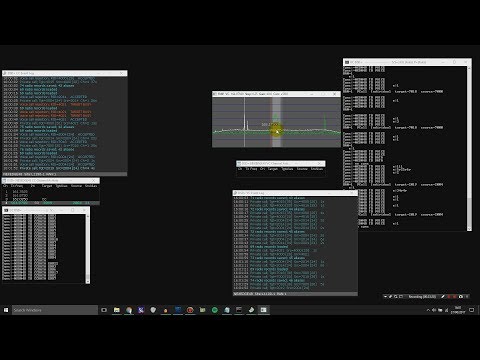
dumpvdl2 running.
dumpvdl2 running.

First Steps Towards Decoding HD Radio

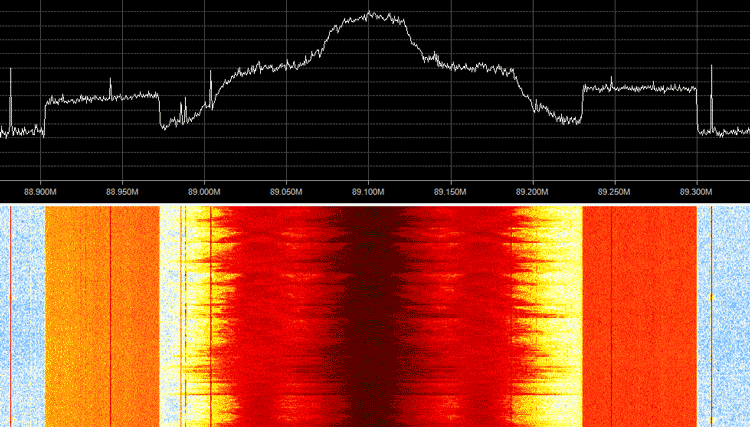
Programmer Phil Burr wrote in and wanted to share his newest code which is a partial implementation (no audio) of the iBiquity IBOC HD Radio standard. HD Radio is a proprietary broadcast radio protocol and is used only in North America. You may have noticed it before as the rectangular sidebands on the spectrum which surround standard analogue broadcast FM signals.

The audio codec specifications are not public and is thus not implemented here, so this code has very little use outside of being a good learning tool. But Phil does write that if anyone if able to figure out how to decode the codec, then this code may be a good starting point.

Phil writes:

I wrote this because I wanted to learn about digital broadcasts. Despite the fact that the audio codec used is iBiquity’s proprietary HDC codec, I decided that writing a receiver that could decode the air interface would be a great learning experience.

iBiquity’s HDC codec is supposedly based upon some of the same technologies as HE-AAC codec so it may be possible for some audio codec gurus, given access to the raw HDC audio packets, to write a decoder for the codec.

The receiver is somewhat limited. It only decodes FM MP1 profile transmissions (which happens to includes every IBOC FM transmitter in my area). It is also somewhat limited in the Layer2 packet demultiplexing. It likely needs a strong signal in order to decode signals reasonably well. However it is just enough to get access to the main program stream.

HD Radio Sidebands Visible on the Spectrum

Reverse Engineering Honeywell 345 MHz Home Automation Sensors with an RTL-SDR

OpenHAB is an open source home automation software program which is designed to interface and manage all the various sensors and systems in an automated house. One problem however, is that many wireless sensors and actuators utilize a proprietary communications protocol that is not supported by OpenHAB.

In his home, Dan Englender had several Honeywell 5800 series 345 MHz wireless security door sensors, all of which interface using a proprietary protocol that is not yet implemented in OpenHAB. In order to get around this, Dan decided to reverse engineer the protocol and implement a decoder into OpenHAB himself. 

Dan’s four part write up covers the RF capture & demodulation, protocol reverse engineering and implementation into OpenHAB. First he looked up the frequency and bandwidth of the signal via the FCC filing information on fcc.io. Then he captured some packets from a door sensor using his RTL-SDR and GNU Radio, and then wrote a short Python program to decode the protocol and transmit the door open/closed information to OpenHAB. In the future he hopes to optimize the decoder so that it can comfortably run on a Raspberry Pi as the GNU Radio script uses quite a bit of computing power.

The final project is called decode345 and the code is available over on his GitHub.

Honeywell 345 MHz Door Sensor
Custom Door Sensor Status in OpenHAB

[Also seen on Hackaday]


A Pre-Built Raspberry Pi Image for using an RTL-SDR as an APRS RX iGate

Keith Maton (G6NHU) wrote in and wanted to share his new ready to go APRS RX iGate image for the Raspberry Pi. APRS stands for “Amateur Packet Reporting System”, and is a type of packet radio communications system used by Amateur Radio operators. They often use them to transmit short mail messages, weather sensor updates, track vehicles and for various other purposes. An iGate allows APRS messages to be transmitted over the all world via the internet via a signal chain such as: RF->iGate RX->Internet->iGate TX->RF.  To run an iGate you should be a radio amateur with a callsign. A global aggregation of APRS broadcasts received by iGates can be seen at aprs.fi.

An RTL-SDR can be used to receive APRS packets easily and many amateur radio enthusiasts have been setting up APRS RX only iGates using the “direwolf” decoding software. Keith’s image simplifies the process of installing and configuring software significantly by proving a plug and play image that you just burn to an SDcard and plug into your Raspberry Pi. His post also explains how to configure the iGate correctly.

iGate Raspberry Pi Image Running

Drifting an RC Car with Computer Control and a HackRF

Over on Hackaday we’ve seen a post showing how HackRF experimenter Thomas was able to control his radio controlled car with a HackRF. With some simple control curves programmed in, he is then able to use the computer and HackRF to create the perfect drift maneuver with the car.

Watson has uploaded the code to GitHub under the name monster-drift. The code is based on Node.js which is an event-driven JavaScript programming environment. The software allows you use a HackRF to control any radio controlled car that uses a simple On-Off Keying (OOK) protocol and which operates at a frequency of 27 MHz. Most cheap RC cars do use this frequency and protocol, but high-end models may use something a little more sophisticated. Some information about the protocol implementation is given here. We look forward to hopefully seeing interesting projects like remotely controlled autonomous RC cars in the future.

Monster Drift from Javascript

Hacking a Danfoss Wireless Thermostat with an RTL-SDR

Over on his blog Andy writes how he wanted a smart way to control his central heating system with a Raspberry Pi and Arduino microcontroller. He discovered that if he could reverse engineer his existing wireless thermostat then he would have an easy way to control the boiler in his house and with that a smart controller could be made. By reverse engineering the thermostat he also avoids the need to rig up his own control system.

The existing thermostat wireless receiver is a Danfoss RX2. In order to reverse engineer the protocol Andy opened up an older that one he had and saw that it used an Infineon TDA5210 RF receiver chip. Armed with this part number he was able to look up the datasheet and determine the operating frequency. Then by using an RTL-SDR he captured some packets while pressing buttons on the thermostat transmitter and piped the audio file into audacity, where he was able to clearly see the digital waveform.

Andy then wrote a Python program using the ‘wave’ library, which allowed him to easily read binary values for a .wav file. With his code he was able to extract the data from the signal and determine the preamble, sync word, thermostat ID and the instruction code (on/off/learn).

In a future post Andy hopes to show us how he’ll use an RF69 module with an Arduino to actually control the thermostat using the reverse engineered packet knowledge.

Danfoss Wireless Thermostat and a Received Binary Waveform in Audacity

WaveConverter: An Open Source RF Reverse Engineering Tool

During the Schmoocon 2017 conference presenter Paul Clark introduced a new open source Linux tool called WaveConverter which he’s been working on for reverse engineering RF signals. Paul writes:

WaveConverter is a tool that helps you extract digital data from RF transmissions that have been captured via Software Defined Radio (SDR). After the user defines the modulation parameters, framing and encoding, WaveConverter will process a stored I-Q file and extract the data from any transmissions that match this definition. Using programmable timing tolerances and glitch filters, WaveConverter is able to extract data from signals that would otherwise appear corrupted.

This software will make the process of reverse engineering signals easier and more error-proof. Because WaveConverter includes the ability to store and retrieve signal protocols (modulation + encoding parameters), we have been generating a database of protocols that we can quickly use to iteratively attack unknown signals.

This tool should be very useful for reverse engineering digital signals, such as those found in keyfobs, wireless doorbells, wireless temperature sensors and any other simple RF device. Simply use an SDR device like an RTL-SDR to capture a sample of the signal of interest and then open it up in WaveConverter to first easily analyze the signal and determine it’s properties, then to automatically demodulate any subsequent signal into a binary string. For more information the documentation can be found here (pdf).

WaveConverter seems to be quite similar in purpose to Inspectrum and DSpectrum which are two Linux tools that are also designed for reverse engineering digital signals.

WaveConverter Screenshot

[First seen on Hackaday]


The PandwaRF RF Analysis Tool

Recently we heard about the PandwaRF Portable Analyzer (previously known as the GollumRF). This is not an SDR, but can probably be described as a programmable and computer controlled radio. It appears to be based on the Yardstick One design which is made by Micheal Ossmann, the creator of the HackRF. Both the Yardstick One and PandwaRF are based on the CC1111 sub-1 GHz RF transceiver chip. These types of pseudo-sdr’s can be very useful for reverse engineerin, analyzing and experimenting with simple digital signals.

For example it could be used to capture data from any ASK/OOK/MSK/2-FSK/GFSK modulation in the 300 – 928 MHz band. You can then easily analyze the data, and the restransmit the same or a modified signal. The same could be done with a TX capable SDR like the HackRF, but doing so tends to require a lot more work.

The difference between the Yardstick One and PandwaRF appears to be mainly in the connection interface. The PandwaRF is essentially the Yardstick One with a Bluetooth LE connectivity and an Android/iOS smartphone app. USB connectivity for Linux still exists. It also has an internal battery whereas the Yardstick One does not. They wrote a post comparing the RTL-SDR, Yardstick One and PandwaRF here.

The device seems to be new, as it just starting shipping in November and the first batch is still being sold. It costs 145 euros and appears to originate from the EU. There is also a ‘mini’ version in pre-order which also costs 145 euros. In comparison the Yardstick One costs about $99 – $145 USD depending on the shop you choose.

The PandwaRF
The PandwaRF
PandwaRF Android App