Tagged: rtl2832u

Using Multiple RTL-SDR’s to Capture a Trunking System

An RTL-SDR dongle has a maximum usable bandwidth of about 2.4 MHz which most often isn’t enough to capture an entire trunking system that may be spread out over a larger bandwidth. In order to get around this limitation Luke Brendt has been using three RTL-SDR dongles together to capture a trunking system in his area which is spread over 6 MHz of bandwidth.

Luke uses his own Trunk Recorder software and writes that he has modified it to support multiple SDR’s. His software has the following description:

Trunk Recorder is able to record the calls on a trunked radio system. It uses 1 or more Software Defined Radios (SDRs) to do. The SDRs capture large swatches of RF and then use software to process what was recieved. GNURadio is used to do this processing and provides lots of convienent RF blocks that can be pieced together to do complex RF processing. Right now it can only record one Trunked System at a time.

  • Trunk Recorder currently supports the following:
  • P25 & SmartNet Trunking Systems
  • SDRs that use the OsmoSDR source ( HackRF, RTL – TV Dongles, BladeRF, and more)
  • Ettus USRP
  • P25 Phase 1 & Analog voice

Luke also mentions that using three RTL-SDRs like this seems to be more efficient on the CPU than using a single SDR that has 8 MHz of bandwidth due to the amount of down sampling that needs to be done on larger bandwidth SDRs. 

When I was using a single SDR, each Recorder had to take in the full 8MHz and pull out the small 12.5KHz that was interesting. The end results is that I could only record about 3 channels at once before the CPU got overloaded. Since that control channel was going at the same time, that was the equivalent of about 32MHz of bandwidth to process.

With the RTL-SDR, each Recorder only has to look at 2MHz, which puts a lot lighter load on the CPU. Roughly speaking, having 3 Recorders active, plus the control channel would mean that only a total of 8MHz was being processed. As you can see, this means that it scales much more efficiently.

Using three RTL-SDR's to monitor a 6 MHz trunking system.
Using three RTL-SDR’s to monitor a 6 MHz trunking system.

Creating a wireless RTL-SDR server with a small OpenWRT WiFi Router

Over on his blog yo2ldk has been experimenting with creating a wireless RTL-SDR server by using a mini OpenWRT based WiFi router (page in Romanian, use Google Translate for English). The router he uses is the GL iNet 802.11n 150Mbps router, which is a mini WiFi router that only costs $27 USD and is about the same size as an RTL-SDR dongle. It is mainly intended for use with IoT devices, but it runs the Linux based OpenWRT firmware and has enough processing power and WiFi bandwidth to run an rtl_tcp server streaming at 2MSPS with no lag.

With an RTL-SDR connected and the router running rtl_tcp, the router can be placed anywhere there is power (yo2ldk uses a portable battery pack) to create a remote radio receiver with absolutely no coax cable losses. It’s WiFi range could be extended over long distances by using a directional Yagi antenna.

Using routers instead of mini computers like the recently released Raspberry Pi 3 may be a good option because they are very small, usually much cheaper, maybe be more power efficient, and may work better at transmitting the large amounts of data rtl_tcp requires.

In the future yo2ldk hopes to install everything into a shielded metal case, add an upconverter and also a solar panel for remote power.

YO2LDK's remote RTL-SDR set up.
YO2LDK’s remote RTL-SDR set up.

We note that if you have an old Android phone, then this could also potentially be used as a remote RTL-SDR server. To create an android RTL-SDR server simply download the Martin Marinov Android RTL2832U Driver from the Google play store. Find the IP address of your Android phone by going to Settings -> About Device -> Status -> IP Address. Then open the RTL2832U driver app and click on “Enable advanced mode (for debug & stream to PC)”. Initially the rtl_tcp string will have the code “-a 0.0.0.0”, simply change this to the IP address of your Android phone, for example “-a 192.168.1.15” and then click Start stream. Now on a remote PC connected to the same network open SDR# go to RTL-SDR (TCP) and type in the IP address of the phone and use the port number 14423. Click the play button and you should now be streaming your RTL-SDR data over WiFi.

Beta testing a modified RTL-SDR Driver for L-band heat issues

The R820T/2 RTL-SDR’s are known to have a problem that surfaces when trying to listen at L-band frequencies above about 1.5 GHz. As the dongle heats up the internal PLL appears to loose lock, causing reception to be lost above a certain frequency which is usually above around 1.5 GHz. There appears to be manufacturing variation between R820T/2 chips, so some dongles may exhibit this problem, whilst others do not, and some may fail at lower or higher frequencies than others.

This problem can be almost completely solved by cooling the RTL-SDR, and this is the reason we have added a thermal pad to the RTL-SDR dongles sold by us to aid with passive cooling via the metal case. In our tests this solves the problem for almost all dongles, but a few still do sometimes still exhibit this problem after running for a few hours.

Recently we were informed by a reader of RTL-SDR.com about a conversation on IRC where some users suggested modifying the RTL-SDR drivers to solve this problem. The suggestion was to modify the VCO current settings so that they were implemented in the same way as in the Airspy (which also uses the R820T2 but does not have this problem). Basically, in the Airspy the current is set at maximum on initialization, whereas in the RTL-SDR drivers it is set lower, and then bumped up if the PLL fails to lock. Setting it to maximum in the first place seems to help stop signal loss at L-band frequencies.

So far we’ve tested this change with a dongle that was known to be very bad at L-band. This dongle used to fail at 1.65 GHz after 20 seconds. With the driver change it fails after 2 minutes which is an improvement. With passive cooling via thermal pad and our metal case it used to fail after 15 minutes or so, but with passive cooling and the driver change it runs indefinitely.

If you’re having problems at L-band and would like to test this change then we’ve uploaded a modified Windows version of the driver on GitHub here https://github.com/rtlsdrblog/rtl-sdr/releases. It is based on Keenerds version of the RTL-SDR drivers. Simply download the .dll file and replace the current version in your SDR# folder, or other folder. Let us know if it helps you. 

The main change made is r82xx_write_reg_mask(priv, 0x12, 0x00, 0xe0); is added to the init code, and r82xx_write_reg_mask(priv, 0x12, 0x80, 0xe0); r82xx_write_reg_mask(priv, 0x12, 0x60, 0xe0); are removed from the set_pll and pll check code.

Thanks to patchvonbraun, Youssef of Airspy and others on IRC for discussing this problem.

case_only
Passive cooling via thermal pad and metal case heatsinking resolves the L-band problem in most cases.


Listening to an Astronaut Transmitting from the International Space Station

Over on YouTube user surfrockuk shows a fun and educational use of the RTL-SDR. Every now and then astronauts will arrange a ham radio session where they will communicate with a school. An RTL-SDR can be used to listen in on at least the downlink (astronaut talking) portion of these transmissions. 

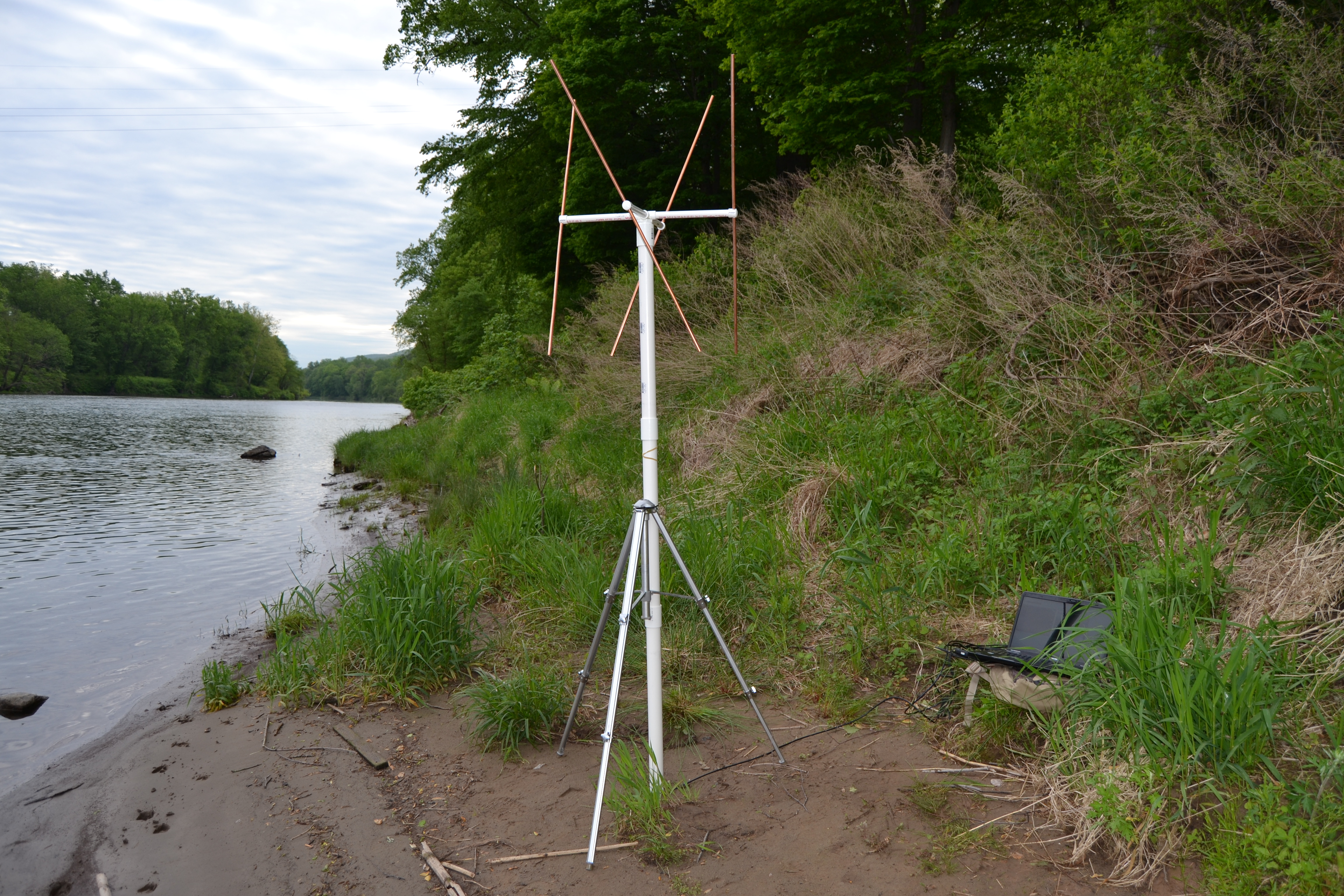
The following video shows astronaut Tim Peake transmitting from the international space station (ISS) on Feburary 19th 2016. He was speaking to Oasis Academy in the UK. To receive the signal surfrockuk used an RTL-SDR with a QFH antenna. Many people have reported that other simple antennas such as discones, quartwave ground planes and even long wire antennas have been good enough to receive transmissions from the ISS too.

Other transmissions that can be received from the ISS include SSTV, space walk communications, and in the future DATV.

Tim Peake Transmitting from the International Space Station - 19th February 2016

Hacking Alarm Systems with an RTL-SDR and RFcat

Back in 2014 the author of boredhackerblog.blogspot.com did a final year project for his wireless security class on hacking home alarm systems. His presentation was titled “How we broke into your house”. In his research the author used both an RTL-SDR and a simple RFcat wireless transmitter and performs a simple replay attack on a cheap $50 alarm system. His process for reverse engineering the alarm was essentially:

  1. Look up the device frequency and listen to it with an RTL-SDR and SDR#.
  2. Record the signal and visually study the waveform in Audacity.
  3. Look up system part info and determine encoding type (e.g. ASK/OOK)
  4. Determine the bit string and baud rate.
  5. Program the RFcat to send the same disarm binary string.

Once again research like this shows that cheap home alarm systems have literally zero protections against wireless attacks. In a previous post we also showed how the popular Simplisafe wireless alarm system could be disarmed in a somewhat similar way.

$50 home alarm system broken by an RTL-SDR and RFcat.

RTLSDR4Everyone: Review of the Nooelec Ham-It-Up V1.3 and Balun 1:9

Over on his blog rtlsdr4everyone, Akos has posted two new reviews. One post reviews the latest ham-it-up v.13 upconverter and the other reviews the “Balun 1:9” impedance transformer.

An upconverter allows you to receive HF frequencies (0-30 MHz) with an RTL-SDR which has a lower frequency limit of 24 MHz.  The ham-it-up upconverter was one of the first upconverters to go on the market that targeted users of the popular RTL-SDR dongle. Over the years the ham-it-up has slowly been revised and now it is up at version 1.3. The biggest changes in the latest version are a revised design that uses the ADE-1 in reverse (better VLF operation), a presoldered oscillator and it also now includes the previously optional noise source by default. 

In his review Akos compares the ham-it-up v1.3 to the older v1.2 model. His results show that the revised design seems to have better immunity to noise and better FM broadcast filtering. He also tests out the new battery power via connection and shows that using battery power is less noisy.

Previously we posted a review comparing the ham-it-up v1.0, SpyVerter and Nobu’s Japanese upconverter. Although the ham-it-up v1.3 is much improved and we have not tested it, we still believe the SpyVerter is the better upconverter choice at the moment due to its better architectural design and included metal case, though Akos does point out that the ham-it-up is currently about $15 USD cheaper and has a passthrough switch.

Ham-it-up v1.3 vs ham-it-up v1.2

In his second post Akos reviews the Balun 1:9 which is a $10 balun that is designed for attaching a long wire antenna to the ham-it-up. The goal of the balun 1:9 is to transform the high impedance long wire antenna down to around 50/75 Ohms for the receiver. In Akos’ results he writes that he mostly see’s identical or better performance with the balun connected.

The Nooelec balun 1:9

To add to Akos’ review, we want to note that we think that there might be some confusion over baluns and ununs. We wonder if a 9:1 unun (instead of a balun) should be used for a long wire antenna, since a long wire is an unbalanced antenna. We think a balun should be used for a balanced antenna such as a dipole. In his review Akos also found that connecting two longwire antennas to the spring terminals improved reception. This may have possibly been because adding two longwires essentially created a balanced dipole antenna. To implement a longwire antenna unun with a balun, we think that the second terminal and coax shield should be connected to a good ground source like a cold water pipe. If you have knowledge on this topic please comment to confirm or expand on our theory.

FlightBox: Commercial RTL-SDR Based ADS-B (1090ES & 978UAT) Receiver for Pilots

For some time now, small aircraft pilots who don’t have access to expensive ~$1000+ ADS-B gear have been successfully using an RTL-SDR and Raspberry Pi combination to receive ADS-B and UAT to display aircraft and weather data on an iPad. The first time we posted about this was back in August 2015.

The full implementation uses two RTL-SDR dongles to receive both 1090ES aircraft position information and 978 UAT to receive weather radar information. Both dongles are used on a Raspberry Pi mini computer that runs a program called Statrux. Stratux takes the ADS-B information received by the RTL-SDR’s and re-transmits the data out via WiFi. Then an iPad running special pilot navigation aid software such as ForeFlight can interface with the WiFi signal and receive the ADS-B and weather information.

Assembly of a Stratux box requires the purchase of each individual component or a Raspberry Pi kit that includes the stratux software image on an SD card, RTL-SDR and WiFi adapter. However, setting up a Stratux box may be a little difficult for pilots who do not have any electronics DIY skills.

To solve this, a new product called FlightBox recently ran a successful Kickstarter campaign. FlightBox provides a ruggedized plastic case, a Raspberry Pi 2 preloaded with software, two nano RTL-SDR dongles, two pigtail adapters, a 10Hz WAAS GPS module, and two customized ADS-B whip antennas (one for 978 MHz and one for 1090 MHz).

The FlightBox costs $200 for single band operation and $250 for dual band (1090ES and 978UAT). They are currently accepting pre-orders for delivery in late March/April.

For more information about Stratux see the active discussion forum at reddit.com/r/stratux.

The FlightBox: An RTL-SDR based ADS-B 1090ES and 978UAT receiver for Pilots.
Components used in the FlightBox, including two RTL-SDR dongles.
Components used in the FlightBox, including two nano RTL-SDR dongles.

Creating an RF Proximity Alarm (Close Call) with an RTL-SDR

“Close Call” is a feature that some radio scanners have which notifies the user when there is a radio transmitter that is in the near vicinity (such as from a police radio). It works by detecting the strength of signals from near field emissions, and it requires a strong RF signal to trigger.

Over on the ar15.com forums, user seek2 wanted something similar to the “close call” feature, but didn’t want certain transmissions like APRS signals from hams driving by to set it off. He also didn’t want to be restricted to near field emissions, rather he wanted something that acted more like a squelch that would activate for strong signals only.

To implement this seek2 used an RTL-SDR dongle, together with the rtl_power spectrum scanning software. He outputs the signal strength data generated by rtl_power to a CSV file which is then piped into a tail -f terminal command in Linux which simply outputs the latest lines of the CSV file as it updates in real time. Then he uses a simple Python script to monitor the output and to set off an alarm and report strong signals when it see’s them. His script is also used to filter out reports from strong unwanted signals like APRS.

Below is a video showing an example of Close Call working on a Uniden hardware radio scanner for reference.

Uniden CloseCall© What is it? How does it work? How well does it perform?