Tagged: rtl2832u

SDR Soundcard Mod

Yesterday we got an email from a reader (Tom) about a soundcard capacitor mod that is useful for SDRs. Tom writes

First you buy one of these sound cards: Creative Soundblaster X-Fi Surround 5.1 Pro USB (various internet sources)

Then you make the following mods: http://www.rfsystem.it/shop/download/SB_Creative_XFi_Pro_USB.pdf

I did the capacitor mod and it makes a HUGE difference, and there is a bonus. Not only do you get an excellent, very low noise sound card, but the drivers include a “what u hear” mixer that works find on Windows 7 so you don’t need to buy a separate virtual audio cable.

The unmodified  Soundblaster X-Fi had somewhat fewer noise spikes showing up across the spectrum on SDR# than my internal soundcard. However when I did the capacitor mod, they decreased by a drastic amount. Before I realized the extent of the original internal noise spikes, I wasted time trying to “decode” them – worked about as well as my attempts to communicate with aliens via my dental work.

So now my SDR# display looks really clean and most everything that looks like a signal is a signal. I don’t have before and after pictures, but the ones in the pdf file look like mine.

BTW the capacitor values are probably not all that critical. I used a couple I had laying around – a 1000 uF 16v and a 120 uF 16v. Anyone with some soldering experience and a reasonably small tip can do the mod but it’s a little tricky to position the caps and have the case close properly. The unwary might get polarity confused – the tantalum caps on the board are marked on the positive end and the electrolytics you add are marked on the negative end.

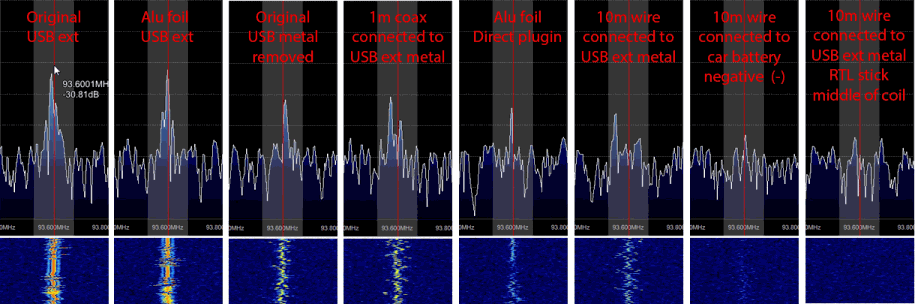
The capacitor mod essentially involves soldering in two more capacitors onto the soundcard PCB. The improvement is more useful for soundcard based SDRs such as the SoftRock, however, in Toms case he found that the capacitor mod also improved his RTL-SDR reception by removing numerous unwanted noise spurs he was seeing.

Since the RTL-SDR is not a soundcard based SDR, in Toms case the external soundcard was probably causing strong interference that the RTL-SDR was picking up, and the capacitor mod treated the noise source.

The mod may also help by giving you a cleaner audio signal, which may help when decoding digital signals.

SDR Soundcard Mod

New RTL-SDR Adaptation for HF and VHF/UHF For Sale

A few months ago we saw a Hungarian hardware developer selling a custom RTL-SDR software defined radio which included an upconverter built into the PCB.

Now a new Brazilian hardware developer has begun selling similar home made RTL-SDR units that can receive HF by default. Note that the page is in Portuguese, but Google translate does a reasonable job at translating.

These units come in a nice box and are capable of receiving between 0 to 1750Mhz.  Attached to the box are two UHF (SO-259) 50 Ohm connectors, one for an HF antenna and one  and a USB port. The developer also provides a CD which seems to come with the drivers, SDRSharp and some plugins. We aren’t sure if this SDR is using direct sampling or an upconverter to get HF signals as there don’t seem to be many details about the modifications made on the page.

The price is $185 Brazilian Reals, which is about $82 USD.

Combined RTL-SDR and Upconverter

The page links to a video showing the SDR in action which is shown below.

SDR Touch Updated to Version 1.6

Version 1.6 of the popular Android based RTL-SDR software defined radio software, SDRTouch has been released. News comes via this forum post.

This release adds the following

  • Waterfall
  • Speed optimizations
  • Fixed squelch clicks
  • Fixed a few crash cases

They have also made the FFT engine about 3 – 4 times faster than in previous versions.

Download it from the Google Play store

sdtouch

Decoding Pagers on the Raspberry Pi with RTL-SDR

Hackaday has brought to attention a tutorial written on the Raspberry Pi forums by Sonny_Jim showing how to decode pager transmissions on the Raspberry Pi. In the tutorial he also shows how to set up a web server to be able to view the decoded transmissions in a web browser.

He uses a RTL-SDR and Raspberry Pi and pipes the output of rtl_fm into the multimonNG software to decode the messages.

Tutorial: HF Decoding Tour with the FUNcube Dongle Pro+

On the FUNcube Dongle blog/store amateur radio enthusiast DK80K (a.k.a Nils) has sent in a link to a 16 page pdf file showing a comprehensive tour on the FUNcube Dongle Pro+’s capabilities on the HF spectrum.

He gives an overview of many digital ham and HF utility modes including DRM, WSPR, RTTY, Olivia, MFSK16, PSK31, Pactor, Packet, Hellschreiben, ROS, SSTV, HF ACARS, SSB, CW, DSC/GMDSS, SITOR-A/B, Globe Wireless, Time Signals, ALE, Baudot, FAX and Stanag 4285.

The FUNcube is a software defined radio similar to the RTL-SDR, but with better sensitivity and noise performance, but at a higher price (around $200 USD). These modes can also be received with the RTL-SDR and an upconverter such as the Nooelec Ham-It-Up upconverter.

Download his pdf here (Mirror)

Portable RTL-SDR Running on Raspberry Pi

Over on Reddit user olgierd has posted a video on this thread showing his work on developing a portable software defined radio based on an RTL-SDR R820T, the rtl_fm software and a Raspberry Pi with LCD screen. The software is based on rtl_fm which has the capability to demodulate FM/AM/SSB signals. His video shows him tuning to various signals using a tuning knob.

Note that his setup is capable of playing the audio, but it is not shown in the video as he only had earbuds connected. In the future he hopes to make it more portable by adding a li-ion battery.

RTL-SDR Tutorial: Receiving Weather Balloon (Radiosonde) Data with RTL-SDR

Around the world meteorological weather balloons are launched twice daily, and continuously transit weather telemetry to a ground station using something called a radiosonde. The RTL-SDR software defined radio combined with a decoding program can be used to intercept this telemetry, and display it on your own computer. You will be able to see real time graphs and data of air temperature, humidity, pressure as well as the location and height of the balloon as it makes it's ascent.

Note that if you are in the USA, then this tutorial may not be applicable for you as different radiosondes are used. Instead have a look at this post which shows how to use the SkySonde software from NOAA. You can also try an alternative command line based decoder called RS available on GitHub.

This tutorial is also applicable to other software defined radios such as the Funcube dongle, Airspy, HackRF, BladeRF or even hardware radios with discriminator taps, but the RTL-SDR is the cheapest option that will work.

Examples

In this example YouTube user Superphish shows a radiosonde being received and decoded using a RTL-SDR, SDRSharp and SondeMonitor.

Weather Balloon (Radiosonde) tracking with RTL SDR (RTL2832), Sondemonitor and SDR Sharp

Continue reading