Tagged: rtl-sdr

RTL-SDR Blog V4L (Lite) Now Available for Purchase!

We're happy to announce that the RTL-SDR Blog V4L (Lite) model is now available for purchase in our store! Our initial production batches are small, so we will have limited stock at first, and the first batches will be available for shipment only from our warehouse in China. But we expect to ramp up production and get stock on Amazon over the next 2-3 months.

Currently, only our blog store (via the red add to cart button), official eBay listing and Aliexpress listing sell this product. Amazon will be stocked in about 2-3 months. 
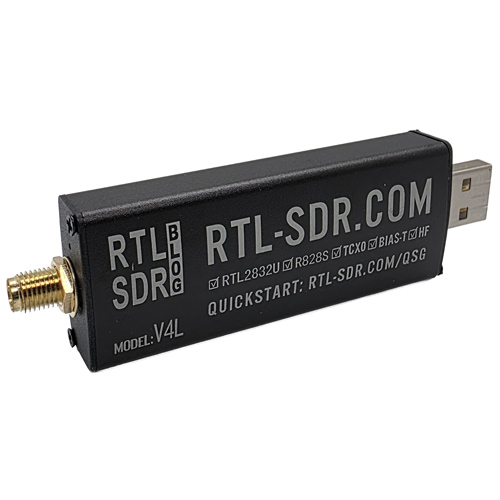
The RTL-SDR Blog V4L (Lite)

As you may already know, the Blog V4 line of products was recently made end-of-life due to the exhaustion of the stockpile of Rafael R828D tuner chips that the V4 models require. The R828D chip has not been in production for many years, but we were able to access a large stockpile of the chip via our contract manufacturer relatively cheaply, which made the Blog V4 models cost-viable. We predicted that the V4 models would be in production until the end of 2026, as we expected to be able to purchase a few more R828D chips from third-party stockpiles at slightly higher prices. But it turns out that the last few chips available in those third-party stockpiles were all counterfeits (they had put legitimate chips in the first 100 spaces in the reel, then for the rest they had lasered the R828D logo on a totally different chip with the same package size and expected us not to notice!).

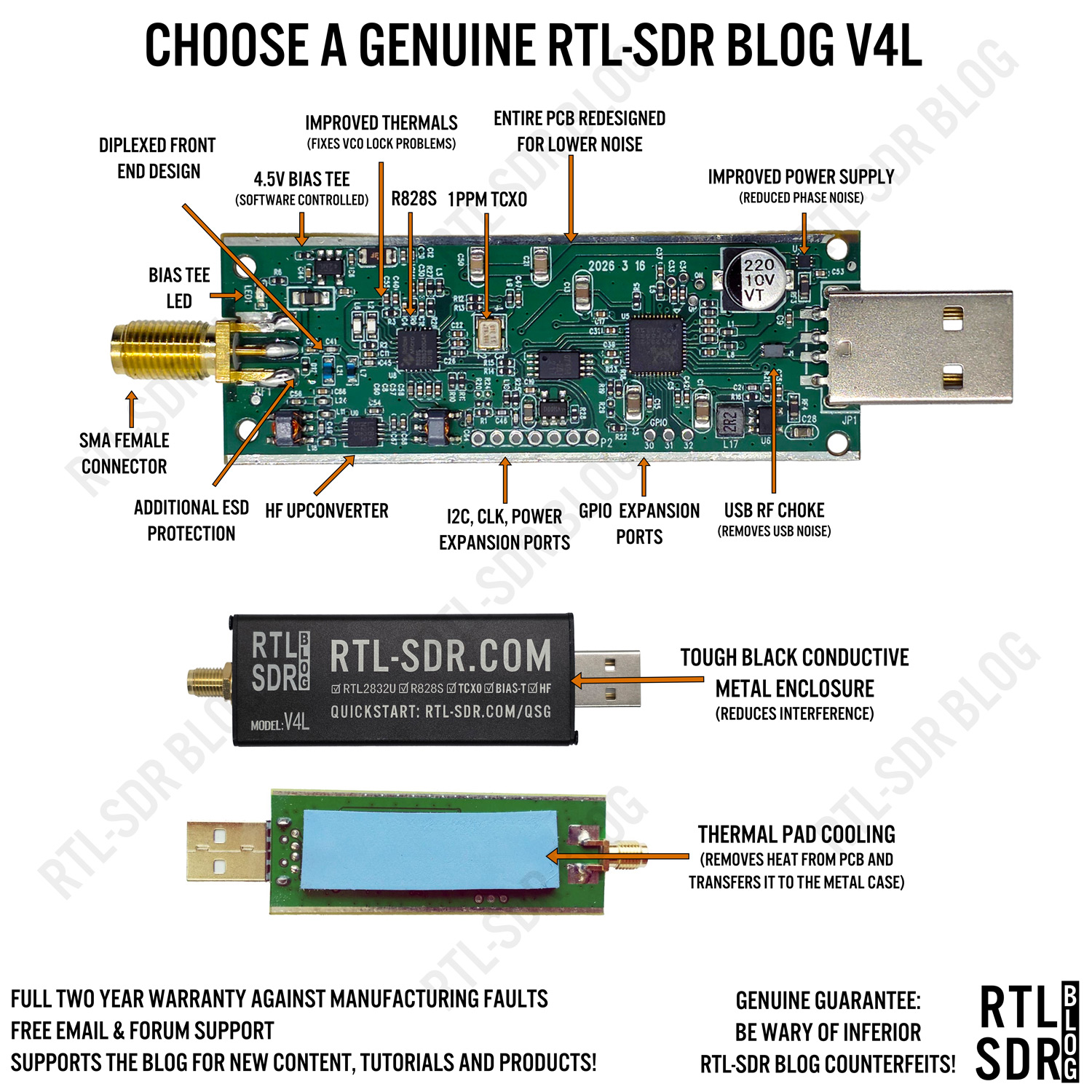
We have recently secured a confirmed good stockpile of Rafael R828S chips via our contract manufacturer, which allows us to produce the new Blog V4L (Lite) design. Compared to the R828D, the R828S is a variant with one fewer RF input. This means that instead of a triplexed filtered input, we can only do a diplexed filtered input. Hence the 'lite' designator, as the design is identical to the original V4 models, except for the triplexed input filtering feature. This lack of filtering comes with a minor upside: improved sensitivity due to less filtering losses on the front end.
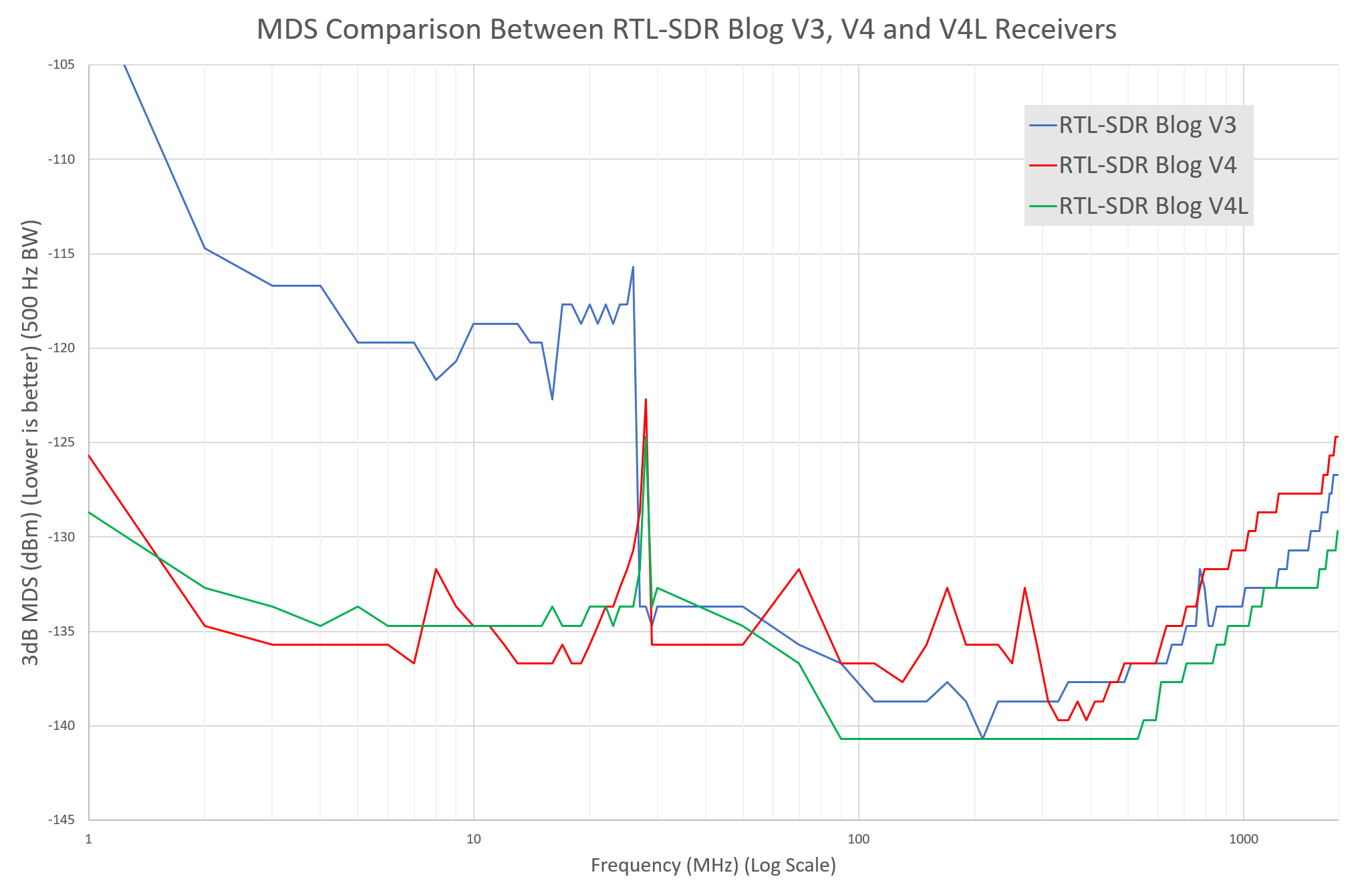
MDS Measurement Comparisons

Of course, the downside is that the front end is not as well filtered against strong signals, so the two-tone test produces identical results to the V3 model.
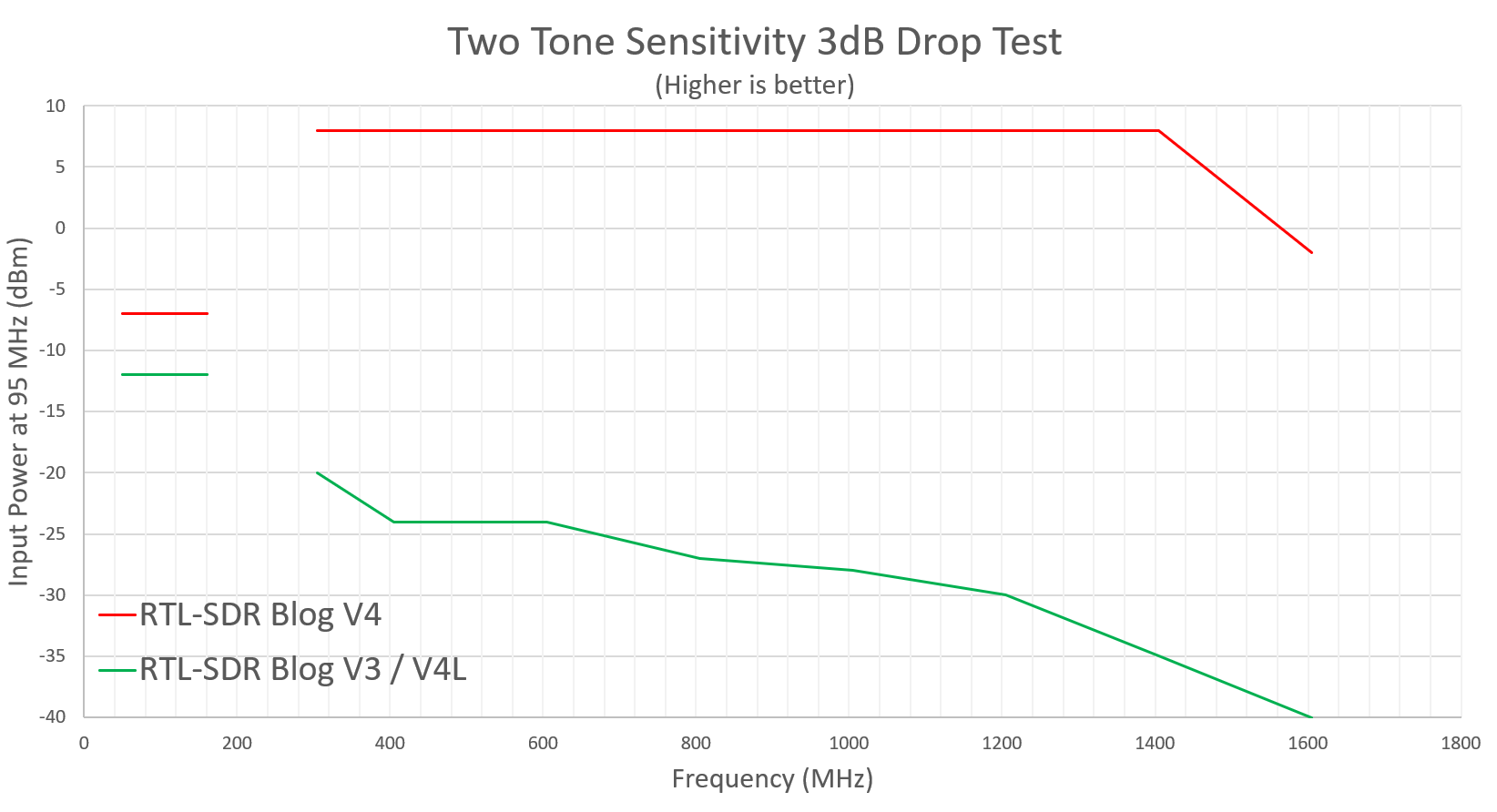
Two-Tone Test Results

The V4L still maintains the same built-in HF upconverter architecture of the V4 models and, like the V4, has the improved PCB layout, 1PPM TCXO, 4.5V Bias Tee, bias tee LED, improved power supply, and more.

Another upside is that the R828S chip is cheaper, and so we can sell the Blog V4L at a slightly lower price!

We note that, like the V4 models, the V4L is also a limited edition product. The V4L also relies on a large stockpile of a chip that is no longer in production. We expect the V4L chip stockpile to last about one year. Beyond that, we have a solid idea for V5 model design that is still in the early stages of development, but please don't expect any further news on that until 2027.

As the R828S chip has not been used in an RTL-SDR model before, the official Osmocom drivers do not yet support it. We have submitted a patch request through their channels, but have not heard back yet. - Update: Osmocom has updated their repo and added V4L support.

For now, V4L users can use our rtlsdrblog/rtl-sdr-blog driver fork available on GitHub, with Windows DLL Releases. ExtIO users can access a compatible Windows ExtIO here. We have submitted patches for the Android RTL-TCP app as well. More information about driver compatibility can be found in the V4L user's guide. 
Tech-ni-shn Measures RTL-SDR Blog and Airspy Sensitivity

Thank you to Kevin Murphy (ZL1UJG) (aka Tech-ni-shn) for writing in and submitting some RTL-SDR and Airspy sensitivity measurements that he has recently done over on his YouT ube channel. In his tests, Kevin measures an RTL-SDR Blog V4, RTL-SDR Blog V3 + SpyVerter, Airspy HF+ Discovery, and Airspy Mini using a signal generator, attenuators, and SDR#.

His results show that the RTL-SDRs and Airspy devices have very similar minimum discernible signal (MDS) levels, all measured around ~-133 dBm. Kevin has provided a PDF summary of his results, and the video below.

Video#012 SDR Sensitivity and Noise figure

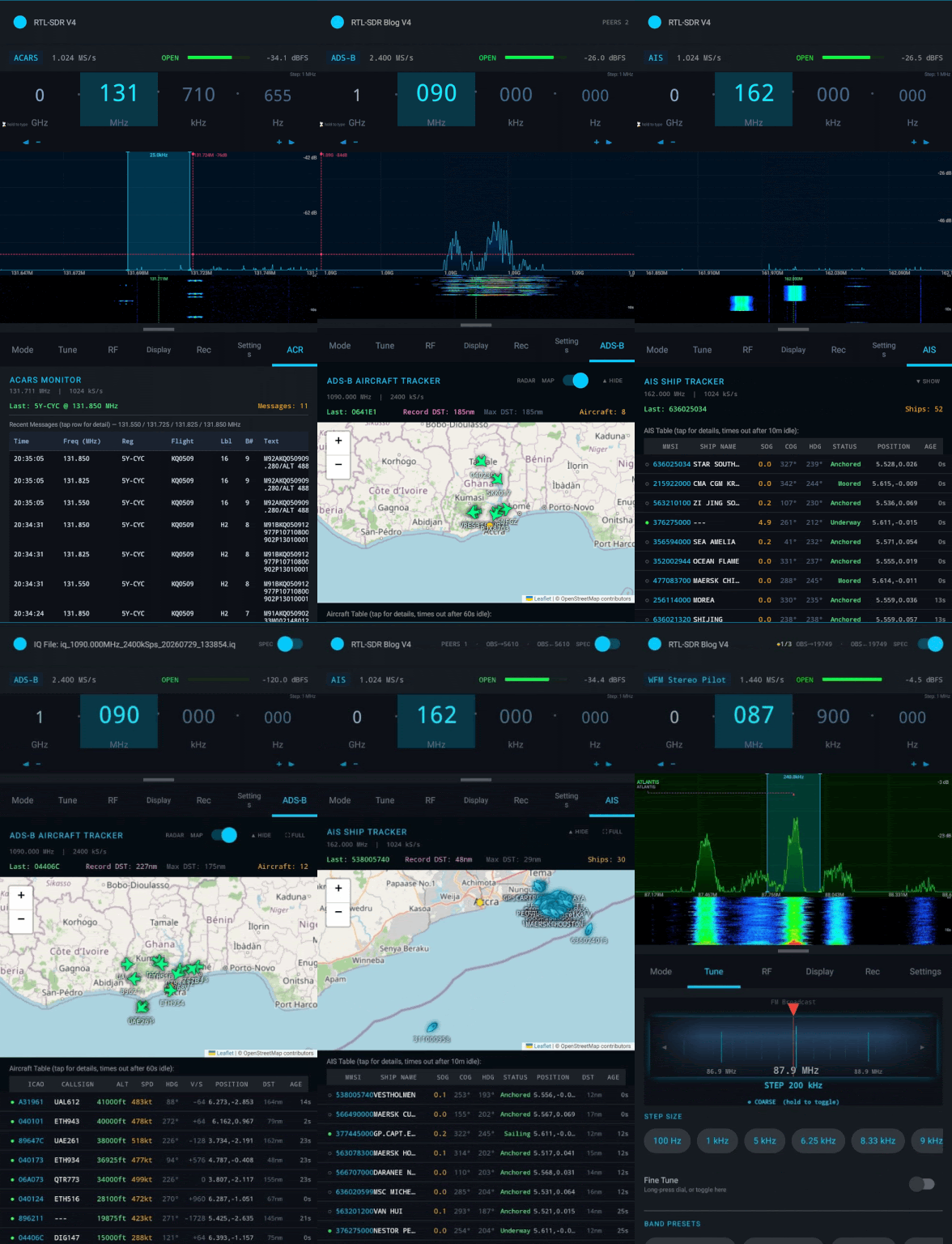
9GRadio: An Android RTL-SDR App for Spectrum Monitoring and Decoding Analog/HAM/Aviation/Marine Radio Traffic

Thank you to Richard (9G5AR) for writing in and sharing with us the release of his open source Android app called 9GRadio. Richard writes that 9GRadio is an app designed for spectrum monitoring/analysis and the decoding of analog/ham/aviation and marine radio traffic.

In terms of demodulation it supports AM, FM, NFM, WFM, WFM Stereo, USB, LSB, CW, CWR, DSB and RAW IQ modes.

For digital decoding, it supports APRS, digital voice modes such as DMR, D-STAR, YSF, dPMR, NXDN, and aircraft, marine, and datalink modes such as ADS-B, AIS, ACARS, RDS, and multilateration.

Richard also notes that 9GRadio includes a full multilateration stack for locating transmitters, which works with 2+ networked 9GRadio receivers. Interestingly, the multilateration stack is noted to be protocol-agnostic, meaning it should work not only with ADS-B, but also with any mode that provides a digital identity for a transmission, such as AIS, ACARS, RDS, and digital voice modes.

The app is not available on the Google Play Store, but the APK is available for sideloading on the project's GitHub Releases page, along with the open source code.

9GRadio GIF of various screens

Scanner Command: Mapping Incidents from Live Radio Calls and ADS-B to Airband Voice with AI

Recently, we posted about DeepSDR, which is a program that automatically transcribes voice data from public safety radio communications and uses an LLM to categorize and plot incidents on a map as they happen.

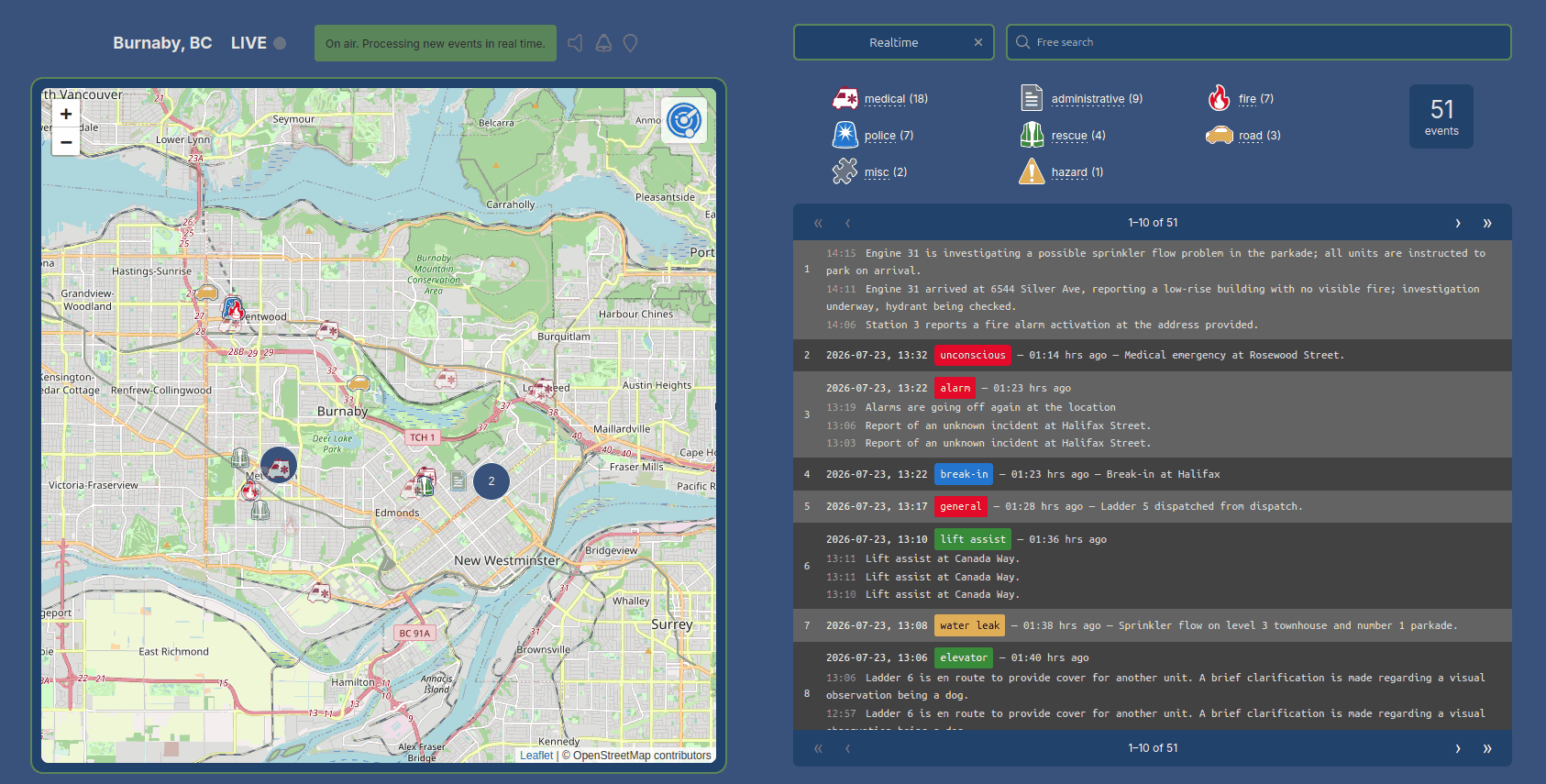
In that post, we noted that we expect to see more projects like this soon, and sure enough, another program called "Scanner Command" with a similar angle has been submitted to the blog by author Benjamin Blood. Like DeepSDR the software listens to public safety and then uses voice transcription and an LLM to automatically understand, categorize and map incidents on the map. One additional feature that Scanner Command has is a fun tool that correlates ADS-B data with airband voice. Benjamin explains it best:

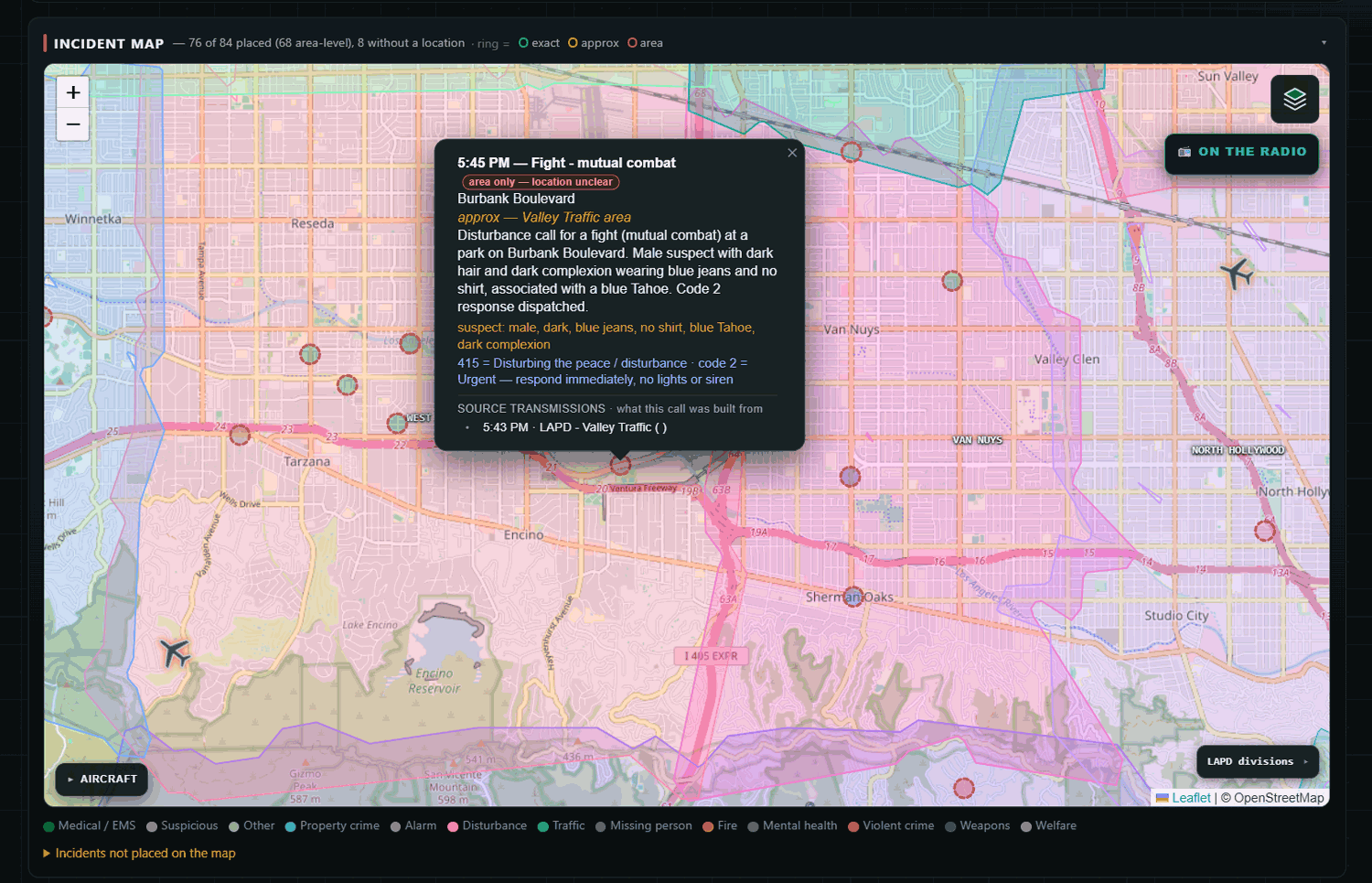
Scanner Command turns a radio scanner into a live AI incident map. A Uniden SDS200 covers the trunked digital public safety side (the LA area's P25 Phase II system, with ProScan driving the scanner and handing off every recording), and two $45 RTL-SDR dongles handle the rest, one decoding ADS-B with readsb, one capturing VHF airband transmission by transmission. Everything gets transcribed locally with Whisper, an AI extraction pass works out what happened and where, and about 30 seconds after a call ends it's a color-coded pin on the map with the audio one click away. Location matching is honest on purpose: an exact intersection match gets a solid pin, an area-only match gets a dotted one, and it tells you which.

Here's the design idea underneath it, and what I think separates it from the other transcribe-and-map projects out there: this is built for tactical situational awareness when the grid's down. The system does its learning while it's online, building its own gazetteer of local streets and places, learning unit callsigns and talkgroup names, priming the transcriber's vocabulary from real local traffic, precisely so it's more capable when it's cut off. Map tiles, geocoding, and hazard data are all cached locally with that scenario in mind.

The picture in my head has always been: grid's down, the box is running on backup power serving wifi, and my neighbors connect with their phones and everyone can see what's happening around us, instead of one guy hunched over a scanner relaying it. It's not shelf gear you dust off when something happens; the whole point is that running it every day is what trains it for the day you need it. Transcription is already fully local, the LLM extraction step currently uses a hosted model when online (it runs me about a dollar a day at 24/7), and the next build phase is a GPU box that closes that last gap with a local model.

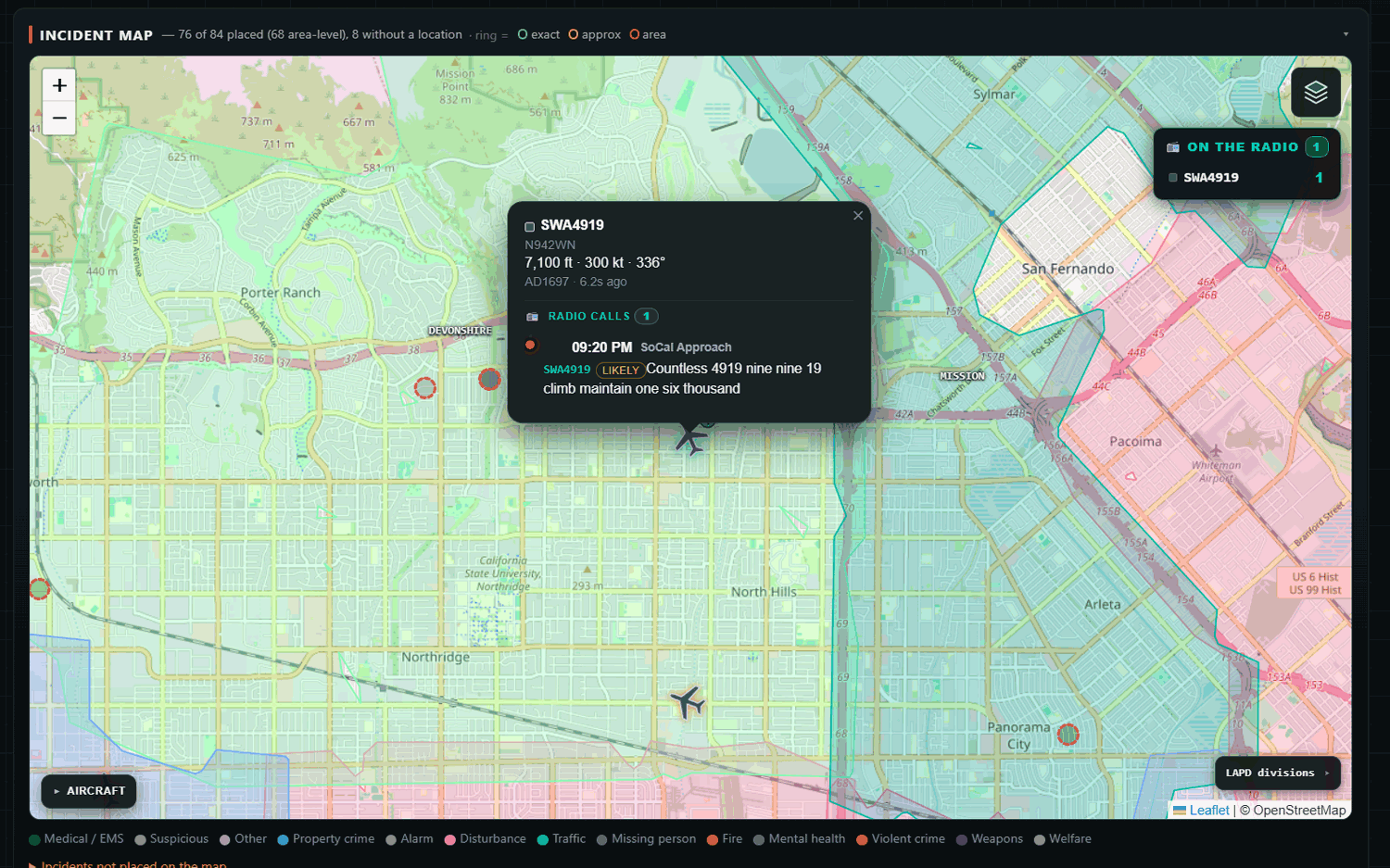
The feature people are having the most fun with is the airband/ADS-B correlation. The system pulls spoken callsigns out of airband transcripts and matches them to ADS-B tracks by time and geometry, with match windows scaled by altitude and speed, plus hex-to-tail-number derivation. Click a plane on the map and hear what its pilot actually said, with a confidence badge when the match came from a partial readback. Beyond that: an ATAK feed (CoT/KML/GeoJSON), twice-daily AI briefs, a BOLO board, incident threading with a unit activity board, and helicopter orbit detection.

ADS-B aircraft position data automatically linked to airband voice transcripts

Benjamin adds that a public demo is available at https://demo.scannercommand.com. But he notes that "the public demo is a replay of two real days of traffic from my setup".

The software has not yet been released, and it does not appear to be free or open-source. There is a signup waitlist available on the scannercommand.com website.

This is an exciting time with AI not only helping to rapidly develop new software, but now being used to summarize and condense the vast amount of information about the state of the surrounding world available in the RF spectrum. 

Scammer Command example mapped incident report
I Turned My Police Scanner Into a Live AI Incident Map (24/7)

Testing Airspy’s New WebSpy Web SDR Interface with an RTL-SDR

A couple of weeks ago we posted about "WebSpy", a new web client for Airspy software defined radios. Developer @lambdaprog, (aka Youssef Touil) has kindly provided us with an early beta of the server to test.

WebSpy is built into SpyServer, and SpyServer is an existing program that streams data from Airspy and RTL-SDR devices directly to SDR#. This new beta SpyServer now incorporates WebSpy into it, so once SpyServer is running on the server, all you need to do is run the binary and browse to https://SERVER_IP_ADDR:5555 in a browser, and the WebSpy interface will show.

As SpyServer supports RTL-SDR dongles, WebSpy also works as intended with RTL-SDRs. So in our test, we used a remote RTL-SDR connected to a networked Pi 5 and started up WebSpy. As the default includes self-signed certificates, you will get an unsecured warning from your browser, but this is safe to ignore. If you were to share your WebSpy publicly, you would want to generate your own certificates. Youssef recommended using acme.sh for that.

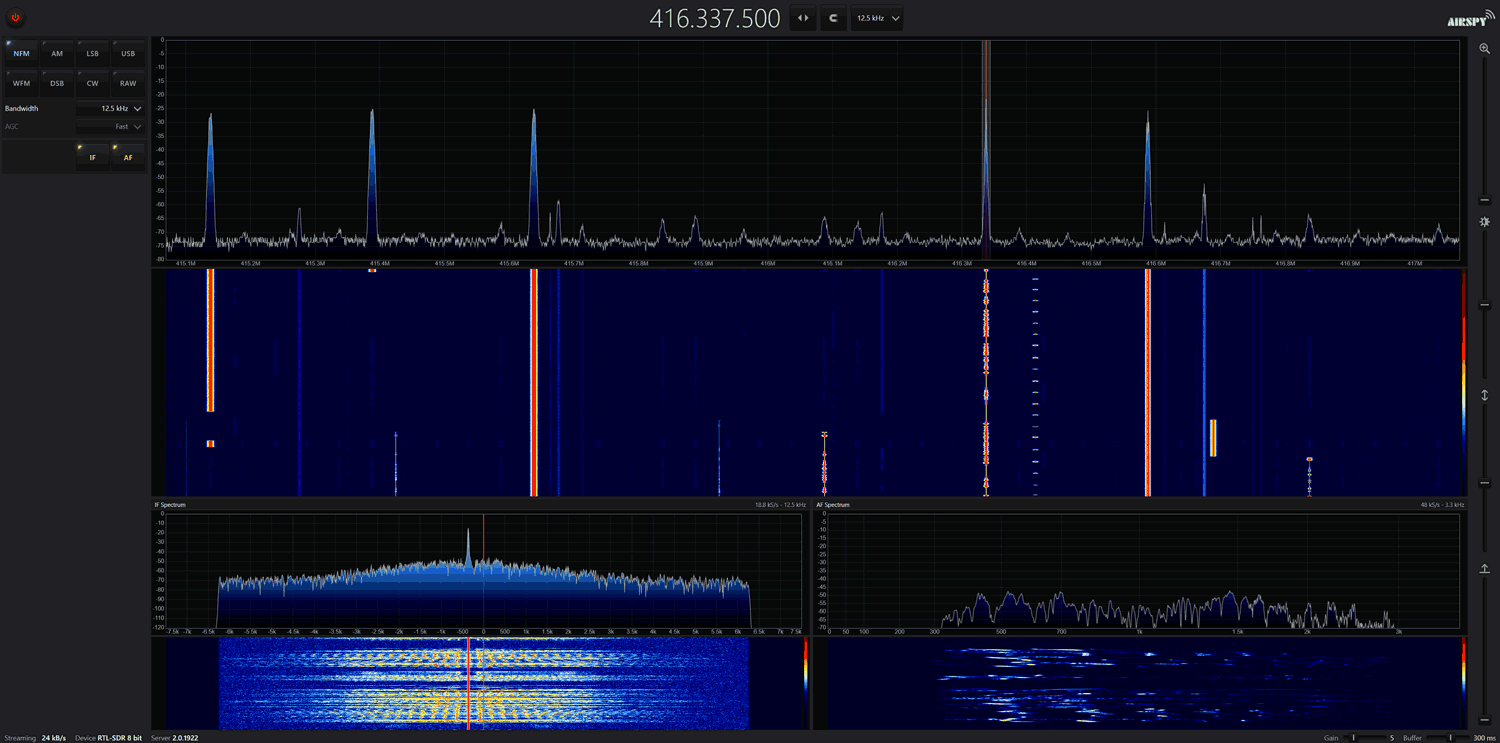
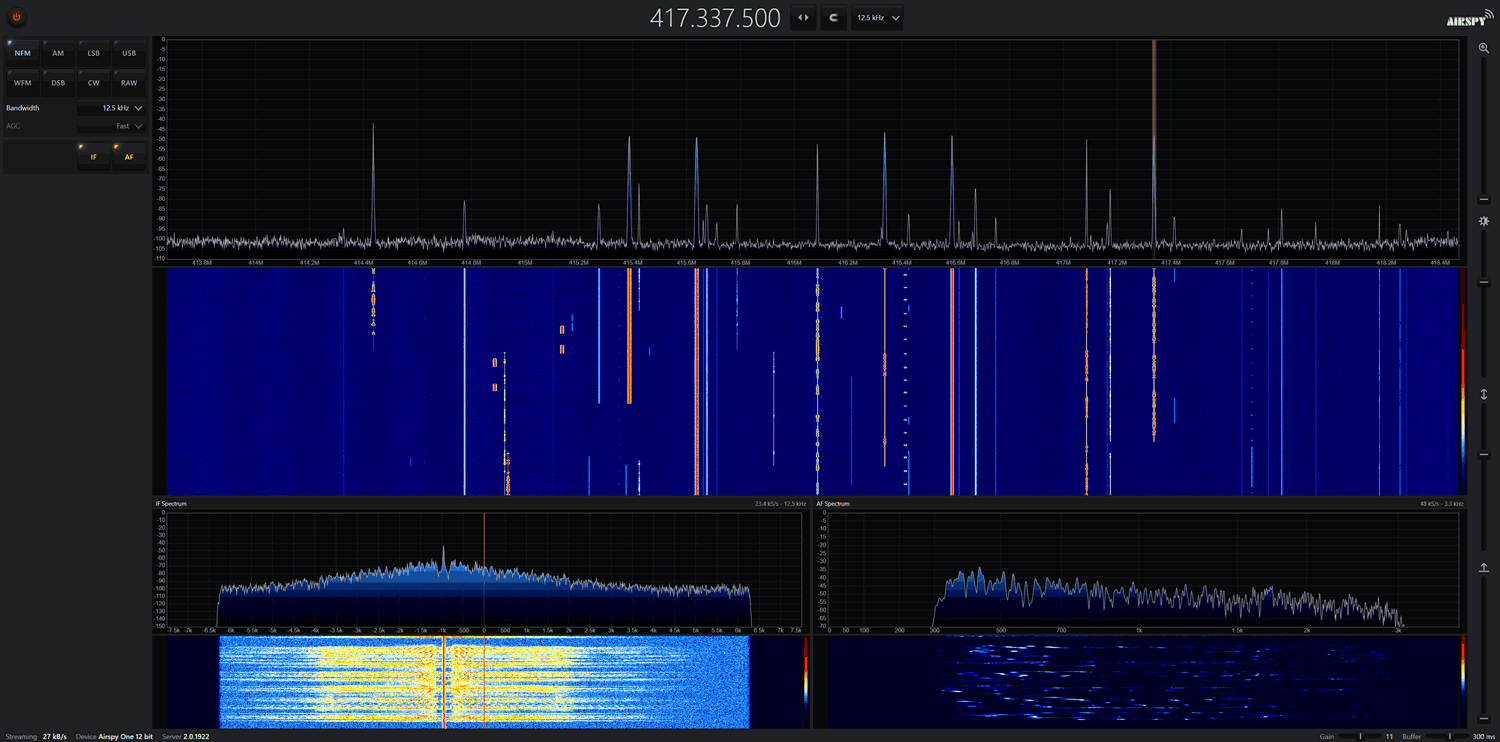
Clicking the power icon in the web interface starts the SDR connection, and then you can tune to frequencies using the top tuning interface like you would with SDR#. Audio is extremely clear, as if you were running the SDR directly. As Youssef explained in our earlier post, WebSpy uses some proprietary IQ compressors that preserve spurious-free dynamic range, and it does all the IQ decoding directly in the browser to avoid audio codec compression artifacts.

With an Airspy and RTL-SDR receiving a narrowband 12.5 kHz voice channel, we got about 25 kb/s network usage. Reducing the channel size to 2.4 kHz LSB reduces the usage to around 13 kB/s. A wideband FM signal at 200 kHz uses about 240 kB/s. Of course, expanding the channel size to the max 2.4 MHz of the RTL-SDR results in a much higher network bandwidth of 1.2 MB/s, but there are not many situations that would require that.

We tested in Chrome, Edge, and Firefox, and all browsers worked fine. In terms of CPU usage, it barely touched 10% on any core with a single user. Youssef mentioned that a single Pi 5 should be able to serve up to 40 simultaneous sessions for WFM users, and hundreds for SSB/AM users (and we suspect NFM too).

WebSpy CPU Usage
WebSpy CPU Usage

The implementation of WebSpy is still pretty bare in this beta. Most of the features present in SDR# are not there, but Youssef mentioned that these are being worked on, and plugin support may even be added in the future. You also can't tune individual frequency digits with the mouse wheel like you can in SDR#, and there are no squelch or bias-tee controls.  But as this is still in development, we expect more features and tweaks in the future. 

WebSpy Running an RTL-SDR
WebSpy Running an Airspy

TunerScope: A Browser App to Help Optimize HDTV Antenna Positioning with an RTL-SDR

Thank you to Luke Berndt for writing in and sharing with us a new RTL-SDR browser-based app he's created called TunerScope. TunerScope is a spectrum analyzer program that focuses on helping users in areas with ATSC digital TV achieve perfect HDTV antenna positioning.

The app runs entirely in a Chrome browser, so you can just connect your RTL-SDR to your device, browse to https://tunerscope.com, and start using the app instantly. 

TunerScope has a few interesting features, including the use of spectrum stitching to visualize the full 6 MHz + wide ATSC signals as the RTL-SDR only provides 2.56 MSPS max, multipath detection via in-channel flatness, a snapshot reference trace to see how well your antenna movements are helping, an SNR reading, location-aware channel labeling and a tower map, and a channel list view.

We note that from what we can gather, this app appears to be designed for the US only and may only support ATSC signals and FCC lookups for the location aware features.

AI-Disclaimer: From a comment on the YouTube video it appears TunerScope was developed with Claude. 

I got better HDTV using an SDR

DeepSDR Updates: Live Public Safety Incident Map with an RTL-SDR, Whisper and an LLM

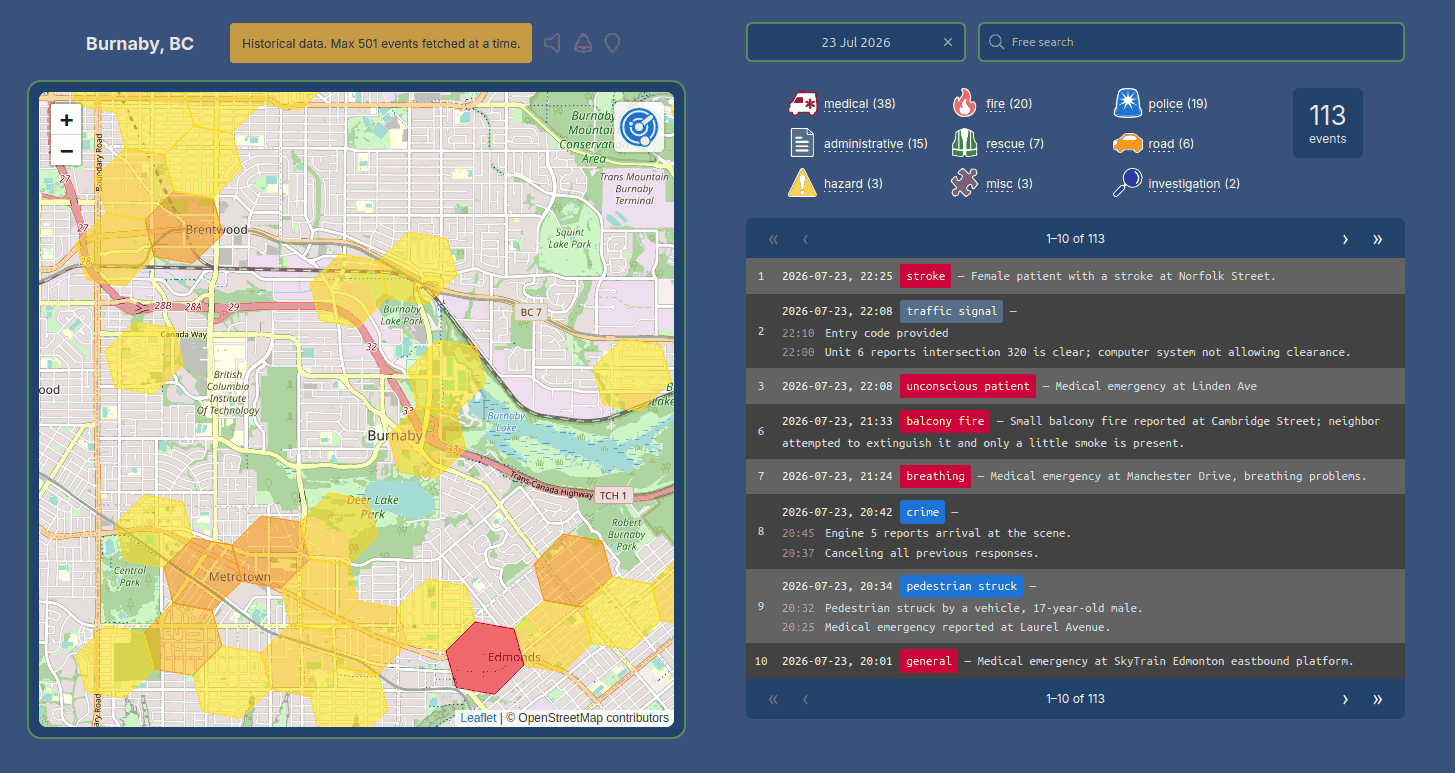
Last week we posted about Hubquhq's DeepSDR project (project contact page), which collects transcribed voice data from multiple public safety radio channels and then uses an LLM to summarize and plot incidents on a map.

Recently, he wrote in again and wanted to share additional information about the project and how it works after receiving a few questions from interested parties. He writes:

I run every stage in a separate docker container: Capture (I capture audio as longer sessions for archiving, and separately just short sessions where there's no silence for further processing. I tried using VAD to detect voice, but with radio it was missing some talk, so I just use ffmpeg) > Transcribe > LLM > Finding latitude and longitude for addresses > Grouping connected conversations. 

He has also provided a PDF explaining how DeepSDR works in more detail, which you can download here

DeepSDR Incident Map

isTRAIN: Detecting if a Train is Blocking a Local Crossing By Listening to Railroad Frequencies

Jhestyr takes pride in being punctual, but a local railroad crossing keeps getting in the way. Trains sometimes park across it for hours at a time, and there is no way to know one is sitting there until you have already driven out to it. Every wasted trip to the crossing and back out to an alternative route costs him a significant chunk of time and fuel.

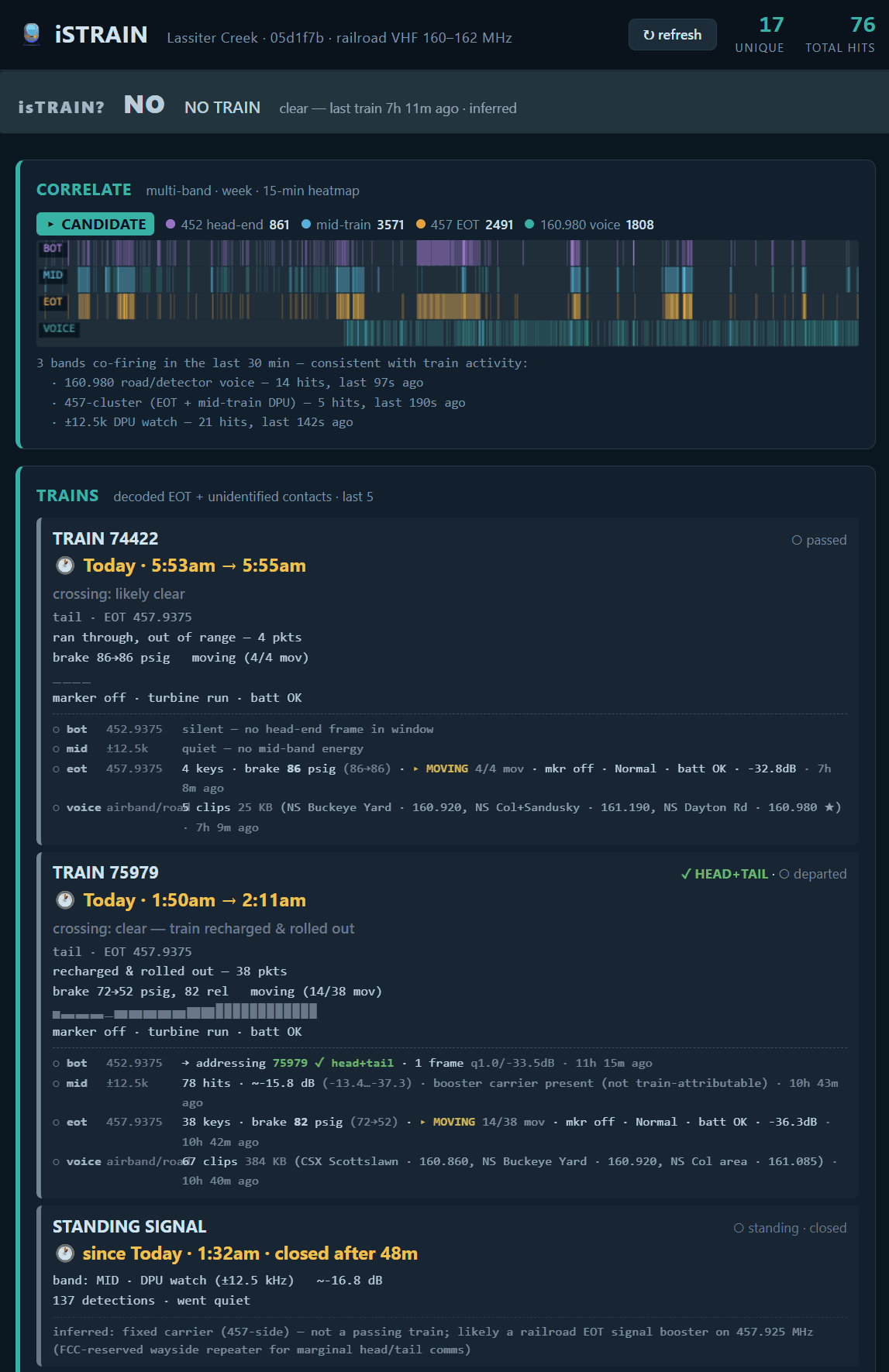
This is why Jhestyr used two RTL-SDR dongles to build isTrain, an open source program that decodes End-of-Train brake pressure and motion telemetry on 457.9375 and 452.9375 MHz, transcribes railroad voice traffic in the 160 to 162 MHz band via Whisper, and fuses both sources into a single live verdict on whether the crossing is blocked.

The program generates a webpage that can be accessed, providing a YES/NO verdict on whether there is a train blocking the crossing. A live public instance of Jhestyr's isTrain webpage is available here https://istrain.jhestyr.net.

AI-Disclaimer: Jhestyr notes that the code was developed with a 60/40 agentic/human split.

The isTrain Web Interface