In the 70's and 80's the US government launched a fleet of satellites called "FLTSATCOM", which were simple radio repeaters up in geostationary orbit. This allowed the US military to easily communicate with each other all over the world. However, the technology of the time could not implement encryption. So security relied entirely on only the US militaries technological advantage at being the only ones to have radio equipment that could reach these satellites.
Of course as time progressed equipment which could reach the 243 - 270 MHz range of the satellites became common place, and the satellites began picking and repeating terrestrial broadcasts of things like cordless phones. These days the satellites are often hijacked by Brazilian radio pirates, who use the satellites for long range communications.
A common hobby of RTL-SDR users is to listen to these pirates. All you need is a simple antenna and to be based in a region where the satellites cover both your ground station and the pirates.
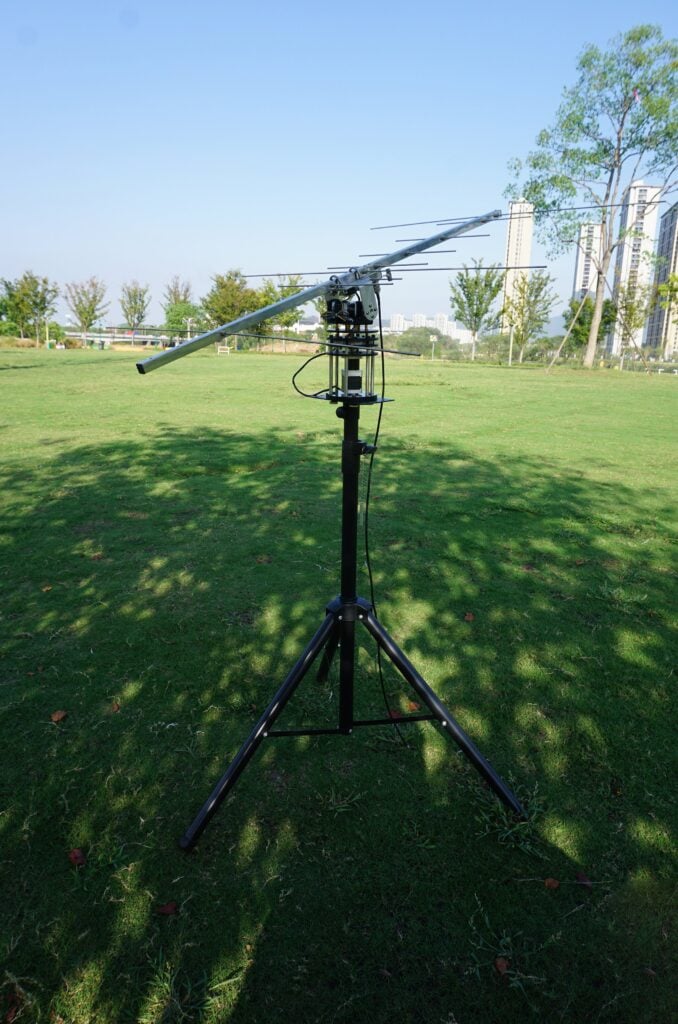
Over on YouTube the "saveitforparts" channel has uploaded an entertaining video overviewing the pirate phenomenon, and showing how it's possible to listen in using a cheap Baogeng scanner and RTL-SDR. He uses a homemade Yagi and cleverly makes use of an old security camera motorized PTZ mount to accurately aim the antenna. Once the Yagi antenna is aimed at the satellite, pirates can be heard on the radio.
Searching For Space Pirates On Old Military Satellites
On a previous post, we showed an interview by SignalsEverywhere and an anonymous Brazilian radio pirate who explains how and why they do what they do. If you search our blog for 'satcom' you'll also find several previous posts including examples of receiving SSTV from pirates.
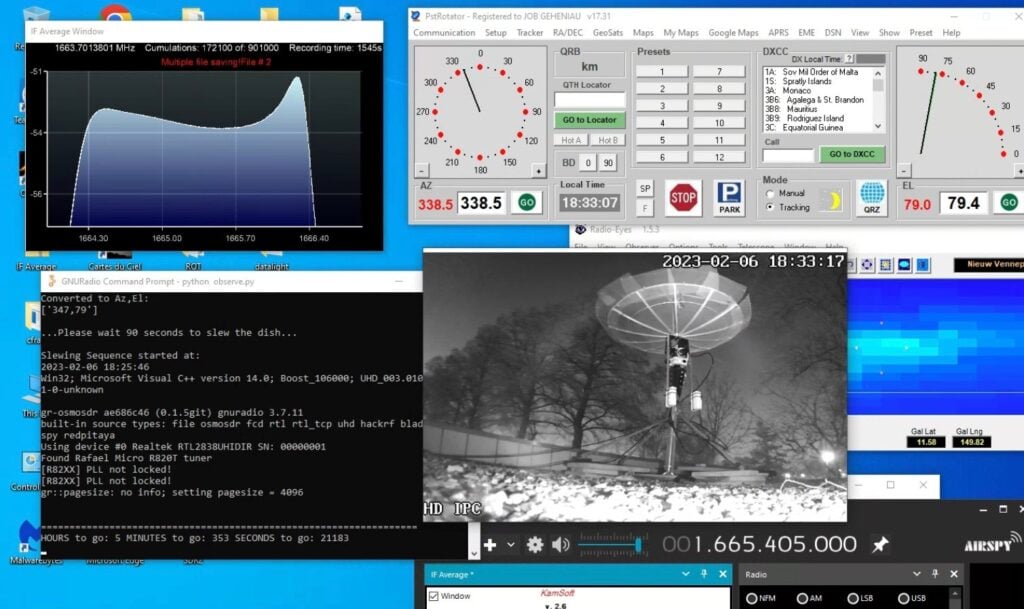
In his most recent work Job has managed to detect the W3 star forming region at the Hydroxyl (OH) frequency of 1665.405 MHz.
W3 is an enormous stellar nursery about 6200 light-years away in the Perseus Arm, one of the Milky Way galaxy's main spiral arms, that hosts both low- and high-mass star formation. - Source
Hydroxyl (OH) can be observed both in emission and absorption. Emission frequently manifests itself as maser emission which is of specific interest. Energy Levels of OH Diatomic molecules like OH have numerous energy levels as they not only have electronically excited levels, but they can also vibrate and rotate. Both rotation and vibration are quantized and give rise to the large number of levels. Because of the wealth of energy levels, OH can be observed at various wavelength in the optical, infrared and radio regime. - Source
Over on the RTL-SDR Facebook group (not affiliated with this blog), Job has described his experiment in more detail (link requires a Facebook account and membership). He writes:
As you may know or not...., I have been busy the last few weeks trying to detect maser W3(OH) with my 1.5-1.9 dish. The W3 complex lies in a darkened part of the Perseus galactic arm, at a distance of ∼2.2 kpc, and is one of the most intensively studied star-forming regions in the Milky Way Galaxy. Quite a challenge! It looks like I have a hit now after all.
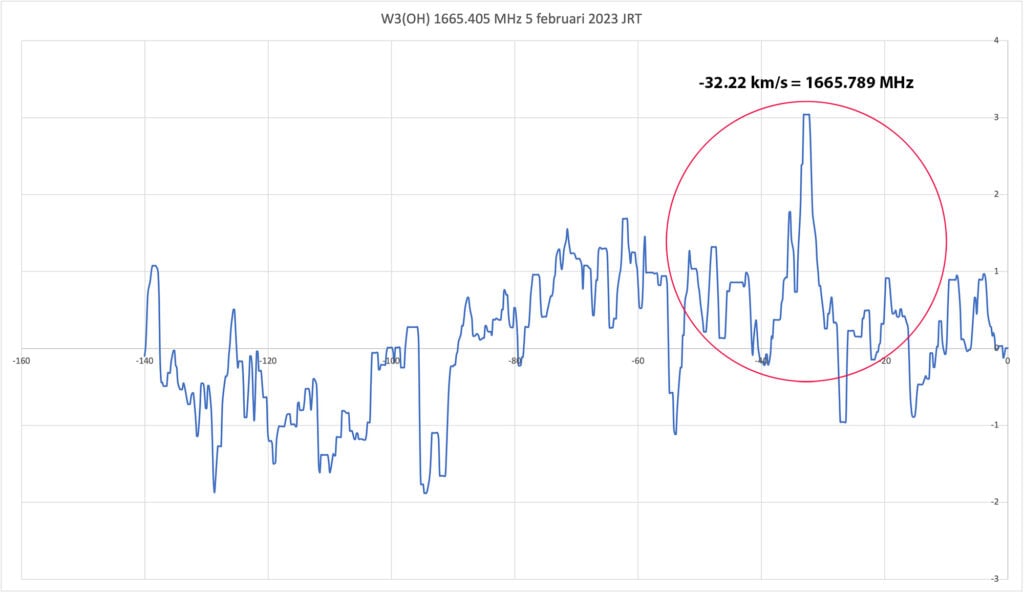
Adjusting the Feed, calibrating the position of the dish and a lot of trial and error and a lot of patience seem to be leading to a result after all.... For now, I will keep this as my W3(OH) registration at 1665.405 MHz. Taking into account the Vlsr of currently 17 km/s (speed of earth and rotation around the sun), the final result comes close to the correct measurement. 1665.789 MHz = -32.22 km/s. Vlsr according to my calculations in terms of location and time is 17 km/s. -32-17=49 km/s. I think and hope that -49 km/s is the correct velocity of W3(OH) also considering the reasonably clear peak in the measured values in the graph.
These W3(OH) results were done with a special 1665 bandpass filter and 2 mini circuits lna/s. I will keep measuring for a while in the coming days, but soon I will switch back to another Feed over, namely the now under construction 611 MHz Feed with associated bandpass filter to once again 'capture' pulsar B0329+54. My ultimate goal with this dish!
I was very close last six months, but after extensive research with fellow radio amateurs we unfortunately could not confirm with 100% (!) certainty that the pulsar was detected at 1420 MHz with the 1.9 dish.
Also that research continues with longer exposure times and now research at 611 MHz, there is still some soldering and drilling and sawing to be done..... But first things first. Glad with this result anyway. Takes a lot of perseverance and patience.
Job's Radio Telescope detects Maser W3(OH).Job's Radio Telescope detects Maser W3(OH).
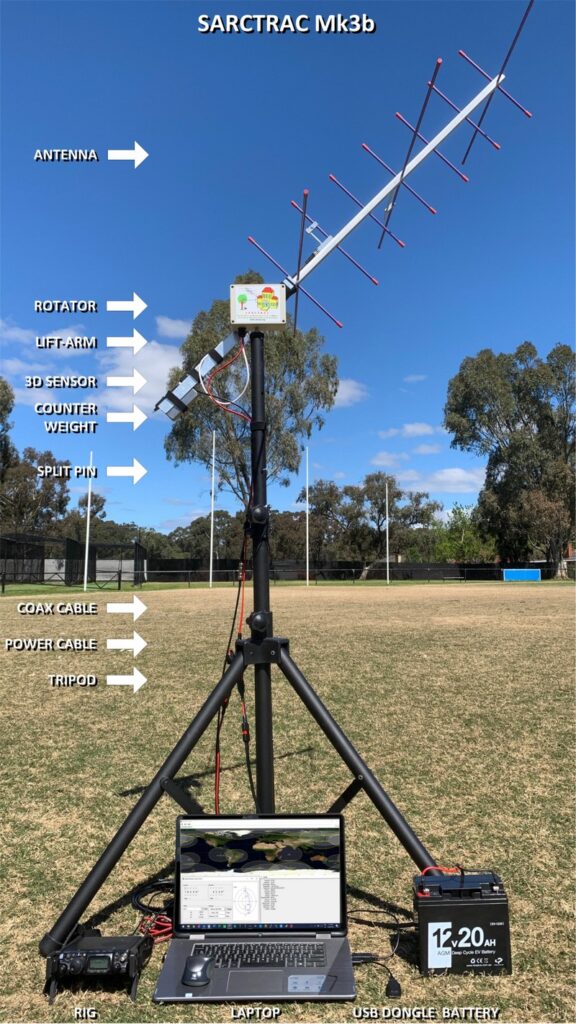
In January we posted about the AntRunner, which is a $325 (incl. shipping) satellite antenna rotator shipped from China. Recently we've come across another low cost satellite rotator from Australia called the "SARCTRAC Mk3b" which was developed as part of a school amateur radio educational program. This rotator fully assembled comes in at AU$400 + AU$50 worldwide shipping (US$290 + US$40 = US$330), making it's price comparable with the AntRunner. SARCTRAC can be purchased from the sarcnet products page. Currently only the fully built unit is available, but in the future they plan to offer a cheaper kit option.
We're yet to test the SARCTRAC Mk3b, but based on an overall review of it's advertising, it appears that the SARCTRAC has some superior specifications and a superior design when compared to the AntRunner.
Unlike the AntRunner, SARCTRAC comes with all its components enclosed in a waterproof IP65 rated enclosure. Its design also makes use of a 3D position sensor with magnetometer, allowing the unit to know its orientation at all times, meaning that it should be able to automatically position itself from startup. The design also makes use of DC motors with a built in worm gear drive, so the the motors back driving is not possible.
The system is controlled via a built in Raspberry Pi 3B+ and can communicate with the controlling PC via WiFi. Raspberry Pi's have stable WiFi connections, so we shouldn't see the connection problems that we had with the ESP32 based AntRunner.
Just like the AntRunner, SARCTRAC is only a lightweight rotator with torque specs of 50kg.cm static and 25kg.cm dynamic. So it should be able to handle counterbalanced Yagi beams, and lightweight dish antennas.
The SARCTRAC Mk3b. An Australian designed and made light duty antenna rotator.
SARCTRAC Mk3 Satellite Antenna Rotator Controller and TRACker
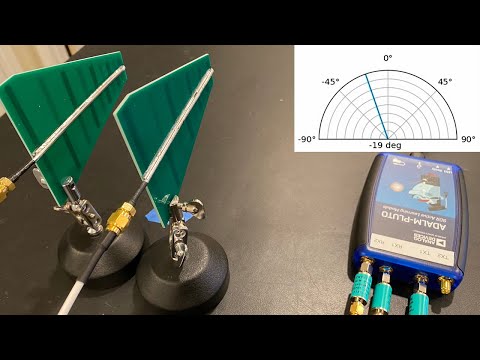
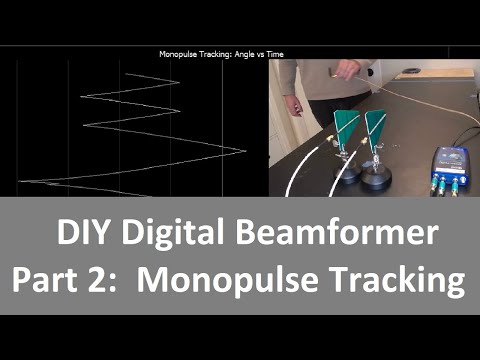
Over on YouTube Jon Kraft has been uploading videos explaining some interesting beamforming experiments he's been doing with his PlutoSDR. One experiment shows how to create a DIY monopulse tracker, which is a type of radio direction finding technique.
The PlutoSDR has two RX ports and two TX ports, and in this experiment he uses two directional antennas for the RX and one monopole antenna for the TX. Part 1 of this series explains standard phased array beam forming, and part 2 moves on to explain monopulse with adaptive tracking.
If you were interested in this, check out Jon's other videos on his channel. A recent video explains how time delays work in digital beamforming.
Over on YouTube @dereksgc has been putting together a comprehensive video series on weather, amateur and other satellite reception. His series starts with receiving images from NOAA APT satellites, then Meteor M2, as then goes on to talk about low cost V-Dipole satellite antennas, how satellite dishes work, and recently how to use Ku-band LNBs with a satellite dish.
If you're getting started with RTL-SDR and satellite reception, this video series may be a good introduction for you.
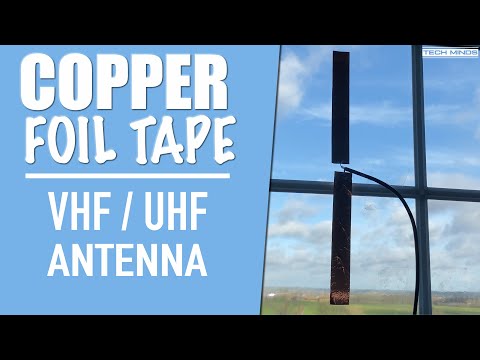
In his latest YouTube video Matt from Tech Minds shows how to build extremely low cost antennas out of copper tape. Rolls of copper tape are commonly found very cheaply in garden stores as slug barrier tape as garden slugs will not travel over copper.
After using a dipole calculator Matt solders coax to two strips of copper tape, resulting in a rudimentary dipole (without balun or choke). His first test with a UHF sized dipole showed poor SWR and yielded poor results on an actual radio/SDR. But his second test with a VHF sized dipole actually yielded decent results.
Weather satellites that transmit HRPT give you high resolution uncompressed images of the earth. With an SDR, L-band feed, 60 cm or larger satellite dish and LNA+filter these images can be received by anyone. Derek OK9SGC has the definitive HRPT reception tutorial available here. However, as these are low earth orbit satellites, the user is required to find a way to track the satellite as it moves across the sky. With some skill and experience, hand tracking can work, but a motorized solution is really what is desired. Other applications such as ham satellite communications as well as radio astronomy projects may also benefit from motorized tracking .
Antenna rotators that rotate in azimuth and elevation can be used to track satellites moving across the sky. The problem is that antenna rotators are typically very expensive, or are a major task to DIY, involving circuit construction and 3D printing of parts.
Recently on Tindie we came across the "AntRunner" which is a relatively low cost portable antenna rotator from China coming in at US$325 with free shipping to most countries (VAT is added for the EU as $50 in shipping fees).
AntRunner is based on two geared stepper motors, a motor controller PCB and an open frame. AntRunners code is open source, as well as some partial hardware schematics.
It can be interfaced via a USB serial connection or through WiFi via it's onboard ESP32 chip, and it relies on the Hamlib 'rotctl' software library running on either the controlling PC, or another intermediary device like a Raspberry Pi. Once setup, software like Gpredict on the PC or Look4Sat on Android devices can be used to control the rotator.
The AntRunner: Low cost antenna rotator
AntRunner Tests
We ordered an AntRunner for testing with our own funds. Our setup involved a USB connection from the AntRunner to a Raspberry Pi, 12V plug pack and a 60cm dish. We installed hamlib on the Raspberry Pi, and used Gpredict (PC) and Look4Sat (Android) on networked devices to send the desired elevation and azimuth commands to hamlib on the Raspberry Pi for particular satellites.
(Note that if you are installing hamlib for the AntRunner, you should do so from source as the packages in Ubuntu 22.04 appear to be out of date. And the older version of hamlib installed via Ubuntu does not support the AntRunner).
Overall the AntRunner works as expected and was easily able to follow HRPT satellites across the sky. It was also great for easily pointing and switching between geostationary satellites like GOES and GK-2A. It easily held and moved a 60cm dish and feed which weighs about 3 kg. The specs of the AntRunner indicate 5 kg max load (although the GitHub specs note 10kg), so it should be able to hold larger diameter dishes as well.
However we did have an issue with the advertised WiFi connection which is an alternative to the USB serial connection. When connected to WiFi the connection would always drop after a single movement command was sent, and it would never reconnect unless rebooted twice. For this reason we abandoned WiFi and only used the USB serial connection, and communicated wirelessly via the Raspberry Pi. There is also a WiFi web interface available for testing movement commands and setting up the WiFi connection, but it is only in Chinese.
It's possible that RF noise from the motors was causing the WiFi disconnection, but on the frequencies that L-band satellites operate at, we did not notice any motor interference.
The AntRunner is advertised as a portable rotator, so that means it is not suitable for use in poor weather as it has no cover to protect the motor circuit board and motors themselves from rain. However, it is certainly small and light enough to be portable. You just need a portable 12V power supply as well.
Another issue is that when power is lost, the motors will spin freely, resulting in the antenna coming crashing down fast. So care must be taken when powering down with someone there to hold the antenna. The user is also required to physically hold the antenna level at 0 degrees elevation before powering up the AntRunner, so that it will reference 0 degrees elevation. Once powered the antenna holds in place.
There are also no limit switches on the device, so if an erroneous command is sent, it could send the motors into a position that could damage something.
AntRunner (Image from Tindie) (NOTE: The tripod stand is not included)
Conclusion
Overall if you want something cheap and pretty much ready to use out of the box for tracking HRPT or other LEO satellites, the AntRunner is a good budget choice if you intend to only setup temporary stations. It is not suitable for permanent satellite receiver setups, at least not without some modifications.
A similar product is the SATRAN MK3 which was a 3D printed kit costing 175 Euros + shipping, but unfortunately this product appears to no longer be sold.
The ultimate in low cost rotators is probably the SatNOGS V3 rotator, but as mentioned this is a DIY project that requires a significant time commitment as it involves 3D printing multiple parts, sourcing components, building PCBs and constructing everything together. We have found one company offering a SatNOGs hardware kit, containing all of the parts required for US$445.
A commercial option might be the Yaesu G-5500DC which goes for US$759.95 on HRO, however you also need the GS-232 Rotator Computer Controller for computer control which is an additional US$589.95. Update: We've been informed that there are also cheaper third party computer controllers for Yaesu rotators, such as the CSN Technologies S.A.T Rotator Controller which sells for US$278.
Thank you to Carl Reinemann (aka usradioguy) for submitting his article about Vitality GOES. Vitality GOES is an open source tool that displays the weather satellite images received by SatDump and/or goestools in a user friendly web interface that is accessible over a network connection.
SatDump and goestools are decoders that can be used to decode images from GOES and other satellites, when combined with a PC or single board computer, satellite antenna and RTL-SDR or similar SDR dongle. What they lack however is an easy way to display the received images, as the images are simply dumped to folders. If you're interested in getting started with GOES reception, we have a tutorial here.
Carl's article explains the purpose of Vitality GOES in detail and shows a few example screenshots. He notes how it can be used to display full disk images, composite together Meteor M2 images, present EMWIN data such as forecasts and warnings, and more.
Carl also notes that Vitality GOES was recently updated to V1.2 with the main update being added support for SatDump. SatDump can decode dozens of different weather satellites, not only GOES, so this opens up a wide range of possibilities.
Vitality GOES - Feature Overview
Vitality GOES: Example screenshots from Carl Reinemann (usaradioguy)