Category: Applications

KerberosSDR Running RF Direction Finding on a Tinkerboard

KerberosSDR (formerly HydraSDR) is our upcoming 4-input coherent RTL-SDR. It's designed for coherent applications like RF direction finding, passive radar, beam forming and more, but can also be used as a standard 4-channel SDR for monitoring multiple frequencies. In this post we demonstrate the direction finding application running on the TinkerBoard. 

Reminder: If you have any interest in KerberosSDR, please sign up to our KerberosSDR mailing list. Subscribers to this list will be the first to know when KerberosSDR goes on preorder, and the first 100 sales will receive a discounted price.

Subscribe to our KerberosSDR Announcement

Please select all the ways you would like to hear from RTL-SDR Blog:

You can unsubscribe at any time by clicking the link in the footer of our emails. We use MailChimp as our marketing platform. By clicking below to subscribe, you acknowledge that your information will be transferred to MailChimp for processing. Learn more about MailChimp's privacy practices here.

KerberosSDR Updates

This week we've managed to get the KerberosSDR demo software made by Tamás Peto functioning on a TinkerBoard. The TinkerBoard is a US$60 single board computer. It's similar to a Raspberry Pi 3, but more powerful. We've also tested the app running on the Raspberry Pi 3 and Odroid XU4. The Pi 3 is capable of running the software but it is a little slow, and the Odroid XU4 is a little faster than the TinkerBoard. In the future we hope to further optimize the code so even Raspberry Pi 3's will be smooth.

In the video below we used a circular array of four whip antennas connected to KerberosSDR. The TinkerBoard is connected to KerberosSDR and is set up to generate a WiFi hotspot, which we connect to with an Android phone and a Windows laptop. The Windows laptop connects to the TinkerBoard's desktop via VNC, and the Android phone receives an HTML/JavaScript based compass display via an Apache server running on the Tinkerboard. With this setup we can wirelessly control and view information from KerberosSDR and the TinkerBoard.

We've also tested the KerberosSDR system on a real signal, and have found it to work as expected. More demo's of that coming later.

For more info on KerberosSDR please see our previous announcement post.

KerberosSDR Direction Finding Test 2: Tinkerboard + Circular Array

KerberosSDR Prototype
KerberosSDR Prototype with TinkerBoard Running Computations

New NOAA APT Image Decoder

Over on GitHub user martinber has released a new NOAA APT image decoder that can run on both Linux and Windows. The decoder is called noaa-apt and takes a .WAV file of a NOAA satellite pass, and turns it into an image file. The .WAV file can be recorded in any SDR program like SDR#, HDSDR, GQRX etc.  The program is programmed in Rust, and has ready to run binaries available for both Linux and Windows available on it's GitHub Releases page.

Compared to the features found in WXtoIMG the software is fairly basic, but as WXtoIMG has been abandoned it's good to see new APT decoders still being worked on. The software can also be used to simply resample the .WAV file into a sample rate required by other more featured decoders like aptdec.

NOAA weather satellites broadcast an Automatic Picture Transmission (APT) signal, which contains a live weather image of your area. With an RTL-SDR and antenna they can be received and downloaded every time one of the satellite's passes overhead. We have a tutorial on using an RTL-SDR with WXtoIMG available here.

NOAA-APT: NOAA APT Weather Satellite Image Decoder

Listening To Multiple DMR Channels with DSD+ and a HackRF on Linux

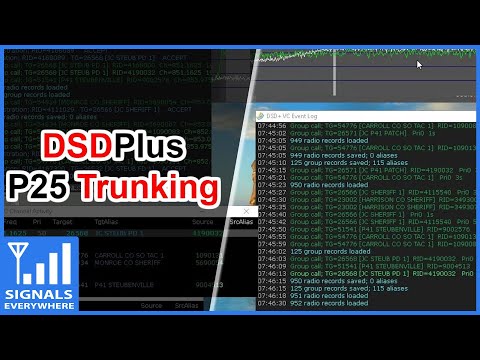
Thanks to Tony C who wrote in and wanted to share a method that he's found to listen to  multiple DMR digital voice channels in Linux. DSD+ is a Windows program that can be used to decode DMR. Although for Windows it is possible to use in Linux via the emulator known as Wine, and pipe the digital audio to it from GQRX. In the quote below, DSD+ "FL" is short for "Fast Lane" which is DSD+'s paid beta service that you can join to get  newer code with more features. Tony writes:

I believe that can bridge the gap between using Linux with the ease of use programs of windows. As I am sure we both can attest that setting up trunk tracking / anything SDR is not as easy on Linux as it is on windows. For example, DSDplus FL makes it extremely easy to identify/decode DMR networks. There are similar things that can be done on Linux, but as I stated, it isn’t as easy to setup.

So the method that I setup and have been using successfully, using Ubuntu and a HackRF, setting up DSDplus 2.98 on wine, that gets audio piped from GQRX using a virtual sink as outlined in https://www.hagensieker.com/wordpress/2018/04/29/dsd-in-ubuntu-18-04/. It was a great blog, but I felt that it was incomplete when trying to get all the voice traffic passed on a network, as it only works on 1 channel at a time.

So I found the control channel for the network and created 5 bookmarks in GQRX and gave them the tag “DMR”. From there I downloaded gqrx scanner https://github.com/neural75/gqrx-scanner followed the install and setup instructions. From there I activated the scanner and GQRX will cycle through the frequencies and when voice traffic is passed, it will stop, and DSDPLUS via wine will decode and record the audio.

[The screenshot] example was for P25, but it has worked in connect+ as well, the only thing is that you cannot bookmark the control channel. I know other options exist out there such as SDRtrunk / op25 which I have used, but I believe this provides a good alternative to those who have used windows and are comfortable with the ease of use of dsdplus FL but want to be on the Linux OS. 

DSD+ Decoding Multiple DMR Channels on Linux


Aggregating Weather Balloon Data Online with a Custom Raspberry Pi Image

Thanks to a RTL-SDR.COM reader for submitting a tip about radiosondy.info, a weather balloon data aggregation website made by SQ6KXY. Weather balloons carry a sensor and transmitter payload called a radiosonde. These radiosondes transmit their data to a ground station via an RF signal, which is typically at around 400 - 406 MHz in most countries. With an RTL-SDR and decoder software (related tutorial) it is possible to receive and decode their weather data, and also often their GPS location data. The location data can be used to find and collect radiosondes once they reach the ground.

SQ6KXY has created a website called radiosondy.info which aims to aggregate and make weather balloon data received by contributors public. It is similar to sites like flightradar24 which aggregate ADS-B data from aircraft. The main page allows you to view radiosondes that are currently flying, and the archive of previous flights.

To make contributing to the site as simple as possible, SQ6KXY has created a custom image for the Raspberry Pi, which is automatically generated by the website for your particular user account, local radiosonde frequency requirements, and number of SDRs. They don't specifically mention it, but we assume that contributors are mostly using RTL-SDRs in their receivers. The custom image is available for generation after signing up.

Web tool to generate a custom Raspberry Pi Image for Radiosonde Tracking

Testing the RTL-SDR V3 Direct Sampling Mode for use in a 2-FSK RPiTX Modem

Over on his blog, Rowetel has been testing our RTL-SDR Blog V3 in order to possibly use as a cheap FSK receiver for his RPiTX 2-FSK modem project. His post details some measurements that he's done in order to determine the lower HF band performance of the RTL-SDR V3 running in direct sampling mode, and it's viability for use in his 2-FSK modem system.

In the first test he uses RPiTX to generate a 2-FSK signal, which is then received and decoded by a RTL-SDR V3 connected to an attenuator and laptop. The Bit Error Rate (BER) is then measured while the attenuation is increased until the decoder fails. With this test he found a MDS somewhere between -115 dBm and -125 dBm, and a maximum input power of -30 dBm before clipping.

In another test he measures the RTL-SDR's ability to withstand a blocking CW signal. The results show that even with a 65 dB stronger signal just 7 kHz away, the 2-FSK modem system was able to continue working.

Finally he concludes:

So I figure for the lower HF bands this receivers performance is OK – the ADC quantisation noise isn’t likely to impact performance and the strong signal performance is good enough. An overload of -30dBm (S9+40dB) is also acceptable given the use case is remote communications where there is unlikely to be any nearby transmitters in the input filter passband.

Test Setup
Test Setup

Using a Raspberry Pi 3, USB Soundcard, Speclab and Exagear to Detect SAQ VLF Transmissions

Thanks to DE8MSH for writing in about his project that involves using a Raspberry Pi 3 and cheap 7€ USB sound card connected to an old Grahn GS1 VLF antenna to detect the SAQ VLF station. Standard PC or USB sound cards can be used as a narrowband VLF capable SDR simply by connecting an antenna to the sound inputs. SAQ (aka Grimeton Radio Station) is a heritage VLF transmitter in Sweden that transmits CW at 17.2 kHz, normally only on Alexanderson Day and Christmas Day, but can sometimes unofficially transmit without announcement due to maintenance, training or local events.

In terms of software running on the Pi 3 DE8MSH uses Spectrum Laboratory (speclab) to monitor the sound card waterfall, and has written a Python script that uploads the processed images from speclab to a Twitter account every 20 minutes. This way he hopes to be able to detect any unannounced SAQ transmissions from his station in Sweden. 

Spectrum Laboratory is actually a Windows and x86 only program, however as shown in one of our previous posts, it is possible to use a special compatibility emulator called Exagear which allows you to run x86 programs on ARM hardware. Together with Wine you can then run x86 Windows programs on single board computers like the Raspberry Pi 3 which run Linux on ARM hardware.

Speclab Screenshot from DE8MSHs Pi3 soundcard monitoring system

HDSDR Version 2.80 Beta Released

HDSDR is a popular general purpose multimode program for Windows that supports various SDRs including the RTL-SDR. Version 2.80 (beta) of HDSDR was released a few days ago and brings with it a few GUI and feature updates. An extensive description of the changes can be found in the change log, but briefly the changes are:

  • GUI buttons updated to a more modern and cleaner look
  • Improved friendliness to blind users during IQ recording playback
  • A better IQ file player with the ability to loop over a certain time frame
  • Improved snap to frequency option
  • Improved LO tuning with an "autochange LO if necessary" option
  • The ability to sort IQ recordings by date
  • Ham/broadcast band spectrum identifiers added
  • Ability to import the HFCC frequency list into the frequency manager
HDSDR v2.76a (left) vs. v2.80 (right)

Building a Tracking Mount for HRPT Weather Satellite Reception Part 2

Earlier this month we posted about The Thought Emporium who uploaded a video to YouTube where they documented the first steps of their construction of a tracking mount for a 2.4 GHz grid WiFi dish which they intend to use for HRPT weather satellite reception.

If you didn't already know, receiving HRPT weather satellite signals is a little different to the more commonly received NOAA APT or Meteor M2 LRPT images which most readers may already be familiar with. HRPT is broadcast by the same NOAA satellites that provide the APT signal at 137 MHz, but is found in the L-band at around 1.7 GHz. The signal is much weaker, so a high gain dish antenna with motorized tracking mount, LNA and high bandwidth SDR like an Airspy is required. The payoff is that HRPT images are much higher in resolution compared to APT.

In this video they document the steps required to finish the physical build and add the electronics and motors required to control and move the dish. The final product is a working tracking mount that should be able to track the NOAA satellites as they pass over. In the next video which is not yet released they plan to actually test reception.

Track Satellites in Orbit - Part 2