Category: Applications

A modified dump1090 with ADS-B Heatmap and Range Alititude View

Dump1090 is one of the most popular ADS-B decoders that is used together with the RTL-SDR dongle. ADS-B stands for Automatic Dependant Surveillance Broadcast and is a system used by aircraft that broadcasts their GPS positions. It is a replacement for traditional reflection based radar systems. We have a tutorial on using the RTL-SDR to decode ADS-B here.

There is now a forked version of dump1090 by tedsluis that incorporates heatmap generation and range/altitude view. A heatmap will allow you to visualize where the most active aircraft paths in your area are and the range/altitude view allows you to see at what altitudes aircraft typically fly at in different locations. The software logs aircraft data in a CSV file, and then after collecting enough data a second program can be used to generate the heatmap. The full explanation of the software and instructions for installing and using it on a Raspberry Pi Linux system together with PiAware are posted on the flightaware.com forums.

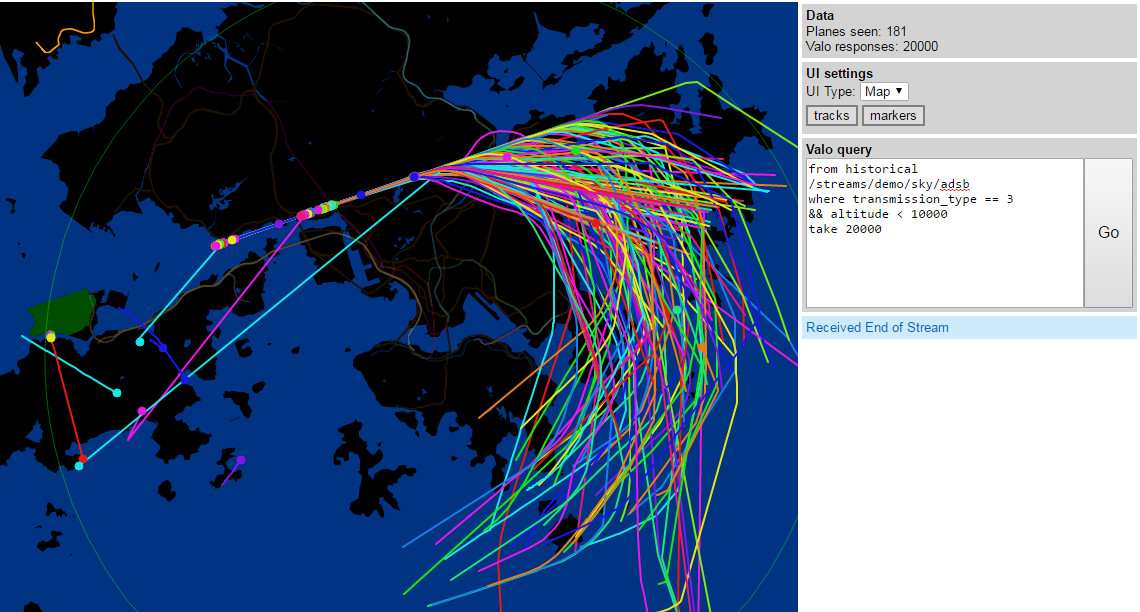
A heatmap of aircraft flight paths.
dump1090-mutability with Heatmap ADS-B and range altitude view

Spektrum: New RTL-SDR Spectrum Analyzer Software

Recently a reader of RTL-SDR.com, Pavel wrote in to let us know about a new program called “Spektrum” which he has written. Spektrum runs on Windows and Linux and turns an RTL-SDR dongle into a spectrum analyzer in a similar way to rtl_power GUI front ends and RTLSDR Scanner. However one key improvement is that it is based on a version of rtl_power that has been modified by Pavel in order to make it more responsive and remove the need to wait until a full sweep is completed before you can see any results. The modified version of rtl_power can be found at https://github.com/pavels/rtl-sdr.

Spektrum also has an additional “relative mode” feature. This allows Spektrum to be easily used together with a wideband noise source to measure things like filter characteristics and the VSWR of antennas. See our previous tutorial on this here, but note that in our tutorial we used Excel instead of Spektrum to do relative measurements.

The Processing language was used to create Spektrum and Pavel has also released his processing library for accessing rtl_power functionality over at https://github.com/pavels/processing-rtlspektum-lib/releases.

Ready to use releases of Spektrum for Windows and Linux 64-Bit OSes can be downloaded from https://github.com/pavels/spektrum/releases. Note that there may be a bug with the current release which causes only a gray window to show, but we’ve contacted the author about it and it may be fixed soon.

Spektrum: A new spectrum analyzer program for the RTL-SDR

SDR-J Now Compatible with the Raspberry Pi 2

The popular software DAB (Digital Audio Broadcast) decoder SDR-J has recently been updated and can now run on the Raspberry Pi 2. In addition the author has also added experimental DRM decoding capabilities to his shortwave receiving software. The author writes about the Raspberry Pi 2:

The Raspberry PI 2 has a processor chip with 4 computing cores. By carefully spreading the computational load of the handling of DAB over these cores it is possible to run the DAB software on the Raspberry PI 2.

In my home situation the – headless – Raspberry PI 2 is located on the attic and remotely controlled through an SSH connection using the home WiFi on my laptop in my “lazy chair”. To accomodate listening remotely, the DAB software on the Raspberry PI 2 sends – if so configured – the generated PCI samples (rate 48000) also to an internet port (port 100240). On the laptop then runs a very simple piece of program reading the stream and sending it to the soundcard

DAB is a digital audio protocol that is used in some countries as a digital alternative to broadcast FM (music stations). SDR-J is a suite of programs that includes the ability to decode DAB, FM, and several shortwave modes such as AM, USB, LSB, PSK, RTTY, WeatherFax, SSTV, BPSK, QPSK, CW, NavTex (Amtor-B), MFSK, Domino, Olivia, Hell, Throb and now DRM. It can directly connect to RTL-SDR receivers as well as other hardware such as the Airspy and SDRplay.

Screenshot of SDR-J running on the Raspberry Pi 2.

An Unfiltered ADS-B co-op: ADSBexchange

Recently Dan, a reader of RTL-SDR.com wrote in to let us know about a new web project he’s started called adsbexchange.com. ADSBexchange is similar to services like FlightRadar24.com and FlightAware.com, but with one key difference. ADSBExchange explicitly states that they do not and will not filter ADS-B traffic for security reasons. Other similar services all filter FAA BARR (Block Aircraft Registration Request), military and other potentially sensitive ADS-B data. However, Dan argues that filtering the data is simply unneeded security theatre as anyone can build their own unfiltered receiver for very cheap. He writes:

I recently started a website that collects SDR ADS-B and MLAT data (typically from dump1090) worldwide, and displays it unfiltered – http://www.adsbexchange.com . This means that military, “blocked” and other “restricted” traffic is available to see, which is unique as far as I can tell.  We’ve recently tracked a U2 over the UK above 60,000 ft., Air Force One, and various diplomatic aircraft.  Additionally, there is a database of all previous aircraft “sightings” searchable on various parameters.

All of my research indicates this is legal, but perhaps “frowned upon” by local authorities.  The major flight tracking sites seem to not want to make any waves and voluntarily strip this data from their public feeds, even though they are typically fed “unfiltered” data from their volunteer participants.

The service is currently looking for RTL-SDR users who feed ADS-B data to join their feeding program so that they can expand their service coverage.

adsbexchange

Receiving Digital Amateur TV from the ISS with an RTL-SDR

The international space station (ISS) is currently testing transmission of a DVB-S digital video signal. At the moment only a blank test pattern is transmitted, but one day they hope to be able to transmit live video properly for the purposes of making live contact with astronauts, and possibly to stream video of scientific experiments, extravehicular activities, docking operations, or simply live views of the Earth from space.

Over at www.pabr.org the author Pabr has been experimenting with using an RTL-SDR dongle for the reception of these digital amateur TV (DATV) signals. Over on Reddit he also posted some extra information about his work:

I have been able to receive DVB-S broadcasts from the ISS (known as HamVideo or HamTV) with a high-gain 2.4 GHz WiFi antenna ($50), a custom downconverter ($65), a R820T2 dongle, and a software demodulator (Edmund Tse’s gr-dvb). I used to think this could only be done with much more expensive SDR hardware.

It is commonly known that rtl-sdr dongles do not have enough bandwidth to capture mainstream satellite TV broadcasts, but the ISS happens to transmit DVB-S at only 2Msymbols/s in QPSK with FEC=1/2, which translates to 2 MHz of RF bandwidth (2.7 MHz including roll-off).

Before anyone gets too excited I should mention that:

  • This was done during a favourable pass of the ISS (elevation 85°)
  • With a fixed antenna, only a few seconds worth of signal can be captured
  • Demodulation is not real-time (on my low-end PC)
  • Currently the ISS only transmits a blank test pattern.

I now believe the BoM will be less than $50 by the time the ISS begins broadcasting interesting stuff on that channel.

Pabr uses a 2.4 GHz parabolic WiFi antenna to receive the signal. He writes that ideally a motorized antenna tracker would be used with this antenna to track the ISS through the sky. Also since the DATV signal is transmitted at around 2.4 GHz, a downconverter is required to convert the received frequency into one that is receivable with the RTL-SDR. The DATV decoder is available on Linux and requires GNU Radio.

Receiving DATV from the ISS
Receiving DATV from the ISS with an RTL-SDR

An RTL-SDR Phase Correlative Direction Finder

Over on YouTube user Tatu Peltola has uploaded a video showing his RTL-SDR based phase correlative direction finder in action. This set up uses three RTL-SDR dongles and three antennas to measure phase differences and thus determine the direction towards a signal source. All three RTL-SDR’s must be coherent, meaning that all three of their 28.8 MHz clock signals must come from the same source. 

In the video Tatu walks around the three antennas with a handheld radio. An arrow on a laptop screen points in the direction of the transmitter.

A known problem with RTL-SDR’s is that even with the clock sources synchronized there is still an unknown cause of additional phase shift. To solve this problem Tatu writes:

Each rtl-sdr is fed from the same reference clock to make their phase shift remain constant. They still have unknown phase shifts and sampling time differences relative to each other. This is calibrated by disconnecting them from antennas and connecting every receiver to the same noise source. Cross correlation of the noise gives their time and phase differences so that it can be corrected.

The three antennas used for direction finding.
RTL-SDR phase correlative direction finder

Reverse engineering a wireless thermostat with an RTL-SDR

When Tom Taylors home heating boiler was replaced the builders also replaced the old wired rotary thermostat with a digital wireless one. It sounds good, but Tom soon discovered that the thermostat UI was terrible and that the buttons were horrible to press, making him prefer to shiver in the cold. So Tom decided to see if there was a smarter way to control the heating.

When Tom investigated the thermostat, he discovered that the wireless unit transmitted in the unlicensed 433 MHz band and that the thermostat only transmitted two commands, turn on or turn off. By using his RTL-SDR and the CubicSDR software on his Mac he was able to detect the short blip of the thermostat wireless signal. Next he recorded the on and off signals and opened the sound files in Audacity, an audio processing software tool. In Audacity he was able to compare the sound waveforms of the on and off signals.

From his analysis he discovered that each signal consisted of a preamble and then an on or off command which is repeated twice, presumably to reduce the likelihood of interference. Tom also discovered that the commands were encoded with pulse width modulation.

From this knowledge Tom was then able to use a cheap 433 MHz transmitter together with an Arduino microcontroller board and a short script to create identical on or off transmissions that control the boiler. Tom writes that his next steps are now to create a heating schedule based on his families shared calender, make a thermostat control loop and create a web connected interface with a Raspberry Pi.

The 433 MHz thermostat on/off signal detected with an RTL-SDR in the CubicSDR software

Demonstrating the RTL-SDR based “Etch-A-SDR” Portable SDR

Over on YouTube user devnulling has uploaded a video showing his “Etch-A-SDR” project. This project involved creating an all-in-one SDR device out of an Odroid C1, Teensy 3.1 and an RTL-SDR dongle. The Odroid C1 is an embedded computer, similar to the Raspberry Pi 2 and the Teensy 3.1 is a microcontroller development board. The “Etch-A-SDR” is named as such because of its resemblance to an Etch-A-Sketch toy. It has two knobs that can be used for tuning and several side buttons for changing demodulation modes etc.

Upon boot the Etch-A-SDR opens GQRX and is ready for tuning within seconds of turning it on. In addition to using it as a portable SDR with GQRX the Etch-A-SDR can also be booted into normal Linux mode and into Etch-A-Sketch mode, where it operates as a normal Etch-A-Sketch toy.

The code can be downloaded from https://github.com/devnulling/etch-a-sdr.

The Etch-A-SDR portable SDR