Over on YouTube user Osama SH has uploaded a video briefly showing the steps needed to use an RTL-SDR dongle to sniff some SMS text messages and voice calls made from his own phone. This can be done if some encryption data is known about the phone sending the messages, so it cannot be used to listen in on any phone – just ones you have access to. In the video he uses Airprobe and Wireshark to initially sniff the data, and find the information needed to decode the text message. Once through the process he is able to recover the SMS message and some voice audio files.
The Spyverter is a new high performance upconverter that is being developed by the team behind the Airspy software defined radio and the SDR# software. It is designed to be used together with the Airspy, but it should also be compatible with other SDRs as well. The main claimed advantages over other upconverters will be it’s low loss and high IIP3 performance, which means that the Spyverter will not saturate in the presence of strong signals as easily as other upconverters.
Recently W9RAN, who is involved in the design and testing of the Spyverter uploaded some demo videos of the Spyverter + Airspy combo in action. The first video shows how the Spyverter when used together with the Airspy and SDR# allows for seamless tuning between VLF, HF through to VHF/UHF (no need to set any offsets).
Seamless tuning of SDR# with AIrspy & Spyverter
The next video shows the Spyverter + Airspy combo working during a RTTY contest on 40M with very densely packed signals, some of which were very strong.
W9RAN demo of Spyverter in 40 meter RTTY contest
W9RAN (ranickel on YouTube) also has additional Spyverter + Airspy videos on YouTube for viewing if you are interested.
Wireless traffic lights reverse engineered with an RTL-SDR
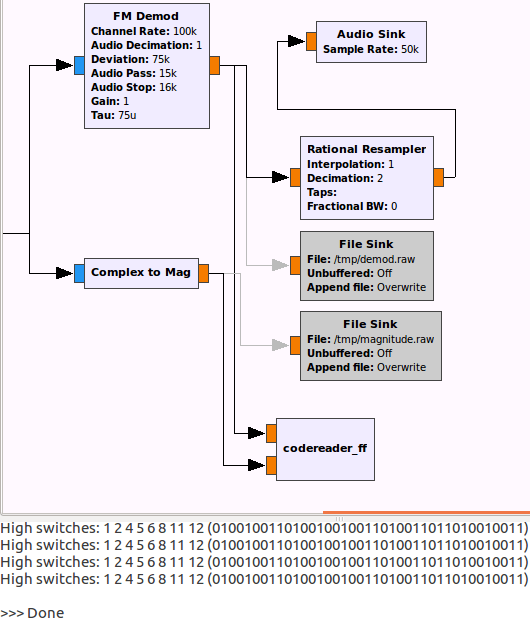
Bastian discovered two signals at around 170 MHz which corresponded to two pairs of lights. By analyzing the signal in Baudline and Audacity he discovered that the signal was AFSK1200 modulated between 1200Hz and 2400Hz. He then created a simple GNU Radio program which was able to output the frame bit data. After some analysis he was able to make sense of the structure and create a simple web interface that visualized the data as virtual traffic lights on his PC. The YouTube video below shows the signal and his RTL-SDR decoding software in action.
It seems that the telemetry is unencrypted, however we would assume that the control signals are encrypted.
By first looking at the old FCC label on the keypad, Veghead discovered that the device transmitted between 319 MHz and 340 MHz. He then used his RTL-SDR dongle to take a recording of the transmitted signals, before opening them up in Audacity – a free audio processing program.
By analyzing the waveform in Audacity, Veghead discovered that the alarm panel uses simple ON-OFF Keying (OOK) modulation. Although the frequency of the signal drifted a lot (probably due to aged components), he was able to write a decoder that he called cletus which converts the recorded complex I/Q signal into a real signal and then uses a state machine to turn the waveform into 1’s and 0’s. Finally the program then outputs the correct button that was pressed to the terminal.
Vintage wireless alarm keypad reverse engineered with an RTL-SDR
The “ADS-B on Android” app has been updated and now supports the reception and display of 978 MHz UAT FIS-B Weather and Traffic data. The app also receives ADS-B data as per normal. To use the app you will need an RTL-SDR dongle and a USB OTG cable.
UAT stands for Universal Access Transceiver and is a protocol similar to ADS-B that is used mainly by smaller aircraft in the USA. UAT has some extra features for pilots compared to ADS-B. In addition to location information UAT provides a Traffic Information Service (TIS-B) which allows pilots in the air to see what ground control sees on their traditional RADAR system. It also provides a Flight Information Service-Broadcast (FIS-B) which includes NEXRAD weather data and other information. NEXRAD is an array of ground station weather radars that are used to provide pilots with accurate maps of precipitation and wind.
The free version of the app has ads and does not display NEXRAD weather radar on the default map. The pro version removes the ads and allows you to display a NEXRAD overlay on the map. It costs $2.50 USD.
A pulsar is a rotating neutron star that emits a beam of electromagnetic radiation. If this beam points towards the earth, it can then be observed with a large dish antenna and a radio, like the RTL-SDR. The abstract of the paper reads:
This project sought to determine the minimum useful antenna aperture for amateur radio astronomers to successfully detect pulsars around the Hydrogen line frequency of 1420MHz. The technique relied on the collaboration with GM Gancio, who provided RTL SDR data of the Vela pulsar (B0833-45, J0835-4510) and others, collected with a 30m radio telescope. This data was processed to determine the achievable signal-to-noise ratio from which, the minimum useful dish size necessary for some effective amateur work, could be calculated. Two software packages were developed to do synchronous integration, a third to provide a power detection function and a fourth for spectrum analysis to recover pulsar rotation rate.
With their system the authors were able to detect and measure the rotation period of the Vela pulsar. Also, from their data they were able to estimate that the minimum dish aperture required to observe the Vela pulsar would be 6m, noting that the Vela pulsar is probably the strongest pulsar ever detected. They also write that by utilizing 5 RTL-SDRs to gather 10 MHz of bandwidth together with some processing that the minimum required dish aperture could be reduced to 3.5m.
The Vela pulsar pulse power integrated over a 50 second 100MB file, combining some 560 pulsar pulses.
Results from air cooling the RTL-SDR.The air cooled and heat sinked RTL-SDRs
All of Peters papers can be found on his website at y1pwe.co.uk/RAProgs/index.html. He has many RTL-SDR radio astronomy related resources there, so check it out if you are interested.
Bus sign: Wireless bus telemetry updates this sign.
A similar reverse engineering of bus telemetry was performed before by Oona Raissan in Helsinki, Finland. Oona found that in Helsinki bus telemetry was transmitted as a DARC subcarrier embedded in regular broadcast FM radio. In many countries bus telemetry runs through GSM or TETRA communications as well, which are encrypted and would be very difficult to decode.
However in Paderborn, Germany Bastian discovered that the bus telemetry system used a different protocol which he discovered by noticing that some very strong signals appeared on his spectrum at 150.9 MHz whenever a bus drove by his flat.
After making a recording of this signal in GQRX, bastian analysed it in Audacity and discovered that the binary data bits were encoded by the presence or absence of a half sine wave. After discovering the encoding he was then able to determine the bit rate and build a decoder in GNU Radio. His post goes into further detail about concepts he used in his GNU Radio program such as frame detection, bit stuffing and error detection.
Finally, with all his decoder program written he was able to gather lots of data from each packet such as the bus ID, line, bus stop, distance from last bus stop, delay, position and even the orientation of the bus. Bastian has also uploaded a video showing everything in action, which we have embedded below.
Bus position heatmap from data obtained via the RTL-SDR
A reader of our blog, EBC81, has written in to let us know about a new RTL-SDR based AIS decoder that he has written for the Android OS. AIS stands for Automatic Identification System and is used by ships to broadcast their GPS locations, to help avoid collisions and aid with rescues. An RTL-SDR with the right software can be used to receive and decode these signals, and plot ship positions on a map.
EBC81’s program is called rtl_ais_android and can be downloaded from this GitHub link. It decodes the AIS data into NMEA messages, which can then be sent via UDP to mapping programs in Android or a program like OpenCPN on your PC. To use the app you will need a USB OTG cable to connect your Android device to the RTL-SDR.
In the future EBC81 hopes to create a second app which will display the ship positions on a map.