Category: Applications

Electrosense+: Global Network of RTL-SDR Sensors with Decoding of FM/AM ADS-B AIS LTE ACARS

Back in late 2019 we posted about the Electrosense network which is an open source project aiming to deploy radio spectrum sensors worldwide. The idea is to help analyze and understand radio spectrum usage across the globe. Each sensor consists of an RTL-SDR, Raspberry Pi and an optional downconverter to receive the higher bands.

Recently Dr. Sofie Pollen wrote in and informed us that they have recently upgraded Electrosense and now users can use any sensor on the network to actually decode signals remotely over a web browser. The currently supported demodulators/decoders include FM/AM, ADS-B, AIS, LTE base station info and ACARS. This makes the Electrosense network kind of similar to the KiwiSDR or OpenWebRX SDR network where there are also various decoders built into the web software.

To test it out you need to create an Electrosense account at electrosense.org. Once logged in, go to "My Electrosense" on the top right, and choose "Spectrum Decoder". You can then choose from a number of Electrosense contributors stationed around the world. Once the waterfall is displayed you can click on signals to decode and listen to them, or change the decoder. Changing to ADS-B or AIS will bring up a map with decoded aircraft or boat positions. Changing to ACARS or LTE will show a text window with the decoded information.

A full electrosense kitset can be purchased from Jetvision, however Sofie notes that they do ship free sensors to some people who cannot afford the kit, and you can apply to increase coverage in your area via this link.

Currently active electrosense sensors
Currently active Electrosense sensors
Electrosense web GUI decoding a wideband FM signal

Tech Minds: Eavesdropping on Video Monitors with TempestSDR

Over on his latest video Tech Minds' explores the use of TempestSDR to eavesdrop on video monitors with his Airspy Mini. TempestSDR is a program that we've posted about several times in the past. With an RTL-SDR or other compatible SDR like a HackRF it allows you to reconstruct an image from a computer monitor or TV just from the radio waves unintentionally emitted by the screen or cable. SDRs with larger bandwidths like the HackRF or Airspy are better at reconstructing the image as they can collect more information.

In his video Tech Minds shows how to download and setup one of the newer branches of TempestSDR which unlike older versions doesn't require much installation work. Using an Airspy Mini he shows that he is able to view what is on his screen via the emitted RF waves.

Eavesdropping Video Monitors With TempestSDR RTL-SDR

Imaging the Milky Way in Neutral Hydrogen with an RTL-SDR Part 2

Last month we shared information about Job Geheniau's success with using an RTL-SDR dongle to image our galaxy in neutral Hydrogen. Our galaxy is full of neutral Hydrogen, and lots of neutral Hydrogen together results in a detectable radio peak at 1.42 GHz. This peak is called the Hydrogen line. By scanning the galaxy at the Hydrogen line frequency with a 1.5 meter dish on a motorized mount, an RTL-SDR, and a few filters and LNAs, Job is able to create a radio image of our galaxy.

In Job's previous attempt he created an image by pointing the dish antenna at 168 predefined grids calculated to cover the Milky Way, resulting in 168 points of exposure data. In his latest work Job has created an even higher resolution image by taking 903 points of exposure data. Each exposure took 150s and the total 903 exposures took 8 nights to record. Once all data was collected he uses the same process as before, which is to input all the Hydrogen line data into a standard 2D excel sheet, then use conditional formatting to create a heatmap which reveals the image. He then applies a blur and stretches the image into the Mollweide Cartographic which can represent the entire Universe in one image.

Job has shared with us his PDF where he documented his process and shares his images (note 16 MB PDF file). We also share his full resolution images below, just click to open. We think that these images are quite amazing and an excellent achievement for a backyard radio astronomer.

If you're interested in Hydrogen line radio astronomy we have a tutorial that will help you observe the Hydrogen line peak on a budget. The tutorial could be improved upon by motorizing the dish, allowing you to create images like the ones above. You might also be interested in a similar project by Marcus Leech who took 5 months of hydrogen line observations with an RTL-SDR in order to create an even higher resolution image.

An Introduction to Radio Trunking Systems with a Focus on P25 and SDR Trunk

Thank you to Carl Makin (VK1KCM) for submitting a video that he produced for his local ham radio club in Australia. In the video Carl first gives an overview on radio trunking systems and explains why they are used to improve spectrum efficiency.

He goes on to focus solely on P25 digital voice trunking networks. Carl is based in NSW, Australia so he talks a bit about what P25 services are available in his area and which ones are unencrypted. Finally he demonstrates the SDR Trunk software decoding one of his local P25 networks with two RTL-SDR dongles, and explains what information we can see in the software.

Carl VK1KCM on P25 Trunked

A Simple Guide to Setting up a DIY NOAA Weather Satellite Ground Station

A few weeks ago we posted about Sophie Dyer and Sasha Engelmann's work in creating an artistic performance based on weather satellite reception with SDRs. More recently they have uploaded their own tutorial showing how they receive NOAA APT weather satellite images with an SDR, turnstile antenna and computer. Sasha and Sophie note that they are attempting to create visually rich guides that don't assume any prior knowledge of radio, science or engineering.

From Sasha's Twitter feed we note that they are also working on upcoming public workshops in the UK and Germany on the topic of reflections on what it means to bring an intersectional feminist ethos to satellite image decoding + weather sensing, & new creative collaborations in 2020. If you are interested in their work please follow @sashacakes and @sophiecdyer on Twitter.

Receiving NOAA weather satellites

Step-by-step Guide to Creating a GNU Radio Based QO-100 SSB Receiver

Thank you to M Khanfar for submitting his video that shows a step-by-step tutorial on building your own SSB receiver in Windows GNU Radio for QO-100 satellite reception.  His tutorial includes adding several tuning sliders in the GNU Radio GUI as well.

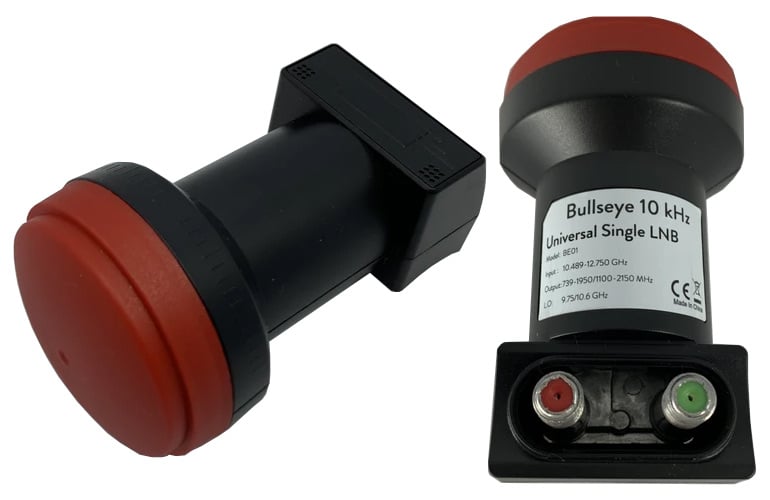
QO-100 / Es'hail-2 is a geostationary satellite at at 25.5°E (covering Africa, Europe, the Middle East, India, eastern Brazil and the west half of Russia/Asia) providing broadcasting services. However, as a bonus it has allowed amateur radio operators to use a spare transponder. Uplink is at 2.4 GHz and downlink is at 10.5 GHz. We note that we are selling a "bullseye" LNB in our store which allows most SDR dongles to be able to receive the signal with high frequency accuracy.

GNU-RADIO QO-100 SSB Receiver

TechMinds: How to Track Weather Balloons Using SDR

In his latest video Tech Minds has uploaded a video showing how to use an SDR to receive transmissions from radiosondes carried by weather balloons. Every day meteorological agencies around the world launch weather balloons several times a day. Each balloon carries a device called a radiosonde which continuously transmits weather telemetry to a ground station. With an SDR, antenna and free software it's possible to decode these radiosonde signals yourself from home.

In the video Tech Minds uses an RSPdx, SDRuno, VBCable and the RS41 Tracker software to receive telemetry from an RS-41 radiosonde launched in his area. We note that an RTL-SDR and SDR# could also be used. He shows the various bits of weather information available from the telemetry including information like temperature, pressure, humidity and the dew point. GPS and hardware status data is also available. Finally he shows how to view the balloon's flight path in Google Earth.

How To Track Weather Balloons Using SDR

Hak5: Turning a Key Croc into an RTL-SDR Server

The Hak5 Key Croc is a pentesting tool designed for emulating USB devices such as keyboards. It is commonly used by pentesters for keylogging and keystroke injection. It has some advanced features like keyword detection which can be used to detect when a certain word is typed. Under the hood it runs Linux on a quad-core ARM processor.

Over on the Hak5 YouTube channel Glytch shows us that he's been using the Key Croc as a remote RTL-SDR server. The server is setup through a payload script, which is then activated by typing "setup" into notepad on a PC. The keystroke logging and keyword detection feature detects the setup keyword, and runs the payload script which installs the RTL-SDR drivers and rtl_tcp server all while using the keystroke injection feature to output the install progress. Then it is a simple matter of plugging in an RTL-SDR, and connecting to the rtl_tcp server on a program like SDR#. 

Glytch notes that this is useful because you can run the entire Key Croc server and RTL-SDR on a portable battery pack, and now you have a remote SDR that you can place anywhere within your WiFi network.

Turning a KeyCroc into an RTL SDR Server w/ Glytch