Category: Other

Spectral Fusion with Sparrow-WiFi: SDR meets WiFi, Bluetooth, and drones in one new tool

Thanks to Mike (ghostop14) for submitting another interesting article this time about his work with spectral fusion on the WiFi and Bluetooth bands. In the article Mike describes his new Sparrow-WiFi tool, which is a tool that allows you to visualize the WiFi and Bluetooth signal spaces all in one spectral display. The hardware consists of a WiFi and Bluetooth dongle as well as optionally an SDR like the HackRF. The software displays all data simultaneously on the same display, so you can easily tell if there is some channel clashes occurring, or if there is some other source of interference. In Addition Sparrow-WiFi also works remotely and even with a Raspberry Pi mounted on a drone.

From the article he writes:

Thinking about the 2.4 and 5 GHz bands, my biggest issues with traditional wifi tools were always that apps such as inSSIDer which are great on the Windows side didn’t have a nice polished Linux GUI equivalent so I’d have to run a Windows system or virtual machine to visualize the signal space. On the flip side, some of the great Linux-only capabilities didn’t have a nice polished integrated UI and I’d have a lot of textual data, some of which the Windows tools didn’t provide, but it was harder to visualize. Then there’s the fact that wifi tools can’t “see” Bluetooth (and vice versa), and SDR historically didn’t have enough instantaneous bandwidth to show the whole 2.4 GHz or 5 GHz spectrum at one time. And, did I mention the tools don’t integrate or talk to each other so I can’t get a “single pane of glass” perspective of all the different ways to look at the same RF space simultaneously? It would be great if I could get one single view of the most common protocols and see the actual spectrum all in one place at the same time.

Now enter the era of the Internet-of-Things, new SDR receivers, and even drones and my old wifi tools seem to have been left a bit behind. Why do I say that? I can’t “see” all of the chatter from wireless networks, Bluetooth, ZigBee, NEST devices, remotes, etc. scattered all over my wireless bands in one view. Sure, I can run 3 or 4 tools independently to find the signals and try to see what they are, but it becomes tough to get a single integrated perspective. Especially when I can’t see my RF spectrum overlaid on top of the wifi SSID’s and Bluetooth advertisements to sort out what may be related to a a signal I know about and what may be something else. Ultimately, it means that I can’t clearly explain why I have poor wifi connections in one area versus another even though I may not have overlapping channels (I know, use 5 GHz and sparrow-wifi supports that too). The reason for this is simple; current tools don’t have true spectral awareness based on the most common possibilities in one integrated solution.

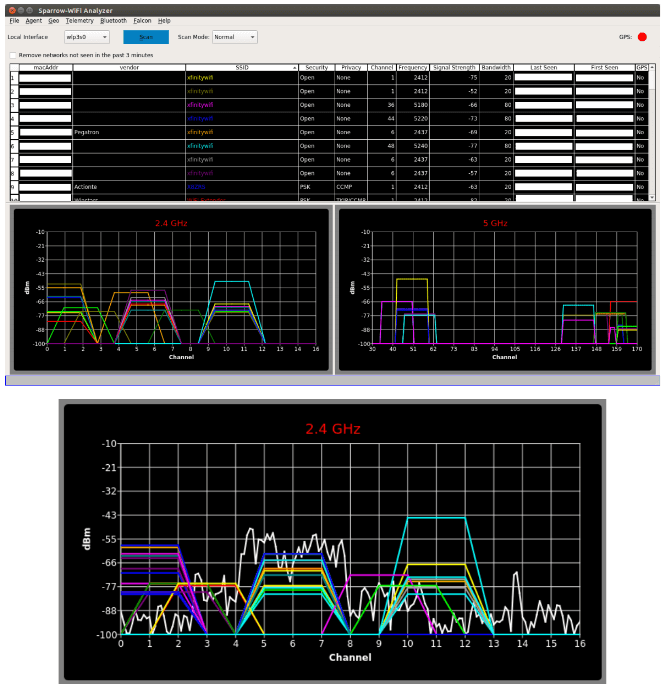
Now, let’s ask even harder questions. What if I want to step up my wifi “wardriving” and start “warflying”? Or, what if I need a mobile platform that can be sent into an area on a rover? Can I bring the same spectral awareness in a small enough platform to fly for example as an under-350-gram payload complete with power, wifi, spectral scans, and even pull GPS for anything we see? And, can I interact with it remotely for real-time visibility or have it work autonomously? Okay, now you’re just asking a lot. These were all goals of a new tool I just released called “Sparrow-wifi” which is now available on GitHub (https://github.com/ghostop14/sparrow-wifi.git). Sparrow-wifi has been purpose-built from the ground up to be the next generation 2.4 GHz and 5 GHz spectral awareness and visualization tool. At its most basic, it provides a more comprehensive GUI-based replacement for tools like inSSIDer and linssid and runs specifically on Linux. In its most comprehensive use cases, Sparrow-wifi integrates wifi, software- defined radio (HackRF), advanced Bluetooth tools (traditional and Ubertooth), GPS via gpsd, and drone/rover operations using a lightweight remote agent and GPS using the Mavlink protocol in one solution.

Sparrow-Wifi Spectral Fusion. Wifi & Bluetooth dongle data + Live spectrum from a HackRF.

A full list of the possible scenarios that Sparrow-WiFi was designed for is pasted bleow.

  • Basic wifi SSID identification.
  • Wifi source hunt - Switch from normal to hunt mode to get multiple samples per second and use the telemetry windows to track a wifi source.
  • 2.4 GHz and 5 GHz spectrum view - Overlay spectrums from Ubertooth (2.4 GHz) or HackRF (2.4 GHz and 5 GHz) in real time on top of the wifi spectrum (invaluable in poor connectivity troubleshooting when overlapping wifi doesn't seem to be the cause).
  • Bluetooth identification - LE advertisement listening with standard Bluetooth, full promiscuous mode in LE and classic Bluetooth with Ubertooth.
  • Bluetooth source hunt - Track LE advertisement sources or iBeacons with the telemetry window.
  • iBeacon advertisement - Advertise your own iBeacons.
  • Remote operations - An agent is included that provides all of the GUI functionality via a remote agent the GUI can talk to.
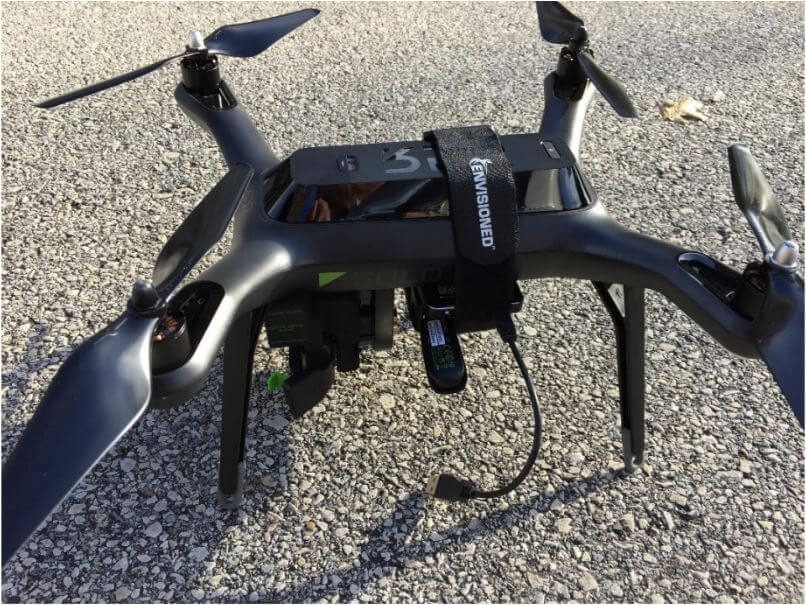
  • Drone/Rover operations - The agent can be run on systems such as a Raspberry Pi and flown on a drone (it’s made several flights on a Solo 3DR), or attached to a rover in either GUI-controlled or autonomous scan/record modes. And yes, the spectrum output works over this connection as well.
  • The remote agent is HTTP JSON-based so it can be integrated with other applications
  • Import/Export - Ability to import and export to/from CSV and JSON for easy integration and revisualization. You can also just run 'iw dev <interface> scan' and save it to a file and import that as well.
  • Produce Google maps when GPS coordinates are available for both discovered SSID's / Bluetooth devices or to plot the wifi telemetry over time.
Sparrow WiFi running on a Raspberry Pi on a drone

A brief look at the FaradayRF

The FaradayRF is not a software defined radio, but it is a computer controlled digital TX/RX radio device. Basically it is a radio designed to communicate digital data over the 33 cm ham/ISM band. The 33 cm band is between 902 to 928 MHz in the ITU Region 2 area (Americas, Canada, Greenland and some pacific islands). It was designed for amateur radio operators out of the need for a device that allows for easy experimentation with digital radio. An amateur radio licence is required, but only at the technician level which is the easiest licence to obtain.

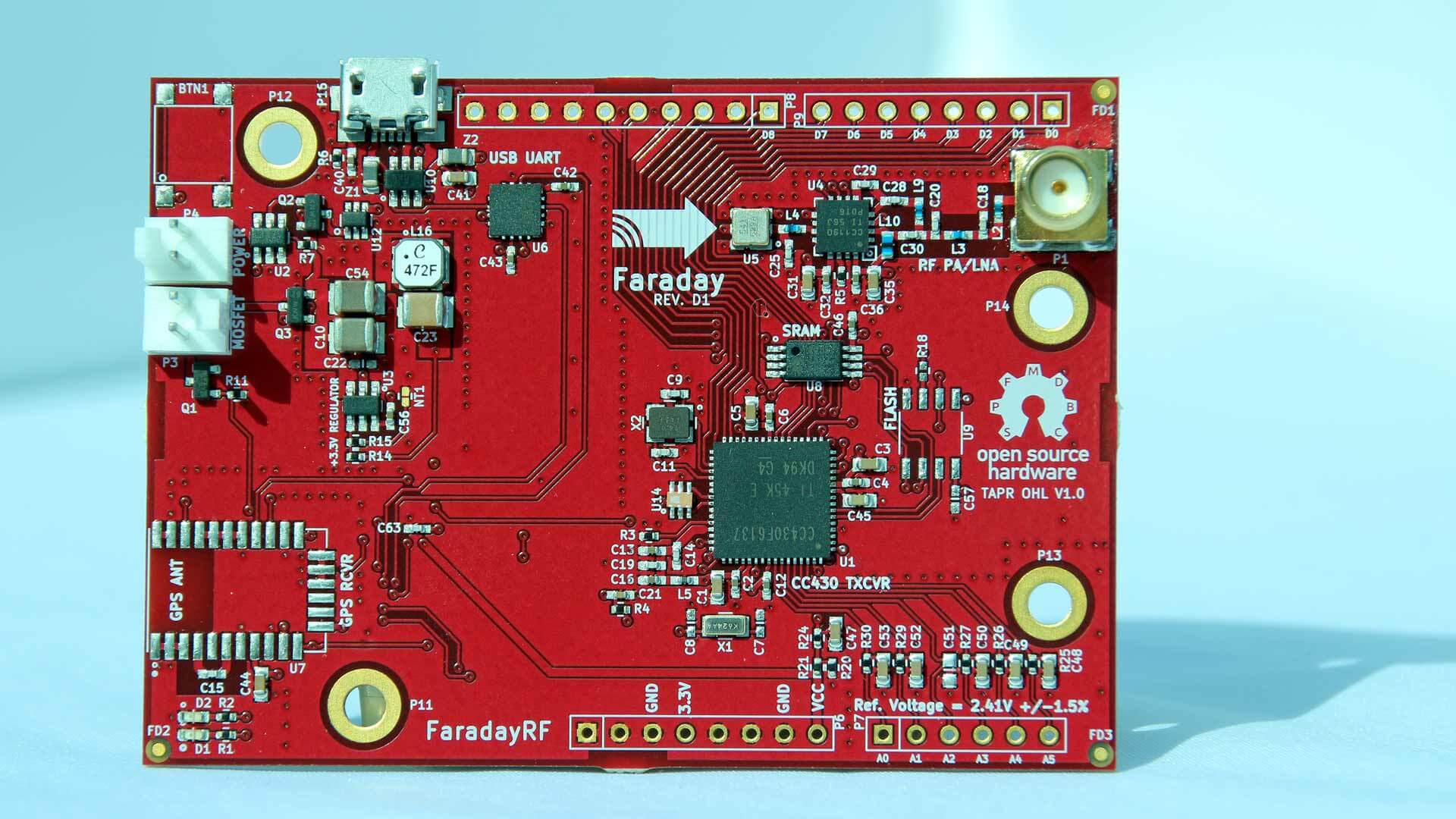
The product itself is a simple PCB which has on board a low power microcontroller (no OS), a GPS module, and an RF front end that can TX up to 400 mW. They write that with 400 mW a signal at 900 MHz can be transmitted up to 40 miles away. Also, by using low power micro-controllers and hardware radio (instead of SDR), they write that they were able to power the device from a single 9V battery for over 12 hours. The hardware and software is also all open source.

In some ways the FaradayRF is kind of similar to the Yardstick One/PandwaRF radios which were designed for reverse engineering or security research on digital signals. But the FaradayRF comes with SAW filtering to provide a clean output, an amplifier to boost the signal, and software aimed at providing digital comms making it more for amateur radio use.

Some applications might include point to point telemetry/comms, high altitude balloons, ocean buoys, digital voice, APRS, text messaging etc.

The FaradayRF starter set currently costs $300 USD and includes two units (one with GPS included and another without) or $330 USD with two GPS capable units.

Over on TwiT the creators were interviewed earlier on in the year and a video of that interview is available. Also check out their blog which shows some of the interesting things that they're doing with the FaradayRF.

The FaradayRF PCB
The FaradayRF PCB

There was also a 5 minute "lightning talk" about the FaradayRF presented at the DCC 2017 conference, which we show below. The talk about the FaradayRF starts at 9:57.

HRN 354: Lightning Talks from the 2017 DCC on Ham Radio Now


Defcon 25 SDR and Radio Related Talks

Defcon is a huge yearly conference based on the topics of information security and hacking. Some of the talks relate to wireless and SDR concepts. Recently videos from the last Defcon 25 conference held in July 2017 have been uploaded to YouTube. Below is a selection of some interesting SDR and radio related talks that we have found. If you're interested in exploring the rest of the talks then you can find them on their YouTube page. Most of the radio related talks are in the 'WiFi Village' category.

DEF CON 25 Wifi Village - Balint Seeber - Hacking Some More of the Wireless World

The hacking continues on from last year! Three interesting applications will be demonstrated, and their underlying theory and design explained. The audience will be exposed to some novel GNU Radio tips and DSP tricks. INMARSAT Aero will be revisited to show (in Google Earth) spatial information, such as waypoints and flight plans, that are transmitted from airline ground operations to airborne flights. A good chunk of the VHF band is used for airline communications; plane spotters enjoy listening to tower and cockpit communications.

Modern SDRs can now sample the entire band, and as AM modulation is used, it's possible to use a counterintuitive, but simple, demodulator chain (first shown by Kevin Reid's wideband 'un-selective AM' receiver) to listen to the most powerful transmission. This will be demonstrated with a GNU Radio-based implementation. It is also possible to 'spatialise' the audio for the listener using stereo separation, which can convey a transmission's relative position on the spectrum. FMCW RADAR experiments are enhanced to include Doppler processing.

Plotting this new velocity information, due to the Doppler effect, shows whether a target is heading toward or away from you, and often reveals targets not normally seen in range-only information - this demonstrates the true power of full RADAR signal processing. This technique will be applied to the live audio demo, a new live SDR demo, CODAR ocean current tracking, and passive RADAR exploiting powerful ATSC digital television signals (this was used to track aircraft on approach across the Bay Area).

DEF CON 25 Wifi Village - Balint Seeber - Hacking Some More of the Wireless World

DEF CON 25 - Matt Knight - Radio Exploitation 101

What do the Dallas tornado siren attack, hacked electric skateboards, and insecure smart door locks have in common? Vulnerable wireless protocols. Exploitation of wireless devices is growing increasingly common, thanks to the proliferation of radio frequency protocols driven by mobile and IoT. While non-Wi-Fi and non-Bluetooth RF protocols remain a mystery to many security practitioners, exploiting them is easier than one might think.

Join us as we walk through the fundamentals of radio exploitation. After introducing essential RF concepts and characteristics, we will develop a wireless threat taxonomy by analyzing and classifying different methods of attack. As we introduce each new attack, we will draw parallels to similar wired network exploits, and highlight attack primitives that are unique to RF. To illustrate these concepts, we will show each attack in practice with a series of live demos built on software-defined and hardware radios.

Attendees will come away from this session with an understanding of the mechanics of wireless network exploitation, and an awareness of how they can bridge their IP network exploitation skills to the wireless domain.

DEF CON 25 - Matt Knight - Radio Exploitation 101

Continue reading →

xaVNA: Kickstarter for a $200 Open Hardware VNA

Thanks to Cary Wang for submitting news about his new Kickstarter for a $200 open hardware VNA called the xaVNA. The xaVNA is PC USB based, has a guaranteed frequency range of 140 MHz to 2.5 GHz (typical 137 MHz - 3.5 GHz), and is supposed to be a lower cost alternative to other low end PC based VNAs such as the PocketVNA and miniVNA Tiny. In addition to the lower cost, the xaVNA is advertised as being superior to its competitors as it has less trace noise and no warm up time is required, as well as the hardware and software being open source.

A VNA (Vector Network Analyzer) is a tool that can allow you to easily measure things like the SWR curve of an antenna, the characteristics of a filter, or the loss of a coax cable for example. So it is a very useful tool to have around if you are building home brew antennas or filters for your SDRs. Compared to a standard antenna analyzer, a VNA gives you complex impedance/phase information as well, making it possible to design better circuits and antennas.

Currently the closest competitors on the market are other PC based VNA's like the PocketVNA ($430) and the miniVNA Tiny ($580). The main advantage of the competitors so far is that they go down to the HF frequencies, but a stretch goal of the Kickstarter is to create an xaVNA that goes down to 10 MHz.

At the moment they only have a functional prototype with the second iteration soon to be ready. The delivery date of a completed unit is expected to be around April 2018. But as with any crowdfunded project remember to only back the project if you are willing to lose your money as there is no guarantee that a product will actually be delivered on time, or even delivered at all.

The xaVNA Prototype
The first xaVNA prototype

ADALM-PLUTO SDR: Unboxing and Initial Testing

The PlutoSDR (aka ADALM-PLUTO) is a new RX and TX capable SDR from Analog Devices who are a large semiconductor manufacturer. The PlutoSDR covers 325 – 3800 MHz, has a 12-bit ADC with a 61.44 MSPS sampling rate and 20 MHz bandwidth. It is also priced at the bargain price of only $99 USD over on Digikey, although it seems they only produced a small batch as at the moment they seem to be already sold out. This may also be a promotional price, with the normal price $149 USD as that is the price we see on the analog.com store. But even at $149 the value for what you get is very high.

A few months ago we preordered a PlutoSDR from the analog.com store, and it was received it a few days ago.

Unboxing

The unit comes in a nice professionally designed cardboard box. Inside is the unit itself, two small 4cm long whip antennas a short 15 cm SMA cable and USB cable. The PlutoSDR unit itself comes in a blue plastic box which measures 11.7 x 7.9 x 2.4 cm and weighs 114 g in total. Two SMA ports are available, one for RX and one for TX. At the other end are two LEDs, a USB port and a power only USB port.

The PCB itself looks to be designed nicely. On the PCB you can see the main AD9363 front end chip, which is actually a 2 x 2 transceiver chip. It supports a tunable channel bandwidth of up to 20 MHz. The other chip is the ZYNQ XC7Z010 which is an ‘All Programmable SoC’. This is an FPGA, processor and ADC for the unit.

Hardware

The PlutoSDR can tune from 325 to 3800 MHz. It has an ADC which can sample at up to 61.44 MSPS with a resolution of 12-bits. There is no TCXO used, so the frequency accuracy is only 25 PPM. Although the maximum sample rate is 61.44 MSPS, the front end AD9363 only has a maximum signal bandwidth of 20 MHz, so that limits the available bandwidth.

For TXing, a claimed TX power of up to 7 dBm is available which is comparable to the TX power of the HackRF.

The unit has no shielding on it via PCB cans or a metal box, so may pick up spurious signals. However, for the intended purpose of learning and testing, no shielding is fine.

Software

Unfortunately software for the PlutoSDR is quite lacking. At the moment there is only really support for MATLAB and GNURadio.

That’s quite understandable however as the PlutoSDR is designed and promoted as a ‘learning module’ or in other words a device for students to learn with. However, if software support for SDR#, HDSDR, SDR-Console, GQRX etc was available it would also make a great unit that could not only compete with the HackRF and LimeSDR SDRs, but also perhaps the Airspy and SDRplay RSP RX only units, at least for UHF applications above 325 MHz.

In a previous post in February we’ve seen on Twitter that Alex Csete (programmer of GQRX) has had his PlutoSDR running on GQRX, but it seems the current public release does not yet support the PlutoSDR (please correct me if i’m wrong!).

The documentation is mostly all available on the PlutSDR wiki. However documentation for setting the unit up with MATLAB and GNURadio, and examples for actually using it is also still quite poor. There is a quickstart guide, but this barely helped. Presumably once more units ship out the documentation will be enhanced. 

To install the PlutoSDR drivers on Linux we used the instructions kindly provided by xavier_505 in this Reddit thread. Once GNU Radio was installed, installation of the gr-iio driver was as simple as running the two lines provided in the thread.

Testing

We’ve given the PlutoSDR a few tests in Linux with GNURadio, and very quickly with the ADI IIO Oscillioscope software for Windows.

In GNU Radio the PlutoSDR source can be found under the “Industrial IO” heading in the block menu on the right, or simply by doing CTRL+F “Pluto”.

One important note is that when using the source you need to set the “Device URI” to ip:pluto.local. This feature presumably allows you to control multiple devices via the network, but for now we’re just using it locally. Also, this may have been a problem related to running Linux in VMWare, but PlutoSDR creates new “Wired Connection” in Linux and we had to always remember to set the network connection to the PlutoSDR using the the network selector in the Linux taskbar for the network to be able to see it.

First we tested a simple FFT and Waterfall sink using the PlutoSDR source. We set the sample rate to the maximum of 61.44 MSPS, and the RF bandwidth to 60M (although the max is 20 MHz). The demo ran well and we were able to see the 900 MHz GSM band. It seems the max sample rate is not used as the output is only 30 MHz, or perhaps it’s only one ADC.

Next we adapted a simple FM receiver from csetes GNU Radio examples by replacing the USRP source file with the PlutoSDR. After adjusting the decimation we were able to receive NBFM clearly.

Next we tried adapting a simple transmit test by creating a flowgraph that would transmit a .wav file in NBFM mode using the PlutoSDR Sink. Again this ran easily and we were able to verify the output in SDR# with an RTL-SDR. No harmonics were found (the one seen in the screenshot is a harmonic from the RTL-SDR).

Finally we tested using the PlutoSDR ADI IIO Oscilloscope software and were able to generate a FFT spectrum of the GSM band.

Conclusion

This is a very nice SDR with good specs and a very very attractive price. However, it is mostly aimed at experimenters and students and you’ll need to be comfortable with exploring GNU Radio and/or MATLAB to actually use it. If you’re okay with that, then adapting various GNU Radio programs to use the PlutoSDR is quite easy.

In the future hopefully some programmers of general purpose receiving programs like SDR#/GQRX etc will release modules to support this unit too.

This is a good alternative to more expensive experimenter TX/RX SDR units like the HackRF and LimeSDR, although you do lose out on frequencies below 325 MHz.

Spectral Fusion with Sparrow-WiFi: SDR meets WiFi, Bluetooth, and drones in one new tool

Thanks to Mike (ghostop14) for submitting another interesting article this time about his work with spectral fusion on the WiFi and Bluetooth bands. In the article Mike describes his new Sparrow-WiFi tool, which is a tool that allows you to visualize the WiFi and Bluetooth signal spaces all in one spectral display. The hardware consists of a WiFi and Bluetooth dongle as well as optionally an SDR like the HackRF. The software displays all data simultaneously on the same display, so you can easily tell if there is some channel clashes occurring, or if there is some other source of interference. In Addition Sparrow-WiFi also works remotely and even with a Raspberry Pi mounted on a drone.

From the article he writes:

Thinking about the 2.4 and 5 GHz bands, my biggest issues with traditional wifi tools were always that apps such as inSSIDer which are great on the Windows side didn’t have a nice polished Linux GUI equivalent so I’d have to run a Windows system or virtual machine to visualize the signal space. On the flip side, some of the great Linux-only capabilities didn’t have a nice polished integrated UI and I’d have a lot of textual data, some of which the Windows tools didn’t provide, but it was harder to visualize. Then there’s the fact that wifi tools can’t “see” Bluetooth (and vice versa), and SDR historically didn’t have enough instantaneous bandwidth to show the whole 2.4 GHz or 5 GHz spectrum at one time. And, did I mention the tools don’t integrate or talk to each other so I can’t get a “single pane of glass” perspective of all the different ways to look at the same RF space simultaneously? It would be great if I could get one single view of the most common protocols and see the actual spectrum all in one place at the same time.

Now enter the era of the Internet-of-Things, new SDR receivers, and even drones and my old wifi tools seem to have been left a bit behind. Why do I say that? I can’t “see” all of the chatter from wireless networks, Bluetooth, ZigBee, NEST devices, remotes, etc. scattered all over my wireless bands in one view. Sure, I can run 3 or 4 tools independently to find the signals and try to see what they are, but it becomes tough to get a single integrated perspective. Especially when I can’t see my RF spectrum overlaid on top of the wifi SSID’s and Bluetooth advertisements to sort out what may be related to a a signal I know about and what may be something else. Ultimately, it means that I can’t clearly explain why I have poor wifi connections in one area versus another even though I may not have overlapping channels (I know, use 5 GHz and sparrow-wifi supports that too). The reason for this is simple; current tools don’t have true spectral awareness based on the most common possibilities in one integrated solution.

Now, let’s ask even harder questions. What if I want to step up my wifi “wardriving” and start “warflying”? Or, what if I need a mobile platform that can be sent into an area on a rover? Can I bring the same spectral awareness in a small enough platform to fly for example as an under-350-gram payload complete with power, wifi, spectral scans, and even pull GPS for anything we see? And, can I interact with it remotely for real-time visibility or have it work autonomously? Okay, now you’re just asking a lot. These were all goals of a new tool I just released called “Sparrow-wifi” which is now available on GitHub (https://github.com/ghostop14/sparrow-wifi.git). Sparrow-wifi has been purpose-built from the ground up to be the next generation 2.4 GHz and 5 GHz spectral awareness and visualization tool. At its most basic, it provides a more comprehensive GUI-based replacement for tools like inSSIDer and linssid and runs specifically on Linux. In its most comprehensive use cases, Sparrow-wifi integrates wifi, software- defined radio (HackRF), advanced Bluetooth tools (traditional and Ubertooth), GPS via gpsd, and drone/rover operations using a lightweight remote agent and GPS using the Mavlink protocol in one solution.

Sparrow-Wifi Spectral Fusion. Wifi & Bluetooth dongle data + Live spectrum from a HackRF.

A full list of the possible scenarios that Sparrow-WiFi was designed for is pasted bleow.

  • Basic wifi SSID identification.
  • Wifi source hunt - Switch from normal to hunt mode to get multiple samples per second and use the telemetry windows to track a wifi source.
  • 2.4 GHz and 5 GHz spectrum view - Overlay spectrums from Ubertooth (2.4 GHz) or HackRF (2.4 GHz and 5 GHz) in real time on top of the wifi spectrum (invaluable in poor connectivity troubleshooting when overlapping wifi doesn't seem to be the cause).
  • Bluetooth identification - LE advertisement listening with standard Bluetooth, full promiscuous mode in LE and classic Bluetooth with Ubertooth.
  • Bluetooth source hunt - Track LE advertisement sources or iBeacons with the telemetry window.
  • iBeacon advertisement - Advertise your own iBeacons.
  • Remote operations - An agent is included that provides all of the GUI functionality via a remote agent the GUI can talk to.
  • Drone/Rover operations - The agent can be run on systems such as a Raspberry Pi and flown on a drone (it’s made several flights on a Solo 3DR), or attached to a rover in either GUI-controlled or autonomous scan/record modes. And yes, the spectrum output works over this connection as well.
  • The remote agent is HTTP JSON-based so it can be integrated with other applications
  • Import/Export - Ability to import and export to/from CSV and JSON for easy integration and revisualization. You can also just run 'iw dev <interface> scan' and save it to a file and import that as well.
  • Produce Google maps when GPS coordinates are available for both discovered SSID's / Bluetooth devices or to plot the wifi telemetry over time.
Sparrow WiFi running on a Raspberry Pi on a drone

A brief look at the FaradayRF

The FaradayRF is not a software defined radio, but it is a computer controlled digital TX/RX radio device. Basically it is a radio designed to communicate digital data over the 33 cm ham/ISM band. The 33 cm band is between 902 to 928 MHz in the ITU Region 2 area (Americas, Canada, Greenland and some pacific islands). It was designed for amateur radio operators out of the need for a device that allows for easy experimentation with digital radio. An amateur radio licence is required, but only at the technician level which is the easiest licence to obtain.

The product itself is a simple PCB which has on board a low power microcontroller (no OS), a GPS module, and an RF front end that can TX up to 400 mW. They write that with 400 mW a signal at 900 MHz can be transmitted up to 40 miles away. Also, by using low power micro-controllers and hardware radio (instead of SDR), they write that they were able to power the device from a single 9V battery for over 12 hours. The hardware and software is also all open source.

In some ways the FaradayRF is kind of similar to the Yardstick One/PandwaRF radios which were designed for reverse engineering or security research on digital signals. But the FaradayRF comes with SAW filtering to provide a clean output, an amplifier to boost the signal, and software aimed at providing digital comms making it more for amateur radio use.

Some applications might include point to point telemetry/comms, high altitude balloons, ocean buoys, digital voice, APRS, text messaging etc.

The FaradayRF starter set currently costs $300 USD and includes two units (one with GPS included and another without) or $330 USD with two GPS capable units.

Over on TwiT the creators were interviewed earlier on in the year and a video of that interview is available. Also check out their blog which shows some of the interesting things that they're doing with the FaradayRF.

The FaradayRF PCB
The FaradayRF PCB

There was also a 5 minute "lightning talk" about the FaradayRF presented at the DCC 2017 conference, which we show below. The talk about the FaradayRF starts at 9:57.

HRN 354: Lightning Talks from the 2017 DCC on Ham Radio Now


Defcon 25 SDR and Radio Related Talks

Defcon is a huge yearly conference based on the topics of information security and hacking. Some of the talks relate to wireless and SDR concepts. Recently videos from the last Defcon 25 conference held in July 2017 have been uploaded to YouTube. Below is a selection of some interesting SDR and radio related talks that we have found. If you're interested in exploring the rest of the talks then you can find them on their YouTube page. Most of the radio related talks are in the 'WiFi Village' category.

DEF CON 25 Wifi Village - Balint Seeber - Hacking Some More of the Wireless World

The hacking continues on from last year! Three interesting applications will be demonstrated, and their underlying theory and design explained. The audience will be exposed to some novel GNU Radio tips and DSP tricks. INMARSAT Aero will be revisited to show (in Google Earth) spatial information, such as waypoints and flight plans, that are transmitted from airline ground operations to airborne flights. A good chunk of the VHF band is used for airline communications; plane spotters enjoy listening to tower and cockpit communications.

Modern SDRs can now sample the entire band, and as AM modulation is used, it's possible to use a counterintuitive, but simple, demodulator chain (first shown by Kevin Reid's wideband 'un-selective AM' receiver) to listen to the most powerful transmission. This will be demonstrated with a GNU Radio-based implementation. It is also possible to 'spatialise' the audio for the listener using stereo separation, which can convey a transmission's relative position on the spectrum. FMCW RADAR experiments are enhanced to include Doppler processing.

Plotting this new velocity information, due to the Doppler effect, shows whether a target is heading toward or away from you, and often reveals targets not normally seen in range-only information - this demonstrates the true power of full RADAR signal processing. This technique will be applied to the live audio demo, a new live SDR demo, CODAR ocean current tracking, and passive RADAR exploiting powerful ATSC digital television signals (this was used to track aircraft on approach across the Bay Area).

DEF CON 25 Wifi Village - Balint Seeber - Hacking Some More of the Wireless World

DEF CON 25 - Matt Knight - Radio Exploitation 101

What do the Dallas tornado siren attack, hacked electric skateboards, and insecure smart door locks have in common? Vulnerable wireless protocols. Exploitation of wireless devices is growing increasingly common, thanks to the proliferation of radio frequency protocols driven by mobile and IoT. While non-Wi-Fi and non-Bluetooth RF protocols remain a mystery to many security practitioners, exploiting them is easier than one might think.

Join us as we walk through the fundamentals of radio exploitation. After introducing essential RF concepts and characteristics, we will develop a wireless threat taxonomy by analyzing and classifying different methods of attack. As we introduce each new attack, we will draw parallels to similar wired network exploits, and highlight attack primitives that are unique to RF. To illustrate these concepts, we will show each attack in practice with a series of live demos built on software-defined and hardware radios.

Attendees will come away from this session with an understanding of the mechanics of wireless network exploitation, and an awareness of how they can bridge their IP network exploitation skills to the wireless domain.

DEF CON 25 - Matt Knight - Radio Exploitation 101

Continue reading →

xaVNA: Kickstarter for a $200 Open Hardware VNA

Thanks to Cary Wang for submitting news about his new Kickstarter for a $200 open hardware VNA called the xaVNA. The xaVNA is PC USB based, has a guaranteed frequency range of 140 MHz to 2.5 GHz (typical 137 MHz - 3.5 GHz), and is supposed to be a lower cost alternative to other low end PC based VNAs such as the PocketVNA and miniVNA Tiny. In addition to the lower cost, the xaVNA is advertised as being superior to its competitors as it has less trace noise and no warm up time is required, as well as the hardware and software being open source.

A VNA (Vector Network Analyzer) is a tool that can allow you to easily measure things like the SWR curve of an antenna, the characteristics of a filter, or the loss of a coax cable for example. So it is a very useful tool to have around if you are building home brew antennas or filters for your SDRs. Compared to a standard antenna analyzer, a VNA gives you complex impedance/phase information as well, making it possible to design better circuits and antennas.

Currently the closest competitors on the market are other PC based VNA's like the PocketVNA ($430) and the miniVNA Tiny ($580). The main advantage of the competitors so far is that they go down to the HF frequencies, but a stretch goal of the Kickstarter is to create an xaVNA that goes down to 10 MHz.

At the moment they only have a functional prototype with the second iteration soon to be ready. The delivery date of a completed unit is expected to be around April 2018. But as with any crowdfunded project remember to only back the project if you are willing to lose your money as there is no guarantee that a product will actually be delivered on time, or even delivered at all.

The xaVNA Prototype
The first xaVNA prototype

ADALM-PLUTO SDR: Unboxing and Initial Testing

The PlutoSDR (aka ADALM-PLUTO) is a new RX and TX capable SDR from Analog Devices who are a large semiconductor manufacturer. The PlutoSDR covers 325 – 3800 MHz, has a 12-bit ADC with a 61.44 MSPS sampling rate and 20 MHz bandwidth. It is also priced at the bargain price of only $99 USD over on Digikey, although it seems they only produced a small batch as at the moment they seem to be already sold out. This may also be a promotional price, with the normal price $149 USD as that is the price we see on the analog.com store. But even at $149 the value for what you get is very high.

A few months ago we preordered a PlutoSDR from the analog.com store, and it was received it a few days ago.

Unboxing

The unit comes in a nice professionally designed cardboard box. Inside is the unit itself, two small 4cm long whip antennas a short 15 cm SMA cable and USB cable. The PlutoSDR unit itself comes in a blue plastic box which measures 11.7 x 7.9 x 2.4 cm and weighs 114 g in total. Two SMA ports are available, one for RX and one for TX. At the other end are two LEDs, a USB port and a power only USB port.

The PCB itself looks to be designed nicely. On the PCB you can see the main AD9363 front end chip, which is actually a 2 x 2 transceiver chip. It supports a tunable channel bandwidth of up to 20 MHz. The other chip is the ZYNQ XC7Z010 which is an ‘All Programmable SoC’. This is an FPGA, processor and ADC for the unit.

Hardware

The PlutoSDR can tune from 325 to 3800 MHz. It has an ADC which can sample at up to 61.44 MSPS with a resolution of 12-bits. There is no TCXO used, so the frequency accuracy is only 25 PPM. Although the maximum sample rate is 61.44 MSPS, the front end AD9363 only has a maximum signal bandwidth of 20 MHz, so that limits the available bandwidth.

For TXing, a claimed TX power of up to 7 dBm is available which is comparable to the TX power of the HackRF.

The unit has no shielding on it via PCB cans or a metal box, so may pick up spurious signals. However, for the intended purpose of learning and testing, no shielding is fine.

Software

Unfortunately software for the PlutoSDR is quite lacking. At the moment there is only really support for MATLAB and GNURadio.

That’s quite understandable however as the PlutoSDR is designed and promoted as a ‘learning module’ or in other words a device for students to learn with. However, if software support for SDR#, HDSDR, SDR-Console, GQRX etc was available it would also make a great unit that could not only compete with the HackRF and LimeSDR SDRs, but also perhaps the Airspy and SDRplay RSP RX only units, at least for UHF applications above 325 MHz.

In a previous post in February we’ve seen on Twitter that Alex Csete (programmer of GQRX) has had his PlutoSDR running on GQRX, but it seems the current public release does not yet support the PlutoSDR (please correct me if i’m wrong!).

The documentation is mostly all available on the PlutSDR wiki. However documentation for setting the unit up with MATLAB and GNURadio, and examples for actually using it is also still quite poor. There is a quickstart guide, but this barely helped. Presumably once more units ship out the documentation will be enhanced. 

To install the PlutoSDR drivers on Linux we used the instructions kindly provided by xavier_505 in this Reddit thread. Once GNU Radio was installed, installation of the gr-iio driver was as simple as running the two lines provided in the thread.

Testing

We’ve given the PlutoSDR a few tests in Linux with GNURadio, and very quickly with the ADI IIO Oscillioscope software for Windows.

In GNU Radio the PlutoSDR source can be found under the “Industrial IO” heading in the block menu on the right, or simply by doing CTRL+F “Pluto”.

One important note is that when using the source you need to set the “Device URI” to ip:pluto.local. This feature presumably allows you to control multiple devices via the network, but for now we’re just using it locally. Also, this may have been a problem related to running Linux in VMWare, but PlutoSDR creates new “Wired Connection” in Linux and we had to always remember to set the network connection to the PlutoSDR using the the network selector in the Linux taskbar for the network to be able to see it.

First we tested a simple FFT and Waterfall sink using the PlutoSDR source. We set the sample rate to the maximum of 61.44 MSPS, and the RF bandwidth to 60M (although the max is 20 MHz). The demo ran well and we were able to see the 900 MHz GSM band. It seems the max sample rate is not used as the output is only 30 MHz, or perhaps it’s only one ADC.

Next we adapted a simple FM receiver from csetes GNU Radio examples by replacing the USRP source file with the PlutoSDR. After adjusting the decimation we were able to receive NBFM clearly.

Next we tried adapting a simple transmit test by creating a flowgraph that would transmit a .wav file in NBFM mode using the PlutoSDR Sink. Again this ran easily and we were able to verify the output in SDR# with an RTL-SDR. No harmonics were found (the one seen in the screenshot is a harmonic from the RTL-SDR).

Finally we tested using the PlutoSDR ADI IIO Oscilloscope software and were able to generate a FFT spectrum of the GSM band.

Conclusion

This is a very nice SDR with good specs and a very very attractive price. However, it is mostly aimed at experimenters and students and you’ll need to be comfortable with exploring GNU Radio and/or MATLAB to actually use it. If you’re okay with that, then adapting various GNU Radio programs to use the PlutoSDR is quite easy.

In the future hopefully some programmers of general purpose receiving programs like SDR#/GQRX etc will release modules to support this unit too.

This is a good alternative to more expensive experimenter TX/RX SDR units like the HackRF and LimeSDR, although you do lose out on frequencies below 325 MHz.

Listening to July’s Arecibo Observatory Ionospheric Heating Campaign

During July 24-31 the large Arecibo Radio Observatory in Puerto Rico (the big dish antenna that you may be familiar with from the movie ‘Contact’) ran an Ionospheric heating experiment which involves transmitting 600kW of net power up into the Ionosphere. This type of experiment is used for researching plasma turbulence in the ionosphere and upper atmosphere.

“The new Arecibo ionosphere HF heater nominally transmits 600 kW net power and has a unique Cassegrain dual-array antenna design that increases gain of three crossed dipoles for each band, using the signature 1000-foot spherical dish reflector,” explained Chris Fallen, KL3WX, a researcher at the University of Alaska-Fairbanks HAARP facility. He has reported that Arecibo would use 5.125 or 8.175 MHz, depending upon ionospheric conditions, but emphasized that these are estimates and frequencies may be adjusted slightly. On July 25, Arecibo was transmitting on 5.095 MHz.

Over on YouTube Mike L. used his SDRplay RSP1 together with our BCAM HPF to record some transmissions from the observatory.

Z33T’s Review of the ColibriNANO: $350 USD 10 kHz – 55 MHz SDR Dongle

Over on YouTube Mile Kokotov (Z33T) has uploaded his review of the ColibriNANO, which is a $350 USD 10 kHz – 55 MHz direct sampling SDR dongle built by Russian company Expert Electronics. It features a 14-bit direct sampling ADC which is then decimated into 16-bits at bandwidths of up to 3 MHz, or 24-bits at up to 768 kHz. This should give it excellent dynamic range preventing any sort of overloading.

In the video Mile gives the Colibri an excellent rating. In the video description he writes:

The Colibri-NANO USB stick is a powerful direct sampling SDR receiver with frequency range from 10 kHz to 55 MHz. ColibriNANO is not another cheap USB dongle found on e-bay. This high quality SDR receiver has been developed by Expert Electronics and has strongly and solidly build aluminum body, Electrostatic discharge (ESD) protection, USB 2.0 interface and a quality SMA antenna connector.

ColibriNANO has 14 bit Ananalog-To-Digital Converter, with a clock frequency of 122.88 MHz. Coverage is 10 kHz to 55 MHz, with low pass RF-filter on 55 MHz to protect from strong FM transmitters. The filter can be turned off so you can use the receiver in undersampling mode up to 500 MHz. In that case external filters and preamlifier (like the 2m filtered preamplifier from the same producer) is recommended for maximum results.. 

This excellent little SDR-receiver has nine IQ sample rates, from 48 kHz to 3 MHz so the frequency span on the spectrum window can be changed from 48 kHz up to 3 MHz.

There are no bandpass filters in the device, So one can think that a 14-bit Analog-To-Digital Converter may be subject to overload if you have powerful transmitters nearby. But the software has extensive RF gain control, so you should not have to worry too much. 
As I said before the Analog-to-Digital Converter in this wonderful SDR-receiver uses 14 Bit, and with decimation process results in an excellent 110 dB Blocking Dynamic Range. 

Another nice feature of the ColibriNANO SDR is the combined attenuator/pre-amplifier stage, which can be fine-adjusted in 0.5 dB steps from -31 to +6 dB. Together with the low noise floor and an excellent sensitivity, the result is a receiver with excellent large signal handling capabilities. The ColibriNANO is a perfect HF little SDR scanner which can be compare with much more expensive 
The Colibri-NANO can be operated directly attached to the computer of the user, or can be used remotely at a distant location. This is done with the freely available ExpertRemote software. 

At the location of the SDR a small computer is required (for example a Raspberry-Pi) and for the internet connection can be used a relatively slow internet link. This, for example, allows you to use the SDR receiver at some quiet location anywhere on the world.
Expert Electronics Software for the ColibriNANO allows you to use all the potential of the receiver: remote operation, synchronization with the transceiver, IQ channel bandwidth up to 3 MHz, control of the preamplifier and LPF and so on…

All mode for demodulation are supported. Here are Some of the software features:
– IQ output via Virtual Audio Cable
– Compatibility with any sound card installed on your PC for the audio output
– Synchronization with transceivers via CAT interface
– Remote operation with the ColibriNANO receiver 
– Special interface to control the CW Skimmer
– Screen resolution Supports FullHD and 4K monitors

And the important thing is that All new versions of the software are free!

To control the ColibriNANO via Internet you need freely available ExpertRemote system, based on the client-server connection. This system allows you to place the receiver and server in the remote location with low RF-noise but has the internet connection. This might be some remote village or place with no electrical interference and 3G/4G Internet (or any other connection type). 

Using the ExpertRemote system you can enjoy in clear noiseless reception from your phone, tablet, notebook or PC. Even simple antennas, placed in a “quiet” place, allows you to listen weak signals from the DX-stations better than in urban area filled with all kind of RF-noise.

Another feature of this system is that the receiver’s software can be synchronized with transceivers and be used as the panorama adapter with high resolution. In that way you can use the transceiver to transmit signals, and receive on your remotely located receiver via the ExpertRemote system. 

The ColibriNANO can be used with third party software like HDSDR etc.
You can find more information about this great 14 bit SDR-receiver on Expert electronics official website.
If you are interested in Radio technic and electronics fell free to visit my web-pages: www.qsl.net/z33t

This device appears that it will soon compete with the Airspy HF+ which is an upcoming SDR that claims similar performance for HF. We will work on comparing the two in a later review post.

ColibriNANO SDR-Receiver REVIEW

Feedback Request: New RTL-SDR Product, Ideas and Interest Check

We are considering building a new multi-purpose RTL-SDR product. The idea is to make several difficult to achieve applications and projects much more accessible. We are looking to implement the following ideas:

  • 3x on-board coherent RTL-SDRs built into the PCB
    • 4x SMA inputs: 3x individual inputs, 1x common input (switched between the two). 
    • All RTL-SDRs connected to the same clock source – enables coherent experiments
    • All RTL-SDR feature sets and performance equivalent to RTL-SDR V3 or better
  • On-board noise source and directional coupler
    • Useful for correlation with rtl_coherent
    • Measure filter characteristics, and get rough SWR antenna readings.
  • Noise source able to be switched in and out via silicon switches
    • Useful with rtl_coherent and other coherent experiments for cross correlation timing correction. This allows for accurate direction finding.
  • Ability to mount onto a Raspberry Pi 3, and provide an ESD protected, buffered and filtered output for RpiTX transmissions. (a PCB plugin filter specific to the transmission frequency would need to be installed onto PCB to use this feature)
    • With a filter installed the board can be connected to an antenna and used with RpiTX for simple transmissions.
    • Go portable with an Raspberry Pi 3 compatible HDMI LCD screen and a battery pack. Possible HackRF portapack alternative.

Possible applications:

  • Multi-band RTL-SDR applications
    • One RTL-SDR receiving NOAA, one receiving ADS-B, one scanning the air band.
    • Easy trunk tracking with 2x RTL-SDR. Third RTL-SDR used for something else.
    • One streaming NOAA weather, one scheduled to receive NOAA/Meteor sats and weather balloons, one receiving Outernet weather updates.
  • Coherent applications
    • RF direction finding
    • Passive radar
    • Possible radio astronomy applications?
  • Noise source applications
    • Characterize filters
    • VSWR meter with directional coupler
  • Raspberry Pi mount applications
    • Replay attacks and security analysis of ISM band devices with RpiTX and an ISM band filter.
    • Transmitting WSPR with WSPRpi.
    • Portable if used with a small HDMI screen and battery pack.
    • Possible control of board via an Android app.
    • Similar applications to the HackRF Portapack idea.
    • Multi-band noise locator if a GPS is added to the Pi. e.g. See Tim Havens’ ‘Driveby’ concept.

The idea is still in the concept stages so we’re looking for any feedback from the community to see if this is even something that people would want.

Would a receiver board like this interest anyone? We would also work on providing basic ready to go software on a downloadable image file for the Raspberry Pi 3 so starting an app would be as easy as using a launcher. We would also provide various tutorials as well.

The target price would be $99 USD. If you think this is too much, please let us know what you would expect to pay in the comments.

Are there any additional features that anyone requests? Please let us know in the comments.

Would you pay $99 USD for a 3-input RTL-SDR coherent receiver with built in noise source, antenna switcher and filtered RpiTX output?

View Results

Loading ... Loading ...