Category: RTL-SDR

UFO Detection with an Image Intensifier and FM Reflections Received with an RTL-SDR

Recently reader Syed Ali wrote in and wanted to share some experiments in UFO detection that he's been performing with an image intensifier and an RTL-SDR. The RTL-SDR is used to detect a distant FM radio station reflecting from objects passing overhead, and the image intensifier is a sensitive camera that helps make events like satellite passes more visible. In his video some visually detected objects like a possible satellite pass or aircraft at 0:09 to 0:18 and 0:55 to 1:00 seem to correlate with a radio reflection. 

Syed Ali writes:

These are three small video clips taken from an hour observation. I had an idea how to use RTL-SDR for meteor detection. So I tuned my rtl-sdr to a distant FM Radio station behind a mountain range from my own location. Any object flying over mountain range can be detected by receiving the transmission of that FM radio station via its signal being reflected from that flying object.

So I set up my image intensifier pointing towards the sky in the same direction above those ranges. I recorded a few unknown objects in the video viz a viz their RF reflections and Dopplers in sdrsharp software.

You will also notice a strange laser beam which seems to be coming from the sky to the ground because it encircles and changes its position around the field of view of my image intensifier. Moreover, in the last few seconds of the clip, you will see a strange object hovering and then taking a U turn near left edge of the video frame. Those were indeed strange findings. Please see for yourself and do leave your comments. Thanks. Observation Time : 1:20 am to 2:30 am, 21 October 2018

We're a little skeptical about the UFO claims though, as the lasers may just be car headlights, and the fast moving object may just be a bug reflecting light, and the lack of radio reflections around those points seem to confirm that nothing large is there.
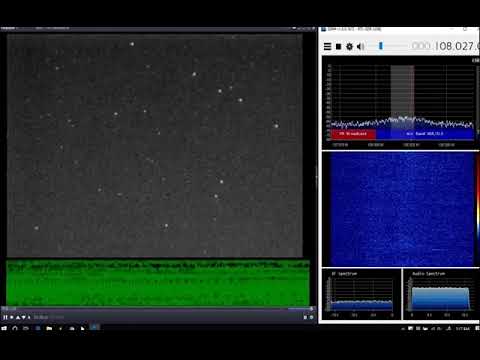
UFO Detection using Image Intensifier and RTL-SDR

SDR# Update: SpyServer Network Browser now Available

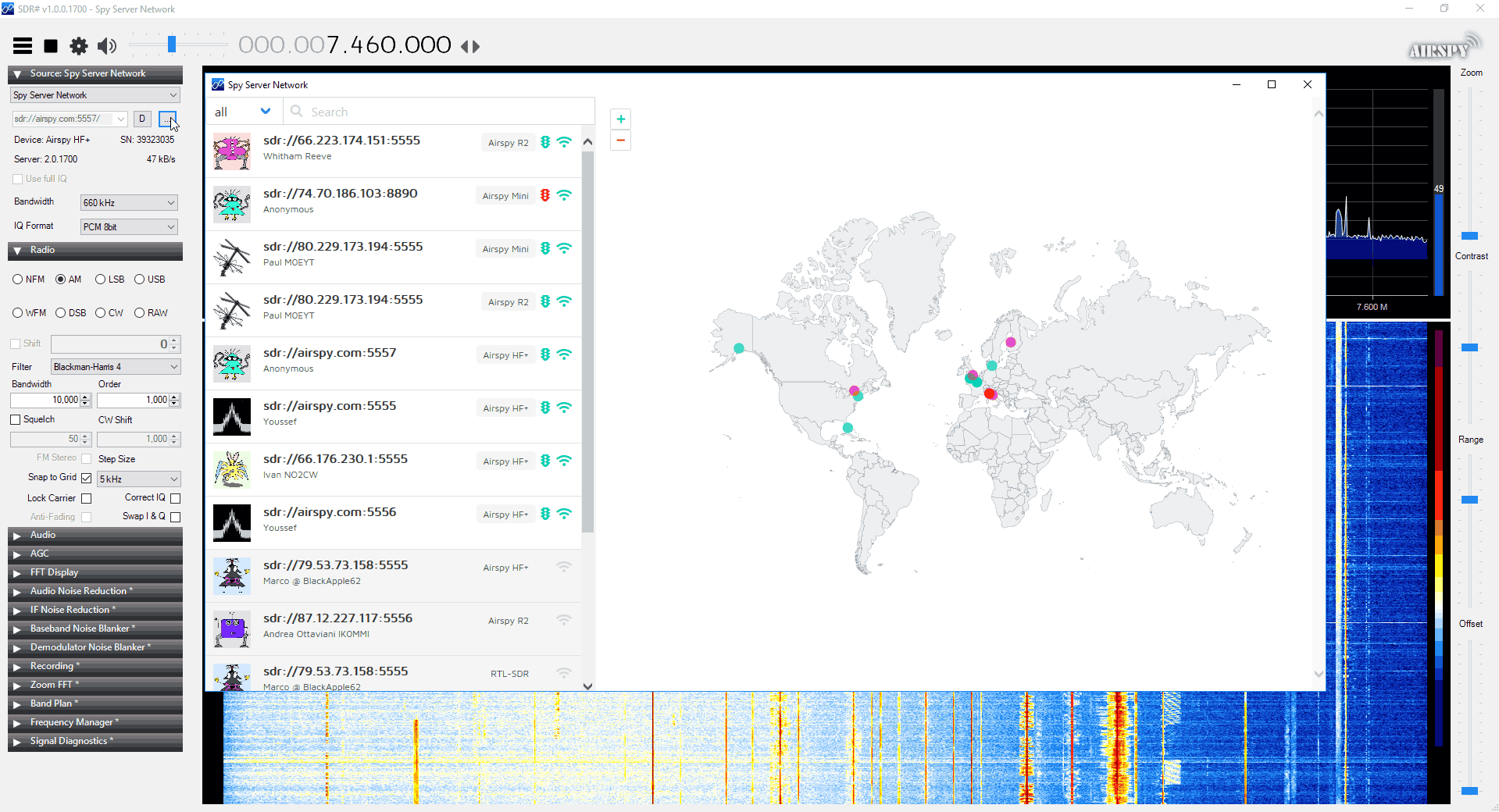
The programmers of SDR# have just released a new version which now includes a SpyServer directory browser. SpyServer is an Airspy and RTL-SDR compatible SDR streaming server for SDR#. It allows you to access your SDR remotely over the internet or a network connection by using efficient data compression techniques. 

The new browser allows you to browse for active and publicly shared SDRs that are running SpyServer. To launch the browser in the latest SDR#, choose "SpyServer Network" in the Source drop down menu, and click on the "..." button. At the moment there are only a few servers listed, and not all work. But we expect more to show up and work as people update their SpyServer software.

For SpyServer users, the latest server version will automatically list your server in the directory, but it can be turned off in the config file.

SpyServer Network Browser

Receiving GOES Weather Satellite Images with GNURadio and XRITDecoder in Windows

Thank you to ON7NDR as well as CM2ESP for submitting and figuring out a way to get GOES 16 decoding working with RTL-SDR using the free XRITDecoder, Xrit2Pic software and GNU Radio for Windows. 

ON7NDR's story is that he wanted to be able to receive GOES 16, but not being familiar with Linux he wanted a Windows based solution. He writes that the credit to finding the solution goes to CM2ESP who has written up a tutorial (pdf) explaining how to set everything up in Windows. ON7NDR has also written a separate complimentary tutorial (docx) that explains some steps in CM2ESPs tutorial a little further and provides a few tips on choosing correct the correct version of GNU Radio. He's also provided a screenshot showing what the correct config file looks like for an RTL-SDR dongle.

We note that for Windows there is also USA-Satcom's XRITDecoder, however this is closed source software which costs $100 USD.

GOES Full Disk Image of the Earth

A Complete Linux based Receiver and Decoder Application for Meteor M2

Thank you to Neoklis (5B4AZ) for writing in and letting us know about his recently completed project which is a RTL-SDR compatible receiver and decoder application for the Meteor M2 weather satellite. It is a combination of other open source programs and he writes:

I combined the recently released Meteor-M2 LRPT demodulator by Davide Belloli (dbdexter-dev), and the older image decoder (translated to C) released by Artem Litvinovich (artlav), with relevant code from my own "sdrx" SDR Receiver application to create a complete monolithic Meteor-M2 Receiver and Image Decoder application, "glrpt".

Neoklis' glrpt application is available on his website www.5b4az.org under the "Weather Imaging -> Meteor M LRPT Receiver" menu. The application is open source and appears to be Linux only. In order to install it you'll need to download and compile the source code, and compilation instructions are available in the documentation stored in the doc folder. Neoklis also writes that you can find his older APT image decoder called "xwxapt" under the same Weather Imaging heading of his website.

GLRPT User Interface Showing Processed Meteor M2 Images

Using an RTL-SDR to decode VOR Aircraft Navigation Beacons in Real Time

VOR stands for VHF Omnidirectional Range and is a way to help aircraft navigate by using fixed ground based beacons. The beacons are specially designed in such a way that the aircraft can use the beacon to determine a bearing towards the VOR transmitter. VOR beacons are found between 108 MHz and 117.95 MHz, and it's possible to view the raw signal in SDR#.

Over on RadioJitter author Arnav Mukhopadhyay has uploaded a post describing how to decode VOR into a bearing in real time using an RTL-SDR dongle. His post first explains how VOR works, and then goes on to show an experimental set up that he's created using a GNU Radio program.  With the software he was able to decode an accurate bearing towards the VOR transmitter at a nearby airport.

Arnavs post is a preview of an academic paper that he's worked on, and the full paper and code is available by request on the radiojitter post. We've also seen on YouTube that Arnav has uploaded a video showing the software working in action, and we have embedded it below.

Bearing to nearby airport VOR transmitter determined with an RTL-SDR and GNU Radio.

Reverse Engineering Wireless Blinds with an RTL-SDR and Controlling them with Amazon Alexa

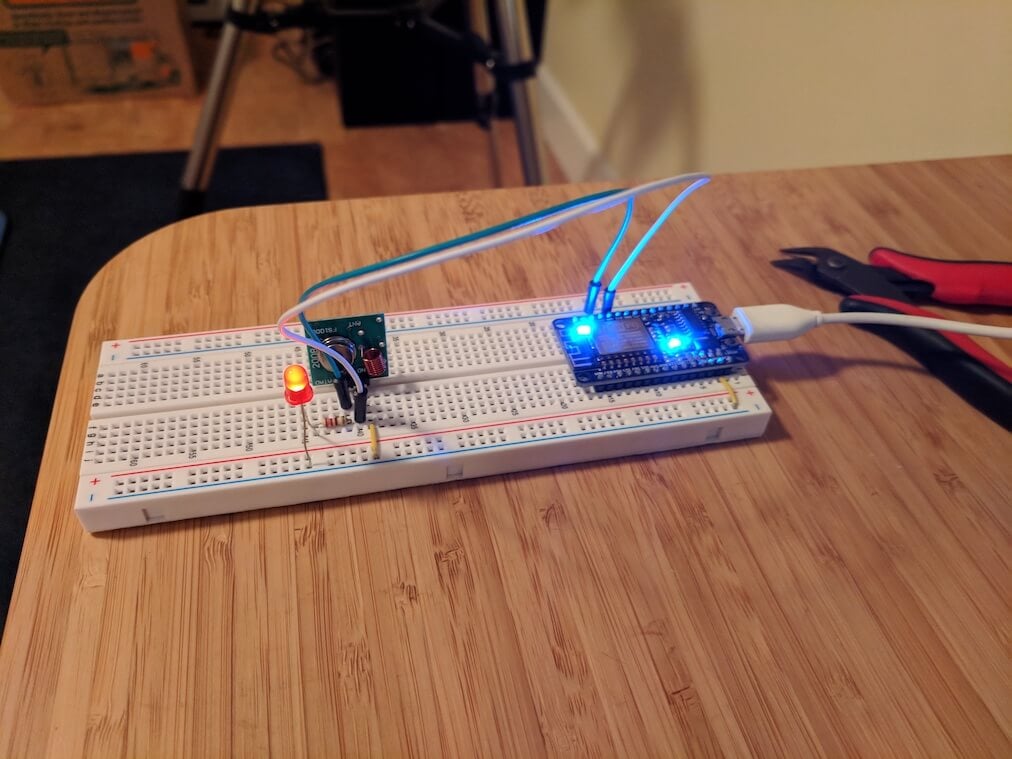
Amazon Alexa is a smart speaker that can be programmed to control home automation devices via voice commands. For example, Stuart Hinson wanted to be able to control his wirelessly controlled blinds simply by verbally asking Alexa to close or open them. Stuart's blinds could already be controlled via a 433 MHz remote control, so he decided to replicate the control signals on an ESP8266 with 433 MHz transmitter, and interface that with Alexa. The ESP8266 is a cheap and small WiFi capable microchip which many people are using to create IoT devices.

Fortunately replicating the signal was quite easily as all he had to do was record the signal from the remote control with his RTL-SDR, and use the Universal Radio Hacker software to determine the binary bit string and modulation details. Once he had these details, he was able to program the ESP8266 to replicate the signal and transmit it via the 433 MHz transmitter. The remaining steps were all related to setting up an HTTP interface that Alexa could interface with.

If you're interested, we've also previously posted about another Alexa + RTL-SDR mashup which allows Alexa to read out ADS-B information about aircraft flying in your vicinity.

[First seen on Hackaday]

The ESP8266 with 433 MHz Transmitter

More KerberosSDR Passive Radar Demos

KerberosSDR is our upcoming low cost 4-tuner coherent RTL-SDR. With four antenna inputs it can be used as a standard array of four individual RTL-SDRs, or in coherent applications such as direction finding, passive radar and beam forming. More information can be found on the KerberosSDR main postPlease remember to sign up to our KerberosSDR mailing list on the main post or at the end of this post, as subscribers will receive a discount coupon valid for the first 100 pre-order sales. The list also helps us determine interest levels and how many units to produce.

In this post we're showing some more passive radar demos. The first video is a time lapse of aircraft coming in to land at a nearby airport. The setup consists of two DVB-T Yagi antennas, with KerberosSDR tuned to a DVB-T signal at 584 MHz. The reference antenna points towards a TV tower to the west, and the surveillance antenna points south. Two highlighted lines indicate roughly where reflections can be seen from within the beam width (not taking into account blockages from mountains, trees etc).

The second video shows a short time lapse of a circling helicopter captured by the passive radar. The helicopter did not show up on ADS-B. On the left are reflections from cars and in the middle you can see the helicopter's reflection moving around.

We are expecting to receive the final prototype of KerberosSDR within the next few weeks. If all is well we may begin taking pre-orders shortly after confirming the prototype.

Subscribe to our KerberosSDR Announcement

When preorders start subscribers to this list will receive a discount coupon valid for the first 100 pre-order sales. This list also helps us determine interest levels and how many units to produce, so please sign up if you're interested.

Please select all the ways you would like to hear from RTL-SDR Blog:

You can unsubscribe at any time by clicking the link in the footer of our emails. We use MailChimp as our marketing platform. By clicking below to subscribe, you acknowledge that your information will be transferred to MailChimp for processing. Learn more about MailChimp's privacy practices here.

Spektrum SV Mod: RTL-SDR Spectrum Analyzer Software Now with Improved UI

Spektrum is a popular spectrum analyzer program that is used with RTL-SDR dongles. It is based on the command line rtl_power software and is compatible with both Windows and Linux. Thanks to it's easy to use GUI it is an excellent piece of software for scanning and determining where active signals exist, or for measuring filters and antenna SWR with a noise source.

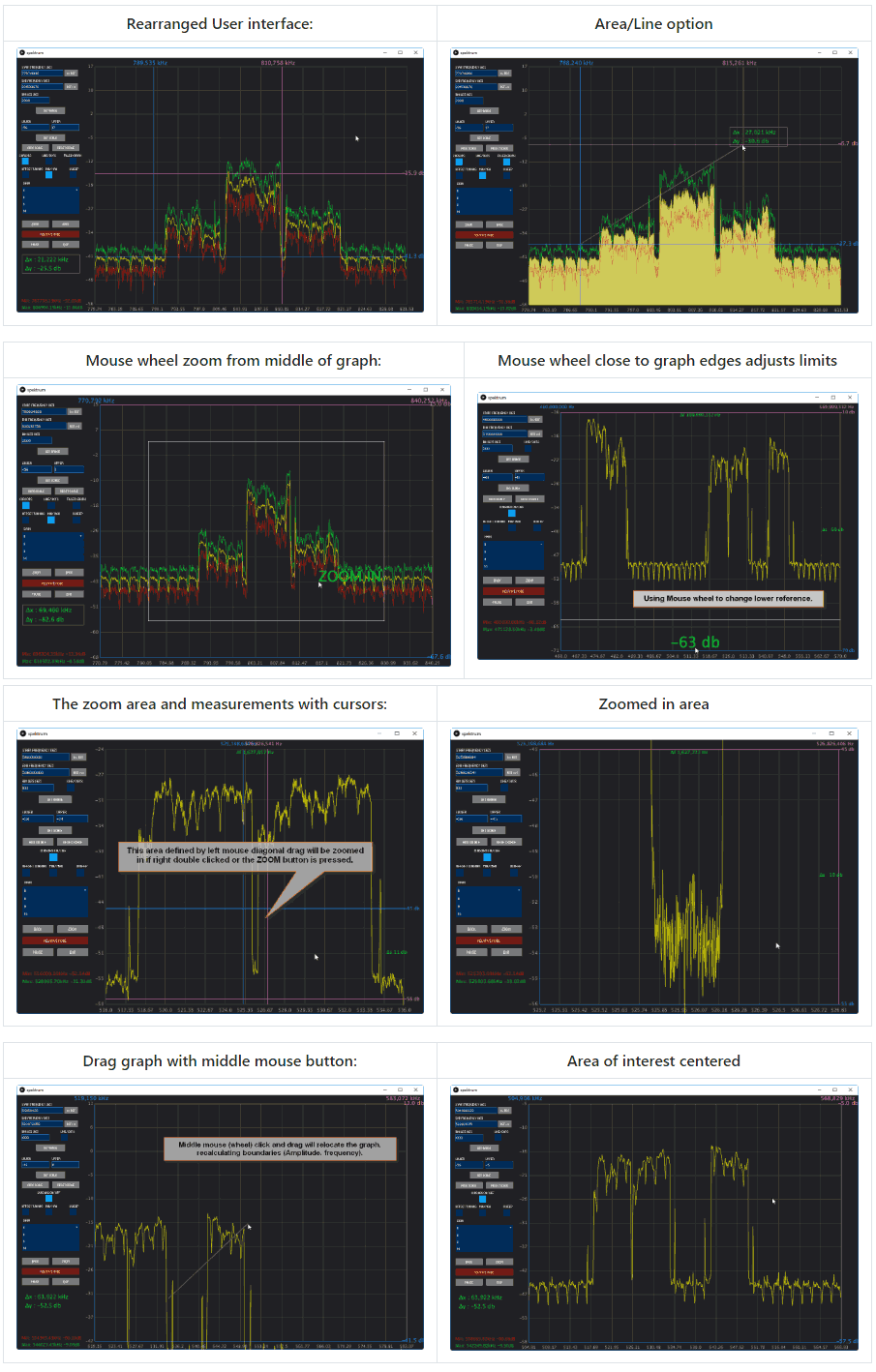
Recently SV8ARJ (George) and SV1SGK (Nick) have been working on extending the original open source Spektrum code. Their improvements focus around the UI and making it more functional and easier to use. Currently the updated branch is in alpha, and they are hoping that any testers could help report bugs, issues and wishes to them. The code is available on their GitHub and the latest Windows test build can be downloaded from their DropBox.

The changelog reads:

  • 2 Cursors for Frequency axis.
  • 2 Cursors for Amplitude axis.
  • Absolute and differential measurements with cursors.
  • Zoom functionality of the cursors's defined area (gain + frequency).
  • Mouse Wheel Gain adjustment on graph (Top area for upper, low area for lower).
  • Mouse Wheel Frequency adjustment on graph (left area for lower frequency, right for upper).
  • Mouse Wheel in the centrer of the graph performs symetric zoom in/out.
  • View/settings store/recall (elementary "back" operation, nice for quick zoomed in graph inspection).
  • Right click positions primary cursors.
  • Right Double Click positions primary cursors and moves secondary out of the way.
  • Left Double Click zooms area defined by cursors (Amplitude + frequency).
  • Left Mouse Click and Drag on a cursor moves the cursor.
  • Middle (mouse wheel) Double Click resets full scale for Amplitude and Frequency.
  • Middle (mouse wheel) Click and Drag, moves the graph recalculating limits accordingly.
  • Reset buttons to Min/Max range next to Start and Stop frequency text boxes.
  • Cursor on/off checkbox now operate on all 4 cursors.
  • ZOOM and BACK buttons.
  • Filled-in graph option (line or area).
  • Display of frequency, Amplitude and differences for all cursors.
  • Modified: Button layout.
  • Fixed: Save/Reload settings on exit/start. IMPORTANT : delete the "data" folder from the installation location if you have it.
  • Filling in graph option (line or area).
Spektrum UI Updates
Spektrum UI Updates