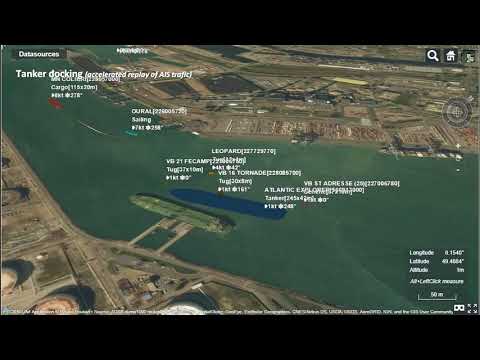
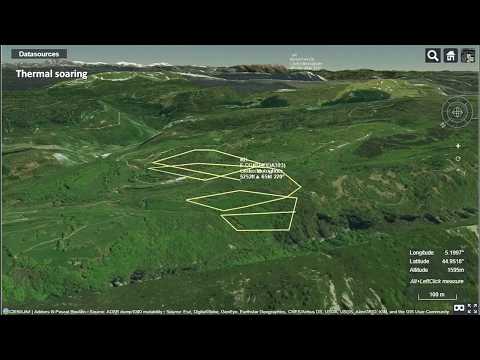
Over on YouTube user pascal poulain has uploaded a short video that shows a timelapse of the flight path of a weather balloon in Cesiumjs as it rises and falls, as well as a time lapse of a marine tanker docking, with the signals received with an RTL-SDR. In a third video pascal also shows a visualization of glider flights tracked via FLARM and the Open Glider Network which also obtains most of it’s data through RTL-SDR contributors.
Cesiumjs is a tool similar to Google Earth. The main difference is that it works on a wider array of devices through a web browser without the need for any plugins. It is often used for visualizing data on the globe. An example of some of its many demos can be found here.
We’re not sure what tools pascal used, but over on GitHub there is a tool called airtrack which can be used together with dump1090 to display flights in real time on Cesiumjs.
Illustration of 3D realtime tracking of weather sonde.
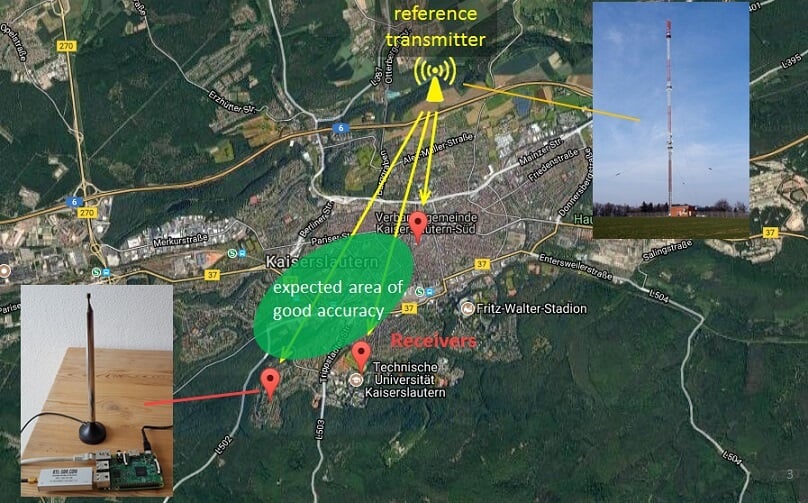
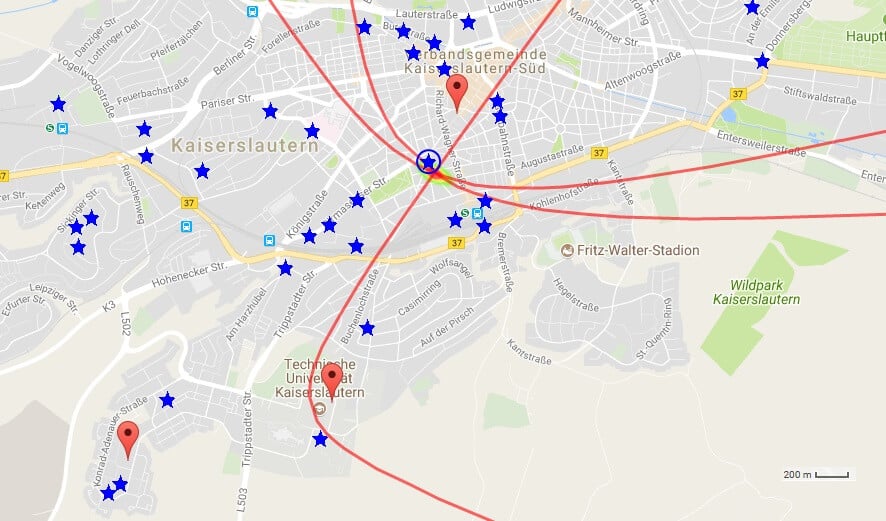
Back in August we posted a number of videos from the Software Defined Radio Academy talks held this year in Friedrichshafen, Germany. One of those talks was by Stefan Scholl, DC9ST and titled Introduction and Experiments on Transmitter Localization with TDOA. This was a very interesting talk that showed how Stefan has been using three RTL-SDR + Raspberry Pi setups to locate the almost exact position of various transmitters with time difference of arrival (TDOA) techniques. TDOA works by setting up at least three receivers spread apart by some distance. Due to the speed of radio propagation, the transmitted signal will arrive at each receiver at a different time allowing the physical origin point of the signal to be calculated.
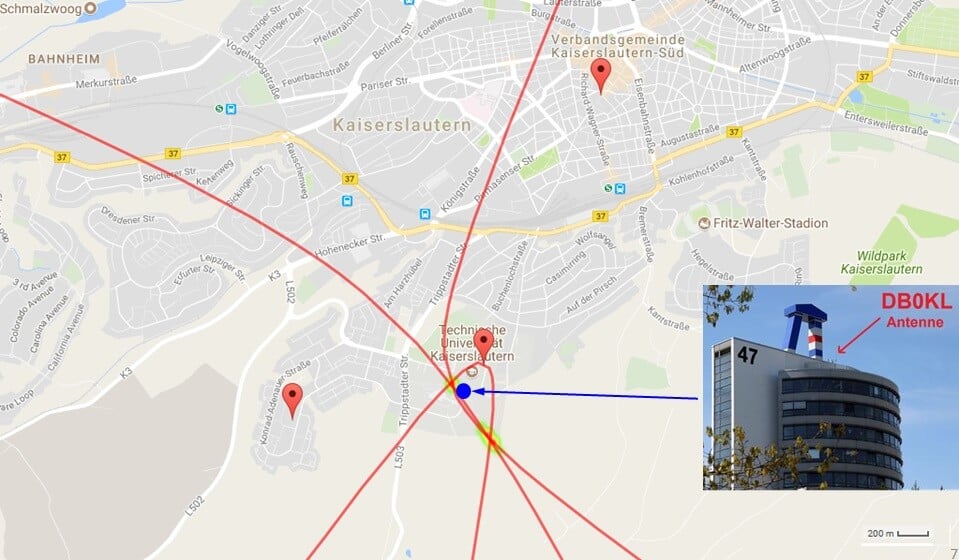
Now over on his blog Stefan has created a very nice writeup of his work with RTL-SDRs and TDOA that is definitely worth a good read. He first explains the basics of how TDOA actually works, and then goes on to explain how his RTL-SDR based system works. He discusses the important challenges such as transferring the raw data, synchronizing the receivers in time and the signal processing required.
Stefans TDOA System
He tested the system on various transmitters including a DMR signal at 439 MHz, a mobile phone signal at 922 MHz, an FM signal at 96.9 MHz and an unknown signal at 391 MHz. The results were all extremely accurate, locating transmitters with an accuracy of up to a few meters.
Earlier in the month we posted about Adrian M’s video that showed his QRadioLink software running on Android with an RTL-SDR. QRadioLink is a digital amateur radio voice decoder and encoder, that currently supports modern digital voice codecs like Codec2 and Opus. It’s compatible with a wide range of SDRs including the RTL-SDR, as well as TX capable SDRs for transmitting.
Over on YouTube Adrian M has recently uploaded a new video showing a comparison of QRadioLink receiving SSB, NFM, Codec2 and Opus voice signals at the same initial power levels. The results show that the digital modes are generally much clearer and static free even at low TX levels. He writes:
The Linux SDR transceiver application QRadioLink uses here an RTL-SDR dongle for reception. The QRadioLink transmit chain is using an USRP B200 with output power set at about half the maximum. The Codec2 digital mode works down to a low CNR (6 dB) where even SSB is hard to copy. The Opus mode provides good voice quality at a level where analog narrow FM is noisy. The code for QRadioLink is fully open-source, licensed under GPLv3, and can be found on Github, where it’s undergoing development. Bug reports, patches and suggestions are welcome.
Over on our store we now sell our dongles with a receive only dipole antenna kit that replaces the older magnetic whip style antennas from the previous kit. This was done for a few reasons
We believe that the dipole kit is much more versatile and will enable beginners to get better reception straight away
Magnets of any type are difficult to ship as they are not allowed by many airmail carriers.
While the magnetic whip still works perfectly fine, the dipole kit should make it easier to get the antenna outside or in a better position away from noisy computers/electronics, and it also allows for a simple v-dipole configuration for satellite reception.
The units are currently in stock at our Chinese warehouse either bundled with an RTL-SDR or as an individual antenna set.
This post is a guide on how to use the dipole antenna set in various configurations. First we'll show and explain about what's included in the set:
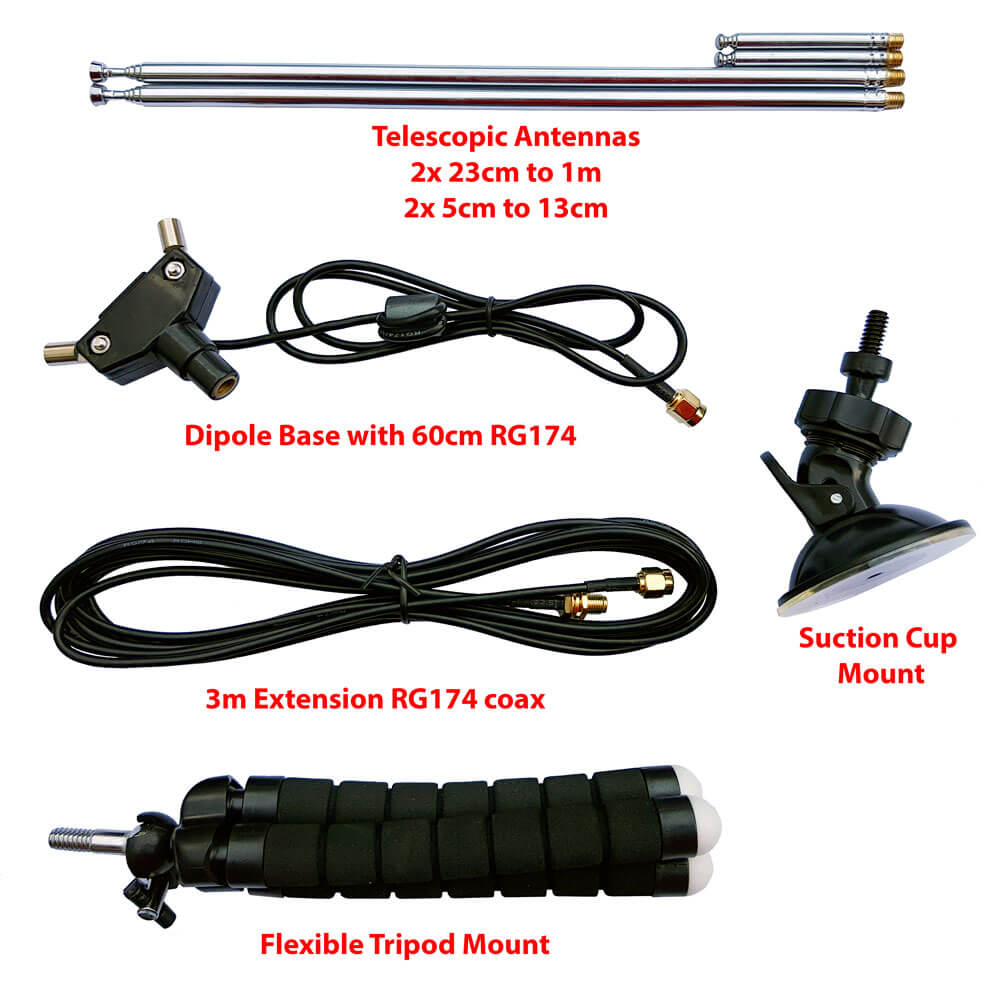
1x dipole antenna base with 60cm RG174 cable and SMA Male connector. This is the dipole base where the telescopic antennas connect to. The short run of RG174 is decoupled from the base elements with a ferrite choke. This helps to prevent the feed line from interfering with the dipole radiation pattern. The dipole has a 1/4 inch female screw on the bottom, which allows you to use standard camera mount products for mounting.
1x 3 meter RG174 coax cable extension. This coax cable extension allows you to mount the antennas in a place that gets better reception. E.g. outside on a window, or higher up.
2x 23cm to 1 m telescopic antennas. The telescopic dipoles are detachable from the dipole base via a M5 thread which allows for greater portability and the ability to swap them out. These long telescopic antennas cover VHF to UHF.
2x 5cm to 13cm telescopic antennas. These smaller antennas cover UHF to 1090 MHz ADS-B, and even still work decently up to L-band 1.5 GHz frequencies.
1x flexible tripod mount with 1/4" male screw. This piece allows you to mount the dipole on a variety of different locations. E.g. a pole, tree branch, desk, door, window sill. The legs of the tripod are bendy and rubberized so can wrap securely around many objects.
1x suction cup mount with 1/4" male screw. With this mount you can mount the dipole on the outside of a window, on a wall, car roof/window, or on any other smooth surface. To use first clean the surface with window cleaner or isopropyl alcohol. Then place the suction cup on the cleaned surface and close the lever to activate the suction.
What's included in the new Dipole kit
Dipole Orientation
Signals are normally transmitted with either horizontal, vertical or right hand/left hand circular polarization (RHCP/LHCP). This is essentially the 'orientation' of a signal, and an antenna with the same polarization should be used too for best performance. A dipole can be used in either vertical or horizontal polarization, just by orienting it either vertically or horizontally.
If you mismatch vertical and horizontal polarization or RHCP and LHCP you'll get an instant 20dB loss. If you mismatch vertical/RHCP, vertical/LHCP, horizontal/RHCP, horizontal/LHCP you'll only get a 3dB loss.
For vertical polarization, in theory it does not matter which way around you orient the antenna as long as it's vertical. However in practice, you may get slightly better results by having the element connected to the center coax conductor pointing UP. You can confirm which element is connected to the center conductor by temporarily removing the black lid on the dipole base (it can be easily pried off with a nail or flat head screwdriver).
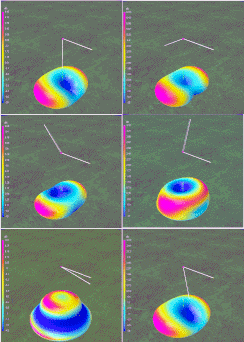
There are also ways to optimize the radiation pattern with dipoles. For example for LEO VHF satellites you can use a V-dipole configuration. You can also make a somewhat directional antenna by using a bent dipole configuration. Some more examples of dipole configurations can be found on KK4OBI's page on bent dipoles.
Terrestrial Signal Reception
Most signals broadcast terrestrially (on Earth) are vertically polarized.
To use the dipole for vertically polarized signals, all that you need to do is orient the elements vertically (up and down).
In theory there is no up and down for the dipole when used in the vertical orientation. However in practice you may find slightly better performance when the 'active' element points up. The active element is the one connected to the center conductor. You can check which element is connected to the center conductor by removing the top cap on the dipole base. This will let you look inside at the connections.
Satellite Reception
The dipole can be used in a V-Dipole configuration for polar orbiting satellite reception. See Adam 9A4QV's post where he wrote about how he discovered that it was possible to use dipoles in this configuration for excellent satellite reception. The idea is to use the dipole in horizontal polarization. This gives 3dB loss on the RHCP satellite signals, but also nicely gives 20dB loss on terrestrial signals which could be overloading your RTL-SDR.
For 137 MHz satellites like NOAA and Meteor M2 extend the larger antenna elements out to about 53.4 cm each (about 2.5 sections). Angle the dipole so it is horizontal and in a 'Vee' shape, at about 120 degrees. Place the dipole in the North-Source direction.
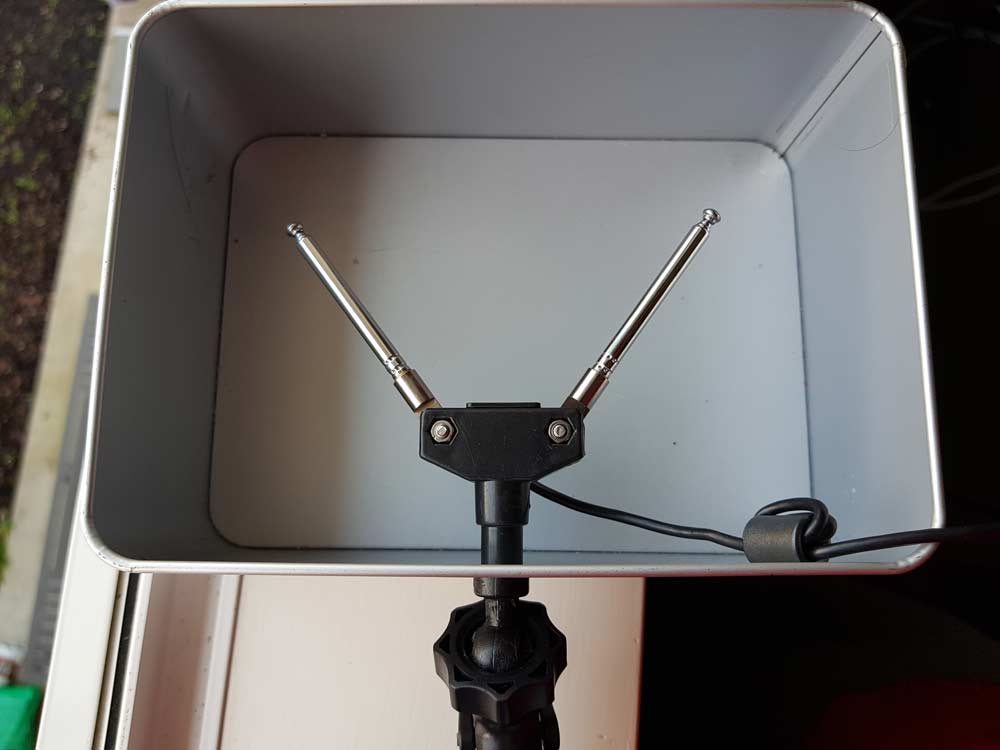
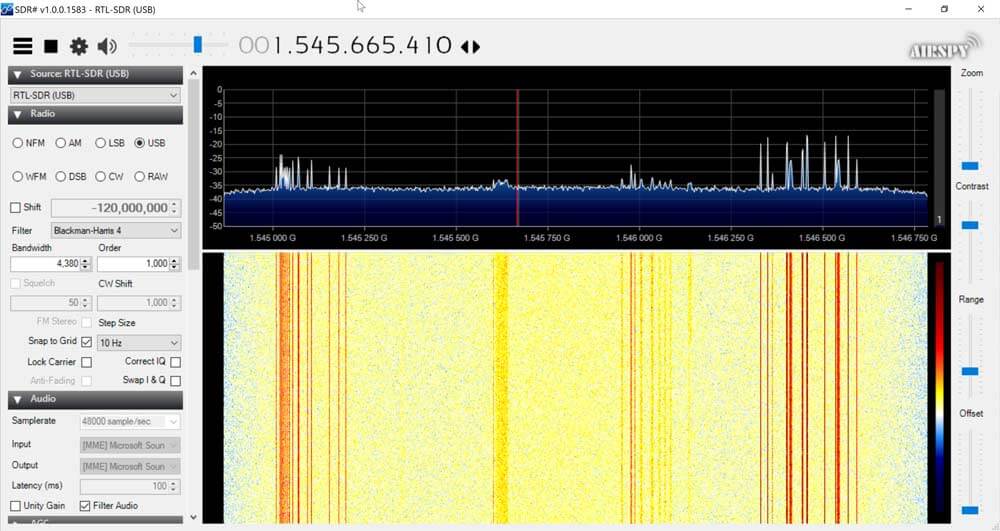
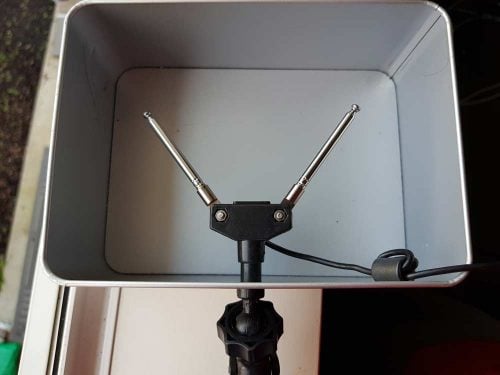
With an appropriate L-band LNA like the Outernet LNA the dipole can also somewhat work to receive L-band satellites. Using the smallest antenna collapsed, use a V-dipole configuration and point it towards the L-band satellite. Ideally use a reflector too. In the image below we used a simple cookie tin as a reflector. A hole was drilled into the center and the mount used to clamp in the antenna. This together with the Outernet LNA was enough to receive AERO and STD-C.
Choosing the Antenna Element Length
Like with the whip you can use an online calculator to calculate the optimal length for your frequency of interest. We recommend this dipole calculator. The exact length does not matter too much, but try to get the lengths as close to what the calculator says as you can. With the dipole you want both elements to be the same length.
In reality extending the antenna to almost any random length will work just fine for most strong signals. But if you're really trying to optimize those weak signals you'll want to fine tune the lengths.
Basically the longer the antenna, the lower it's resonant frequency. The shorter the antenna, the higher the resonant frequency. You want to be close to the resonant frequency. Remember that there is about 2cm of metal inside the antenna itself which needs to be added on. Below is a cheat sheet for various lengths and frequencies. Note that the length refers to the length of one side of the dipole only (e.g. the length that you need to extend each element out to).
Large Antenna, 5 Sections, 100cm + 2cm is resonant @ ~70 MHz
Large Antenna, 4 Sections, 80cm + 2cm is resonant @ ~87MHz
Large Antenna, 3 Sections, 60cm + 2cm is resonant @ ~115 MHz
Large Antenna, 2 Sections, 42cm + 2cm is resonant @ ~162 MHz
Large Antenna, 1 Section, 23cm + 2cm is resonant @ ~ 285 MHz
Small Antenna, 4 Sections, 14cm + 2cm is resonant @ ~445 MHz
Small Antenna, 3 Sections, 11cm + 2cm is resonant @ ~550 MHz
Small Antenna, 2 Sections, 8cm + 2cm is resonant @ ~720MHz
Small Antenna, 1 Section, 5cm + 2cm is resonant @ ~1030 MHz.
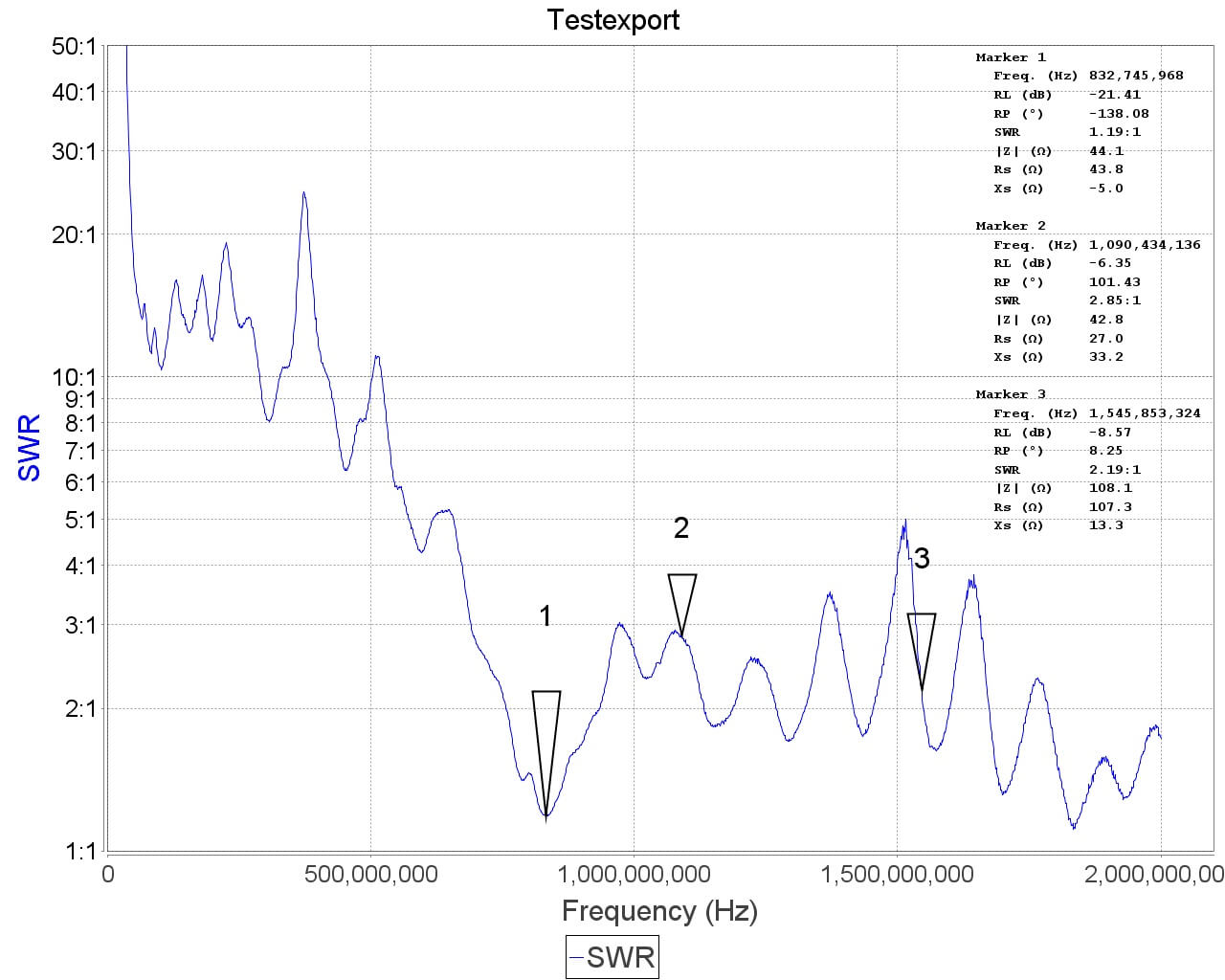
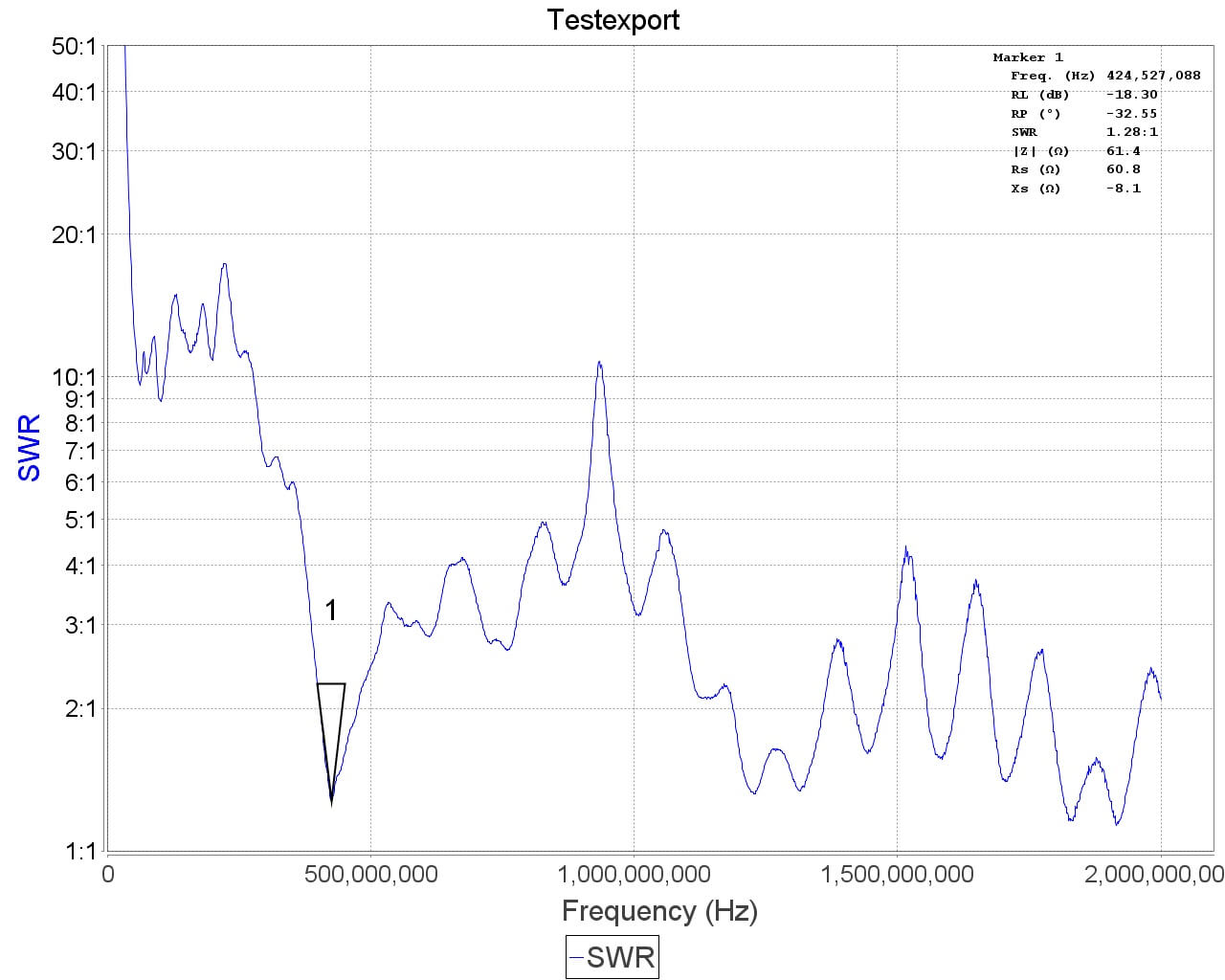
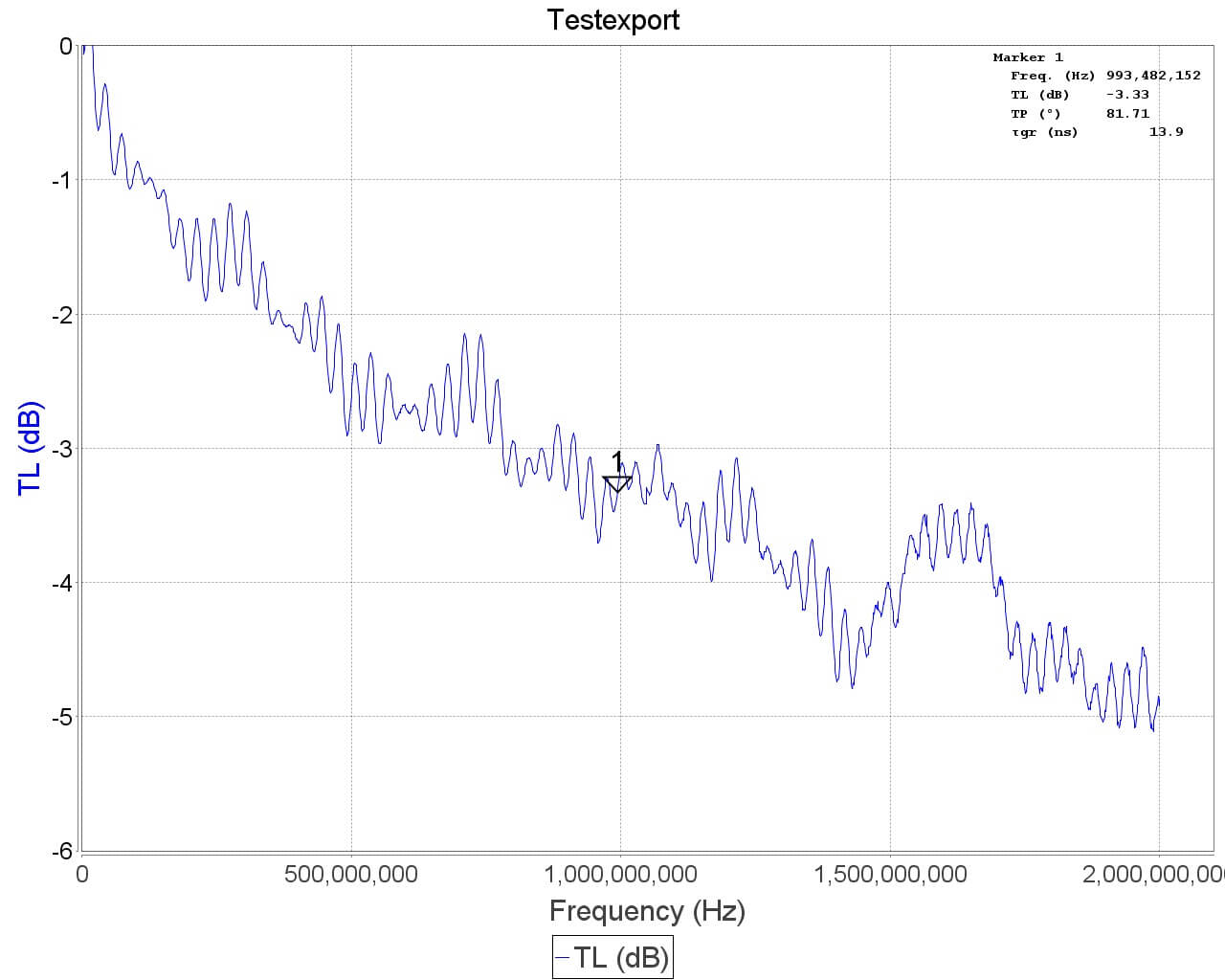
See the SWR plots at the end for a more accurate reading of the resonance points. But in most cases no matter what you extend the length to the SWR should be below 5 at most frequencies which results in 2.5 dB loss or less. More accurate info on VSWR loss graphs can be found in this document from the ARRL "Understanding SWR by Example" (pdf).
Using the Mounts
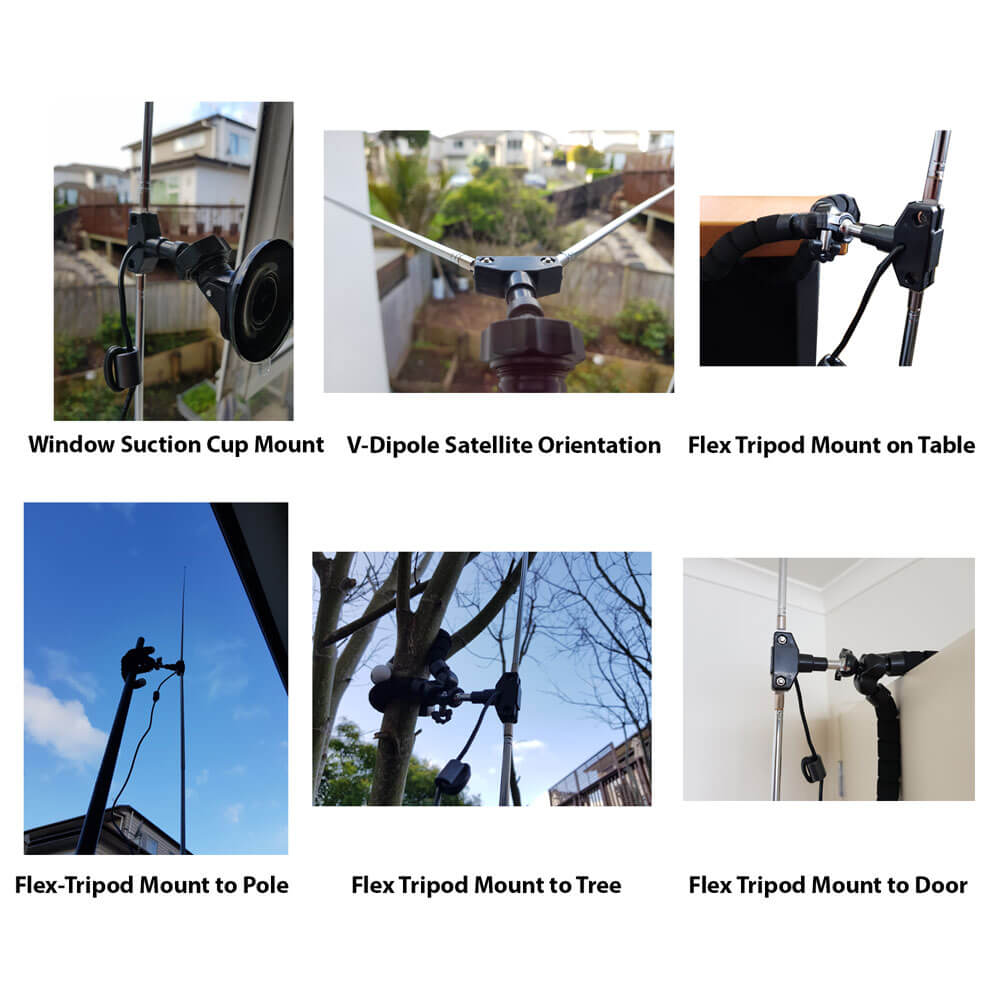
The suction cup mount allows you to easily place the antenna on a window, or any smooth surface. To use it first clean the surface thoroughly with isopropyl alcohol or glass cleaner. Then apply the suction cup and close the lever to lock it in place. The lever requires some force to push down, and this ensures a strong grip. You can then angle the antenna in the orientation that you need using the ball socket. Once in place close the ring to lock the ball socket in place.
The flexible tripod mount is useful to mounting the dipole to almost everything else. Including tables, doors, poles, trees etc. The legs of the tripod have a flexible metal wire inside and rubber sheath so they can be bent into a position to grip almost anything.
Some examples of how to use the mounts.
Note that the mounts and RG174 extension allow you to more easily use the dipole antennas outside or in a better indoors position (e.g. on a Window). But please note that like our older magnetic whip we do not recommend permanently mounting this antenna outdoors. This antenna is designed to be a portable antenna that you put up and take down at the end of the day - not for permanent outdoor mounting. It is not protected against water, not grounded so cannot handle a lightning strike and could be damaged with dirt and grime build up. For permanent outdoor mounting you could conceivably fill the inside and hinges of the dipole with silicon putty or maybe even hot glue and ground the antenna yourself, but we have not tested this. The stainless steel antennas won't rust, but dirt and grime could gum up the collapsing mechanism.
Tightening the hinge
Once you've got the orientation of the dipoles the way you want, you might want to tighten the hinge so the elements don't move so easily anymore. To do this simply take a small screwdriver and tighten the screw on the hinge.
ESD Bleed Resistor
Note that our older antennas had a 100kOhm ESD bleed resistor between the two elements. This is no longer the case on newer models. The purpose of the resistor was to slowly bleed any ESD buildup to ground.
We decided to improve ESD protection on the dongle instead, so the ESD bleed resistor is not longer required and is now omitted on newer productions.
Sample VSWR Plots
Other Notes
Note that this is NOT an antenna designed for TXing. It is an RX antenna only. So please do not TX with it unless you really know what you are doing as you could damage your TX radio.
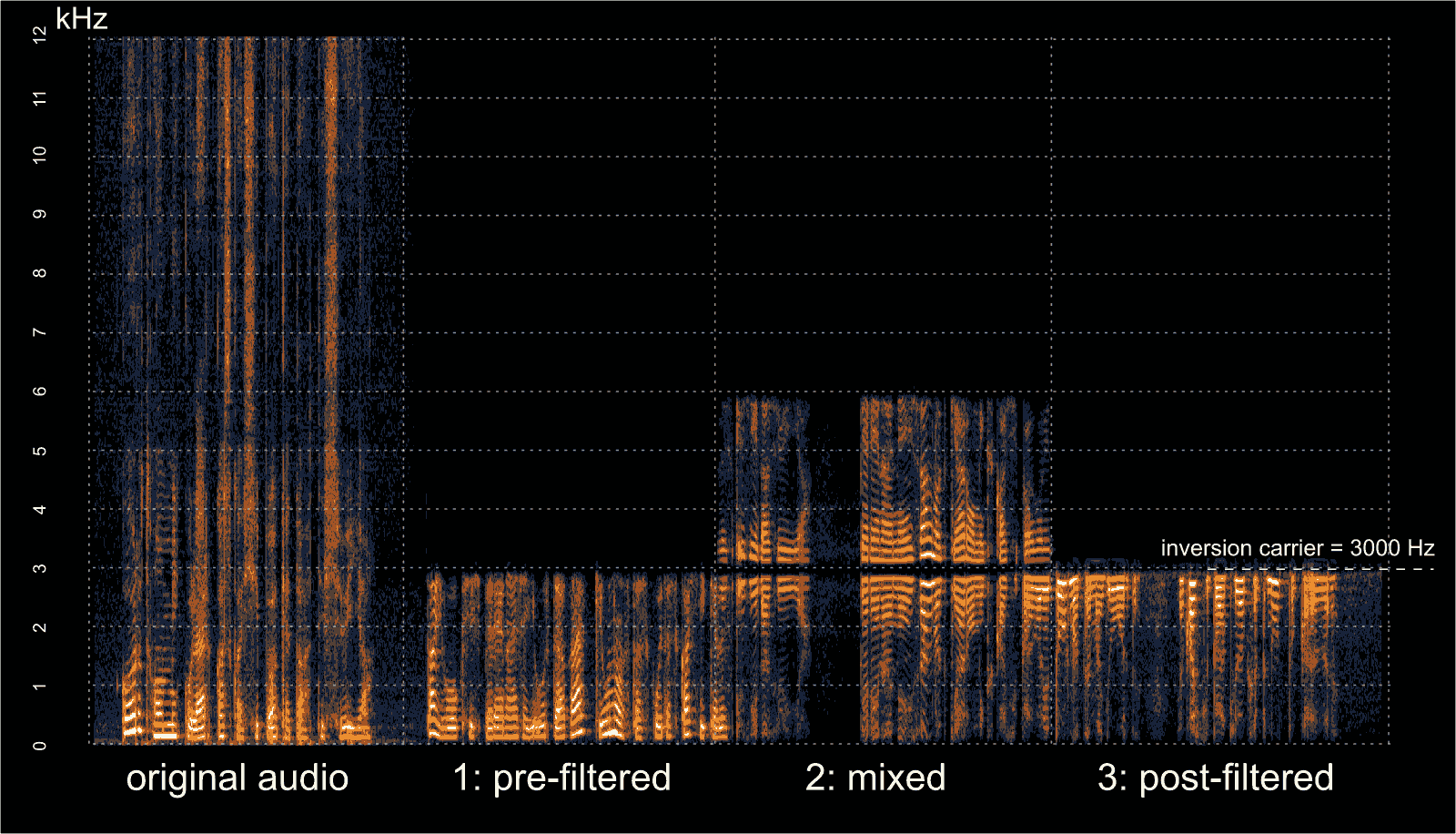
In early September we posted about Oona Räisänen’s deinvert which is a tool that can be used to unscramble voice audio that has had voice inversion scrambling applied to it. Voice inversion works by scrambling the voice frequencies so that a simple eavesdropper will have trouble listening in. A special descrambling radio is required to listen in. This provides very little real security, but may be enough to stop people with cheap scanners from listening in. Oona’s deinvert tool allows us to take a scrambled audio sample recorded with an RTL-SDR or any other radio and decramble the inversion.
In her latest blog post Oona explains how her deinvert software works and how it can also be used to decode the more difficult split-band inversion technique. She also writes that at the default quality level, the deinvert software is fast enough to run in real time on a Raspberry Pi 1.
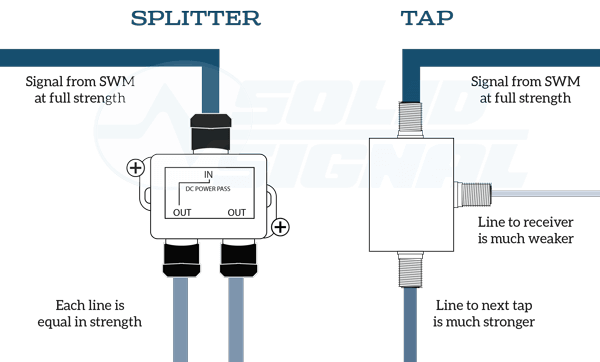
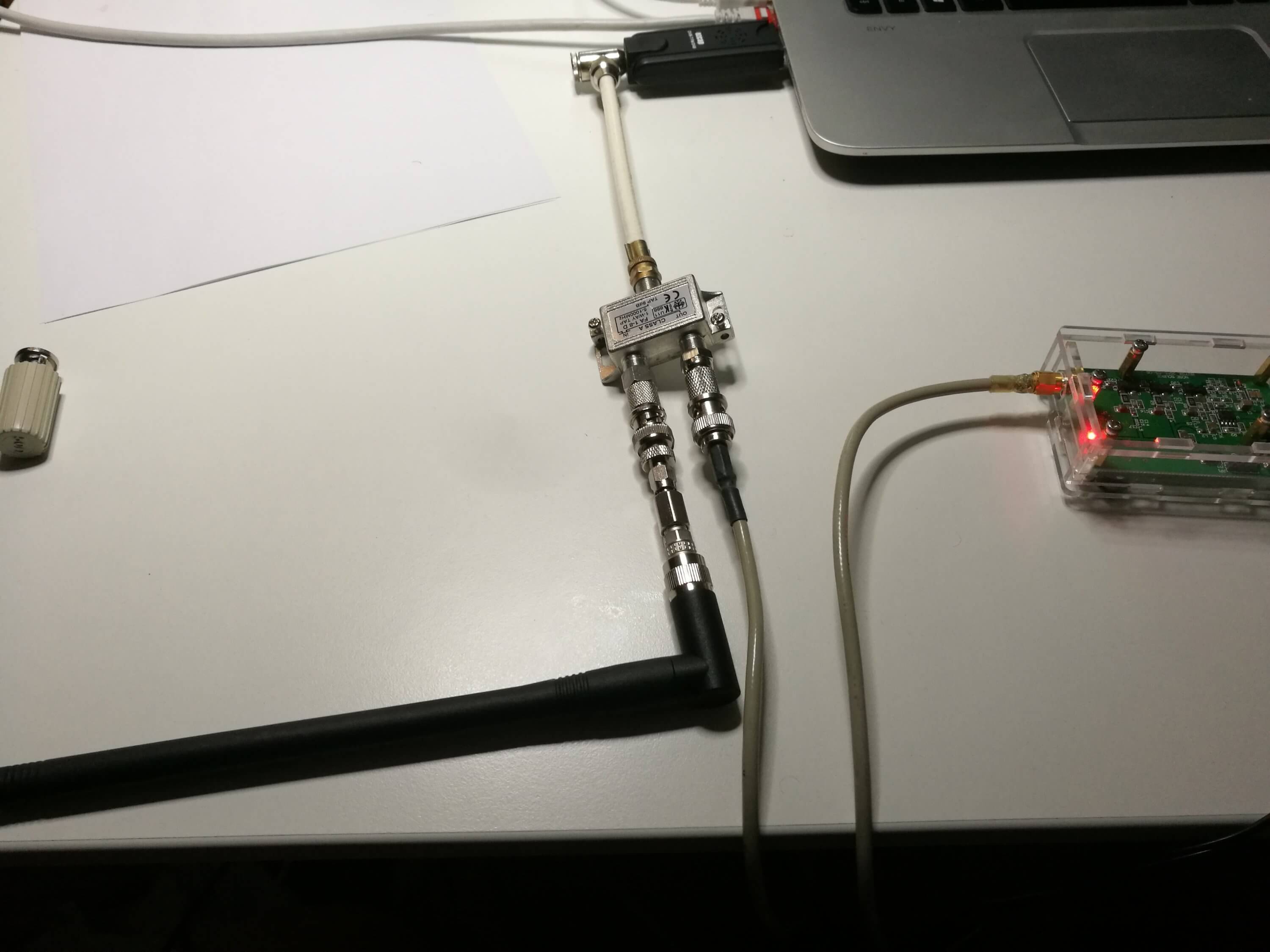
However, being without a directional coupler Tomi looked for other options and realized that cheap TV antenna network taps are also directional couplers. Taps are commonly used with Cable and Satellite TV installations to split a signal from an antenna over multiple TVs. They are designed as directional couplers to ensure that unwanted signals do not feed back into the antenna system and so that there is a pass through port to continue the strong signal down a long cable.
Note that there is a difference between a tap and a splitter. Taps are used when multiple devices need a signal over a long run of cabling. A splitter divides the signal strength by the number of out ports and can feedback unwanted signals into the system.
Taps vs. Splitter Example (Source: http://forums.solidsignal.com/showthread.php/5843-Solid-Signal-s-WHITE-PAPER-The-NEW-DIRECTV-Residential-Experience)
In his tests Tomi found that TV taps worked acceptably well to determine the resonance frequency of an antenna that he was testing. Taps can be found for as cheap as $2 on sites like eBay, although for some listings it is unclear over what frequency range they work well at as sellers assume that they will be used for TV frequencies.
Over on YouTube Christopher Bridges has uploaded a video showing him using a PlutoSDR and a GNU Radio program to transmit a DVB-S signal, which is then received with an RTL-SDR. DVB-S is a digital video broadcasting standard designed for satellite transmissions and digital amateur television video (DATV) also uses DVB-S in the 1.2 GHz amateur band. In this example the PlutoSDR transmits at 1.28 GHz.
Chris uses the rtl_sdr command line software to receive the raw IQ data at 1 MSPS, and then uses the leandvb software to decode the raw IQ file directly into a video file.
If you’re interested in TXing DVB-S/DATV but don’t have a transmit capable SDR, then we note that even a Raspberry Pi just by itself can be used to transmit it with rpidatv.
Linux gnuradio QPSK DVBS PlutoSDR + rtl MacBook leansdr
Thanks to Marcin Jakubowski for submitting news about his new software tool called iqToSharp which is a simple tool that allows you to convert rtl_sdr IQ files into the SDR# IQ format. The rtl_sdr command line tool records raw IQ files but by default they are not compatible with the format used by SDR# so a conversion is required.
This is useful as for example you could set a command line script to record an entire band for a few hours on a portable Linux device like a Raspberry Pi, and then use the converter to listen to the file on SDRSharp at a later time. Recording the raw IQ file allows you to record all signals within the entire bandwidth at full quality.
Note that IQ files can become very large so for archiving compressing them with FLAC can be useful. You might also be interested in the SDR# FilePlayer plugin which allows you to easily skip back and forth in time through a recorded IQ file.