Over on YouTube user Jan de Jong has uploaded a few screenshots and sounds on a video which shows that he was able to receive the ultrasonic sound of bats by connecting a small piezo speaker to an SDRplay RSP1A.
The piezo speaker used in reverse as a microphone appears to pickup bat echolocation sound waves which are typically between 20 to 200 kHz. The piezo is resonant in the 40 - 55 kHz range and converts sounds from that range into electric pulses that can be received directly by the RSP1A.
Researchers at Virginia Tech, the University of Electronic Science and Technology of China and Microsoft recently released a paper discussing how they were able to perform a GPS spoofing attack that was able to divert drivers to a wrong destination (pdf) without being noticed. The hardware they used to perform the attack was low cost and made from off the shelf hardware. It consisted of a Raspberry Pi 3, HackRF SDR, small whip antenna and a mobile battery pack, together forming a total cost of only $225. The HackRF is a transmit capable SDR.
The idea is to use the HackRF to create a fake GPS signal that causes Google Maps running on an Android phone to believe that it's current location is different. They use a clever algorithm that ensures that the spoofed GPS location remains consistent with the actual physical road networks, to avoid the driver noticing that anything is wrong.
The attack is limited in that it relies on the driver paying attention only to the turn by turn directions, and not looking closely at the map, or having knowledge of the roads already. For example, spoofing to a nearby location on another road can make the GPS give the wrong 'left/right' audio direction. However, in their real world tests they were able to show that 95% of test subjects followed the spoofed navigation to an incorrect destination.
In past posts we've seen the HackRF and other transmit capable SDRs used to spoof GPS in other situations too. For example some players of the once popular Pokemon Go augmented reality game were cheating by using a HackRF to spoof GPS. Others have used GPS spoofing to bypass drone no-fly restrictions, and divert a superyacht. It is also believed that the Iranian government used GPS spoofing to safely divert and capture an American stealth drone back in 2011.
Over on his YouTube channel Tech Minds has recently uploaded a video that demonstrates and shows how to use the rtl_433 software with an RTL-SDR to decode 433 MHz ISM band low power devices. Typically these devices include things like home wireless temperature and weather sensors, tire pressure sensors, remote controls, and other various sensors.
In the video he sets up an RTL-SDR and magmount antenna by his window and is able to receive data from several of his neighbors weather stations, and some car key remotes. He shows how to run the software on both Linux and on Windows.
How To Decode 433Mhz Low Power Devices Using RTL433 And A RTL-SDR Receiver
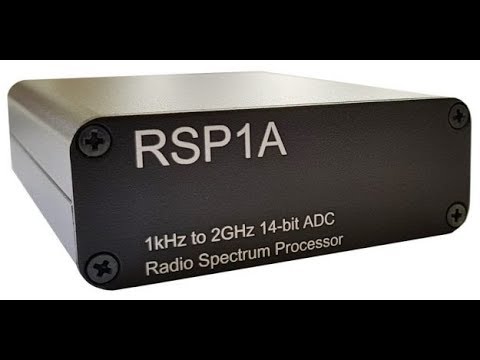
Over on our store we've just released two new products for sale. The first is a metal case upgrade kit for the SDRplay RSP1A. It is similar to the previous enclosure that we sold for the RSP1, but no longer comes with an included BCFM filter since the RSP1A has this filter built in as a software switchable option.
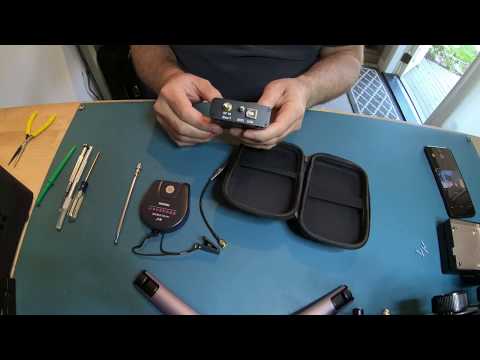
Instead we've included a portable 7 meter (23 feet) long wire antenna spool (Tecsun AN-03L) with SMA adapter, and an 11 cm to 48 cm adjustable SMA telescopic antenna. The 7 meter antenna is great for HF SWLing, and neatly rolls up into the spool for travelling. The telescopic antenna is a portable VHF/UHF antenna that can plug directly into the SMA port of the RSP1A. Both antennas fit neatly into the supplied semi-hardshell carry case. The set costs US$29.95 including shipping and is available on our store, and will be on US Amazon in a couple of weeks.
The second product is the portable antenna set just by itself. The set includes the 7m Tecsun AN-03L antenna spool, the mono plug to SMA adapter and the 11 cm to 48 cm telescopic antenna. It can be used on any SDR with SMA ports. The set costs US$11.95 and is also available on our store. It will also be on Amazon in a couple of weeks.
Recently we've found that there are now cloned units of SDRplay RSP1 and Airspy R2 units appearing on Aliexpress and eBay. (We won't link them here to avoid improving the Google ranking of the clone listings). This post is just a warning and reminder that these are not official products of SDRplay or Airspy, and as such you would not receive any support if something went wrong with them. The performance and long term software support of the clones also isn't known. Buying clones also damages the original developers abilities to bring out exciting new products like we've seen so far constantly with Airspy and SDRplay.
SDRplay
We've been in contact with SDRplay for a statement and they believe that the unit is a clone of the older and now discontinued RSP1, and not the RSP1A, despite the listings advertising RSP1A features such as additional filtering. SDRplay note from the pictures of the circuit board that the cloned unit's circuit board looks like an RSP1, and that the listing description is probably just blindly copied directly from the official RSP1A description.
Currently given that the price of the cloned RSP1 is $139, which is higher than the $109 cost of an original and newer model RSP1A, we don't see many taking up the offer.
Airspy
The Airspy R2 has also recently been cloned and now appears on Aliexpress with the lowest price being US$139 without any metal enclosure. Given that the price of an original Airspy R2 with metal enclosure is US$169, we again don't see many taking up the offer of the clone with such a small price difference.
HackRF
The HackRF is a different story in respect to clones. The HackRF design and circuits are open source, so unlike the closed source designs of the SDRplay and Airspy, in a way HackRF clones are actually encouraged and are legal. For some time now it's been possible to find cloned HackRF's on Aliexpress for only US$120 at the lowest, and from $150 - $200 including antennas and TCXO upgrades. This is quite a saving on the $299+ cost of the original HackRF. Reports from buyers indicate that the HackRF clones are actually decent and work well. The advantage of buying the original version is that you support Michael Ossmann, the creator of the HackRF, and may potentially get a better performing unit.
We've also seen clones of the HackRF Portapack on Aliexpress, which is an add-on for the HackRF that allows you to go portable. The clones go for $139 vs $220 for the original. No word yet on the quality.
RTL-SDR V3
We also note that recently there have been several green color RTL-SDRs released on the market with some being advertised as "RTL-SDR Blog V3" units. These are not our units, and are not even actual clones of the V3. These green units appear to just be standard RTL-SDRs without any real improvements apart from a TCXO. Some listings even advertise the V3's bias tee and HF features, but they are not implemented. Real V3 units come in a silver enclosure branded with RTL-SDR.COM.
Final Words
If you know how China works, you'll understand that it's highly unlikely that there is any legal recourse for SDRplay and Airspy to remove these products from sale. Once a product is popular it is almost a given that it will be cloned. It's possible that the clones might be able to be gimped via blacklisting official software, but that the companies would implement this is a stretch, and would probably be easy to get around. In the end while not ethical in a business fairness sense, these clones may be good for the consumer as they force the original designers to lower their prices and improve added value services.
If readers are interested in a comparison between the clones and original units, please let us know as we may consider an article on it.
Last month we posted that the website for the popular NOAA APT weather satellite decoding software known as WxtoImg went down. Since then we've been in contact with the developer of the software, and he did indicate that he may restore the site at some time in the future, but is currently busy with other projects so doesn't have much time to devote to his old software at the moment.
In the meantime (or perhaps permanently) a WXtoImg fan has created a clone of the original website which he's called "WXtoImg Restored". The site contains most of the downloads as well as a professional edition update key, which was released for free by the original author before. If you don't trust the third party site, some downloads are also still available from the internet archival project's copies of the original WXtoImg website.
There are still some files missing on WXtoImg Restored, and these are outlined on the new website's homepage, so if you have them please contribute them to the site email.
A radiosonde is a small weather sensor package that is typically attached to a weather balloon. As it rises into the atmosphere it measures parameters such as temperature, humidity, pressure, GPS location etc, and transmits this data back down to a receiver base station using a radio signal. The RS41 is one of the newer radiosonde modules sold by radiosonde manufacturer Vaisala, and is currently one of the most popular radiosondes in use by meteorological agencies. The signal is typically found at around 400 MHz and can be received with an RTL-SDR and an antenna tuned for 400 MHz. We have a general tutorial on radiosonde decoding available here.
There are several software packages that can decode RS41 data, such as the multi-radiosonde decoder Windows program called SondeMonitor (25 euros), or the free Linux command line software called RS. Recently a new free Windows GUI based RS41 decoder has been released by IW1GIS. The software can display on Google maps the current location and previous path of the radiosonde, as well as it's weather data telemetry.
Main features are:
Directly decoding of GFSK signal received by the FM radio receiver (the use of a Software Defined Radio is recommended).
Capability to connect and command SDRSharp software by mean of Net Remote Control plugin.
Advanced frequencies scan and decode: RS41 Tracker is able to look for RS41 radiosonde signal in a given list of frequencies, starting the radiosonde decoding when a valid signal is detected.
Real time showing radiosonde position on google map (internet connection is required)
Map auto centered on radiosonde position
Map type selectable by user (road, satellite, hybrid, terrain).
Burst killer detailed information and launch time estimation.
Radiosonde RAW data save
Post processing of RS41 RAW data file
Tracking information (elevation, bearing, slant range)
Over on our forums user thewraith2008 has just released news about his new software called TETRA Trunk Tracker. The software works in conjunction with the TETRA demodulator plugin for SDR#. It works by using two dongles, one to monitor a TETRA trunking channel, and the other to decode voice audio, although a single receiver mode is also available which works with a reduced and fixed bandwidth.
TETRA Trunk Tracker
The post reads:
TETRA Trunk Tracker will follow calls on a TETRA network.
TETRA Trunk Tracker reads DATA that is output from the SDR# plug-in TETRA Demodulator (by TSSDR) via the 'Network Info' calls log window.
It interprets this DATA to determine when a call is set-up, then instructs SDR# (VC) to move to the carrier (frequency) that the call will be on.
It will also watch out for other PDUs to determine when a SSI starts or completes transmissions and when calls are complete (Released).
Features:
A basic call recording (All or Selective call recording).
Display current call details with list of seen SSIs for that call. (SSI populate as they TX).
GSSI holding - will only allow calls with selected GSSI to be heard.
Call lockout based on GSSI. Can be unchecked in list to lockout GSSI.
Call Priority. (Only normal version)
GSSI weighted 0-9, 9 is highest. If on active call and other call event occurs, if new call has higher
priority then will switch to it.
Collect/Save all seen GSSIs with Labels and Priority, By Network.
Collect/Save seen SSIs with Labels and Last seen Date/Time, By Network.
Set a call time-out. Returns to idle state if call does not see a release PDU after X time in seconds.
Log call events to screen and file, if enabled.
Log raw CC and VC PDU messages as seen by the 'TETRA Demodulator' plug-in, if enabled.
Log GSSI daily call activity. (Simple version does not play calls when this is selected)
Set base frequency via UI.
Set CC park carrier # via UI.
Set VC park carrier # via UI.
Suppress some PDUs. (unchecked is mainly for testing only)
Suppress lockout messages.
Sort SSI and GSSIs/Lockouts (by GSSI). This only occurs on start-up.
Country Code label, defined via file (shown as menu item)
Network label, defined via file (shown in tool tip where MNC,LA is in 'Call Details' panel)
Location Area label, defined via file (shown in tool tip where MNC,LA is in 'Call Details' panel) Only shown when Network label used.
Ignores Encrypted PDUs (with no reference to them)
Set a seen GSSI priority via UI.
Update a seen GSSI/SSI label via UI.
Call active indicator.
Restore SDR# windows to a defined position.
If the TETRA Demodulator does not work for you this program will do nothing to change that.
This is the third release of this program. (TETRA Trunk Tracker v0.99.6) And 2nd release for (TETRA Trunk Tracker v0.99.6s - Simple)
Two versions are available:
Normal (Uses 2 SDR# and 2 Dongles) with TETRA Demodulator and Net Remote plug-ins
Simple (Uses 1 SDR# and 1 Dongles with some features not available) with TETRA Demodulator and Net Remote plug-ins
Backup your "Tetra-trunk-tracker.dat" settings file. Then delete "Tetra-trunk-tracker.dat" as it has changed and old one will cause error on load.
Some work as gone into trying to make TETRA Trunk Tracker easier to run once the initial setup has been done.
A MCC (Country Code) label file is included for your convenience "TETRA_mcc.txt".
It has only been tested on Windows 7 - Professional SP1 (32 bit), English
You MUST have a PC that is capable of running SDR# x 2 with the TETRA plug-in. (Not overloaded CPU usage.)
It is in alpha stage. This means is may contain errors that may cause issues with the other programs it works with. i.e. crashing them or itself.
The TETRA plug-in currently been developed by TSSDR is also in early development. Because of this any changes made in plug-in releases most likely will break this program.
I have created it to suit my needs. And it currently works for me with the TETRA network I monitor.
I make no claim that it will work for other networks.
Please read the provided files for set-up and usage:
TTT_set-up_manual.pdf
TTT_Features_and_Usage.pdf
I have tried to be as thorough as possible with the documentation to explain usage and features. I believe any questions can be answered by reading these files. These files most likely are not complete and contain errors and are not laid out as good as they could be.
It only works with the provided TETRA plug-in supplied in zip. (2018-June-06). This version uses a custom compiled version of 'Net Remote' supplied in zip
It is only meant to be a temporary solution until something better comes along.