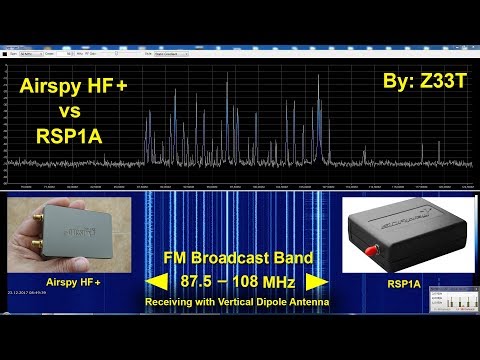
Frequent reviewer of SDR products Mile Kokotov has just uploaded on his YouTube channel a new video where he compares the Airspy HF+ against the SDRplay RSP1A on FM broadcast reception.
At first Mile compares the two against strong broadcast stations, and then later compares them on weak DX stations surrounded in amongst other strong stations. With the strong stations a difference between the two radios is impossible to detect. But with the weaker stations that are surrounded by strong signals the Airspy HF+ has the edge with it's higher dynamic range and sensitivity.
Mile writes:
In this video I am comparing two popular SDR-Receivers (Airspy HF+ and SDRplay RSP1A) on FM Broadcast Band.
I have made few recordings with every receiver with the same antenna trying to set the best SNR = signal-to-noise ratio.
My intention was to ensure the same conditions for both SDR`s in order to make as fair as possible comparison.
No DSP enhancing on the SDR`s was used.
Antenna was Vertical Dipole.
When receiving signals are strong enough, You should not expect the difference between most receivers to be very obvious!
If you compare one average transceiver (which cost about $ 1000 USD) and top class transceiver which cost ten times more, the difference in receiving average signals will be very small too. Almost negligible! But when you have difficult conditions, the very weak signal between many strong signals, than the better receiver will receive the weak signal readable enough, but cheaper receiver will not. Today it is not a problem to design and produce the sensitive receiver, but it is far more difficult to design and produce high dynamic receiver for reasonable price! The Airspy HF+ and RSP1A are very very good SDR-receivers. They have different customers target and have strong and weak sides. For examle Airspy HF+ has better dynamics in frequency range where it is designed for, but RSP1A, on the other hand, has broadband coverage...
Airspy HF+ vs SDRplay RSP1A Comparison on FM Broadcast Band
Thanks to Dr. Celalettin Uçar from Turkey for submitting a video of the work done by a PhD student who as part of his research created an RTL-SDR based ground penetrating radar simulation and metal detector. He writes:
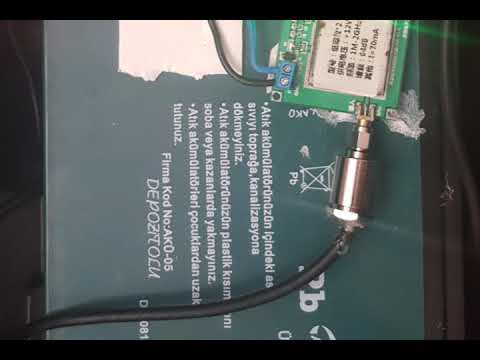
This apparatus (YAĞRIN) was created with rtlsdr in a phd work. We achieved detecting a metal gasoline tube from the depth of aproximately 1 meters. Furthermore, we created the time domain signal and ploted the reflaction from the metal with using the matlab (simulink) model.
A video on YouTube is linked which we display at the end of the post. They write that the system consists of a 12V DC supply, step down voltage regulator, ADF 4350 programmable signal generator, 25W power amplifier (470 MHz, 45 dBm signal power), Philips omnidirectional antennas (RX,TX), a 64 dB low noise amplifer and an RTL-SDR and computer to display the output. The software he uses is SDR# which appears to simply listen for a tone and detect any changes that occur when something metal moves near it. The PC also runs a MATLAB Simulink model which we believe helps detect metal signatures by plotting the reflection.
In the past we posted about a similar but simpler metal detector implementation by Ancient Discoveries.
RTL-SDR BASED GPR (Simulation) & METAL DETECTOR (YAĞRIN) - Dr. Celalettin UÇAR
Over on YouTube user Laboenligne.ca has uploaded a review of the ColibriNANO. If you didn't already know the ColibriNANO is a low cost but high performance direct sampling receiver designed for the HF bands. Currently it costs $269.95 US from nsiradio. It now competes almost directly with the recently released Airspy HF+ which is a lower cost $199 unit with similar performance specifications.
Laboenligne.ca's review initially goes over the specs of the ColibriNANO and usage of the free ExpertSDR2 software that is used with the ColibriNANO. He also shows how the ColibriNANO can be connected to a Raspberry Pi 3 and used remotely over the internet. This is similar to the Airspy's SpyServer, but the difference is that ColibriNANO's server interface works in a browser via HTML5, so it can be used on any platform including mobile devices. Of course the ExpertSDR2 software can also be used to connect to the server as well. In his review Laboenligne.ca notes that he is very impressed with the remote web interface and has set up a public server demonstration of his ColibriNANO available at vpn.laboenligne.ca. He notes that if there is no reception to try again later, as he may be using the antenna on another radio.
The ColibriNANO SDR receiver review (English version)
Many homes in the US and elsewhere no longer require meter reader personnel to come onto the property to read a physical meter at the back of the house. Instead the meter transmits wireless data in the 900 MHz ISM band about electricity usage, and all the meter reader has to do is turn up outside the house and take a reading from the street.
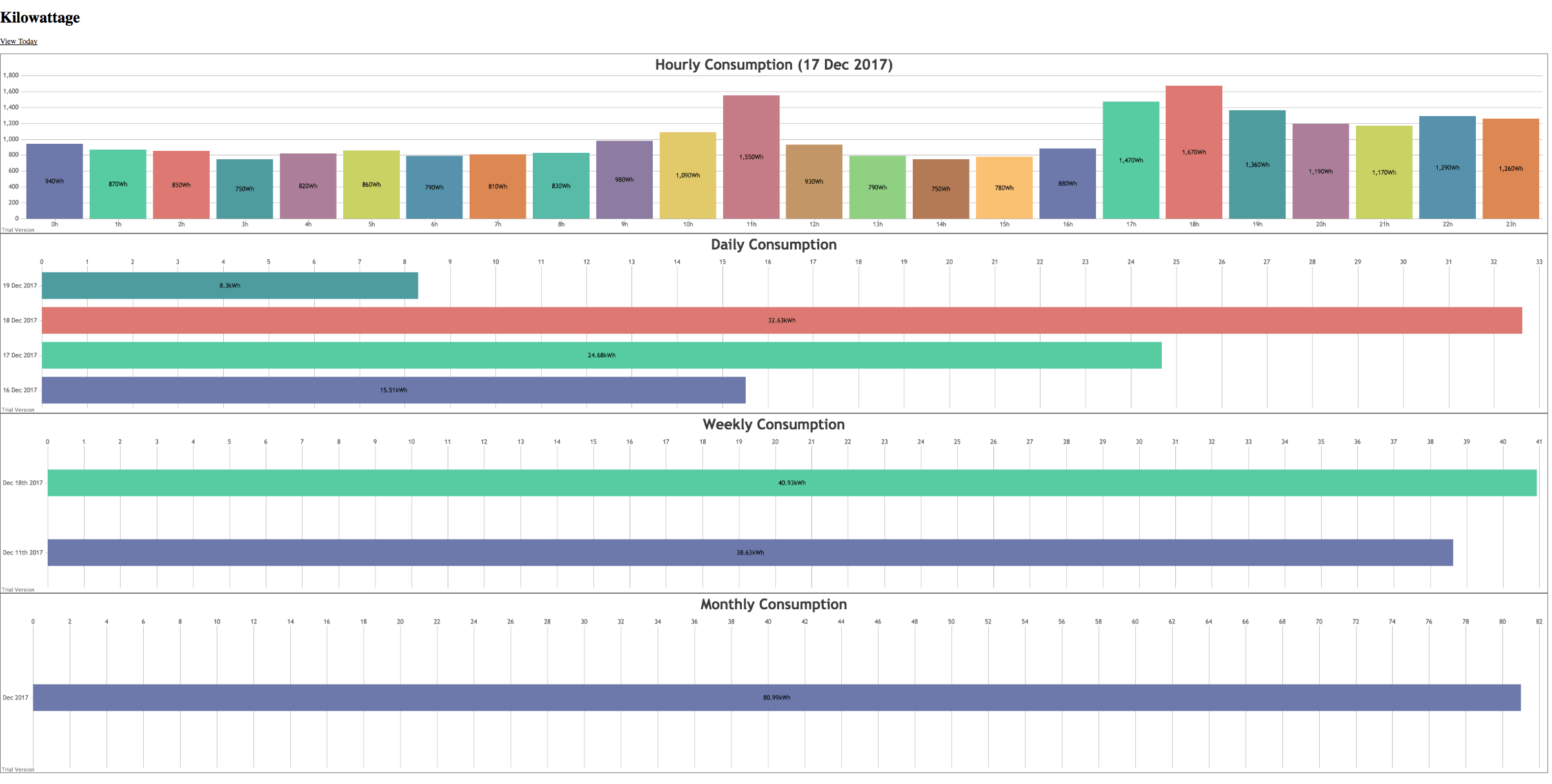
These electricity usage signals are unencrypted and can easily be decoded and displayed with an RTL-SDR and a ready to use program called rtl_amr. The signals even travel quite far, and there have been reports of receiving neighbours signals up to 600m away. K-roy took his RTL-SDR and rtl_amr and wrote on top of it a program that creates a JSON output of the data for easy processing, a PHP, SQLite3 and JQuery based database system for storing the data, and an HTML5 based page for graphing and displaying the data.
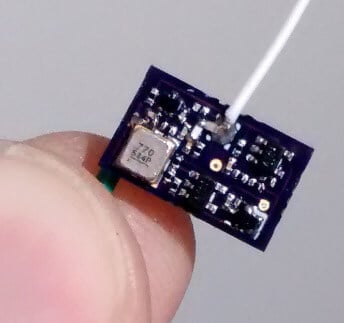
Over on Hackaday.io we've come across a project by "Tom" who has created a small tracking device which is located using an RTL-SDR dongle and directional Yagi antenna. The tracking device itself is a simple fingernail sized low power UHF transmitter that transmits short pulses about every second or so in the 915 MHz ISM band. Tom writes that the range is about 400m (line of sight) and with a small button cell battery the device lasts a couple of days with its 180 uA current draw. Presumably longer operation could be achieved by significantly reducing the pulse rate of the circuit.
To receive the tracking device an RTL-SDR is combined with a high gain directional Yagi antenna, a three level 10 - 30 dB attenuator and an Android phone running the RF Analyzer app. The idea is to simply use the attenuator and directional Yagi antenna to determine the direction in which the signal is strongest. That direction with the strongest signal will indicate where the transmitter is. Tom's video below shows an example of the transmitter and RTL-SDR based tracking setup.
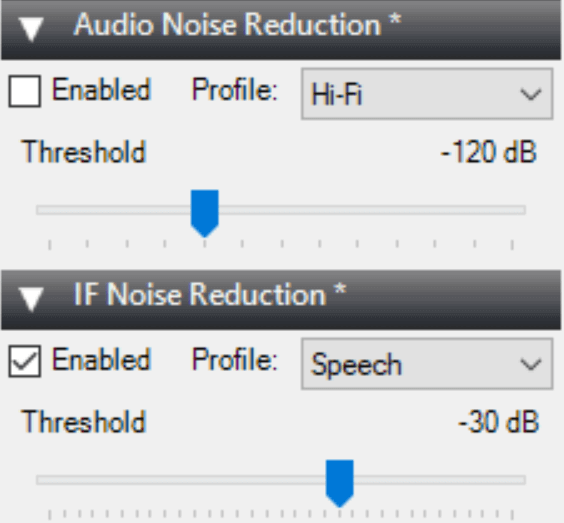
Recently the SDR# team have updated the algorithm on the noise reduction plugins used in SDR#. It appears that both the IF and Audio noise reduction plugins were updated with a better smoothing algorithm. We briefly tested the new algorithm and compared it against an older version. The new algorithm has noticeably less hiss and is slightly clearer when compared at the same noise reduction level. We tested with the same threshold levels and using the speech profile.
At the same time we've also seen news that Simon of SDR-Console is working on another noise reduction algorithm based on deep neural networks in the latest private beta version. A video of it in action was posted by Paul J in the SDRplay users group (note that you will need a Facebook account and will probably need to be a member of the SDRplay group to view that video). The algorithm seems to be based on the RNNoise paper that was posted here. The SDR# algorithm was also tweaked based on information gained from that paper although it doesn't use neural networks directly.
If you are in the USA, you might recognize HD Radio (aka NRSC-5) signals as the rectangular looking bars on the frequency spectrum that surround common broadcast FM radio signals. These signals only exist in the USA and they carry digital audio data which can be received by special HD Radio receivers. Earlier in the year in June a breakthrough in HD Radio decoding for SDRs like the RTL-SDR was achieved by Theori when he was able to piece together a full HD Radio software audio decoder that works in real time.
It turns out that some of these HD Radio signals run by iHeartRadio also contain other data streams such as live weather and traffic data that is consumed by HD Radio based car GPS receivers or audio head units in US vehicles. HDRadio.com also write that they can embed other data such as sports scores and emergency messages into the data stream as well.
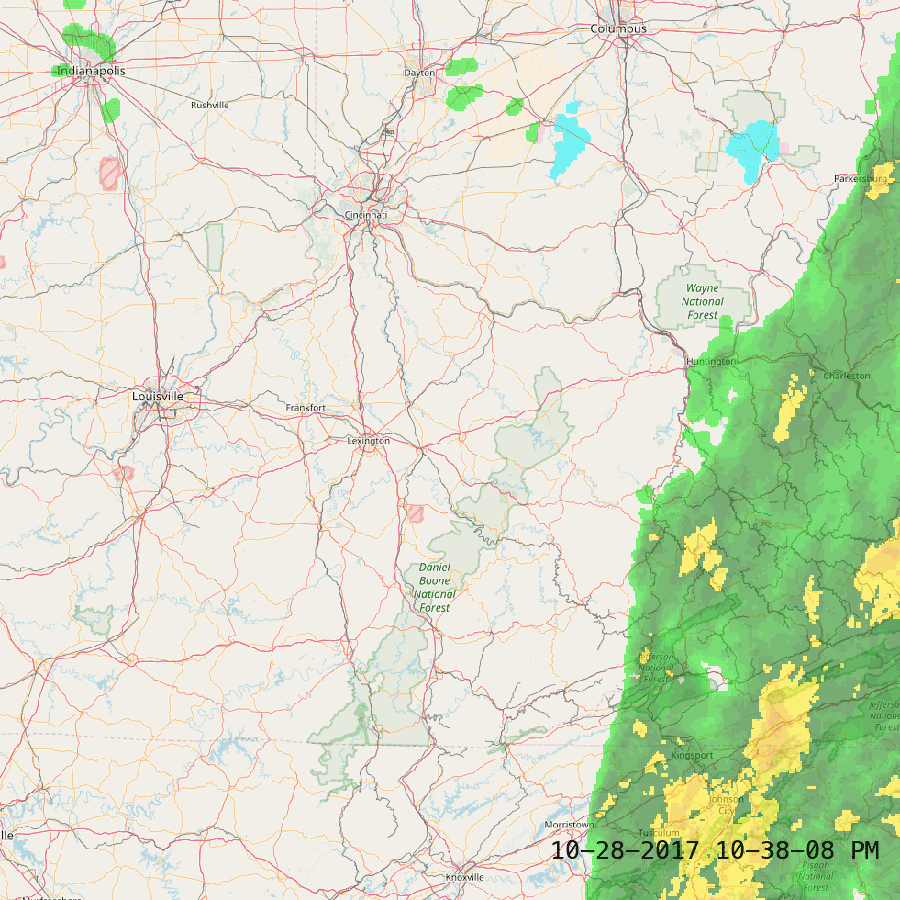
KYDronePilot's Python script utilizes Theori's decoder to save all received weather and traffic data maps for a folder. Below is an example of traffic and weather data that he received.
HD Radio Received Traffic DataHD Radio Received Weather Data
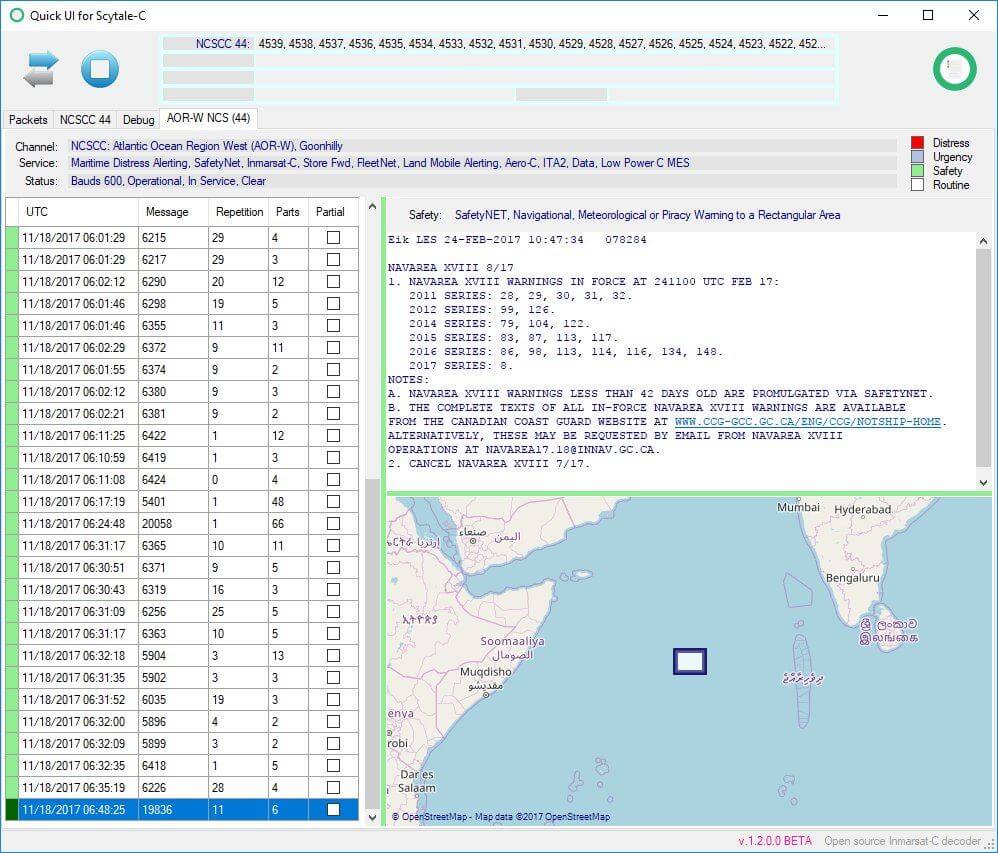
Inmarsat STD-C is an L-band geosynchronous satellite signal that transmits at 1.541450 GHz. This means that the signal can be received with a simple patch antenna, LNA and RTL-SDR dongle. The satellite is geosynchronous (stationary in the sky), so no tracking is required. On the STD-C channel you'll see messages mainly for mariners at sea such as weather updates, military operational warnings, pirate sightings/reports, submarine activity, search and rescue messages and more. If you are interested we have a tutorial based on other software packages available here which also shows some STD-C message examples. The tutorial can easily be adapted for use with Scytale-C instead.
We've also seen on Twitter that Scytale-C beta tester @otti has noted that a SDR# plugin based on Scytale-C seems to be in the works.
An Important Note on the Coding Ethics of Scytale-C + Tekmanoid Decoder Updates
We feel that it is responsible to make a note on coding and licencing ethics about this software. Originally the software was illegally decompiled by 'microp11' from the closed source Tekmanoid STD-C decoder written by Alex and re-released in a different programming language with a different GUI as the 'open source' B4000Hz software. After Alex took action and micrcop11 realized what he did was wrong he took B4000Hz down. Since then microp11 notes that he has written Scytale-C fully from scratch without the closed source code knowledge. But to be unquestionably legal a full two man clean-room rewrite would probably need to be done as once knowledge of source code is acquired it can be difficult to think of a separate implementation (a somewhat related post discussing this on StackExchange).
However, Alex has noted microp11's passion, and microp11's remorse at the initial decompilation and release of B4000Hz, and has decided to take the higher road and not pursue any further DMCA complaints. Instead he has kindly decided to allow the software to exist, but with acknowledgement of Tekmanoid included. We're glad that the matter was resolved amicably, but still if you use the Scytale-C software we would urge you to still consider the free or paid version of the Tekmanoid STD-C decoder to support Alex.
Recently Alex has updated his software to include a spectrum analyzer and more appealing method of displaying EGC messages. Alex writes regarding his Tekmanoid STD-C decoder:
This software [Tekmanoid STD-C Decoder] is closed source and has been since it was first released around 2009. At that time I made a choice to keep the source private but share the executable EGC app for free with the public, so that others could have some fun on the L-band!
The "pro" EGC-LES version was developed in parallel the same year but kept private, nobody even knew it existed. Although I recognized its potential financial value I didn't take "advantage" of it. Firstly because it was a personal hobby project (can't put a price on intellectual property) and second, because I didn't want to help to further expose people's private communications to the open public.
In February 2017 a raw clone of my de-compiled code was made public, to be later withdrawn with an apology. That is the moment I decided to release the PRO version as payware to the public. Many new features present in today's PRO version have been proposed by users and my aim is to satisfy everyone's wishes.
Recently another similar project was released from the same author, with lots of documents to support the code and only minute traces of the initial de-compilation. This time one could indeed claim to have built it "from scratch" - codewise at least. The fact still remains that *part* of the knowledge (not 'code' necessarily) required to put it together was obtained from this initial reverse engineering process.
Despite the negativity surrounding this case, I decided to withdraw my takedown request on the project in exchange for an acknowledgement to the original Tekmanoid decoder, as this person himself wished to include from the start anyway.
To end it with another positive note, I can only hope this newcomer will bring something new to the scene, and that we will see some interesting things!
Below is a video of the updated Tekmanoid decoder.
Tekmanoid EGC+LES pro decoder
Update: Microp11 wrote to us after this post went out and wrote the following:
I just want to let you know that scytalec is not a re-write. It is another solution of solving the problem of decoding the Inmarsat-C. Written from scratch. Inadvertently any Inmarsat-C decoder in the 1.5GHz band will have the same the building blocks and they are now documented in detail in the bibliography published with my code. The information is hard to find. All the information is from publicly available sources only. Such that the code will be able to withstand the obstacles or remaining open source. The majority of the documentation is technical manuals, as they each in part reveal a piece of the puzzle, and collectively they contain an almost complete communication protocol. Some are books and they must be the specific revision mention within the bibliography. Moreover if any coder will read the documentation they will actually be able to write a better decoder as I found parts of it too late for a more elegant code writing. And this is the whole idea of scytalec, that anyone can do it if they put their mind to it. There is enough documentation to tackle the C-band as well. And giving enough time, I might be planning on doing that after the sdr# plugin I’m working at. Not alone, as I was and I am being helped by others to which I am grateful and their names were and will be mentioned within the code. Just so you will have an idea of how deep the documentation correctness went for this project, even if a code comment was incorrect, say I was referring to a frame as a “block” or “part” I would get an admonishing email on that. So yes, I have high reasons to stand by this code originality.