Pete’s tutorial starts from a fresh install of Ubuntu and uses GQRX, GNU Radio Companion, WxtoIMG and the MeteorM2 decoding tools. He shows how to set up the audio piping within Linux, how to run the MeteorM2 LRPT Offline decoder Windows tool in Wine, a Linux Windows emulator and how to use WxtoIMG together with GQRX.
The NOAA and Meteor M2 weather satellites transmit images that they have taken of the earth. With an RTL-SDR and appropriate antenna you can receive these images. On this blog we have Windows tutorials on receiving NOAA and Meteor M2 satellites.
The Windows LRPTOfflineDecoder tool running in Linux with Wine.
The Chaos Communication Camp (CCC) conference was recently held in Germany this year. The conference is a five day event that focuses on topics such computer security, hacking, electronics and other similar related topics. The full list of talks can be found here, but on this page we list all the SDR related talks which we could find. If you know of any more SDR related talks from the CCC please let us know in the comments.
“The Rad1o: Listen to all the things”
This year participants of the CCC were all given a Rad1o badge, which is a HackRF variant. In this talk the creators of the Rad1o explain their experience with creating the Rad1o and give an overview of it’s hardware and software options.
“Satellite Open Ground Station Network: open source ground station, optimized for modularity, built from readily available and affordable tools and resources.”
(Audio broken until 2:50) The SatNOGS project aims to provide low cost satellite ground stations (where one critical component is currently an RTL-SDR dongle) along with free networking software in order to create a crowd sourced satellite coverage network. The SatNOGS project was also the grand prize winner of the 2014 Hackaday prize which saw them take away almost $200k US dollars of prize money. This talk introduces the SatNOGS project.
“Iridium Hacking: please don’t sue us”
Iridium is a satellite service that provides global communications. This talk discusses how the presenters were able to decode the Iridium pager network with a simple software defined radio like the RTL-SDR. At the end of the presentation they show a live demo of the Iridium signals being decoded.
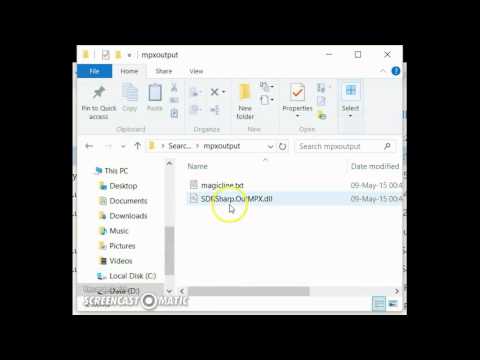
Over on YouTube user pe1etr has uploaded a tutorial video showing how to set up RDS Spy and SDR# for monitoring RDS. RDS stands for Radio Data System and is a sub carrier added to some FM broadcast signals which carries information such as the station name, the song/programme playing and other data. Although SDR# decodes RDS stations already, a more powerful RDS decoder and monitoring tool is RDS Spy. To get RDS Spy to work with SDR# you need to use a special plugin called MPX Output, which allows SDR# to output audio that includes the RDS subcarrier, which can then be piped via a virtual audio cable to RDS Spy.
Pe1etr’s video shows how to install the MPX Output plugin, how to set it up with virtual audio cable and how to use it with RDS Spy.
Tutorial: Using RDS Spy with the SDR# mpx output plug-in
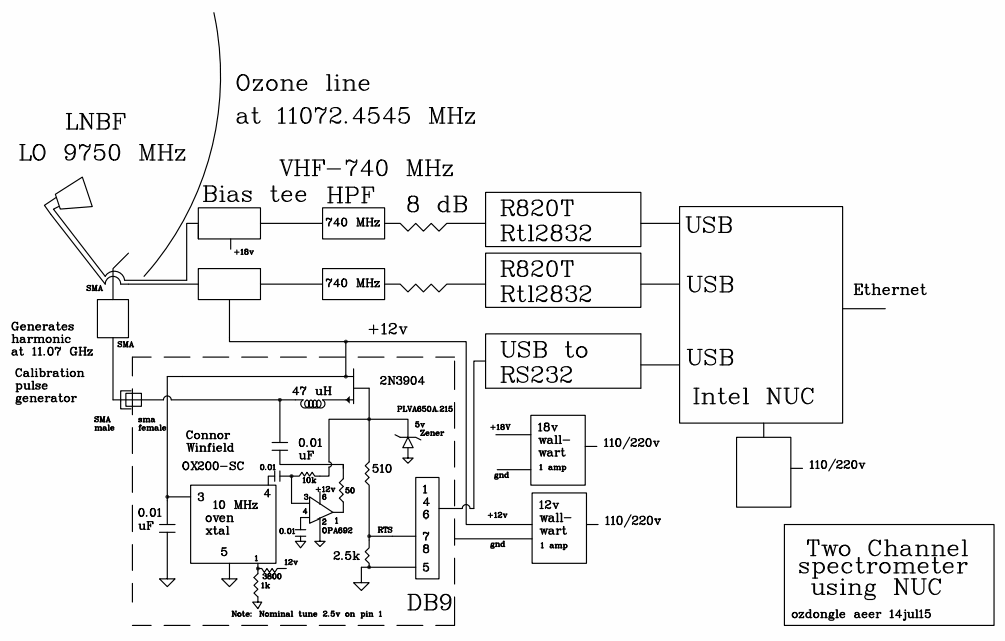
Over at the MIT Haystack Observatory in Westford Massachusetts, researchers O.B Alam and A.E.E Rogers have been working on creating a low cost ground based Ozone spectrometer out of RTL-SDR dongles (pdf warning). An Ozone spectrometer is used by scientists to measure the concentration, velocity and temperature of the ozone gasses in the mesosphere (50 – 85 km above the ground) and lower thermosphere (85 km+) at the Ozone line frequency of 11072.4545 MHz.
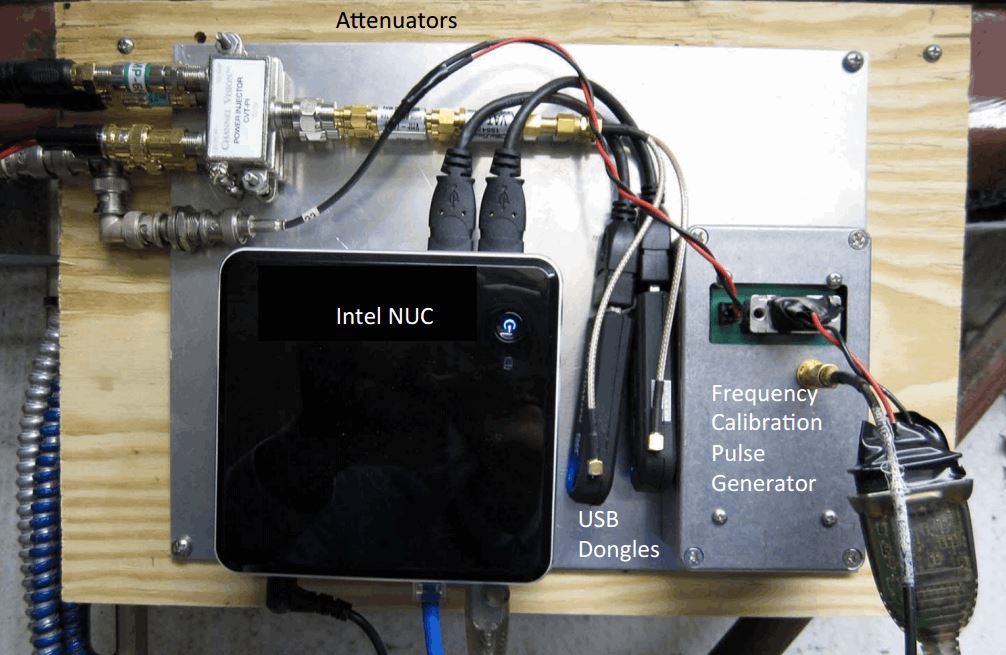
The spectrometer the researchers built consists of a satellite TV parabolic reflector dish with 46.72cm diameter, 9750 MHz LNBF, two Bias Tees, two 740 MHz high pass filters, two 8dB attenuators, a calibration pulse generator, an Intel NUC mini PC and three R820T RTL-SDR dongles.
RTL-SDR based Ozone Spectrometer block diagram from the MIT Haystack Observatory.Photo of some of the components of the ozone spectrometer.
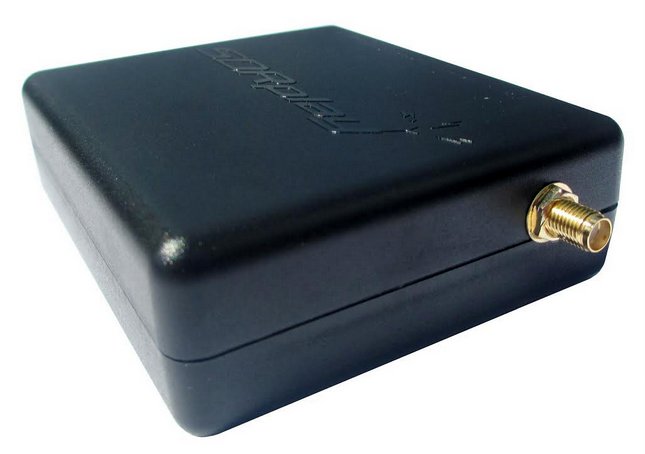
We have just released a new and improved RTL-SDR unit in our store, which we are currently pricing at $19.95 USD, or $24.95 USD including 2x telescopic antennas. The unit comes with the following improvements:
1 PPM temperature compensated oscillator (TCXO) – Accurate tuning and almost zero temperature drift (2 PPM initial offset, 1 PPM temperature drift)
SMA female antenna port – Most dongles use the less common MCX or PAL antenna ports. Ours use SMA which is much more common so more adapters and antennas are available for it. It is also more durable and has lower insertion losses.
R820T2 tuner – More sensitive/lower noise floor than the older R820T tuner. 100% compatible with software for the older R820T.
Improved component tolerances – Allows the RTL-SDR to work more optimally over all frequencies.
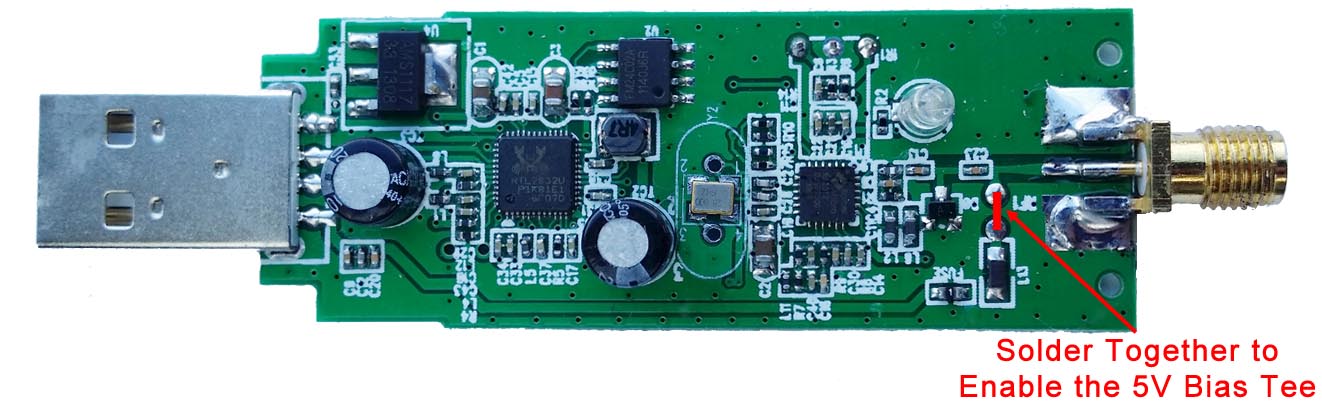
Experimental: 4.5V USB powered bias tee – Can be enabled by soldering two pads on the PCB together. This allows the RTL-SDR to power LNA’s (like the LNA4ALL and HABAMP) and active antennas through the coax cable.
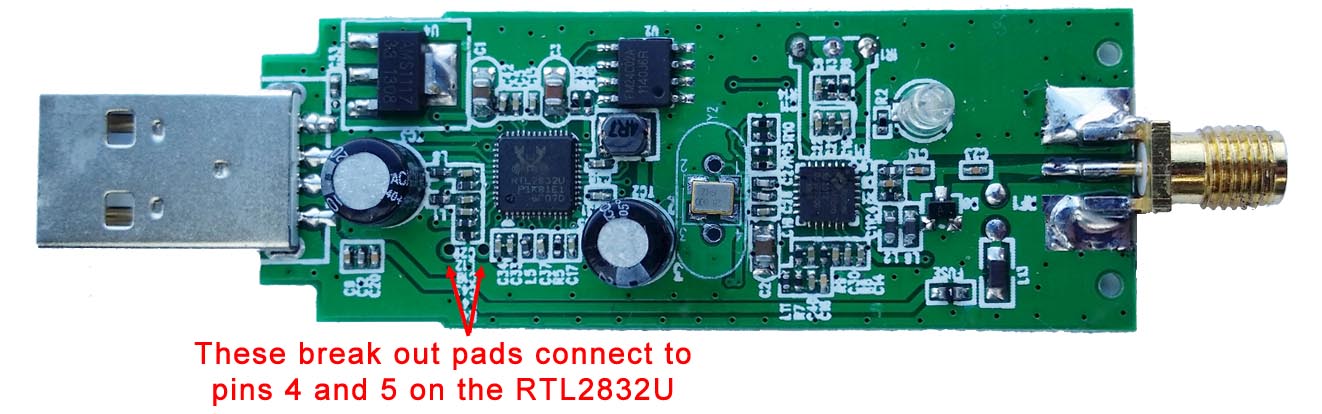
Experimental: Break out pads for direct sampling – Allows easier soldering to pins 4 & 5 on the RTL2832U for enabling the direct sampling mod.
For US customers we highly recommend that you buy from our Amazon store as if you spend over $35 you will receive free shipping from a local Amazon warehouse. This usually takes less than 1 week for delivery. Prime subscribers can also get free 2 day shipping if bought on Amazon. If you like you can also use our international cart to buy from our Chinese warehouse with free shipping.
International customers can get free shipping from our warehouse in China. We will always try to use the fastest tracked air mail shipping method available to us, which will be ePacket, EMS air mail or similar if possible. This should get the parcel at your door within 2 weeks, but please note that this time is heavily dependant on the customs and postal agencies within the destination country which we have no control over. Countries such as Italy, Canada, Brazil, Russia and middle eastern countries are known to have extremely slow customs agencies. If you prefer you can also pay more for express shipping and we will use DHL, UPS, FEDEX or EMS Courier. Just use our cart to select the shipping method you prefer. We also kindly remind customers that with international shipping you are responsible for any customs duties or taxes incurred by the shipment.
Shipping status meanings: ‘In process’ means that your order information has been sent to the warehouse and the parcel is being packed. A tracking number will follow usually by the next business day.
Please note that tracking updates may take a few days to show up.
Warranty Information
We will provide 6 months warranty on manufacturing defects. Please note that if you try the direct sampling or bias tee mods then any warranty will be voided, so please ensure your dongle is working before trying these.
If you suspect a manufacturing fault please email us at [email protected] and include your order number and name. Please include details of the fault and a picture of the fault if it is physical damage. If the unit is faulty we will issue either a refund or send a new unit out depending on your preference.
Specification Discussion
Temperature Compensated Oscillator (TCXO)
The 28.8 MHz oscillator used in most RTL-SDRs is passive and not frequency accurate. This means that when you tune to a known frequency, it will likely be offset by a few kHz. Usually the PPM offset on a normal RTL-SDR is in the range of 30 – 150 PPM. Furthermore, as the dongle warms up, the frequency will drift up to ~20+ PPM until the temperature stabilizes.
The 1 PPM Temperature Compensated Oscillator (TCXO) in our units provides accurate tuning with an initial offset of 2 PPM and a 1 PPM temperature drift over time. This means that a known signal will appear where it should on the frequency spectrum and will not significantly drift in frequency as the dongle warms up.
SMA F Antenna Port
On standard RTL-SDR’s the antenna port is either a MCX or PAL connector. MCX connectors are relatively uncommon and are susceptible to connector strain when using an adapter. PAL connectors are common with some TV connections, but no decent radio or antenna will use PAL due to its high insertion losses above ~100 MHz.
We’ve made these RTL-SDR dongles with SMA female antenna connectors. SMA is a very common connector in the radio field and provides a sturdy and secure connection. In addition SMA antenna adapters are much easier to find and insertion losses are lower.
We know some people prefer the F-type connector used in the previously sold ThumbNet dongles, but from our previous polling we believe the majority (~80%) of users prefer SMA. We may bring out F-type RTL-SDR’s again in the future if there is demand.
Note: Remember to not get confused between RP-SMA and SMA! RP-SMA or “reverse polarity SMA” is used for WiFi equipment only. In the normal radio world, most devices use standard SMA. RP-SMA is reversed, it has the male pin on the female connector, and the female hole on the male end. To be clear: This device is a radio device so it uses normal SMA connectors.
R820T2 Tuner
As discussed when we brought out our previous generation, the R820T2 tuner has slightly better sensitivity than the R820T and also works better at frequencies around 1.5 GHz. It also works better with the experimental HF drivers.
Improved Component Tolerances
We have these units manufactured with tighter tolerances on all passive components.
Telescopic Antennas
In our $24.95 USD package we provide two telescopic antennas. The smaller one goes from 6 cm to 20 cm, and the larger one goes from 20 cm to 1.5 m. The antenna base is also larger with a 4.5 cm diameter, when compared to the smaller bases shipped with most models. This provides more stable operation when using the larger antenna.
With antennas, usually the larger the antenna is the lower the frequency it can receive. These two antennas allow you to tune to almost the entire range of the RTL-SDR. Of course the antenna should be placed outdoors and up as high as possible to get the best performance. Placing the magnetic mount on a metal surface can also help complete the antenna as a quarter wave ground plane.
When fully collapsed the small antenna works decently at 1090 MHz for ADS-B frequencies.
Experimental 4.5V Bias Tee
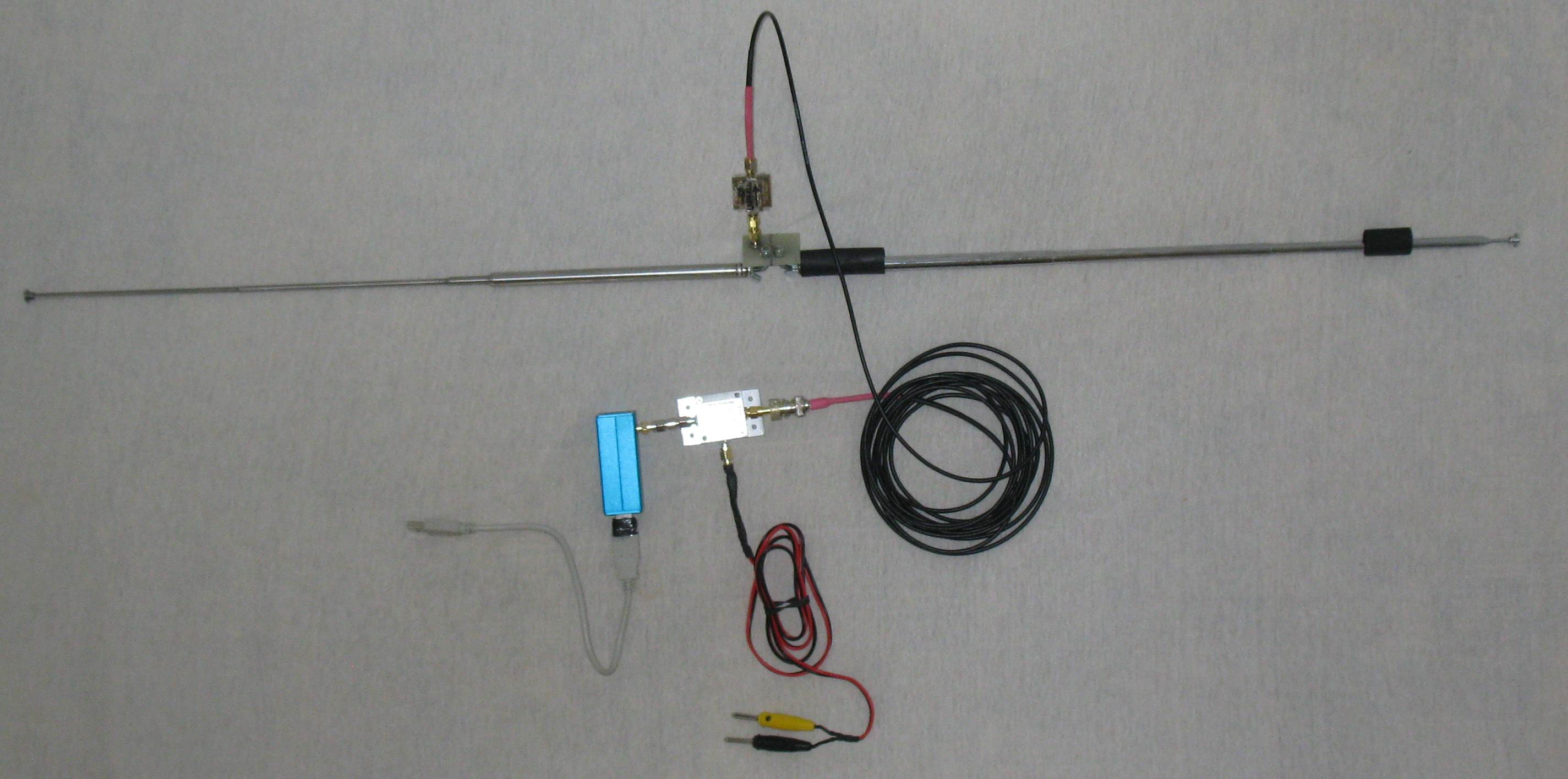
A bias tee allows you to power external RF devices such as Low Noise Amplifiers (LNA’s) and active antennas through the coax cable. Since LNA’s should be placed right after the antenna, it can be sometimes hard to get power to them if a bias tee isn’t used.
We have included a simple (experimental) bias tee option in our latest units, inspired by mods madeby other experimenters. The bias tee is disconnected by default, but it can be activated by soldering two pads together on the PCB. Connecting the pads connects the antenna output to the USB 5V rail. The resistance in the fuse and inductor can reduce the output voltage to about 4.5V.
Bias Tee Instructions
The USB power rail is protected from over current and shorts through a PTC resettable fuse with a hold current of 80 mA and trip current of 200 mA. This means that the fuse will become a short circuit if greater than 200 mA tries to flow through it, which may happen during a short or with faulty equipment. Between 80 mA and 200 mA is an unknown state, where the fuse may or may not trip, depending on the temperature. In practice we’ve tested it with a hold current of 120 mA in a ~16 degree ambient environment (and much hotter inside the dongle casing) and had no issues with premature tripping.
We used a 4.7 uH 250 MHz SRF inductor as the bias tee choke. At the highest frequency tunable by the RTL-SDR (~1700 MHz) this should only give a (simulated) ~1-2 dB loss through the inductor. For better performance at frequencies above 1 GHz you could experiment with a smaller value inductor and possibly with removing the static protection diode, though in our tests we saw very little difference with the diode removed.
We have tested the bias tee with an LNA4ALL and HABAMP both in bias tee mode. Both worked fine running for a number of hours. The HABAMP really improved ADS-B reception a lot and we highly recommend it. We also tested the unit with two LNA’s connected together, both powered by the bias tee and this also worked fine. An LNA like the LNA4ALL draws about 60 mA of current, so running two at once is pushing the hold current of 80mA on the fuse, but we had no trouble with about 120 mA of current, though we need to note that people in hot climates may have different results as the trip current reduces with higher temperatures. We also tested an active GPS antenna (active antennas contain built in LNA’s) which also worked.
With the bias tee and LNA’s we were able to improve weak signal reception and also receive several signals not usually receivable by the RTL-SDR alone such as L-band satellites like Inmarsat, GPS and Iridium with an appropriate antenna.
Experimental break out pads for direct sampling
The direct sampling mod is a hardware modification that allows you to tune to HF frequencies with an RTL-SDR. The best way to apply this mod is to directly solder your antenna or matching transformer to pins 4 & 5 of the RTL2832U chip. However, these pins are very small and so the mod requires extreme soldering ability.
These units have break out pads for these pins which make soldering to them much easier.
Direct Sampling Instructions
Let us know if you have any questions about these units, or feature requests for future units. We’ve tried to make the most popular changes that don’t increase the cost too much, but we are always open to ideas for future improvements.
The SDRPlay is a $149 USD software defined radio with a 12-bit ADC, 8 MHz of bandwidth and a 100 kHz to 2 GHz tuning range. It is a good upgrade to the RTL-SDR and can be considered as a competitor to the Airspy SDR.
One of the initial cons of the SDRPlay was that it had a tuning gap from 380 MHz to 420 MHz. The gap was due to hardware limitations and had nothing to do with censorship. However, now the SDRPlay team have released a new API which fixes these limitations and can fully close the gap.
Along with this update they have also released a new EXTIO driver file with the following improvements:
Implementation of a selectable 1st LO frequency for the block converter. This will apply to frequencies below 60MHz (up-converted) and between 250MHz and 420MHz (down-converted). This allows full coverage between 100kHz and 2GHz in AUTO mode or the re-position of interferes at the expense of coverage range
Added a down conversion routine to convert Low IF modes to Zero IF modes for compatibility in SDR interfaces. IF bandwidths below 1.536MHz supported choice of IF Frequency and sample rate are restricted.
Added Options to control the DC offset compensation mode used by the tuner. Available modes are Static, Periodic, One-Shot and Continuous
Improved robustness when dynamically changing between IF modes and sample rates
The annual Perseids meteor shower is peaking right now (this Wednesday and Thursday), and with the right equipment (and location) you can detect these meteors with an RTL-SDR dongle and appropriate antenna. When a meteor enters the atmosphere it leaves behind a brief trail of ionized air which is highly reflective to RF signals. These trails can reflect carrier waves from distant transmitters towards your antenna, allowing you to detect a meteor entering the atmosphere. This is called meteor scatter.
If you live in Europe, you can use the powerful Graves radar at 143.050 MHz as the transmitter. In other locations and the USA you can also use analogue TV broadcasts like in this post where the observer uses a TV tower in Canada. For Graves all you’ll need is a dipole antenna and perhaps LNA, but for TV transmissions you may need a directional Yagi antenna. More information can be found in our previous posts about meteor scatter and is this document.
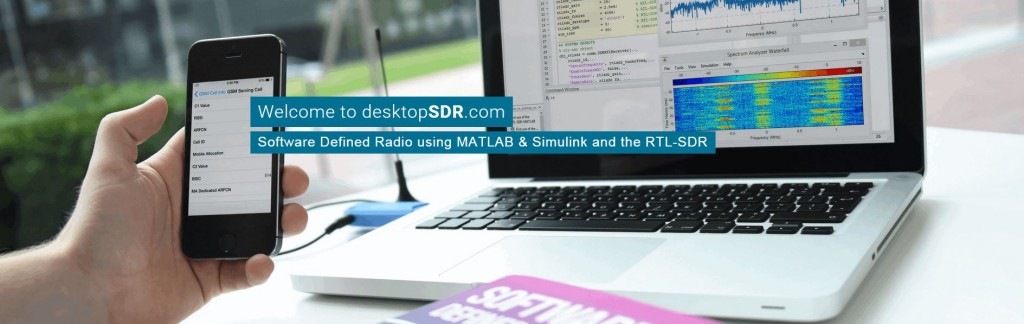
MATLAB is a technical computing language and software suite used commonly by professional and student scientists and engineers. It is similar to GNU Radio in terms of its digital signal processing (DSP) capabilities. Back in January 2014 the MATLAB team released an update which enabled the RTL-SDR to be used as an RF input device.
The text book’s blurb reads:
The availability of the RTL-SDR device for less than $20 brings software defined radio (SDR) to the home and work desktops of EE students, professional engineers and the maker community. The RTL-SDR can be used to acquire and sample RF (radio frequency) signals transmitted in the frequency range 25MHz to 1.75GHz, and the MATLAB and Simulink environment can be used to develop receivers using first principles DSP (digital signal processing) algorithms. Signals that the RTL-SDR hardware can receive include: FM radio, UHF band signals, ISM signals, GSM, 3G and LTE mobile radio, GPS and satellite signals, and any that the reader can (legally) transmit of course! In this book we introduce readers to SDR methods by viewing and analysing downconverted RF signals in the time and frequency domains, and then provide extensive DSP enabled SDR design exercises which the reader can learn from. The hands-on SDR design examples begin with simple AM and FM receivers, and move on to the more challenging aspects of PHY layer DSP, where receive fi lter chains, real-time channelisers, and advanced concepts such as carrier synchronisers, digital PLL designs and QPSK timing and phase synchronisers are implemented. In the book we will also show how the RTL-SDR can be used with SDR transmitters to develop complete communication systems, capable of transmitting payloads such as simple text strings, images and audio across the lab desktop.
While the book is not yet released the full table of contents is currently available for viewing on their downloads page. From looking at the table of contents, we can see that the text book looks very comprehensive and will likely be extremely useful for students who are learning RF and DSP concepts in university level classes. The team behind the book (desktopsdr.com) also have a YouTube channel where it appears that they are releasing supporting videos.