Exploring Russian and International Analog TV From Leaky Cable TV Networks via the Airspy Server Network

Thank you to RTL-SDR.COM reader Micha for submitting a story about how he has been able to use SDR# and the Airspy Server Network to explore cable TV stations across the globe via cable TV signal interference.

If you were unaware, the SDR# software from Airspy.com has access to the Airspy Server Network, which is a collection of public Airspy SDRs available all over the world that can be accessed freely over the internet. To access these SDRs simply select "Airspy Server Network" as the source in SDR#, and click on the "..." button next to the server address entry. A map will pop up where you can select from SDRs all over the world.

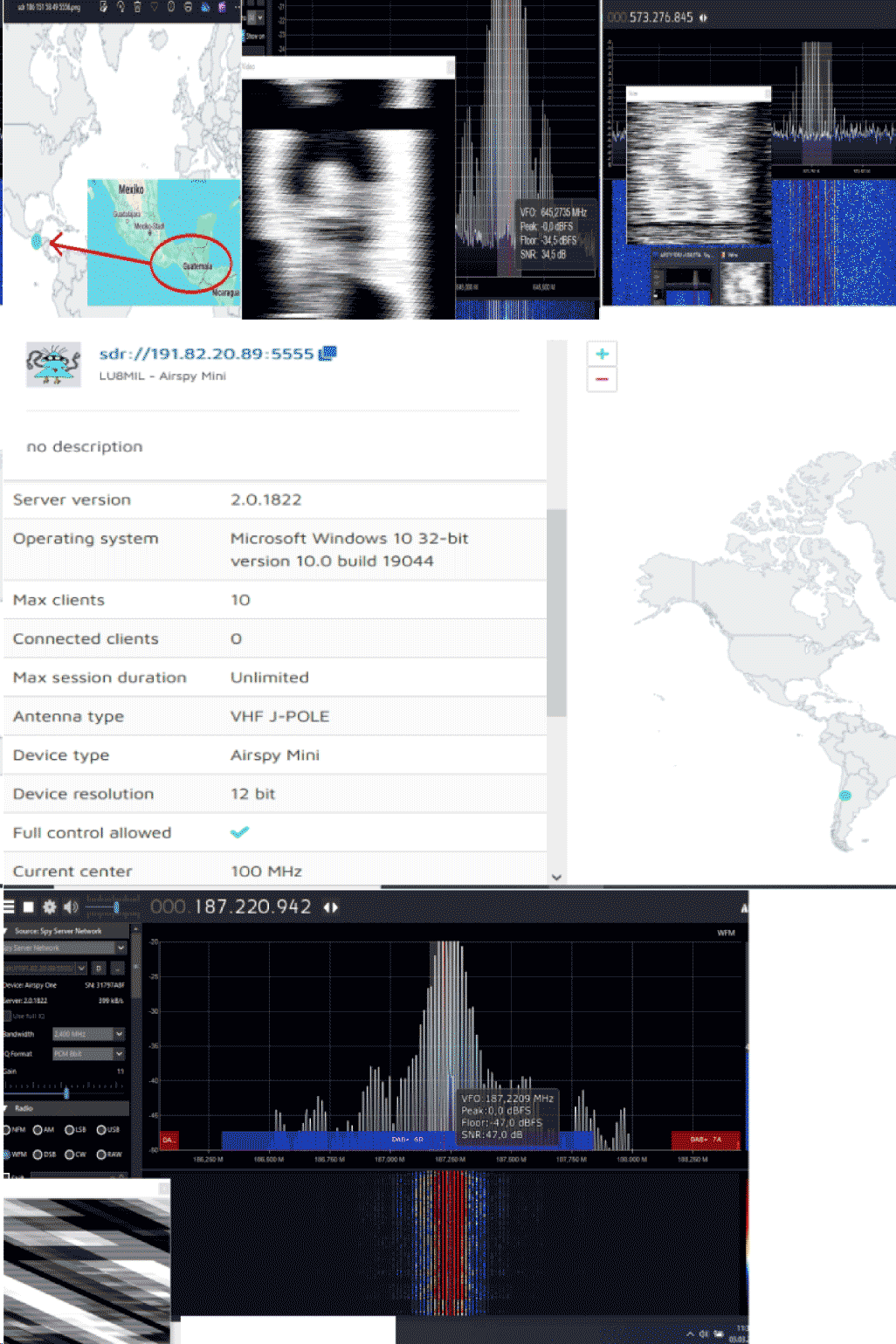
Using Airspy SDRs in Russia, and in other countries (Guatemala, Brazil, Chile, Uruguay, Mexico, Dominican Republic, Argentina, Indonesia, Vietnam, Micha found that there were several analog TV signals found at frequencies that should not have terrestrial TV signals there. Upon further investigation, he realized that these are actually cable TV signals that are leaking and causing interference across the RF bands. Micha notes that he's also observed how the leaking signals often change in frequency and intensity too, making it difficult to keep track of them.

Combined with the TVSharp SDR# plugin, Micha was able to recover some (very rough) images from these interfering signals. Micha has provided several images shown below that demonstrate Russian cable leakage, as well as for Mexico and Argentina.


Receiving Weather Images from NOAA Weather Satellites with an RTL-SDR Blog V4 and Multipurpose Dipole Antenna Kit

Over on YouTube Baltic Lab has uploaded a video showing how he was able to successfully use an RTL-SDR Blog V4 and the included multipurpose dipole antenna kit to receive images from polar-orbiting NOAA weather satellites.

In the video, Baltic Lab shows how to orient the dipole antenna in a "V-Dipole" shape which optimizes it for receiving from satellites. He also shows how to use a VNA to confirm that the telescopic elements on the dipole are extended to the correct length, noting that he was able to achieve a VSWR of less than 1.2 between the target frequencies of 135 to 138.1 MHz, with a near perfect match at 136.5 MHz.

He then demonstrates receiving the NOAA APT signals with his laptop, and successfully recovering the weather satellite image.

Receive Live Weather Images from Space at Home

BSidesPGH 2024 Talk: Introduction to Software Defined Radio For Offensive and Defensive Operations

Over on the YouTube channel "SecPGH" a talk by Grey Fox titled "Introduction to Software Defined Radio For Offensive and Defensive Operations" has been uploaded from the BSidesPGH 2024 conference. BSidesPGH 2024 was a security conference held in Pittsburgh, PA, USA on July 25.

The talks are generally about network security, however, Fox's talk is all about RF security topics and software defined radio. In the talk, he introduces SDR, and devices like the Flipper Zero and demonstrates various basic examples such as receiving FM from a handheld radio and ADS-B.

Next, he goes on to demonstrate security topics such as showing how to capture and analyze signals from a 433 MHz security alarm using an RTL-SDR and Flipper Zero, and how to jam frequencies and replay captured signals. Finally, he demonstrates WiFi cracking with the help of Kali Linux and Flipper Zero with WiFi dev board attached.

BSidesPGH 2024 Track 2 Grey Fox Introduction to Software Defined Radio For Offensive and Def

Easvesdropping on HDMI with TEMPESTSDR and SDRplay

Over on YouTube "Sam's eXperiments logs" have uploaded a video showing how he was able to succeed when using TEMPESTSDR to eavesdrop on HDMI cables with his SDRplay. TEMPESTSDR software combined with a software defined radio allows a user to eavesdrop on TVs, monitors, and more by wirelessly receiving their unintentional RF emissions and recovering information from those emissions. In many cases it is possible to recover live images of the display, clear enough to read text.  

Sam's video explains the challenges he faced with signal strength due to the highly effective shielding of his HDMI cables. To get around this Sam shows how he unshielded his HDMI cables for the test. This is good news for privacy, as it shows how effective shielding can be at stopping these kinds of attacks. He then goes on to show the results he obtained which show text being read from his screen.

I Finally Succeeded: HDMI Signal Eavesdropping with TEMPESTSDR

Tech Minds: Reviewing the Raspberry Pi 5 For Radio Amateurs Book by Elektor

Over on the Tech Minds YouTube channel, Matt has uploaded a video where he reviews a new book by Elektor titled "Raspberry Pi 5 For Radio Amateurs" (€5 off coupon code "Techminds"). The book is all about projects for the Raspberry Pi 5 that can be done with RTL-SDR Blog V3 and V4 software defined radios.

In the video Matt explores the books contents, showing off the various possible projects. Matt also shows how to get started with the book by installing Raspbian, and the RTL-SDR drivers, and then goes on to show how examples of the various software programs mentioned in the book such as SDR++, flrig, chirp, dump1090, predict, HamClock, rtl_tcp, rtl_433, qsstv, fldigi, Xdx and more.

Raspberry Pi 5 For Radio Amateurs With The RTL-SDR V4

A Video Review of FobosSDR

Back in April of this year, we posted about the FobosSDR, an upcoming software defined radio product from the Ukrainian company RigExpert. FobosSDR is an RX-only USB 3.0 device, with a 100 kHz to 6 GHz tuning range, 50 MHz of bandwidth, and 14-bit ADC resolution. At the time of the previous post, FobosSDR was not yet for sale, but now we see that it is available from some European distributors with a price of 495,00 € (~US$544).

Recently 'Radio Bunker' has uploaded a video review of the FobosSDR on his YouTube channel. Note that the video is in Spanish, however, you can use the YouTube auto-translate function.

In the video, Radio Bunker unboxes the FobosSDR and explains its specs and features, then goes on to show how to install the drivers and get it up and running with SDR#. He then shows the SDR receiving some signals like broadcast AM, FM, shortwave, DAB, and WiFi in SDR# with 50 MHz bandwidth.

▶️ REVIEW: FOBOS SDR ◀️ UN RECEPTOR SDR DE GAMA ALTA

Tracking Down an ATIS Tower with KrakenSDR

Over on YouTube The Comms Channel has uploaded a video showing how they used a KrakenSDR to track down the location of an ATIS transmission tower.

If you weren't already aware, KrakenSDR is our 5-channel coherent radio based on RTL-SDRs, and it can be used for applications like radio direction finding. It can be purchased on Crowd Supply.

Airports typically have an ATIS (Automatic Terminal Information Service) transmission tower that broadcasts audio of recorded information such as weather, runway conditions, and any important notices.

In the video, they use the KrakenSDR to track down the location of an ATIS transmission tower at their local airport. In the future, they intend on using the KrakenSDR to help track down Meshtastic radios.

Radio Direction Finding with the KrakenSDR | Radio Direction Finding Series

Pi Pico Rx: A Breadboard Software Defined Radio Based on the RP2040 Raspberry Pi Pico

Over on hackster.io we've seen a story about how maker Jon Dawson designed a self-contained software-defined radio based on the Raspberry Pi Pico that can receive 0 - 30 MHz, with up to 250 kHz of bandwidth. The Raspberry Pi Pico is a microcontroller board based on the Raspberry Pi Foundation's own RP2040 chip.

The Pi Pico Rx's front end consists of a Tayloe Quadrature Sampling Detector (QSD) mixer which makes use of the PIO (Programmable Input/Output) feature on the RP2040. The circuit also has an encoder knob for tuning and a small OLED screen.

Jon had originally created the Pi Pico Rx on a custom PCB, however, his latest work brings the cost down by showing that it can just as easily be implemented on a breadboard with through-hole components.

The full writeup can be found on Jon's blog "101 Things", as can the open source firmware. He has also uploaded a YouTube video explaining and demonstrating the project which we've embedded below.

Software Defined Radio with Pi-Pico