Over on YouTube the "Unboxing Tomorrow" channel has uploaded a video explaining how he uses RTL-SDR dongles to monitor various radio channels for storm warnings. He notes how he uses his RTL-SDR to monitor the NOAA national weather service channel as well as the Skywarn channel which is the amateur radio based storm spotting network used in some parts of the USA. He also monitors a P25 trunking network with DSD+ for good measure.
In addition he shows a bit of his setup which includes an RTL-SDR Blog V3 and Raspberry Pi connected to an LCD screen all mounted on a neat rail system made from T-slots.
Thank you to YouTuber M Khanfar for submitting news about his various Windows GNU Radio tutorials that he has been uploading to YouTube. So far he's uploaded tutorials on creating an FM Receiver, Air Band Receiver, AM/NFM Receiver, NFM Receiver with Squelch and Recorder and Spectrum Analyzer with GNU Radio on Windows 10. The tutorials are straight to the point and designed to be followed along with the video. The full list of videos can be found on his YouTube channel, and we have embedded one below.
Build NFM Reciver with Squelch and Recorder Activity GNU RADIO Win10
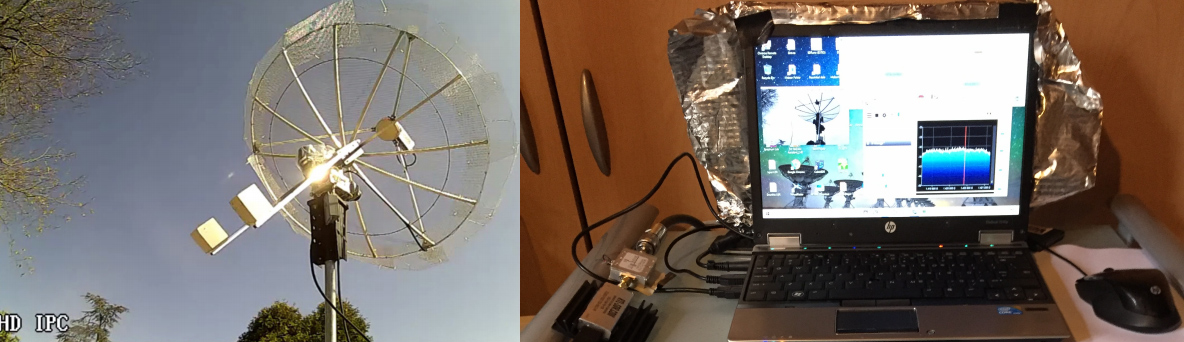
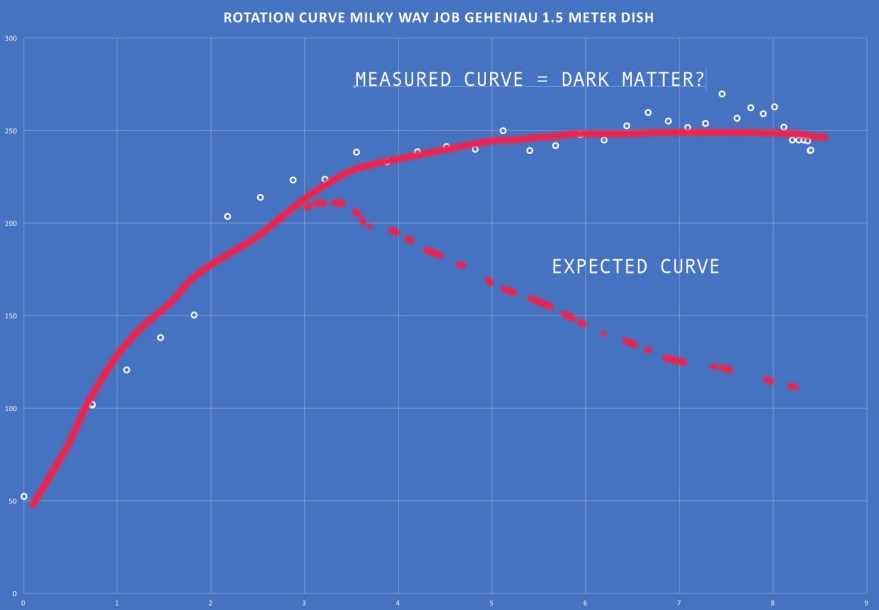
Thank you to Geoff for submitting his experience with creating a hydrogen line radio telescope out of an easy to build helical antenna, Raspberry Pi, LNA and an RTL-SDR. The Hydrogen Line is an observable increase in RF power at 1420.4058 MHz created by Hydrogen atoms. It is most easily detected by pointing a directional antenna towards the Milky Way as there are many more hydrogen atoms in our own galaxy. This effect can be used to measure the shape and other properties of our own galaxy.
Earlier in the year we uploaded a tutorial showing how to observe the Hydrogen line with a 2.4 GHz WiFi antenna. In Geoff's setup he used a home made Helical antenna instead. This antenna is basically a long tube with a spiral wire element wrapped around the tube. He also shows how he needed to impedance match the antenna with a triangular piece of copper tape. The result is a directional antenna with about 13 dBi gain. To complete his setup he used a NooElec SAWBird H1+ LNA/Filter, an RTL-SDR Blog V3 dongle and a Raspberry Pi.
The results show a clear increase in RF power at the Hydrogen line frequency when the antenna points at the Milky Way, indicating that the setup works as expected. It's good to see a Helical working for this, as it is fairly light weight and could easily be mounted on a motorized mount to scan the entire sky.
A Hydrogen Line Radio Telescope made with a Helical Antenna.
Radenso is a company that sells radar detectors. These are used to help motorists avoid speeding fines from Police using radar speed detectors in their cruisers. Their latest upcoming product is called the "Radenso Theia" and is a software defined radio based solution.
In one of their latest YouTube videos they explain how SDR is used in the Theia, noting that the SDR ADC chip they are using is an AD9248. The use of an SDR allows them to more easily apply advanced digital signal processing algorithms to the radar detection task. In particular they note that they can now apply deep learning artificial intelligence filtering which helps to classify different radar gun FFT signatures and avoid false positives from other radar sources such as automatic doors.
While the Theia is designed to be a radar detector, they note that the device could also be used by hardware hackers as a standalone software defined radio. They have thought about this use case and have added a separate uFL connector that can be enabled by soldering a zero ohm connector, and this allows users to connect any antenna to it.
What is a software defined radio and why does it matter for Radenso Theia?
Over on his YouTube channel Aaron has uploaded a video showing how we can SigDigger to decode analog NTSC video from a drone camera which is transmitted at 5.7 GHz. SigDigger is a rapidly evolving SDR program for Linux and MacOS that has a lot of built in functionality for inspecting signals in more depth. Although not specifically designed for it, the Symbol Stream viewer in SigDigger can be used to display NTSC Analog Video. Aaron writes:
For the most part, the older an analog modulation is, the easier it is to get basic results when decoding. TV receivers were rather dumb back in the day, basically fast fax machines glued to an off-band FM radio receiver. Receiver circuits were also slow, and the signal had lots of invisible blank spaces in the borders so that the cheapest TVs could switch to the next line in time. The invention of Teletext leveraged those blanks in order to carry digital information and color information was embedded as an additional narrowband signal in the gaps in the spectrum.With this in mind I wanted to take a look at decoding analog video transmissions from drones. While some drones have moved to more effective digital compression and channel transmission technologies allowing for high definition video, there’s still drones using RC-like communications and the FPV video link is pure FM-modulated NTSC.
Searching the internet provided few results on how I could go about using low cost equipment, such as the HackRF One, to decode drone feeds. After an extensive search I decided to start looking at Linux based software defined radio applications I was already familiar with. By chance I happened to be working with SigDigger, a free digital signal analyzer. It has been discussed on RTL-SDR.com and more recently on Signal Lounge (https://signal-lounge.com/2020/05/05/sigdigger-for-signal-analysis/). It is also included in my own creation, DragonOS (https://sourceforge.net/projects/dragonos-lts/)
After a brief email exchange with the developer it was brought to my attention that visualizing analog video transmission is possible in SigDigger (although with no color information, of course). Since SigDigger supports the HackRF and the HackRF provides coverage in the 5ghz band, it was now possible for me to try to decode a 5ghz drone video feed. I’ve documented the process and my results on my YouTube channel. I should point out that this is currently a side feature of SigDigger and currently lacks synchronization. The symbol view area I used in the video is not made for this. It is meant to display symbols and symbols patterns which, due to its behavior, can incidentally show the contents of analog TV and weather faxes with lots of manual adjustments.
While the SigDigger developer makes mention of plans to include an embedded generic analog TV viewer and possibly add the ability to automatically sync video, there’s currently no timeframe on when that might become available.
SigDigger Decoding NTSC Video from a Drone Camera
DragonOS LTS SigDigger demodulating a 5 GHz analog video/FPV drone link (HackRF One, SigDigger)
We note that if you're interested in PAL/NTSC decoding, there is also the excellent TVSharp plugin for SDR# available.
Over on his website VKSDR has recently released a tutorial about his Linux based xirt-rx software which allows RTL-SDR and other SDR owners receive weather images from the geostationary satellite known as GEO-KOMPSAT-2A (GK-2A). GK-2A is a Korean satellite, hence it is positioned over the Asia-Pacific region, covering Asia, Eastern Russia, Australia and New Zealand.
To receive images from GK-2A you'll need an RTL-SDR, 2.4 GHz WiFi grid antenna and an L-band LNA. We have an earlier tutorial about receiving GK-2A and GOES geostationary L-band satellites that goes into more detail about the hardware required.
VKSDR's xrit-rx software decodes the Low Rate Information Transmission (LRIT) signal from GK-2A which provides a 64kbps data stream and full disk images of the earth every 10 minutes. His tutorial explains the various image types that are transmitted, shows a few example images, and shows that some smooth animations can be created with the 144 images received over a day. The rest of the tutorial goes into the software setup, and explains the installation and configuration procedure.
We note that the latest version of xrit-rx now also comes with a nice web based dashboard that allows you to view the latest image, as well as the upcoming image schedule.
TEMPEST refers to a technique that is used to eavesdrop on electronic equipment via their unintentional radio emissions (as well as via sounds and vibrations). All electronics emit some sort of unintentional RF signals, and by capturing and processing those signals some data can be recovered. For example the unintentional signals from a computer screen can be captured, and converted back into a live image of what the screen is displaying.
Until recently we have relied on an open source program by Martin Marinov called TempestSDR which has allowed RTL-SDR and other SDR owners perform interesting TEMPEST experiments with computer and TV monitors. We have a tutorial and demo on TempestSDR available on a previous post of ours. However, TempestSDR has always been a little difficult to set up and use.
The GNU Radio implementation is a good starting point for further experimentation, and we hope to see more developments in the future. They request that the GitHub repo be starred as it will help them get funding for future work on the project.
The creators have also released a video shown below that demonstrates the code with some recorded data. They have also released the recorded data, with links available on the GitHub. It's not clear which SDR they used, but we assume they used a wide bandwidth SDR as the recovered image is quite clear.
Over on his DragonOS YouTube tutorial channel Aaron has uploaded a video showing how it is possible to run rtl_tcp over the TOR network. TOR is an "anonymity network" which routes your internet traffic through thousands of volunteer nodes in order to make tracing your internet activity more difficult.
Aaron's tutorial shows how to route rtl_tcp traffic through a TOR connection on his Linux distribution DragonOS (although it should work on any Linux distro), and connect to it with GQRX.
However, a major caveat is that the data streaming result is rather poor with there being lots of data drops, probably due to the slowness of the TOR network. Perhaps running a smaller sample rate, or using a more efficient server like Spyserver might work better.
DragonOS LTS Remote access RTL-SDR over TOR network (Gqrx, rtl_tcp, OpenWRT)