Category: Digital Signals

JAERO Updated: Now supports 10.5k Aero-H and Aero-H+

The JAERO decoder for AERO signals on Inmarsat satellites has recently been updated to version 1.03. This new version supports the decoding of 10.5k Aero-H and Aero-H+ signals. The author of JAERO Jonti writes that on these channels he’s seeing significantly more traffic than on the narrowband signals and that he was suprised to see that other non-aircraft messages such news was broadcast on this 10.5k signal. Jonti writes about his experience in developing the 10.5k decoder and his experience with receiving the messages in this post.

AERO is a system similar to VHF ACARS, but instead of running over terrestrial VHF it uses an L-band Inmarsat satellite link. Our first post about the JAERO decoder explains a bit about AERO, and this previous tutorial about decoding Inmarsat EGC messages may help you get set up with decoding Inmarsat signals in general.

Jonti discovered that news updates are also broadcast on 10.5k AERO.
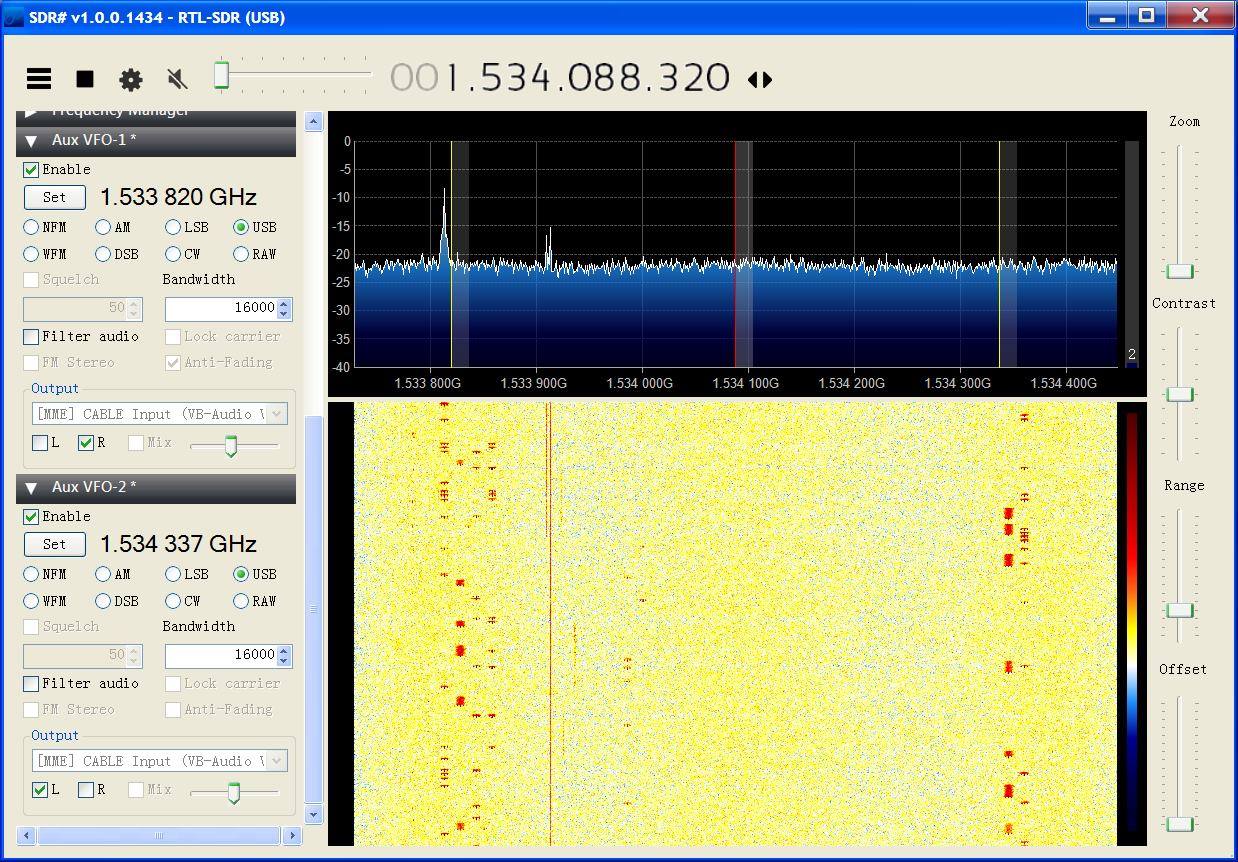
What the 10.5k signals look like compared to the 600 signals.

If you like Jonti’s apps, then please remember to donate a small amount to him so that he can continue to work on them more. His PayPal donate button can be at the bottom of his main page.

Building a NEST Thermostat with Arduino and an RTL-SDR

The Nest thermostat is a smart thermostat that learns your schedule and automatically adjusts the heat in your house for optimal energy savings.  Tristan didn’t want to buy a Nest, but wanted to replicate the Nest thermostat’s functionality by using an Arduino to automatically regulate his apartments central heating boiler. To do this he needed to find a way to turn the heating on and off programatically.

Fortunately Tristan’s current thermostat is wireless, so he decided to use his RTL-SDR to sniff the data it sends to try and find the on and off signals. By using SDR# he was able to discover the radio traffic stream in the ISM band at 433 MHz. After simply recording the signal audio, he passed the audio file into Audacity to analyze the messages. He discovered that the ON and OFF signals were on-off key (OOK) modulated, and he was able to discover the binary control string and pulse timings.

With this information at hand, Tristan was then able to use a cheap 433 MHz radio transmitter together with his Arduino to replicate the ON/OFF boiler control signals. In the future Tristan plans to add a temperature sensor and web interface to monitor everything.

In the past we’ve also posted about a similar project by Tom Taylor where he reverse engineers his thermostat with an RTL-SDR and controls it with an Arduino.

thermostat_bits

More talks from Defcon 23

Some more SDR and RF related talks from Defcon 23. See our previous posts [1][2] for other talks that we posted previously.

Colby Moore – Spread Spectrum Satcom Hacking

Recently there have been several highly publicized talks about satellite hacking. However, most only touch on the theoretical rather than demonstrate actual vulnerabilities and real world attack scenarios. This talk will demystify some of the technologies behind satellite communications and do what no one has done before – take the audience step-by-step from reverse engineering to exploitation of the GlobalStar simplex satcom protocol and demonstrate a full blown signals intelligence collection and spoofing capability. I will also demonstrate how an attacker might simulate critical conditions in satellite connected SCADA systems.

In recent years, Globalstar has gained popularity with the introduction of its consumer focused SPOT asset-tracking solutions. During the session, I’ll deconstruct the transmitters used in these (and commercial) solutions and reveal design and implementation flaws that result in the ability to intercept, spoof, falsify, and intelligently jam communications. Due to design tradeoffs these vulnerabilities are realistically unpatchable and put millions of devices, critical infrastructure, emergency services, and high value assets at risk.

DEF CON 23 - Colby Moore - Spread Spectrum Satcom Hacking

DaKahuna and satanklawz – Introduction to SDR and the Wireless Village

In many circumstances, we all have to wear different hats when pursuing hobbies, jobs and research. This session will discuss the exploration and use of software defined radio from two perspectives; that of a security researcher and Ham Radio operator. We will cover common uses and abuses of hardware to make them work like transceivers that the Ham crowed is use too, as well as extending the same hardware for other research applications. Additionally we will highlight some of the application of this knowledge for use at The Wireless Village! Come and join this interactive session; audience participation is encouraged.

DEF CON 23 - DaKahuna and satanklawz - Introduction to SDR and the Wireless Village

Lin Huang and Qing Yang – Low cost GPS simulator: GPS spoofing by SDR

It is known that GPS L1 signal is unencrypted so that someone can produce or replay the fake GPS signal to make GPS receivers get wrong positioning results. There are many companies provide commercial GPS emulators, which can be used for the GPS spoofing, but the commercial emulators are quite expensive, or at least not free. Now we found by integrating some open source projects related to GPS we can produce GPS signal through SDR tools, e.g. USRP / bladeRF. This makes the attack cost very low. It may influence all the civilian use GPS chipset. In this presentation, the basic GPS system principle, signal structure, mathematical models of pseudo-range and Doppler effect will be introduced. The useful open source projects on Internet will be shared with attendees.

DEF CON 23 - Lin Huang and Qing Yang - Low cost GPS simulator: GPS spoofing by SDR

Solving the Mystery of a Keyless Vehicle Entry RF Deadspot in a Carpark with a FUNcube Dongle

The Brisbane Times ran a story today that discussed an interesting RF phenomenon that was solved using a FUNcube dongle software defined radio. The Funcube dongle is a SDR similar to the RTL-SDR. The issue was that vehicle wireless entry keyfobs would not work at a particular location within an outdoor shopping centre car park.

The story goes like this – First a user on a local Brisbane subreddit message board posted about how he had noticed that his cars wireless entry keyfob would not work when he parked in a certain area of the shopping area car park. The user wrote:

I walked out to my car from Bunnings, and there was a new HSW Maloo parked in front of me with the owner staring at his key fob and shaking his head.

I said “let me guess, car won’t open?” and he said yeah, and he’d been trying for about 5 minutes. I said that I’d had the same thing happen to me a few months back in the same spot, and then went to open my car.

Nothing. No beep, door stayed locked. Looked around and there was another couple trying to get into their car as well (late model C Class).

It took about 5 minutes of me trying the door every 20 seconds or so before it opened. HSV owner was still there when I left. The only thing he and I could think of causing it was the mobile phone tower in front of Aldi.

After reading the post, user u/riumplus decided to go out to the same spot with his Funcube dongle SDR and see if there was any interference that might explain the issues. But he found no such interference. However, when he pressed the wireless entry on his own keyfob he noticed reflections from the main transmission that were coming from the buildings walls. He wrote:

So I pulled out my SDR and I did a complete frequency sweep from 100kHz to 2.2GHz and… also nothing. Everything completely normal. Nothing on that frequency, nor anything odd anywhere else on the spectrum. Couldn’t see any of the usual potential harmonics from RFID or standard WiFi gear. Here’s the output at 433.3MHz(forgot to grab a screenshot centred right at 433.92Mhz but it was also empty, as was 315MHz).

Here’s where it gets interesting – I noticed that that location is almost in the middle of the car park between the three buildings, and they all have large amounts of metal flashing on their fronts. On a whim I watched the output when I pressed my own keyfob. And what do you know, I could see distorted reflections from my own signal bouncing off these buildings right back at me. My guess is that this is what was causing you issues!

It may sound counter-intuitive, but next time it happens try cupping the keyfob in your hand to weaken the signal. It should still be strong enough to trigger your car to open, but then the reflections will be weak enough they won’t cause you trouble.

So it seems that the layout of the buildings caused a focal point for reflections at that particular location which affected some wireless keyfobs.

The location in the carpark of the deadzone.

Decoding End Of Train and Head Of Train Packets with an RTL-SDR

Back in March 2014 we showed a video of a RTL-SDR user decoding End Of Train (EOT) and Head of Train (HOT) signals. Head of Train (HOT) and End of Train (EOT) signals are used on trains to transmit telemetry data such as brake line pressure and monitor accidental separation of the train. If you live near a trainyard of railway line you may be able to pick up these signals.

Now over on YouTube user berwin018 shows us another video of EOT and HOT signals being decoded. There doesn’t seem to be much information in these packets, but they could potentially be used to track which trains are passing by.

To decode EOT and HOT packets you can use the softEOT software which can be downloaded from the softEOT Yahoo! Group after requesting and being accepted into membership.

Decoding End Of Train & Head Of Train Packets

DSD+ Updated to Version 1.101

DSD+ (Digital Speech Decoder+) is a popular decoding tool that can be used to listen to P25, DMR and other unencrypted digital speech signals. Recently DSD+ has been updated from version 1.074 to version 1.101.

The new version brings several changes, including the ability to decode Hytera Extended Pseudo Trunk (XPT) systems, Airspy compatibility, performance improvements and a TCP/IP link from FMP to DSD+ (no longer need to use a virtual audio cable). The full change log is as follows:

DSD+: Fixed AMBE tone frame audio generation.

FMA: Added Airspy-compatible FMP (FMPA.exe)

DSD+: Significant reduction in CPU usage when monitoring busy control channels. Improvement will be most noticeable on low power processors.

DSD+: Detection and decoding of Hytera Extended Pseudo Trunk (XPT) systems.

DSD+: The DSD+ -i command line parameter can contain an IPV4 address; this lets DSD+ connect to a copy of FMP that is running on a different PC in your local network or on the Internet

Example: DSDPlus -i192.168.1.150:20001

DSD+: NEXEDGE radio alias editing

DSD+ now marks auto-generated NEXEDGE radio aliases in the DSDPlus.radios file by prepending an asterisk like so:

NEXEDGE, … yyyy/mm/dd hh:mm, *”aliastext”

If you edit a NEXEDGE alias, you must remove the asterisk; this tells DSD+ that the new alias text is NOT auto-generated and DSD+ will not replace it with OTA alias text

FMP: FMP command line processing

The FMP command line format has been modified and is now similar to the DSD+ command line. A summary is listed here:

FMP rev 1.4t

Usage:
FMP [options] Normal operation
FMP -h Show help

Options:
-i<num> RTL SDR device number (1-255) [-i1]
-o<num> Output audio device (1-255) [-o1]
-o<port> Output audio TCP port (256-65535)
-P<num> PPM value (-999.9-999.9) [-P0.0]
-g<num> RF gain (dB) [max]
-f<MHz> Initial tuned frequency [-f99.9]
-b<kHz> Initial filter bandwidth (4, 7, 9.5, 12.5) [-b7]
-z<num> Show zoomed spectrum (0-1) [-z1]
-e<num> Enable/disable economy mode (0-1) [-e1]
-n<num> Select noise filter (0-2) [-n0]
-v<num> Set volume level (0-500) [-v100]
-s<num> Enable/disable scanner mode (0-1) [-s0]
-wsl<v>.<h> Spectrum window location [-wsl50.50]
-_<num> Minimize windows at startup; bitmapped
-rv Role is trunk voice channel monitor

-rv puts FMP into voice following mode (same as pressing ‘V’ in FMP)

Any shortcuts or batch files that run FMP will have to be modified to match the new command line format.

DSD+: Less processor loading (probably only noticeable on very slow processors)

DSD+: Much faster groups/radios files loading/saving

DSD+: Editing existing radio aliases

In previous versions of DSD+, editing of pre-existing radio aliases can not be done with an external text editor while DSD+ is running; only radio records with no alias text can be edited

With DSD+ 1.092, existing radio alias text can be edited in an
external text editor while DSD+ is running; DSD+ will load and display any updated radio aliases

DSD+: A DSDPlus.radios file corruption bug has been fixed

DSD+: A command line option to add system details to event log entries has been added

-E Add NAC/RAN/DCC/RAS data to event log file entries

DSD+: Decoding of more DMR and TIII messages has been added

DSD+: A symbol recovery bug has been fixed

DSD+: Con+ handling has been modified; previous versions of DSD+ would create “DMR” entries in the DSDPlus.groups and DSDPlus.radios files for traffic on monitored voice channels; DSD+ 1.090 creates “Con+” entries; if you have “DMR” entries with nonzero NID fields, you should either bulk delete them or change their protocol string from “DMR” to “Con+”; Notepad has a simple search/replace function that can be used to do this

DSD+: A command line option to minimize windows at startup has been added

-_<num> Minimize selected windows at startup (bitmapped, 0-15) [-_0]

value window

1 console
2 source audio
4 channel activity
8 event log

sum values to minimize multiple windows

DSD+: Several high contrast display modes have been added

-H<num> High contrast mode (bitmapped, 0-63) [-H0]

two bits are used per graphical window; pressing ‘H’ in a window will cycle it to the next display mode; pressing ‘W’ displays the current -H<num> value in the event log window

DSD+: Control of AMBE and IMBE unvoiced audio levels has been added

-UA<num> AMBE unvoiced speech level (0-100) [-UA50]
-UI<num> IMBE unvoiced speech level (0-100) [-UI50]

pressing ‘A’/’a’/’I’/’i’ will also adjust the levels;
lower levels may reduce the “underwater” sound of some comms

DSD+: DSD+ can get its raw audio source from FMP via a TCP link instead of via Virtual Audio Cable or VB-Cable

-i<TCPport> FMP TCP link port number (256-65535)

linking FMP to DSD+ via VAC or VBC is deprecated; please use the TCP
link feature instead; any port number between 10000 and 65000 should be fine

DSD+: DSD+ can record separate .wav files for each voice call

-P<wav|mp3> Also create per-call wav or mp3 files

the file names encode metadata:

time
duration
protocol
NID
site number
NAC/RAN/DCC/slot
call type (group/private)
target
source

note: per-call mp3 files are not supported at this time

FMP: A command line option to minimize windows at startup has been added

-_<num> Minimize selected windows at startup (bitmapped, 0-3) [-_0]

value window

1 console
2 spectrum display

JAERO: A new RTL-SDR compatible decoder for Inmarsat AERO signals

Back in August of this year we showed how it was possible to use an RTL-SDR dongle, satellite antenna, LNA and decoding software to receive and decode STD-C EGC signals from Inmarsat satellites. We also showed how it was possible to modify a low cost GPS antenna to use as a satellite antenna.

Now a radio hobbyist called Jonti has released a Windows decoder for the Inmarsat AERO set of signals. AERO is a system that provides a satellite based version of VHF ACARS (Aircraft Communications Addressing and Reporting System). ACARS is typically used by ground control and pilots to send short messages and is also sometimes used for telemetry.

Jonti writes:

JAERO is a program that demodulates and decodes Classic Aero ACARS (Aircraft Communications Addressing and Reporting System) messages sent from satellites to Aeroplanes (SatCom ACARS) commonly used when Aeroplanes are beyond VHF range. Demodulation is performed using the soundcard. Such signals are typically around 1.5Ghz and can be received with a simple low gain antenna that can be home brewed in a few hours in conjunction with a cheap RTL-SDR dongle.

In the advent of MH370, Classic Aero has become a well-known name. A quick search on the net using “Classic Aero MH370” will produce thousands of results. The Classic Aero signals sent from satellites to the Aeroplanes are what JAERO demodulates and decodes.

Unlike the usual VHF ACARS, with SatCom ACARS you can not receive signals from the Aeroplane only the people on the ground talking to the people in the Aeroplane. This means you do not get the airplanes reporting their position. Instead you tend to get weather reports, flight plans, and that sort of stuff. Just like VHF ACARS they usually use cryptic shorthand notation. For example “METAR YSSY 040400Z 08012KT 9999 FEW040 SCT048 23/09 Q1024 FM0500 05012KT CAVOK=” is the weather report for Sydney Airport in Australia in a format called METAR. It tells you the time, when the report was issued, the wind direction and speed, visibility, clouds, temperature, due point and air pressure. Then it says from 5 AM UTC the wind direction and speed and that the weather will be nice. There are sites such as Flight Utilities that can decode such information and display it in a more understandable format.

In his post Jonti also shows how he uses a modified GPS antenna to receive the AERO signals.

Jonti's modified GPS antenna for receiving AERO
Jonti’s modified GPS antenna for receiving Inmarsat AERO

We gave JAERO a test and found that it decoded AERO signals easily, even with low signal strength. To use JAERO tune to an Inmarsat AERO signal in SDR# or a similar program using USB mode. JAERO will listen to the audio from the sound card or from a virtual audio pipe. We recommend setting the AFC (Automatic Frequency Control) setting on on if you find that your RTL-SDR drifts too much. 

AERO signals can be found at around 1545 MHz. They only use about 800 Hz in bandwidth. See UHF satcoms page for a list of AERO frequencies.

The JAERO decoder.
The JAERO decoder.
Some AERO signals.
Some AERO signals.

Remember that some R820T/2 RTL-SDR dongles can have problems when receiving this high, especially when they heat up. If you find that your dongle gets deaf at these L-band frequencies try cooling the R820T/2 chip with a heatsink or fan. The Airspy or SDRplay RSP software defined radios are better choices for decoding signals this high, but the RTL-SDR will work fine if your signal strength is decent and the R820T/2 chip is kept cool.

If you are interested in VHF ACARS as well, then we have a tutorial about decoding that here.

Hak5: Reverse Engineering Radio Protocols with SDR and the Yardstick One

Over on YouTube the popular security and hacking themed channel Hak5 have created two videos together with Mike Ossmann (creator of the HackRF and Yardstick One) that give a good introduction and overview on reverse engineering unknown radio protocols. In the video they show how to use a SDR like the RTL-SDR or HackRF to initially capture the radio signal, and then how to use the Yardstick One to reverse engineer and recreate the signal. Using this process they reverse engineer the radio protocol for a wireless liquor cabinet lock.

The Yardstick One is a computer controlled wireless transceiver (but it is not an SDR). The Yardstick One understands many radio protocols by default and can be programmed in Python, lowering the learning barrier for reverse engineering signals.

Mike Ossmann has also been slowly releasing very detailed video tutorials about DSP and radio related topics. If you are interested in reverse engineering radio signals it is a very helpful series to watch.

Radio Hacking: Reverse Engineering Protocols Part 1 - Hak5 1913

Radio Hacking: Reverse Engineering Protocols Part 2 - Hak5 1914