Echoes: An RTL-SDR Tool for Meteor Scatter Detection
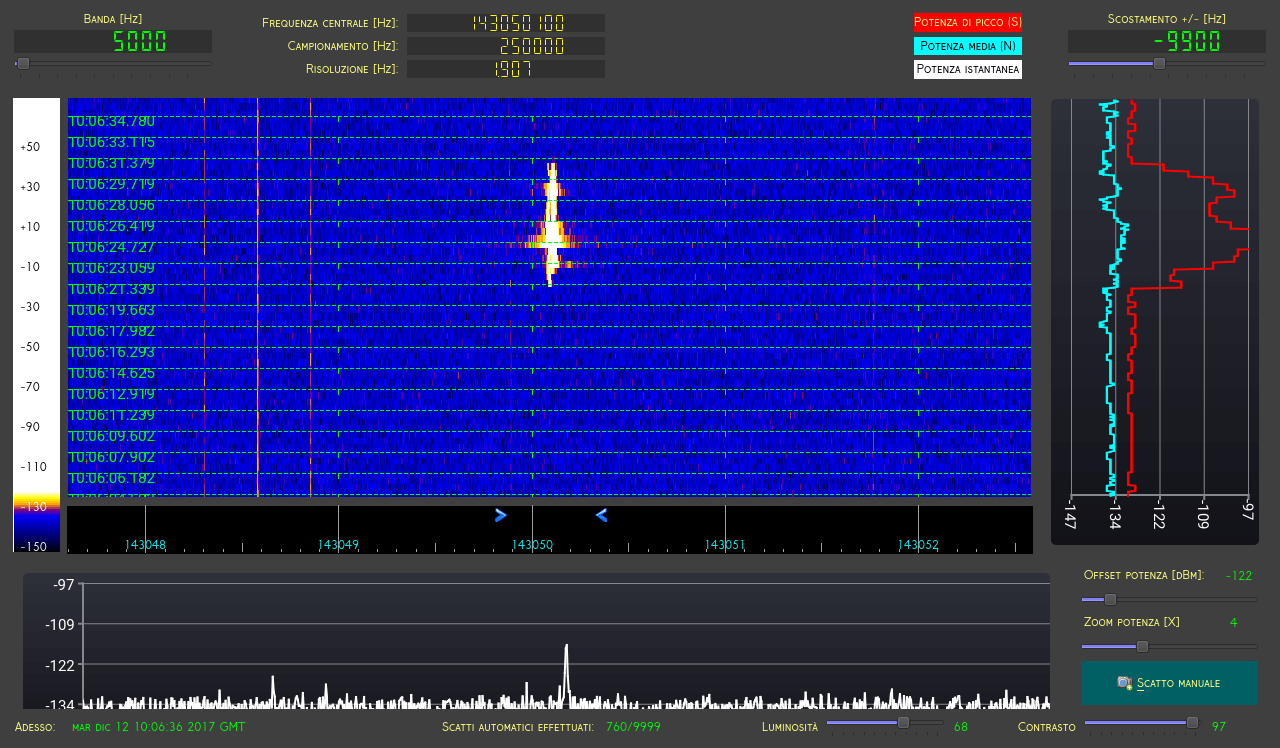
Echoes Running
Echoes Running

Thanks to "gmbertani" for letting us know about his recently released RTL-SDR compatible software called "Echoes". Echoes is a Windows, Linux and Raspberry Pi/Arch compatible tool that can be used together with an RTL-SDR and appropriate antenna to monitor for meteor scatter detections.

Meteor scatter works by receiving a distant but powerful transmitter via signal reflections off the trails of ionized air that meteors leave behind when they enter the atmosphere. Normally the transmitter would be too far away to receive, but if its able to bounce off the ionized trail in the sky it can reach far over the horizon to your receiver. Typically powerful broadcast FM radio stations, analog TV, and radar signals at around 140 MHz are used. By listening to these signal blips it can be possible to estimate the number of meteors falling.

Below we paste the official description and feature list of Echoes, and at the end is a video demonstrating Echoes in action:

Echoes it's a radio spectral analysis software for RTL-SDR devices, designed for meteor scattering purposes.

Echoes doesn't demodulate neither decode any human-made signal. Its main goal is to analyze and record the total power of natural signals and generate screenshots and tabular data (CSV, GNUplot) output in presence of particular peaks in a selected narrow range of frequencies. Since there is no demodulation, there is no provision for audio listening, except for a notify sound when an event has been recorded.

Features

  • Captures waterfall spectra as PNG screenshots and statistics data files.
  • Optionally generates GNUplot data files
  • Multiple instances can manage separate dongles plugged in the same computer
  • Three operating modes: continuos (records data only), periodic (captures data and screenshot every X seconds) and automatic (record data and screeshot each time a customizable (S-N) treshold is exceeded)
  • HTML report production
  • Installers ready for Windows7++ and RPMs / SRPMs for Linux
  • xz binary package for Raspberry PI / Arch distro
  • It can run headless, recording GNUplot and statistic data only
Tom’s Radio Room Tests and Reviews the RTL-SDR Blog Multipurpose Dipole Kit

Over on his YouTube channel Tom Stiles (hamrad88) has been experimenting with and reviewing our multipurpose dipole kit. Tom is a ham radio YouTuber who runs a show that produces content often, so we encourage you to subcribe to his channel if you're interested. Tom reviewed our dipole kit over a series of 5 videos which we link here [1: Discussing the product], [2: Unboxing], [3: First ADS-B Tests], [4: Second ADS-B Tests], [5: Third ADS-B Tests]. We post have embedded video 2 and 5 below.

In his testing Tom finds that using the antenna in the vertical orientation improves ADS-B performance. This is expected as ADS-B signals are vertically polarized, and so the antenna should be too. By using the included suction cup mount Tom is able to get the antenna attached to his window which improves reception by getting the antenna as close to the outdoors as possible. This is an expected use case for the antenna, and it's good to see that good results are being had!

If you're interested in the set please see our store at www.rtl-sdr.com/store, or use the links provided in Tom's videos. We also have a tutorial and use case demonstrations for our dipole kit available at www.rtl-sdr.com/DIPOLE.

TRRS #1384 - RTL-SDR.COM Portable Antenna - Parts

TRRS #1388 - RTL-SDR.COM Antenna Testing Pt 3

Using a Raspberry Pi 3 and RTL-SDR as a 40m FT8/JT65/JT9 Monitor

Over on YouTube user radio innovation has uploaded a brief screen capture showing his Raspberry Pi 3 and RTL-SDR dongle being used as an always-on monitor for low transmit power based signals such as FT8, JT65 and JT9. These signals are transmitted by ham radio enthusiasts for the purpose of making contacts, and determining propagation conditions. This is a good application for an RTL-SDR and Raspberry Pi 3 as it enables cheap monitoring of these signals without the need to tie up a full sized ham radio.

To do this "radio innovation" runs Linrad on the Raspberry Pi, which is a program like GQRX that interfaces with the RTL-SDR dongle. Then the WSJTx software is used to decode the signals. He writes:

Remote Desktop screencapture of my Raspberry Pi3 monitor receiver on 40m amateurradio band with WSJTx and decoding FT8,JT65 and JT9. Receiver hardware is RTL-SDR(tcxo) + simple converter and homemade bandpass filter.

SDR software is LINRAD by SM5BSZ.

RasperryPi3 OS is Ubuntu Mate 16.04.

Update: We now have a tutorial on creating a similar set up available on a new post.

Schmoocon 18: Live Stream of Micheal Ossmann and Schuyler St. Leger on Psuedo-Doppler begins in 15 minutes

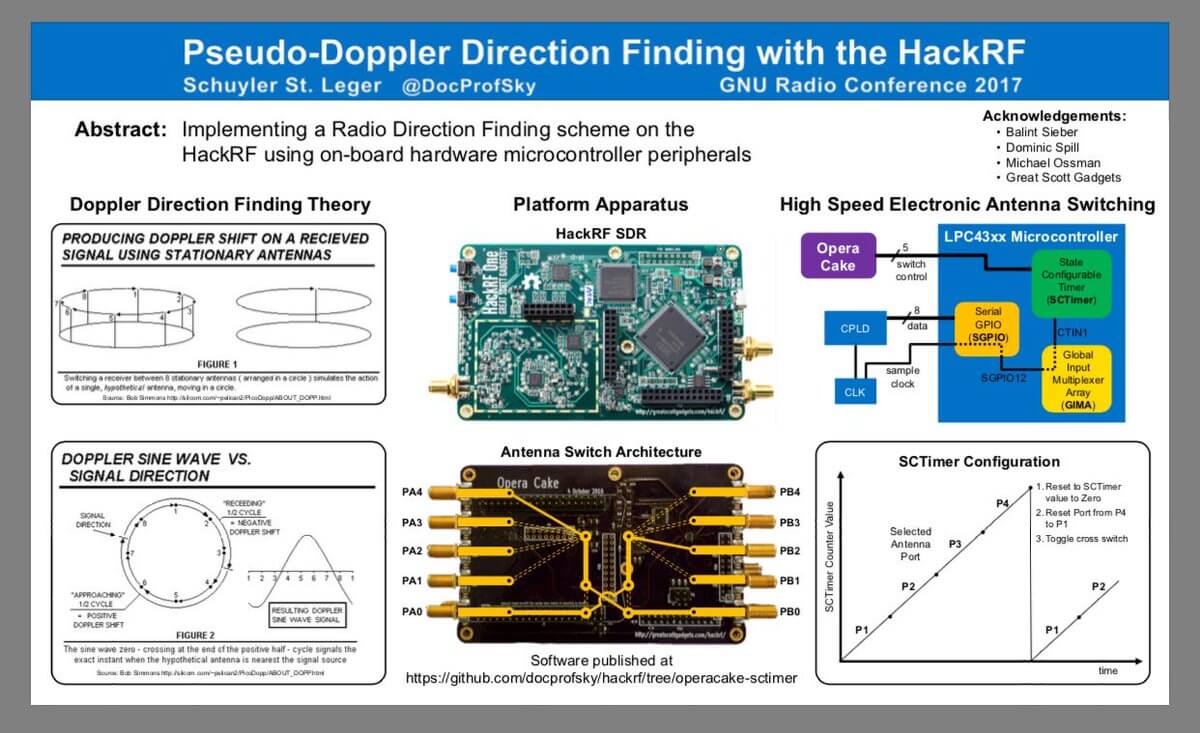
Micheal Ossmann @michaelossmann (famous for creating the HackRF SDR and various other projects) and Schuyler St. Leger @DocProfSky (a very talented young man) will soon be presenting their "Pseudo-Doppler Redux" talk at the Schmoocon 2018 conference at 3:30pm EST. The talk is available for all to watch live on Livestream.

Michael Ossmann and Schuyler St. Leger demonstrate their new take on Pseudo-Doppler direction finding techniques, using SDR to enhance direction finding capabilities.

Schyler's Poster on Pseudo Doppler from GNU Radio Con 17.

Watching the Analog TV Shutdown in Brazil

Over the last few years Brazil has been moving over to digital TV, and has planned to shut down the old analogue TV signals. Vinicius Lenci (PU2VLW) was watching with his SDR during the analog shutdown that occurred in Pedreira-SP on the 17th of January 2018 (note that the post is in Portuguese but Google Translate can be used). The video on his post captures the end of an era by eerily showing the analog TV audio signal suddenly cutting off and turning to noise. In another video where he was monitoring 16 analog channels with an analog TV receiver shows the channels slowly switching off one by one within a few minutes.

Shortly after the analog TV signals were shutdown, Vinicius notes that a new digital TV signal under test at 571 MHz appeared in place of one of the old analogue signals. Also he notes that the now empty 750 MHz band will eventually be replaced by mobile LTE technology.

Capturing the Analogue TV shutdown in Pedreira, Brazil.

Transmitting RF Music Directly From the System Bus on your PC

Recently we've come into knowledge of a program on GitHub called "System Bus Radio" which lets you transmit RF directly from your computer, laptop or phone without any transmitting hardware at all. It works on the principle of manipulating the unintentional RF radiation produced by a computers system bus by sending instructions that can produce different AM tones. An SDR like the RTL-SDR V3 or RTL-SDR with upconverter, or any portable AM radio that can tune down to 1580 kHz can be used to receive the tones. To run the software don't even need to download or compile anything, as there is now a web based app that you can instantly run which will play a simple song.

However, the RF emissions don't seem to occur on every PC, or are perhaps at another frequency. We tested a Windows desktop and Dell laptop and found that no were signals produced. A list of field reports indicates that it is mostly MacBook Pro and Air computers that produce the signal, with some transmitting signals strong enough to be received from a few centimeters to up to 2m away. This could obviously be a security risk if a sophisticated attacker was able to sniff these tones and recover data.

This program runs instructions on the computer that cause electromagnetic radiation. The emissions are of a broad frequency range. To be accepted by the radio, those frequencies must:

  • Be emitted by the computer processor and other subsystems
  • Escape the computer shielding
  • Pass through the air or other obstructions
  • Be accepted by the antenna
  • Be selected by the receiver

By trial and error, the above frequency was found to be ideal for that equipment. If somebody would like to send me a SDR that is capable of receiving 100 kHz and up then I could test other frequencies.

There is also an interesting related piece of software based on System Bus Radio called 'musicplayer', which takes a .wav file and allows you to transmit the modulated music directly via the system bus.

If you're interested in unintentionally emitted signals from PCs, have a look at this previous post showing how to recover images from the unintentional signals emitted by computer monitors. This is also similar to RPiTX which is a similar concept for Raspberry Pi's.

System Bus Radio web app

Reverse Engineering or Brute Forcing Wireless Powerplug Remote Controls with a HackRF One

Over on his blog "Foo-Manroot" has created a post where he shows us how he can control a wirelessly controlled powerplug with his HackRF. These power plugs can be used to turn electrically devices on or off remotely, and their wireless protocol is often simple On-Off Keying (OOK) with little to no security.

Foo-Manroot first explains how easily capture and replay a signal with the HackRF. If the signal is simple without any security like rolling codes then a simple replay attack like this will allow the HackRF to control the device quite easily. In the next section he goes on to explain how to actually analyze and synthesize the packets yourself using Python and GNU Radio. Finally he also shows that a brute force attack can be applied once you know how to synthesize the signal. Brute forcing runs over every possible packet combination in a short time and this can be pretty fast for simple protocols like those used in wireless remote controls. His post also includes all the GNU Radio files required so it is easy for someone to replicate his work easily.

If you are interested in controlling simple OOK devices like a wireless powerplug with replay attacks then we have a tutorial for doing this with a simple RTL-SDR and Raspberry Pi running RpiTX which might be useful for those who don't have a HackRF.

HackRF Controlling the Wireless Power Outlet by Brute Forcing Packets


Leif Compares the Airspy HF+ with the Airspy+Spyverter Combo

Over on YouTube Leif (sm5bsz) has uploaded a video where he compares the Airspy HF+ with the Airspy+Spyverter combination. In the test he compares the two radios at 7 MHz. The signals come in from an antenna, are amplified and then passed into a notch filter which notches at 7.198 MHz. The antenna signal is then passed into an attenuator, and then through a directional coupler and then split into the two radios. A signal generator is used to inject a signal via the directional coupler at the notch frequency, and this signal is used to compare the two radios. This method stops antenna noise from appearing at the notch frequency and so any non-linearities appearing in the notch must be a problem with the radio.

The results that Leif finds are quoted below. They show that although the Airspy HF+ has good linearity, it can still be significantly improved in tough environments by adding a front end filter for the band of interest.

The Airspy HF+ and the Airspy+Spyverter are compared on 7 MHz with and without a band pass filter on the input. Without the filter the HF+ is a little better than the Airspy+Spyverter combo, but when the filter is inserted, the HF+ is MUCH better than the combo.

In an earlier video Leif also compares the two Airspy units on FM broadcast and the 2 meter band. Again he shows that the Airspy HF+ is better than the standard Airspy, but adding a filter to block out the broadcast FM can still help fairly significantly when trying to listen to the 2M band on the HF+.