Category: Amateur Radio

Receiving WSPR with an RTL-SDR V3 and with Automatic Band Changing

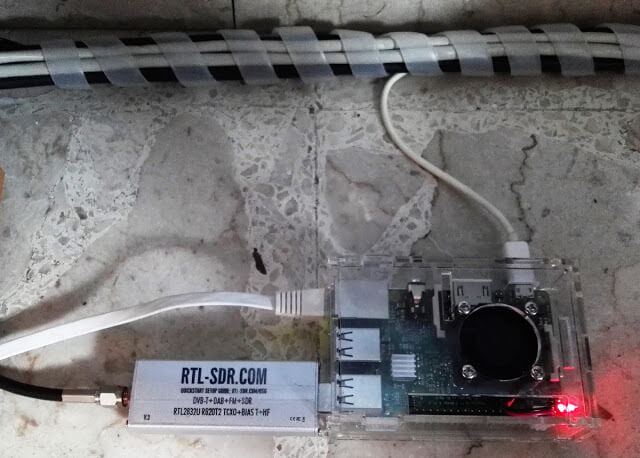
RTL-SDR V3 + Raspberry Pi WSPR Receiver

WSPR (pronounced "Whisper") is short for Weak Signal Propagation Reporting, and is a HF ham mode typically run on very low power levels such as 1W. The data from WSPR reception can be used to determine how good or bad HF propagation is currently around the world as each WSPR message contains a callsign, 6-digit locator and the transmit power level used. Received messages are all reported to the internet and can be viewed on an online map at http://wsprnet.org/drupal/wsprnet/map.

With an RTL-SDR V3 running in direct sampling mode it is possible to receive and decode these messages on a Raspberry Pi 3 using the WSPRD software.

Over on his website IT9YBG has uploaded a tutorial for a method that allows the WSPRD software to automatically change bands depending on the time of day. The method simply uses the crontab in Linux to automatically run a script that stops and then restarts WSPRD on a new frequency at certain times of the day. This is useful because different WSPR bands tend to become active at different times of the day due to changing HF propagation conditions.

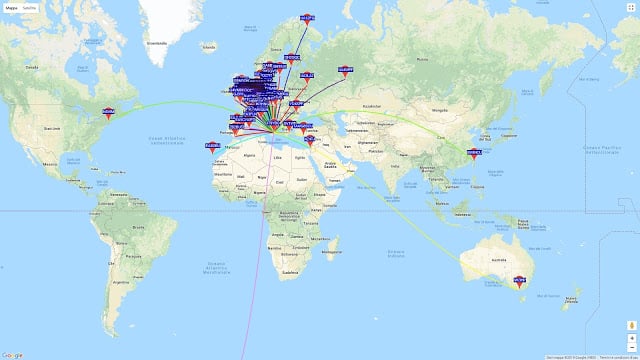
WSPR messages received from all over the world.
WSPR messages received by IT9YBG from all over the world.

The K9AY Loop Antenna: A Directional E-H Antenna for HF

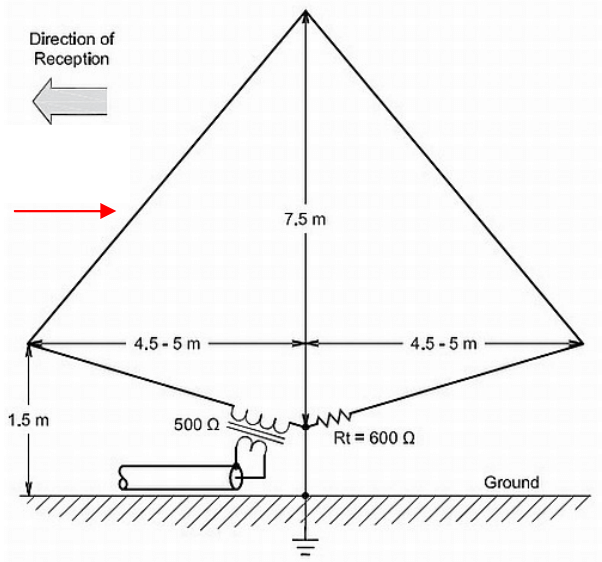
Thank you to Frank Sessink (PA0FSB) for submitting to us his document describing the K9AY loop antenna (pdf), which is the antenna that he successfully uses with his RTL-SDR for HF reception. The antenna combines magnetic (H) and electric (E) field reception in order to create a directive radiation pattern. Frank extends the idea by showing a method that can adjust the directivity electrically with some simple resistor switching.

The antenna that I use is for medium wave DX, specially to receive MW from USA here in Europe/The Netherlands. The antenna is a combination of a magnetic loop and a sense antenna for the E-field. The magnetic loop is directive, but has no front-rear ratio. The E-field antenna has omnidirectional sensitivity. The combination, in correct phase and amplitude, results in a front-rear ratio of more than 25 dB over the frequency range from 500 kHz to around 3 MHz. Higher frequency makes no sense, since skywave signals distort the ground wave directivity pattern.

A simple modification is used as directional antenna with remote control: two orthogonal loops that combine E and H-field in a simple way. I can make 8 selectable directions.

The full document is available here in PDF format.

The K9AY E-H HF Antenna

Using a Raspberry Pi 3 and RTL-SDR as a 40m FT8/JT65/JT9 Monitor

Over on YouTube user radio innovation has uploaded a brief screen capture showing his Raspberry Pi 3 and RTL-SDR dongle being used as an always-on monitor for low transmit power based signals such as FT8, JT65 and JT9. These signals are transmitted by ham radio enthusiasts for the purpose of making contacts, and determining propagation conditions. This is a good application for an RTL-SDR and Raspberry Pi 3 as it enables cheap monitoring of these signals without the need to tie up a full sized ham radio.

To do this "radio innovation" runs Linrad on the Raspberry Pi, which is a program like GQRX that interfaces with the RTL-SDR dongle. Then the WSJTx software is used to decode the signals. He writes:

Remote Desktop screencapture of my Raspberry Pi3 monitor receiver on 40m amateurradio band with WSJTx and decoding FT8,JT65 and JT9. Receiver hardware is RTL-SDR(tcxo) + simple converter and homemade bandpass filter.

SDR software is LINRAD by SM5BSZ.

RasperryPi3 OS is Ubuntu Mate 16.04.

Update: We now have a tutorial on creating a similar set up available on a new post.

YouTube Talk by Ria Jairam: SDR & Setting Up A World Class Station

Over on YouTube FairlawnARC.org have uploaded a talk about SDRs and ham radio by Ria Jairam (N2RJ0). The talk is a good overview of the current state of SDRs for ham radio use, and she discusses the various hardware and software options as well as giving many tips for improving your ham station. The blurb reads:

Our speaker was Ria Jairam (N2RJ), a world class contest operator and member of the Frankford Radio Club. Ria discussed the latest technology and offerings from Flex Radio, the HPSDR project (Ananradios), RTL SDR and others, as well as practical tips for contesting, DXing and rag chewing using your SDR. This presentation was held on Friday, October 20, 2017, 1900 hours at the Fair Lawn Senior Center, 11-05 Gardiner Road, Fair Lawn, NJ. The event was open to the public & refreshments were served.

Ria Jairam, N2RJ YLs, SDR & Setting Up A World Class Station

Part 2 - Ria Jairam, N2RJ YLs, SDR & Setting Up A World Class Station

A Pocket DATV Transmitter and Receiver with Raspberry Pi, LimeSDR Mini and RTL-SDR

Over on YouTube user Evariste Okcestbon has uploaded a video showing his simple pocket DATV system that consists of a LimeSDR running on a Raspberry Pi Zero transmitting live camera images via DATV which is received by an RTL-SDR running on a Raspberry Pi 3.

If you didn't already know, DATV stands for Digital Amateur Television and is a digital mode somewhat similar to digital over the air TV signals that can be used by hams for transmitting their own TV signals on the ham bands. The LimeSDR Mini is a $139 US transmit and receive capable SDR that is currently crowdfunding and available for pre-order on Crowdsupply. It is expected to ship at the end of February 2018.

Evariste uses a range of software packages on each Raspberry Pi. He writes the following in the video description:

Description of a minimal Digital Tv chain : Transmitter and Receiver.

Hardware used on Tx : PiZero,Picam,LimeSDR Mini

Hardware used on Rx : Raspberry Pi 2, RTL-SDR,Monitor

Software used on Tx : avc2ts,dvb2iq,limetx

Software used on Rx : rtl_sdr,leandvb,kisspectrum,ts2es,hello_video

Softwares available on https://github.com/F5OEO
Special Thx to G4GUO, F4DAV and LimeSDR

Evariste is also the author of Rpidatv which allows you to transmit DATV directly from the GPIO pins of a Raspberry Pi without the need for any transmit capable SDR.

Securing the Bitcoin network against Censorship with WSPR

Bitcoin WSPR Test Setup

If you didn't know already Bitcoin is the top cryptocurrency which in 2017 has begun gaining traction with the general public and skyrocketing to a value of over $19,000 US per coin at one point. In addition to providing secure digital transactions, cryptocurrencies like Bitcoin are intended to help fight and avoid censorship. But despite this there is no real protection from the Bitcoin internet protocol being simply blocked and censored by governments with firewalls or by large ISP/telecoms companies.

One idea recently discussed by Nick Szabo and Elaine Ou at the "Scaling Bitcoin 2017" conference held at Stanford University is to use the something similar to WSPR (Weak Signal Propagation Reporting Network) to broadcast the Bitcoin network, thus helping to avoid internet censorship regimes. To test their ideas they set up a HackRF One as a transmitter and RTL-SDR and used GNU Radio to create a test system.

Other ideas to secure the Bitcoin network via censorship resistant radio signals include kryptoradio, which transmits the network over DVB-T, and the Blockstream satellite service which uses an RTL-SDR as the receiver.

If you're interested in the presentation the talk on WSPR starts at about 1:23 in the video below. The slides are available here.

Scaling Bitcoin 2017 Stanford University - Day 2 Afternoon

QrssPiG: Decoding QRSS on a Raspberry Pi with an RTL-SDR

QRSS is a ham communications mode that is essentially just very slow CW (morse code), with each dash/dot being broadcast for a number of seconds. With QRSS instead of audibly decoding the morse code signal, it is decoded visually via a spectrum display (or automatically by software). It is designed to be a QRP mode, which means that hams transmitting QRSS can be heard all over the world even though very low transmit power is used. 

QrssPiG is a QRSS grabber program that runs headless on a Raspberry Pi and can interface with an RTL-SDR. It automatically generates the waterfall graphs of received QRSS images, and supports uploading them via SCP or FTP. The software can also run with a HackRF, or via audio piping from another SDR or standard hardware radio.

Recently on Twitter @ON4CDJ has been trying QrssPiG with an RTL-SDR V3 and has been having good results.

QRadioLink Development Webpage Now Up

Back in September we posted [1, 2] about the QRadioLink software which is an RTL-SDR compatible digital amateur radio voice decoder and encoder program for Linux and Android (with chroot). It supports modern digital voice codecs like Codec2 and Opus. It is capable of being used with multiple SDRs, and can be used for transmitting digital voice too if you have a transmit capable SDR.

Andrian the developer recently wrote in to let us know that QRadioLink now has a website at qradiolink.org that you can follow for updates about its development. The website also explains some of the features of the software, and lists possible performance values of digital voice. The features include:

  • Receives and transmits analog voice, digital voice, low resolution video, text, IP protocol.
  • Narrow band modem with Codec2 or wideband modem and Opus.
  • Digital Modems: BPSKQPSK2FSK4FSK
  • Modes: narrow FM, SSB, digital voice, digital video, digital data
  • Formats: Codec2 700B, Codec2 1400, Opus 10 kbit/s
  • Video formats: JPEG
  • Supported hardware: Ettus USRPRTL-SDR, HackRF, BladeRF and in general all devices supported by gr-osmosdr

Typical Receiver performance is given in the following table, with all values being measured on an R820T RTL-SDR.

Mode Condition Sensitivity (dBm)
Codec2 700B 20 db SINAD -115
Codec2 1400 20 db SINAD -112
Opus 20 db SINAD -102
Narrow FM 12 db SINAD -118

In the future Adrian hopes to expand the software to include features like VOIP integration, SSB transceiver, DTMF & CTCSS encoder/decoders, multi-channel RX, HD video, remote control and a GUI improvement.

QRadioLink Main Page