New Notch Filter Plugin for SDR#

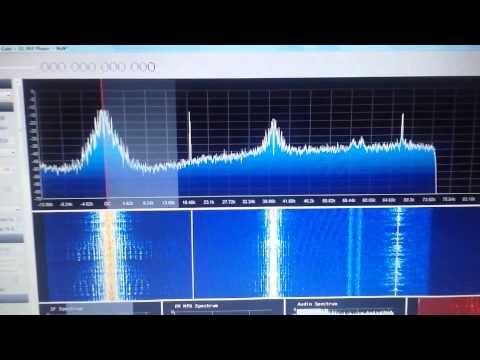
SDR# plugins programmer Vasili Beliakov has recently published a new notch filter plugin for SDR#. A notch filter will allow you to remove interfering signals that appear on top of a signal of interest. An example is shown in the image below first posted on Twitter by Youssef, the main developer of SDR#. In this image there is an interfering signal within the AM signal of interest. The notch filter removes the interferer without the need to remove the entire sideband.

The plugin also has VFO tracking which allows you to save preset notch filters for particular frequencies.

The plugin can be downloaded from https://t.co/dkEaWaQSmT. New Link: https://dl.dropboxusercontent.com/u/43061070/ifnotch.zip
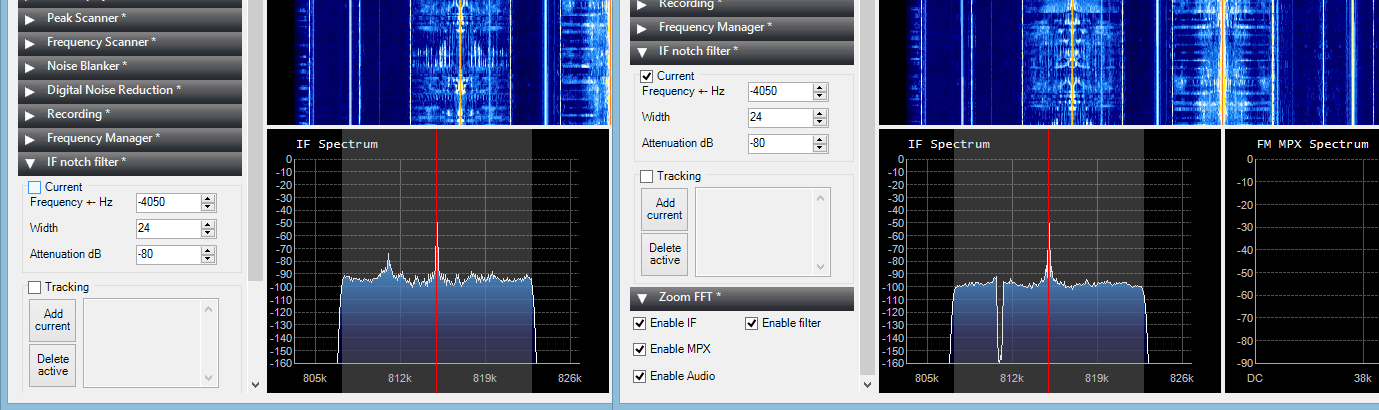
Notch Filter Plugin Example

RTL-SDR Cell Phone IMSI, TMSI and Key Sniffer

Over on YouTube user Kali Gsm has uploaded a video showing off a new software program he has written that allows an RTL-SDR to be used to gather IMSI, TMSI and Key information from a cell phone connected to a PC.

The IMSI (International Mobile Subscriber Identity) is a number that uniquely identifies a cell phone. Because IMSI’s are unique, they can be used to track a cell phone so they are rarely broadcast and instead a TMSI (Temporary Mobile Subscriber Identity) number is used to identify a cell phone instead. The TMSI is changed depending on geographic location or changed by the network randomly. The key is a number that is used to decrypt the GSM data sent to your phone.

Kali Gsm’s software is called rtl_tool_kit and is planned to be released soon on it’s GitHub page. It uses the gr-gsm software to sniff the GSM downlink with an RTL-SDR dongle and also interfaces to a connected mobile phone. The author writes that the following is possible with the software:

  1. You can get imsi tmsi and key of the device connected to your pc.
  2. You can send silent/flash sms
  3. You can connect/match tmsi to a mobile number if target is on the same BTS and in GSM900/2G mode.

Update 25/01/2015: All YouTube videos appear to have been removed – though the uploader reports in the comments that the videos will be back online soon.
Update 29/01/2015: Videos are back online.


Listening to SCA with HDSDR, SDR# and an RTL-SDR

In the USA and Canada a subcarrier called SCA (Subsidary Communications Authority) is used to add additional services to a broadcast FM signal. Some examples of the extra services provided are live financial stock telemetry, audio books for the blind, specialized audio radio programs for doctors etc and background music for supermarkets and stores. These SCA signals are modulated into standard broadcast FM radio signals, but require a special radio to receive them. Subcarrier signals can easily be spotted in the audio/baseband waterfall and spectrum plots available in most SDR software.

Over on the new RTL-SDR DX blog, the author (Jay Moore) has uploaded an article showing how to use an RTL-SDR dongle to listen to audio SCA signals. The process involves using HDSDR to receive the broadcast FM signal, then using Virtual Audio Cable to pipe the audio into SDR#, where it is then possible to tune to the audio SCA signal. The same process could also be used to receive different subcarriers used in other countries such as Finland where a subcarrier is used to transmit DARC encoded bus stop sign telemetry.

SCA audio received via a combination of HDSDR and SDR#
Decoding SCA with HDSDR and SDR#

RTL-SDR Panadapter Using Hardware Radio Receiver IF Stages

Over on YouTube user Jay Moore has uploaded a video explaining how to connect an RTL-SDR dongle to the IF stage of a hardware radio in order to create a panadapter. In the video Jay briefly explains how a radio with an IF stage works and then shows how he tapped into his Sansui 2000 hardware radio’s IF stage directly from the circuit board. The IF stage then connects to a ham-it-up upconverter which connects to the RTL-SDR.

By connecting the IF stage of a hardware radio to the RTL-SDR it is possible to use the hardware radio as the receiver while using the RTL-SDR to still maintain the benefits of a spectrum display. Most purpose built hardware radios will have better reception than the RTL-SDR.

RTL-SDR on receiver IF stages

Updates to the Power Line Noise Detector “Driveby” System

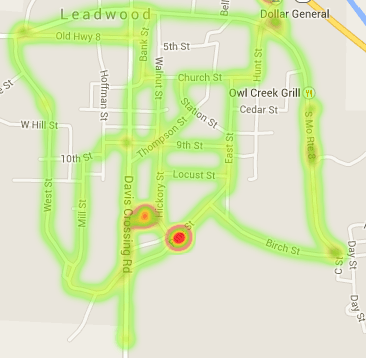
A few days ago we posted about Tim Havens “driveby” project, which is a RTL-SDR based system he developed to help create heatmaps of power line noise in his neighborhood. Upon doing further research, Tim discovered that the main source of power line interference was appearing at a frequency of 44.252 MHz. Then by using his driveby system to create a heatmap of his area at this frequency and also by using a hand held radio he was able to pinpoint a massive source of power line noise.

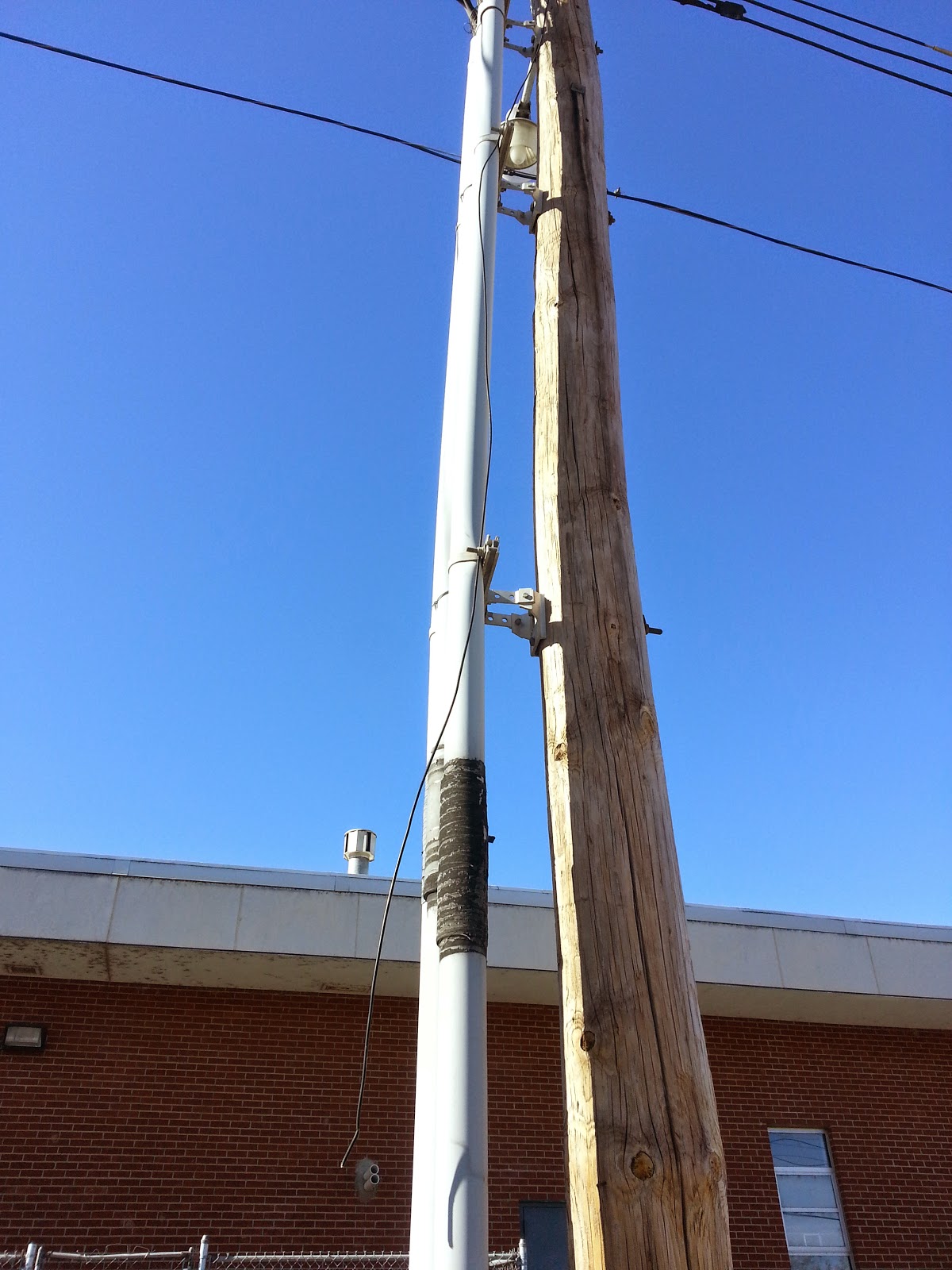
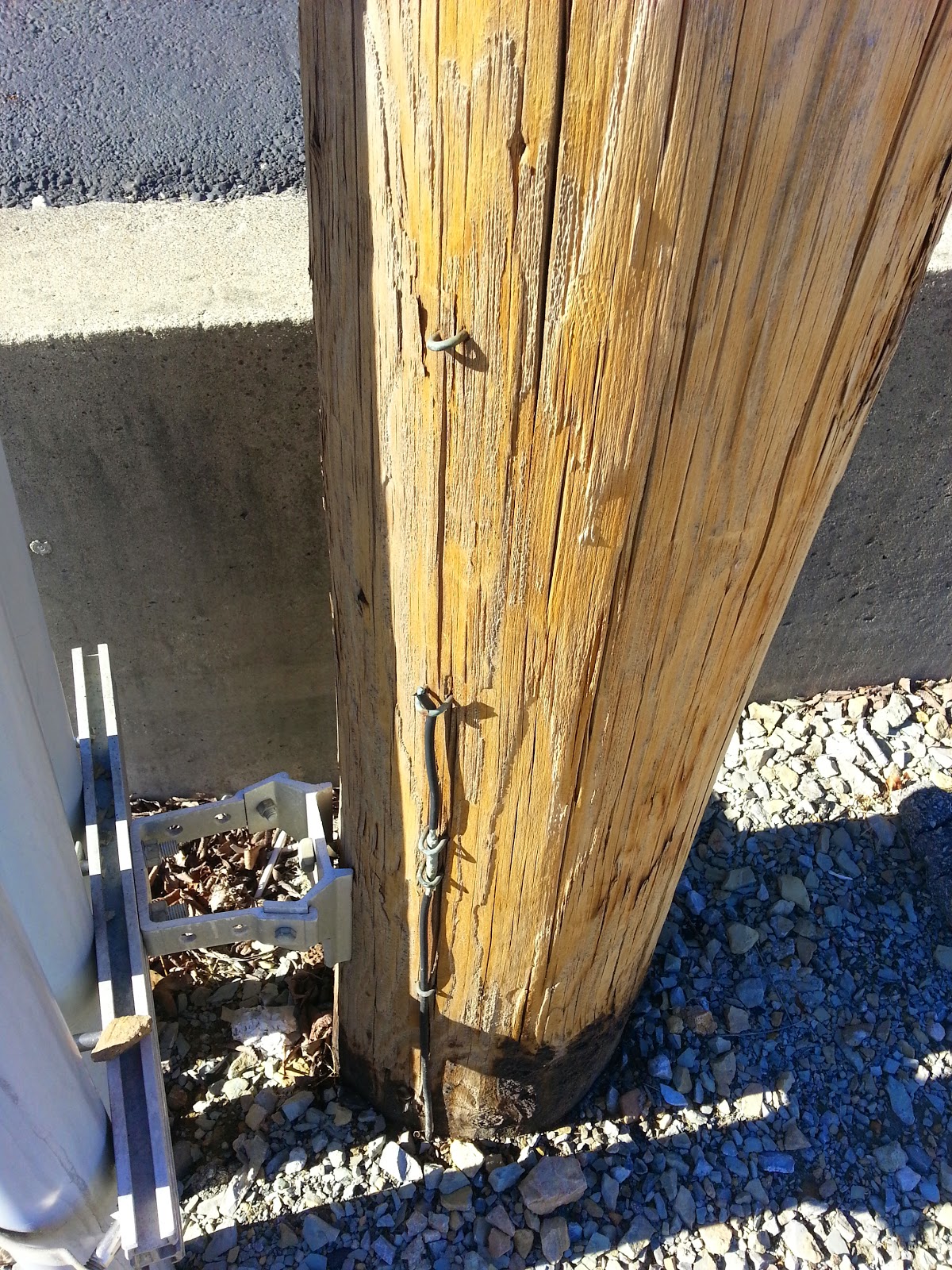
The noise appears to be coming from a faulty and unsafe power pole near a local school. He writes that the power poles primary ground line has been severed and that a wire from the AC line is simply dangling in the air, ready to be grabbed by school children.

Heatmap showing sources of powerline interference
The faulty power pole
The faulty power pole with dangling AC line
Severed grounding line

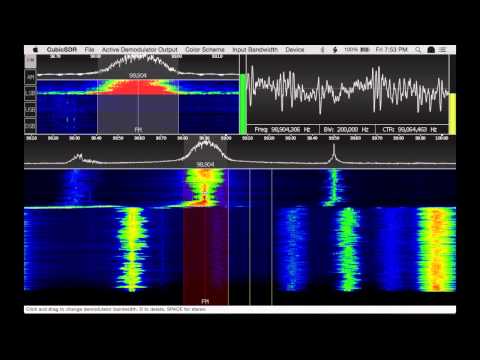
CubicSDR: New open source, cross platform SDR software

Over on YouTube a video showing off a preview version of a new cross platform and open source SDR software program has recently been uploaded. The software is named CubicSDR and aims to support all major operating systems including Linux, Windows and OSX. The code can be downloaded from its GitHub page at https://github.com/cjcliffe/CubicSDR.

CubicSDR currently supports the RTL-SDR, but in the future hopes to support the HackRF and other SDR’s. They also hope to eventually integrate several demodulation filters, make managing multiple SDRs easy and allow for scripting of custom demodulators.

CubicSDR v0.01 Early Preview

Testing an LNA on receiving a weak signal with the RTL-SDR

Over on YouTube Adam Alicajic the designer of the LNA4ALL low noise amplifier has uploaded a video showing the effect of an LNA on reception of a weak signal. He shows an example of how a very weak signal cannot be received by the RTL-SDR even when the gain is set to maximum unless an LNA is connected.

Adam has posted this video in regards to some statements saying that an LNA will only increase the noise floor and cannot bring signals out of the noise floor. There is a discussion about this on this Reddit thread.

DVB-T dongle + LNA = Myth or Truth

Airspy GNU Radio Script for Receiving LRPT Meteor-M2 Weather Satellite Images

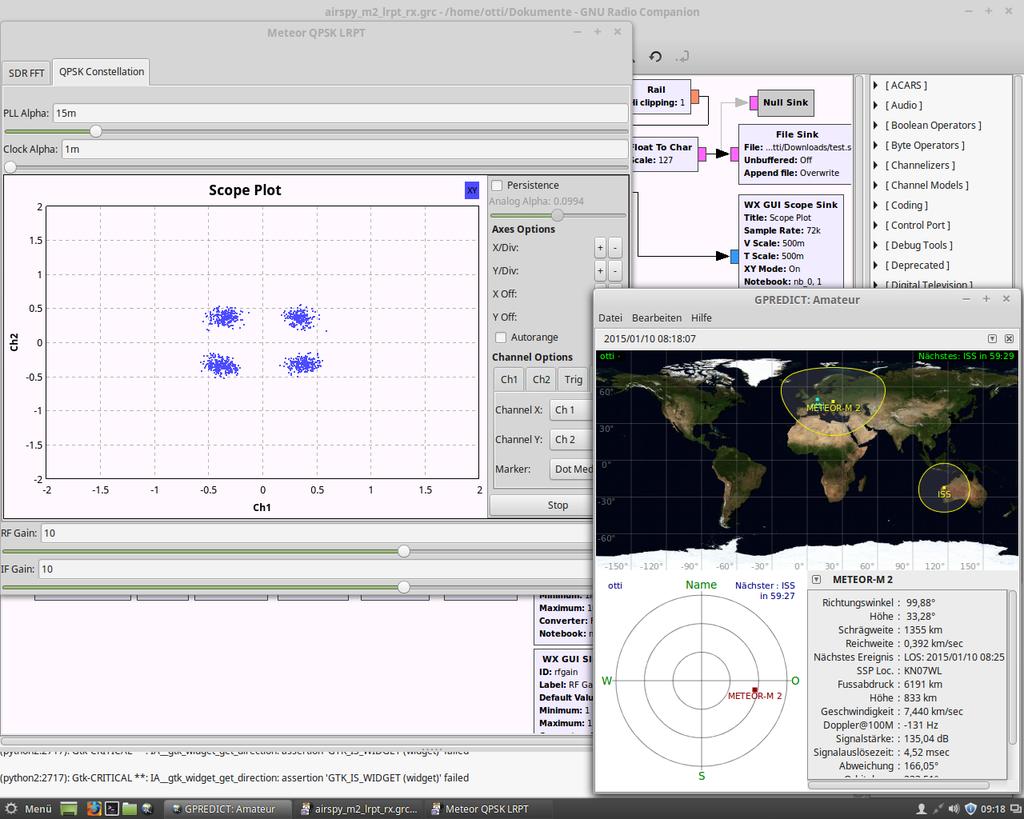
Previously we posted about receiving LRPT weather satellite images from the Russian Meteor-M2 weather satellite using the RTL-SDR. Now on GitHub, developer otti-soft has uploaded a LRPT decoder GNU Radio script for the Airspy. The script appears to be a modified version of the GNU Radio based real time decoder for the RTL-SDR, but optimized for the Airpsy and it’s 10 MSPS or 2.5 MSPS sampling rates. Note that although this is a real time receiver, the final image still needs to be processed on a Windows PC using LRPToffLineDecoder.

Also over on Twitter otti-soft has been uploading some images that he has received with his Airspy.

Real time LRPT Receiver for the Airspt
Real time LRPT Receiver for the Airspy