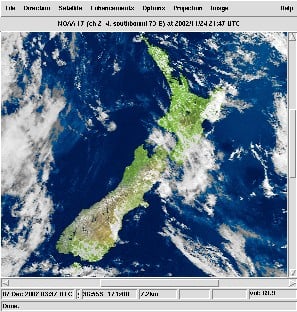
A corner reflector antenna is basically a monopole antenna with a metallic 'corner' reflector placed behind it. The reflector helps the monopole collect signals over a wider aperture resulting in signals coming in stronger from the direction that the corner is pointing at. In past posts we've seen a homemade tinfoil corner reflector used to improve reception of the generic stock RTL-SDR monopole antenna, and a larger one was used in a radio astronomy experiment to detect a pulsar with an RTL-SDR.
Recently The Thought Emporium YouTube channel has uploaded a video showing how to build a large 2 meter 3D corner reflector out of readily available metal conduit pipes and chicken wire. While the antenna has not been tested yet, they hope to be able to use it to receive weather satellite images from GOES-16, to receive moon bounce signals, to map the Hydrogen line and to detect pulsars.
Back in early 2016 we posted about a journalist who used an RTL-SDR to gather ADS-B data about the type of aircraft used at the world economic forum in Davos. The idea was to help highlight the vast wealth and power of the attendees by showing off their heavy use of private aircraft.
Now more recently Laurent Bastien Corbeil has published a similar article in Motherboard (a Vice News tech magazine) explaining how he tracked police and military planes at this years G7 summit which was held in Canada in early June. Laurent used an RTL-SDR Blog V3 with the small dipole antenna attached to a window to gather ADS-B data from all the aircraft activity during the summit.
ADS-B is a radio system used on modern aircraft which broadcasts the aircraft's current GPS location and other data such as aircraft identifiers. It is now used extensively by air traffic controllers as it is significantly more reliable than traditional radar. With a simple RTL-SDR it is possible for anyone to track and plot ADS-B data on a map, and this is how tracking sites like flightradar24.com and flightaware.com work.
From his collected data he was able to spot several interesting aircraft such as Canadian Air Force Chinooks, C130 Hercules', RCMP Pilatus', a military Bombardier jet, and a coast guard Bell 427. He also notes that while he was able to spot Donald Trumps Marine One helicopter with his own eyes, the ADS-B data was not present, indicating that more important military aircraft do not broadcast ADS-B for security reasons.
In the article Laurent makes estimates of the costs of operating these aircraft, and makes some guesses on the type of mission flown by some of the aircraft.
G7 Aircraft Flight Costs (Data by Laurent Bastien Corbeil, Graphics by Marvin Lau)
Over on YouTube w2aew who has many excellent videos explaining various radio topics has uploaded a new video that talks about the basics of bias tees, and shows some applications and examples. In the video he demonstrates using a bias tee to add DC voltage to a serial signal, measure the RF performance of a BJT transistor, and to tune a remotely tunable 'screwdriver' antenna.
On receiver radios bias tees are commonly used to power remote LNA's (low noise amplifiers) or active antennas by putting DC power onto the coax cable. Ideally an LNA should be placed closer to the antenna as this will help reduce the loss caused by coax cable. Often the antenna is far away from the receiver on a roof or attic where there is no power supply. A bias tee solves that by allowing the coax cable to be used for DC power.
We note that our RTL-SDR Blog V3 dongle has a built in bias tee that can be activated in software.
#284: Basics of RF Bias Tees including applications and examples
Just a note that the website for the popular NOAA APT weather satellite decoding software WxtoImg is currently down, and may possibly never be revived. This software is commonly used with RTL-SDR dongles to download weather satellite images from the NOAA 15, 18 and 19 polar orbiting satellites.
It seems that the author of the software has not been maintaining the site and software for a while, although there was a brief update on the site back in 2017 when the professional version keys were released for free. But the keys reportedly no longer work. WXtoImg is closed source, so the code is not available either.
Some of the downloads are still available via archive.org, however it only seems to be the Windows and some of the Linux versions that were archived. Over on two Reddit threads [1] [2], some users are also collecting the last free versions and making them available for download again. If anyone has access to the last beta versions for ARM devices please upload them somewhere too.
Also if anyone happens to have the contact details of the author, or someone who knows the author please let us know as we'd like to ask for permission to mirror the files.
Thanks to the work of Lucas Teske, GQRX is now able to connect to SpyServer servers. SpyServer is the IQ streaming server software solution developed by the Airspy SDR developers. It can support Airspy and RTL-SDR devices, and can be used to access these SDRs remotely over a network connection. It is similar to rtl_tcp, but a lot more efficient in terms of network usage, meaning that it performs well over an internet connection. On a previous post we have a tutorial about setting up a SpyServer with an RTL-SDR.
The code modified by Lucas is the gr-osmosdr module, and Lucas' code can be downloaded from his GitHub at github.com/racerxdl/gr-osmosdr. It doesn't yet appear to have been merged into the official osmocom branch. The gr-osmosdr module is a generic block used to access various SDR hardware, so any software that utilizes it (such as GNU Radio) should be able to connect to a SpyServer connection too.
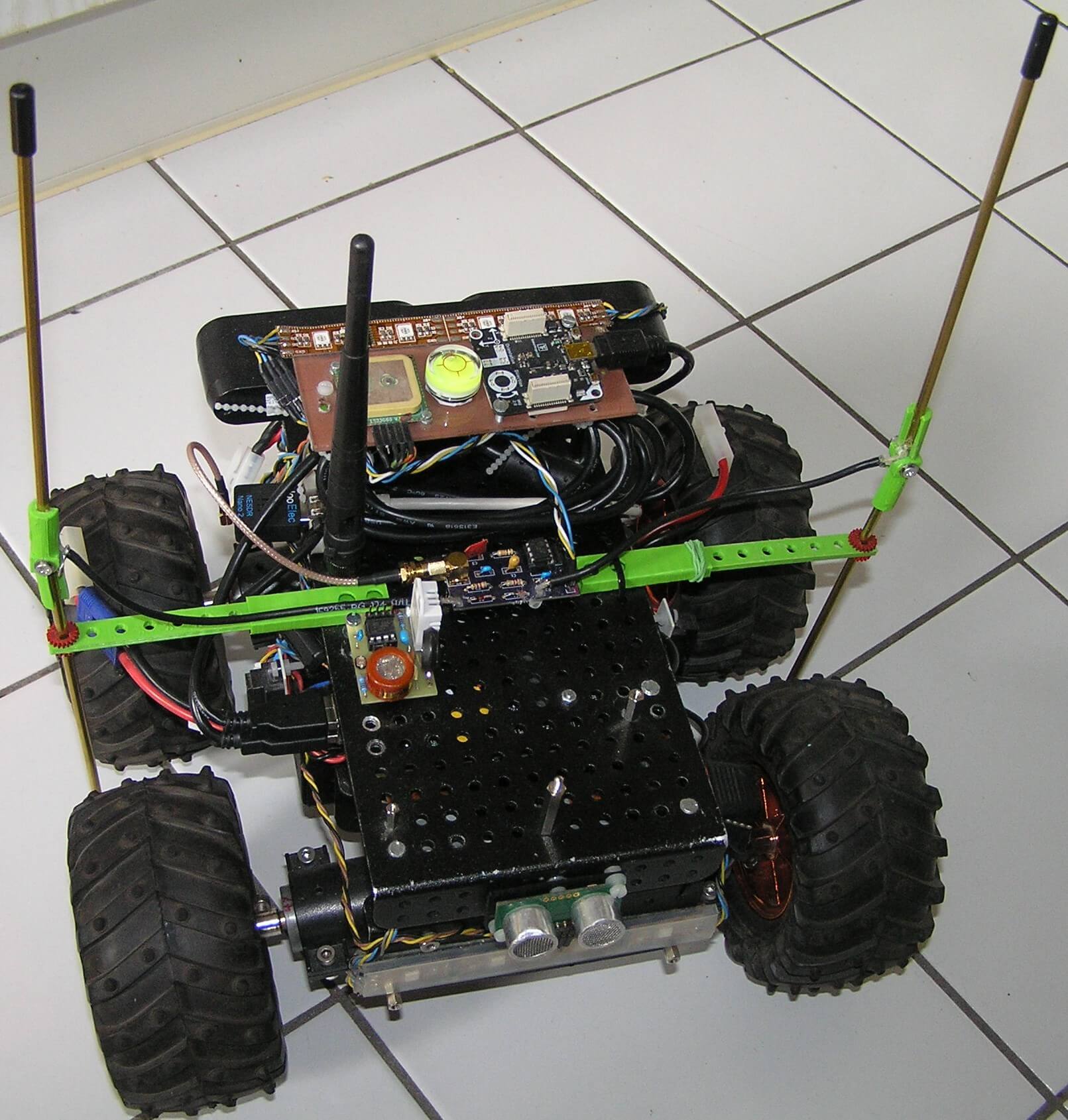
Over on Hackaday.io, project logger Humpelstilzchen has been writing about his attempts to create an autonomous RF direction finding robot RC car with an RTL-SDR. The goal is to set up an ISM band transmitter as a beacon, and use the RTL-SDR on the robot as the receiver. It will then use direction finding techniques to drive towards the beacon. The robot is a 4WD RC toy car with some autonomous navigational features like GPS, ultrasonic, IMU and vision sensors.
In his latest project log Humpelstilzchen describes his first semi-successful attempt at getting RF direction finding working. In the experiment he uses a 433 MHz module to send out an FSK beacon. On the robot two antennas are used for the time difference of arrival/pseudo-doppler direction finding technique, and PIN diodes are used to rapidly switch between the antennas. A GNU Radio script running on a HummingBoard single board computer computes the TDOA/pseudo-doppler algorithm.
Psuedo-doppler direction finding works by rapidly switching between several antennas. The difference in the time that the signal arrives at each antenna can be used to calculate the transmitter's direction.
With the current set up he's been able to get the robot to distinguish if the beacon is closer to the left, or closer to the right, or equidistant. However, he notes that there are still problems with reflections of the beacon signal which can cause the robot to drive in the wrong direction.
This is still a work in progress and we look forward to his future results.
QRP is amateur radio slang for 'low transmit power'. QRP digital modes such as FT8, JT9, JT65 and WSPR are modes designed to be transmit and received across the world on low transmit powers (although not everyone uses only low power). The special design of these modes allows even weak signals to be decodable by the receiving software. Released in 2017, FT8 has shown itself to now be the most popular mode by far with JT9 and JT65 taking a backseat. WSPR is also not as active as FT8, although WSPR is more of a beacon mode rather one used for making contacts.
Apart from being used by hams to make contacts, these weak signal modes are also valuable indicators of the current HF propagation conditions. Each packet contains information on the location of the transmitter, so you can see where and how far away the packet you've received comes from. You also don't need to be a ham to set up a monitoring station. As an SWL (shortwave listener), it can be quite interesting to simply see how far away you can receive from, and how many countries in the world you can 'collect' signals from.
This tutorial is inspired by dg0opk's videos and blog post on monitoring QRP with single board computers. We'll show you how to set up a super cheap QRP monitoring station using an RTL-SDR V3 and a Raspberry Pi 3. The total cost should be about US $56 ($21 for the RTL-SDR V3, and $35 for the Pi 3).
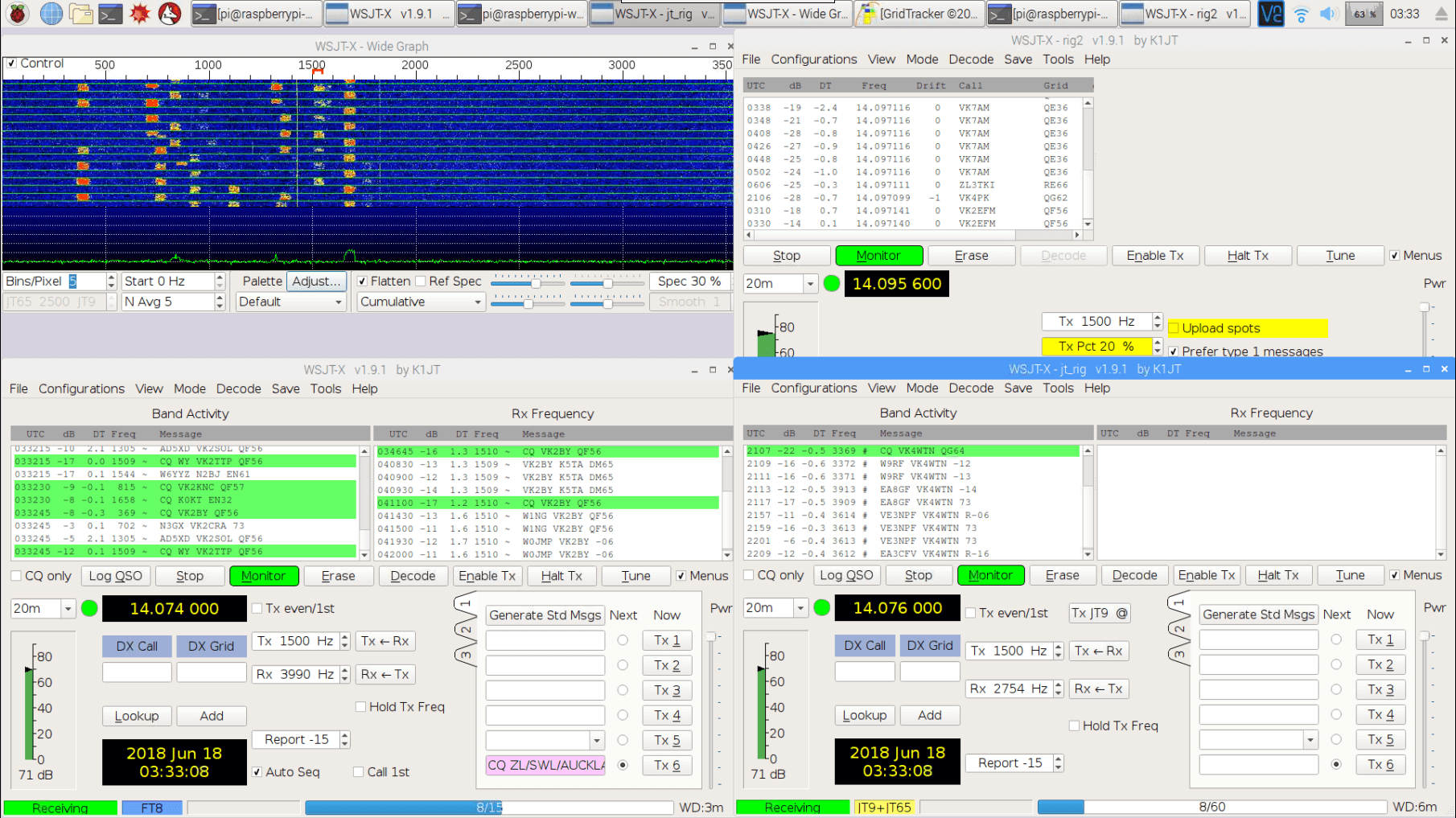
With this setup you'll be able to continuously monitor multiple modes within the same band simultaneously (e.g. monitor 20 meter FT8, JT65+JT9 and WSPR all on one dongle at the same time). The method for creating multiple channels in Linux may also be useful for other applications. If you happen to have an upconverter or a better SDR to dedicate to monitoring such as an SDRplay or an Airspy HF+, then this can substitute for the RTL-SDR V3 as well. The parts you'll need are as follows:
RTL-SDR V3 (or upconverter, or other HF & Linux capable SDR)
Raspberry Pi 3 (or other SBC with similar performance)
Internet connection
Band filter (optional but recommended)
HF antenna (this could be as simple as a long wire)
Examples of QRP Receivers with an RTL-SDR
Monitoring FT8, JT9, JT65 and WSPR simultaneously with an RTL-SDR V3 and Pi 3
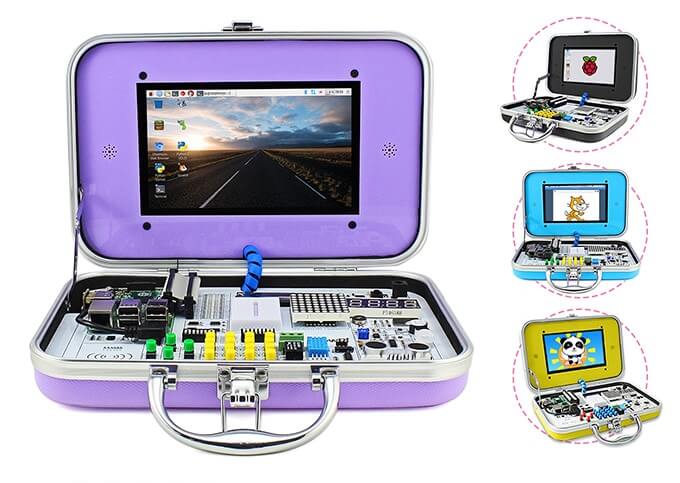
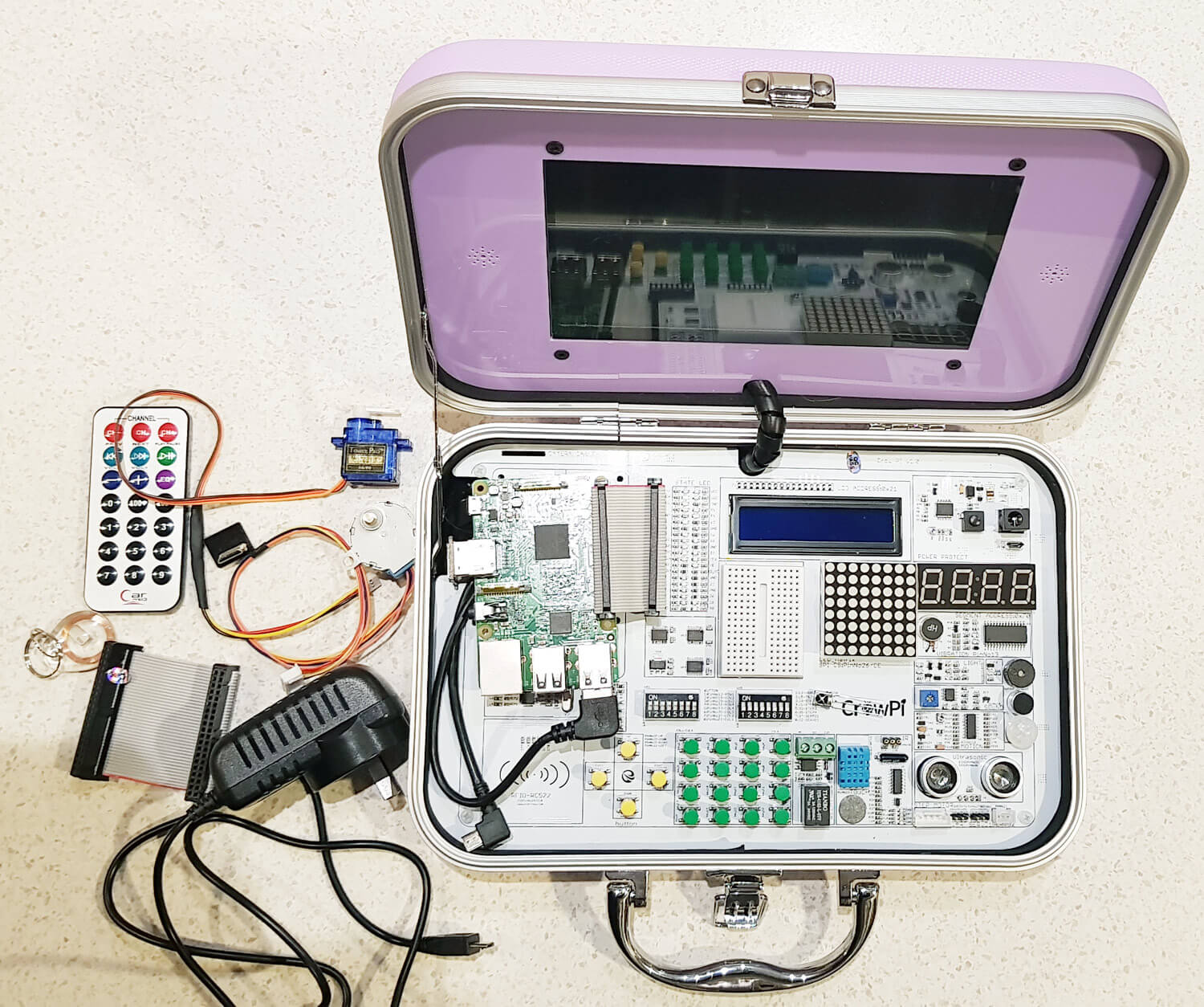
CrowPi is a Raspberry Pi all-in-one experimenters kit that is currently crowd funding on Kickstarter. The idea behind CrowPi is to combine a touchscreen, various sensors, actuators and interfaces into a clutter free kit mounted on a PCB in an easy to carry hard shell case. It's mostly intended to be used in STEM learning environments, however it could also be used for rapid prototyping of Raspberry Pi based ideas, or simply as a portable computer.
The CrowPi
The kit has 4 days left on Kickstarter and has already met its minimum goal. Pledging $1,169 HKD (~USD $150) gets you the basic kit which does not include a Raspberry Pi. Higher pledge levels (up to US$250) get you models that include a Raspberry Pi as well as extras such as a 5V power supplies, earphones, heatsinks, keyboards, game controllers etc. Shipping of the units is expected to commence in July.
Elecrow, the Shenzhen based company behind CrowPi kindly sent us a free kit for an honest review. While not directly related to RTL-SDR or RF, we thought that there might be several applications that might make the CrowPi kit useful for prototyping some simple low cost RF based ideas. For example:
Prototyping IoT based modules that use the RTL-SDR as a receiver. For example receiving a 433 MHz ISM signal and writing received information to the LCD/LED array or activating the relay.
Similarly, using FL2K-SDR or RPiTX to transmit a signal when a sensor is activated, or to transmit telemetry from that sensor (e.g. distance data from the ultrasonic sensor, humidity levels from the DH11 sensor, or light levels from the light sensor)
To get an idea of what's packed into the CrowPi, the kit includes the following modules:
Everything that came with our CrowPi Demo Kit (Except the Raspberry Pi)
1920 x 1080 Capable HDMI 7" Touch Screen
LCD Module
8x8 Matrix LED
Breadboard
4 character 7-seg LED
Vibration motor
Light Sensor
Buzzer
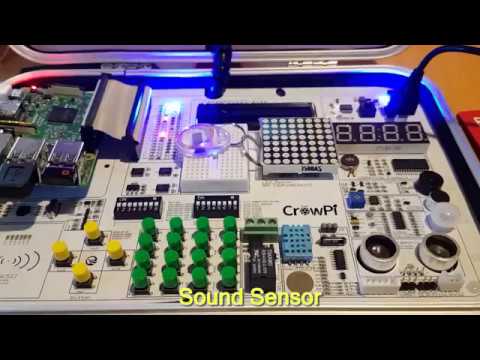
Sound Sensor
Motion Sensor
Ultrasonic Sensor
Servo Interface
Step Motor Interface
UART
Tilt Sensor
IR Sensor
Touch Sensor
DH11 Humidity Sensor
Relay
Matrix of buttons
RFID Module
With our kit we also received:
2x GPIO Flex Cables
1x Stepper Motor
1x Servo
1x Charger
1x IR diode
1x NFC Tag
1x Mini HDMI for the Raspberry Pi Zero
1x IR Remote control
Setup, Initial Testing and Thoughts
Setup: Setup was simple and consisted of downloading their customized Raspberry Pi image onto an SD card, connecting the Raspberry Pi to the HDMI, USB and GPIO pins, and then powering it up using the power jack on the CrowPi Board. A user manual is available for download.
Initial Testing: CrowPi provide a set of lessons that show how to use each of the modules on the board. All modules also have Python code examples that are ready to run as soon as you boot up. Immediately after booting up we were able to run their demo code which allowed us to test all the various sensors, print text to the LCD module, activate the 7-seg display, and actuate a servo and stepper motor.
The tutorials are easy to understand and provide a good basic rundown of the sensors. You will need to have some basic Python skills to understand the Python code however.
Thoughts: The CrowPi is built sturdy, and is definitely easy to use. The touch screen is bright and clear. It is capable of running in 1080P mode, but is a bit too small and hard on the eyes to use at this resolution. We kept the screen in 720P mode. In order to use the Raspberry Pi, you'll need to plug in a USB keyboard and mouse which is not included in the basic kit. A wireless keyboard/mouse combo is ideal. There appear to be speaker holes next to the monitor, but it seems that our demo model is the basic model which does not include built in speakers. The kit is impressive looking and appears to be priced reasonably for what you get.
RTL-SDR and RF Testing
Unfortunately when it came to run the RTL-SDR we instantly ran into a problem. With the one 5V 3A power supply running the Pi, HDMI Screen and modules, it seems that there just isn't enough power budget left over to run the RTL-SDR which draws about 270 - 290 mA current. The RTL-SDR connects fine, but when trying to run GQRX, the Pi 3 shuts down. To get around this problem we have to connect a second power supply directly to the Raspberry Pi 3's input. After doing this the board and kit runs smoothly with the RTL-SDR. Using a powered USB hub would also work.
RPiTX is software for the Raspberry Pi that allows you to transmit RF signals directly via PIN12 or PIN7 from the GPIO ports. On CrowPi PIN12 is already connected to the buzzer, and PIN7 is connected to the humidity sensor. Using PIN12 causes the buzzer to sound, so we tried PIN7. Even though it's connected to the humidity sensor, it doesn't seem to mind the GPIO bit flipping going on. The traces within the board and cable radiate sufficiently to transmit signals strongly enough to use within a room, so no external antenna is needed. Use of PIN7 can be activated in RPiTX by using the "-c 1" flag.
Using our Replay Attacks with an RTL-SDR, Raspberry Pi and RPiTX tutorial, we copied the signal from the remote control of a 433 MHz alarm/door bell, and used RPiTX to replay the signal. Then by modifying some of the supplied CrowPi Python code we were able to get the doorbell to sound on a touch of the touch sensor, activation of the sound sensor and via activation the RFID sensor. We could see the CrowPi being used as a general tool for learning how to prototype simple IoT or home automatic devices. The video below shows a brief demonstration.
It would have been nice if these RPiTX GPIO pins could have been exposed, and not connected to a sensor, but the developers of the board had probably not heard of RPiTX as the goal is for a more general classroom application.
CrowPi Demo
Conclusion
If you're looking to get kids or STEM students/hobbyists interested in what Raspberry Pi's can do, then this kit couldn't make it simpler. The single board and briefcase design makes the whole thing very tidy and portable and the kit looks and feels sturdy and professional. If you know a kid interested in electronics, then this kit would make a great present.
You could probably purchase all the components cheaper individually, but at the end of the day an all-in-one kit just makes sense as it is a lot tidier, and much easier to get up and running quickly.
For RF experiments, it's possible to use the RTL-SDR with the minor annoyance of having to connect two power supplies or use a powered USB hub. RPiTX also functions fine on the device and can be used to transmit an RF signal on activation of any one of the sensor modules. This could easily be used to prototype simple home automation or IoT ideas.