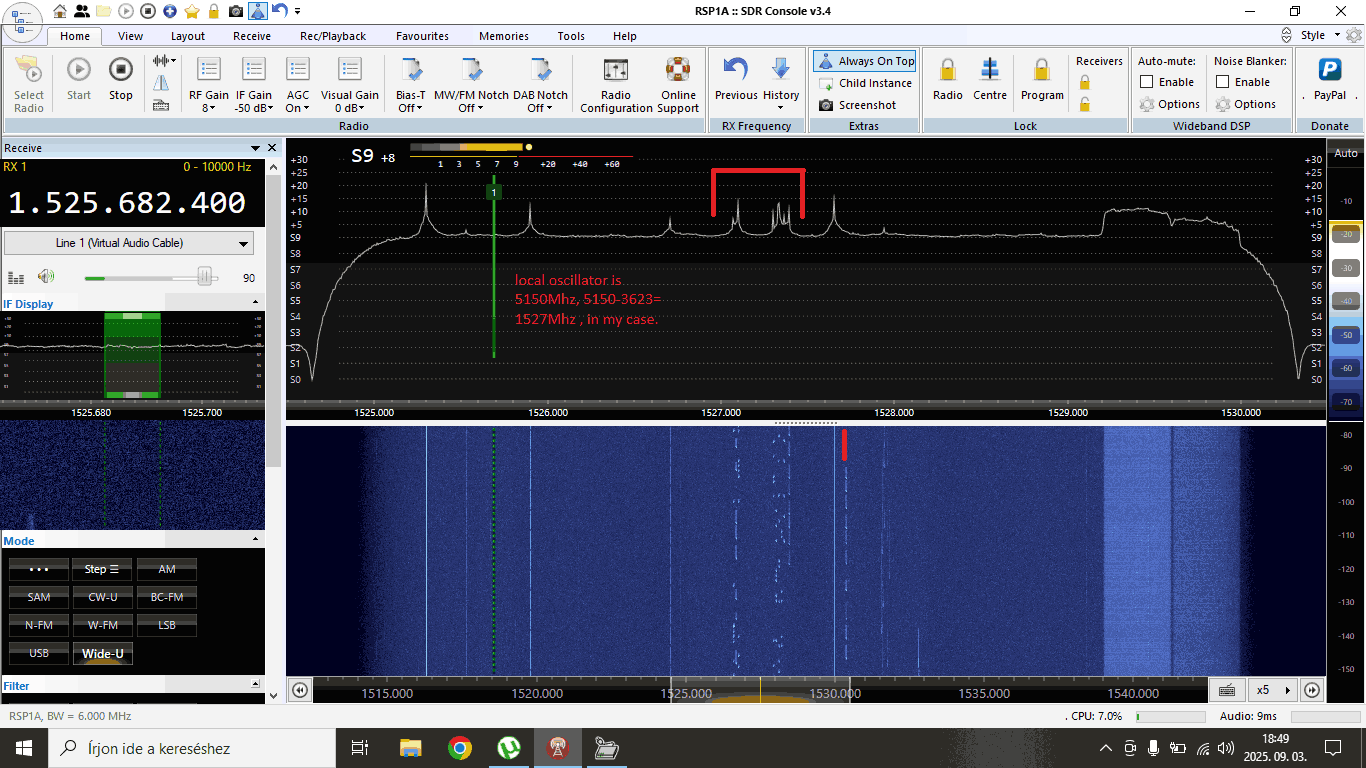
Thank you to Nagy István for sharing with us his setup for decoding ADS-C with a 180cm prime focus dish, a cheap Aliexpress LNB, an Aliexpress bias tee, and an SDRplay RSP1B.
István receives the ADS-C signal from the Inmarsat 4A-F4 satellite, which he can see from his home in Hungary.
István also notes the following information about the Chinese LNB:
This LNB original for DVB reception, but it works on Inmarsat reception, 3.6Ghz where ADS-C signals are, without any modification... But sometimes you need correcting frequency because of LNB oscillator drifting. I don't use dielectric plate, I don't have any material for this, at the moment.
Compared to ADS-B, which continuously broadcasts an aircraft’s GPS position and velocity to any ground station or nearby aircraft, ADS-C instead sends position reports via satellite, and is especially used over oceans and remote areas without ADS-B ground receivers.
However, ADS-C is relatively complex for hobbyists to receive due to the need for a large satellite dish and LNB to convert the 3.6 GHz frequency down to a frequency receivable by most SDRs. However, fortunately, as István shows, the LNB can be obtained cheaply these days.
Inmarsat ADS-C decoding with Jaero and Virtual Radar
ADS-C Being Received with an 1.8m dish, cheap Aliexpress LNB and SDRplay RSP1B.
The Wow! signal is a famous, strong, and unexplained radio signal detected in 1977 by the Big Ear radio telescope in Ohio, lasting 72 seconds and appearing to originate from the constellation Sagittarius. Its origin remains unknown, with some speculating that it could be an extraterrestrial technosignature. Upon reviewing the signal data, Astronomer Jerry R. Ehman discovered the powerful signal burst in the readout and wrote a large "Wow!" next to it, unintentionally coining the name.
A network of small radio telescopes offers several distinct advantages compared to large professional observatories. These systems are low-cost and can operate autonomously around the clock, making them ideal for continuous monitoring of transient events or long-duration signals that professional telescopes cannot commit to observing full-time.
Their geographic distribution enables global sky coverage and coordinated observations across different time zones, which is especially valuable for validating repeating or time-variable signals. Coincidence detection across multiple stations helps reject local radio frequency interference (RFI), increasing confidence in true astrophysical or technosignature transient events.
These networks are also highly scalable, resilient to single-point failures, and capable of rapid response to external alerts. Furthermore, they are cost-effective, engaging, and accessible, ideal for education, citizen science, and expanding participation in radio astronomy.
However, these systems also come with notable limitations when compared to professional telescopes. They have significantly lower sensitivity, limiting their ability to detect faint or distant sources. Their angular resolution is poor due to smaller dish sizes and wide beamwidths, making precise source localization difficult.
Calibration can be inconsistent across stations, and frequency stability or dynamic range may not match the performance of professional-grade equipment. Additionally, without standardized equipment and protocols, data quality and interoperability can vary across the network.
Despite these constraints, when thoughtfully coordinated, such networks can provide valuable complementary observations to professional facilities.
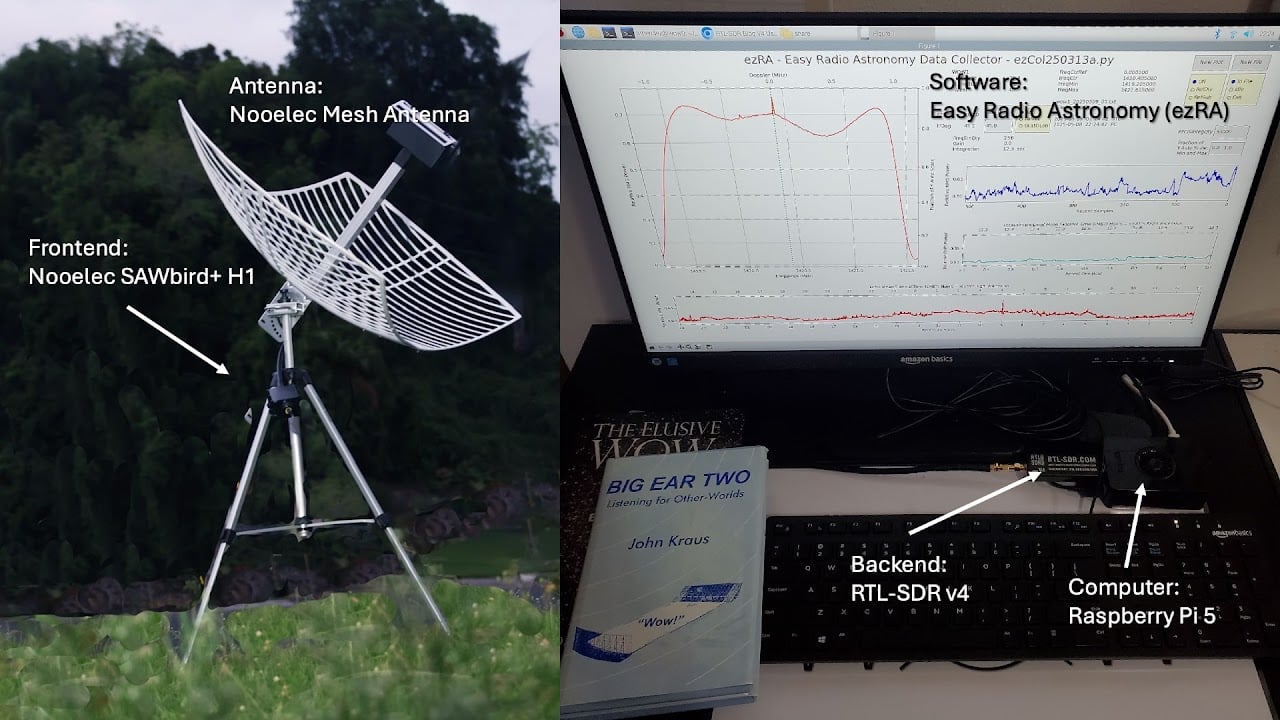
The team note that the Wow! signal was strong enough that it could have been detected by a small home radio telescope. They go on to make the case that we could be missing out on detecting many compelling signals simply because radio telescopes aren't watching every part of the sky simultaneously.
The project will monitor the Hydrogen Line frequency for interesting signals. Currently, the team is using a WiFi grid dish and an external LNA as the radio telescope hardware, but they also aim to evaluate our Discovery Dish with H-Line feed.
Over on YouTube Gabe from the saveitforparts channel has uploaded a new video discussing the decommissioning of NOAA-15 and NOAA-19. We also previously posted about this topic a few days ago, if you are interested.
NOAA-15 was scheduled to shut down on August 12, 2025, but due to anomalies with NOAA-19, the decommissioning date of NOAA-15 has been extended by a few days until the week of August 18th. NOAA-19 has recently been experiencing transmitter failures, and it may be impossible to receive signals from it at the moment, despite its expected decommissioning date of August 19, 2025.
In the video, Gabe also rushes to try and receive signals from all transmitters on NOAA-15 one last time, setting up VHF, L-Band, and S-Band receivers. He experiences some issues with weak signals, interference, and recording failures, but ultimately succeeds in capturing all three signals during one of the final passes of NOAA-15.
US Government Shutting Down More Weather Satellites
Over on YouTube Matt from the Tech Minds YouTube channel has recently uploaded a new video where he tests out our Discovery Dish antenna. Discovery Dish is designed to be a low-cost, portable solution for receiving L-band and S-band weather satellites, Inmarsat satellites, conducting amateur hydrogen line radio astronomy, and more.
In the video, Matt unboxes the Discovery Dish and provides an overview of the build process before demonstrating its use in decoding AERO and STD-C messages on Inmarsat. He then shows the dish and Inmarsat feed being used to receive Iridium satellites, and how they can be decoded using iridium-extractor with a HackRF or Airspy R2.
Finally, Matt swaps out the Inmarsat feed for the Hydrogen Line feed. Using SDR#, the IF AVG plugin, and Stellarium, he was able to obtain a clear hydrogen line peak.
This Discovery Dish Is The ONLY Satellite Dish You Will Need!
Thank you to Nagy István for writing in and sharing with us his video showing how he uses a home-made backfire helix antenna and the JAERO software to receive and decode Inmarsat Aero at 1545 MHz. AERO messages are a form of satellite ACARS, typically containing short messages from aircraft, and some channels also support digital voice communications.
The backfire helix is an antenna design that consists of a helically wound wire, typically wound around a 3D-printed frame, attached to a large backplane. Recently, a similar design called a 'heliocone' has become popular for use with 1.7 GHz polar orbiting satellites.
In the video, Nagy shows two designs, one of his own and the other by Digitalelektro, and the good SNR that he's achieved with them in JAERO.
Inmarsat Aero 1545Mhz decoding with Backfire helix / JAERO software
Thank you to Alexandre Gellibert for writing in and sharing his new Android App, "SDR ProTrack." SDR ProTrack is a radio direction-finding app that uses an RTL-SDR and directional antenna to determine a bearing towards a transmitter.
Interestingly, Alexandre notes that this app was initially developed to track Asian hornets, a bee-killing pest. With hornet tracking, a miniature RF transmitter is attached to a caught hornet, and the hornet brings it back to the nest. RF tracking techniques can then be used to find the nest.
It's possible to determine the bearing toward a transmitter by using a receiver such as an RTL-SDR paired with a directional antenna like a Yagi. Directional antennas have high sensitivity in one primary direction and significantly lower sensitivity in all others. By rotating the antenna until the strongest signal is identified, you can establish the precise bearing angle. Typically, following this bearing will guide you directly toward the signal's origin.
Alexandre wrote in an email to us the following:
Just to let you know we just launched a new Android app compatible with RTL-SDR dongles (though mostly tested on RTL-SDR v4).
App is free to use. Advanced features (like Compass to point the signal potential source) are for premium users.
It's plug and play, easy to use, much more user friendly than SDR++.
Any feedback is really appreciated :)
If you want to know more about the project or the 2 developers behind it (we develop it in France to be able to track asian hornets that kill all the bees), please feel free to contact us.
And the Android page describes SDR ProTrack in the following way:
Unlock the power of radio tracking with SDR ProTrack! Transform your Android smartphone into a signal-tracking powerhouse using an RTL-SDR dongle and a directional antenna. Affordable, versatile, and perfect for enthusiasts, researchers, pros or anyone tracking signals—like Asian hornets or wildlife.
★ Key Features ★
• Automatic RTL-SDR dongle recognition and connection (free) • Spectrum Visualization (Free): View signal shapes in the frequency domain effortlessly. • Compass (Premium): Pinpoint the strongest signal direction with precision. • Signal Strength Display (Premium): Monitor signal power with an intuitive interface. • Custom Settings (Premium): Adjust bitrate, sample rate, and frequency sensitivity to your liking.
★ Requirements ★
• Requires an external RTL-SDR device. • Check compatibility: https://osmocom.org/projects/rtl-sdr/wiki
Need an RTL-SDR dongle, emitters, receptors, or antennas? Visit our website: https://www.intuite.fr/en_GB/pricing
★ About Us ★
Intuite is a company specialized in locating Asian hornet nests. We developed SDR ProTrack to provide a robust, cost-effective solution for radio signal tracking, combining innovative technology with our expertise in signal detection.
★ Open Source Community ★
Join our mission to advance radio tracking! Our open-source library, RTL-SDR Bridge Android Lib, powers SDR Pro Track. Contribute to development, report issues, or explore the code at https://github.com/alexandreGellibert/RTL-SDR-Bridge-Android-Lib. Support our work and help shape the future of signal tracking!
Download SDR ProTrack today and start tracking signals like a pro!
The talk focuses on using SDR hardware such as the RX888, RTL-SDR, and Airspy devices combined with directional antennas for radio direction finding. Interestingly, they also discuss using ultrasonic microphones to find power line noise from bad transformers or insulators. The talk also focuses on ensuring that your SDRs receive real signals and what noise might look like on the spectrum.
This talk provides a comprehensive guide to identifying and locating radio transmitters. Learn about practical techniques, common tools, and methodologies from decades of combined experience finding, squashing, and mitigating against radio frequency interference.
Supercon 2024: Justin McAllister and Nick Foster - How to Track Down Radio Transmissions
An antenna's radiation pattern tells us how it radiates or receives electromagnetic energy in different directions, indicating the strength, directionality, and coverage area of its signals. These days, this is easy to simulate on a PC. However, getting real-world results can still be essential to ensure an antenna is constructed well. For commercial antennas, real-world testing is typically done in an RF anechoic chamber.
In the post, List tests an HB9CV two-element 144MHz Yagi antenna. As expected, the resulting polar plot from the measurements indicates that the HB9CV is a directional antenna.
We've seen a similar setup in the past, as shown in this post, where a NanoVNA was used to measure the antenna power.