Category: Applications

Radwave Beta: Android RTL-SDR RF Analyzer App with Spectrum Pause and Rewind Features

Radwave Screenshot
Radwave Screenshot

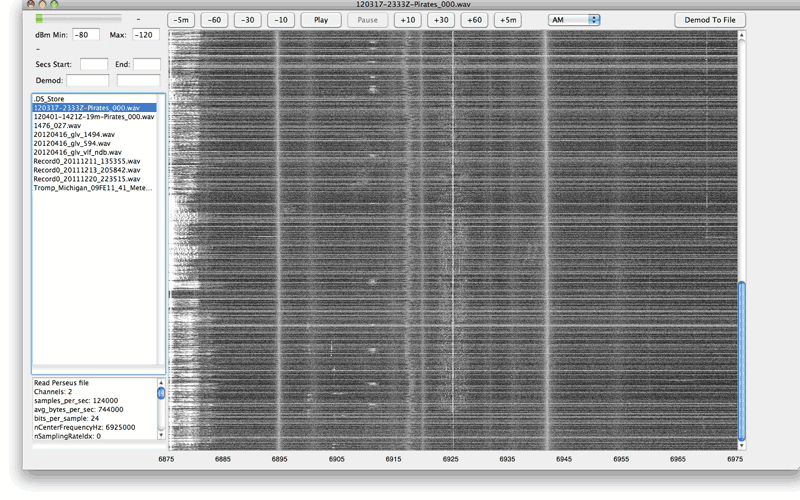
Radwave is a recently released Android App for RTL-SDR dongles. It provides a real time waterfall of the RF spectrum, and it's defining feature is that you can easily zoom, pause and rewind the spectrum at any time. The software is currently in beta, and doesn't demodulate any signals, but the work and ideas behind the spectrum display features is really interesting.

Radwave utilizes RTL-SDR dongles and the RTL2832U driver app to allow people to interactively explore the RF spectrum. You can dynamically zoom in and out in time and frequency, pause, and go back in time - all without losing any samples. If you find something cool, tag it and share with friends.

Radwave core technology is its interactive real-time spectrogram. It shows all the spectrum - utilizing every sample1 - for the entire collection2. Frequencies are aligned over time as you change the RF center frequency3, helping you make sense of what you see.

1 Adjacent non-overlapping DFT windows

2 Up to device limitations

3 Alignment limited by buffer uncertainty

Radwave Intro - We're in Beta!

Tracking Radiosondes with an RTL-SDR and Radiosonde_Auto_RX

A radiosonde is a small sensor and radio package normally attached to a weather balloon. Meteorological agencies around the world typically launch two balloons a day from several locations to gather data for weather prediction. With an RTL-SDR, appropriate antenna and decoding software it is possible to decode the telemetry signal and gather the weather data yourself. You can also use the GPS data to chase and collect the fallen radiosonde package. We have a tutorial on setting up a basic radiosonde decoder in Windows here.

However, if you want to set up a permanent radiosonde receive station it's possible to create an automatic system with a program called radiosonde_auto_rx. It works by performing an rtl_power scan over the radiosonde frequency range and looking for peaks that might indicate that a radiosonde is currently transmitting. If a peak is found it tries to decode it as a radiosonde, and if successful will begin uploading the weather data to an online aggregation site called sondehub.org. With this sort of system there is no need to know in advance the launch times and exact frequencies that your local meteorological agency uses, as often this information is not public.

Recently Mark Jessop and Michael Wheeler, the team behind radiosonde_auto_rx, also did a talk at the linux.conf.au conference. The talk explains radiosondes and demonstrates their software in action. They then go on to talk about chasing radiosondes, and re-purposing collected sondes.

[Also seen on Hackaday]

STM32 Development Boards (literally) Falling From The Sky

Steve M Talks about Osmo-FL2K at Osmocom Conference 2018

Osmo-FL2K can be considered as the [evil] transmit-side brother of RTL-SDRs. It is a driver that allows cheap $5 - $15 USB 3.0 VGA adapters to be used as a transmit-only capable SDR. It might be considered [evil] as transmitting illegally and without filtering can pollute the RF spectrum, but being responsible with it and using appropriate filters could enable extremely low cost transmitters.

Recently at the October 2018 Osmocom Conference, Steve M, the man behind the Osmo-FL2K discovery and software (and heavily responsible for the development of RTL-SDR too) has given a talk titled "osmo-fl2k - the [evil] transmit-side brother of RTL-SDR". In the past he's also given a similar talk that we posted about previously.

The talk goes over the discovery and reverse engineering of Osmo-FL2k, discussion of the application itself, some signals that have been successfully transmitted and some measurements.

Osmocom is behind the discoveries of RTL-SDR and OsmoFL2K. If you'd like to support them please donate at OpenCollective, and check out their other projects at osmocom.org.

osmo-fl2k - the [evil] transmit-side brother of RTL-SDR

YouTube Tutorial: Software Set up for a Portable Raspberry Pi and RTL-SDR Based NOAA Weather Satellite Receiver

Last year in December we posted about Matt's element14 sponsored video which showed us how to create a portable briefcase contained NOAA satellite received based on a Raspberry Pi and RTL-SDR dongle. The build consisted of a heavy duty briefcase, modified ATX PSU and stripped down LCD monitor panel. This build resulted in a rugged and portable receiver. The full series of videos demonstrating the briefcase, ATX PSU conversion, LCD teardown, and NOAA satellite receiver demo can be found on his YouTube Playlist.

In his latest video Matt goes over the software installation procedure for creating an automated NOAA weather satellite receiver on the Raspberry Pi. He uses gpredict for predicting the satellite passes, and the Raspberry Pi version of WXtoImg for decoding the images. The rest of the video shows how to set up the software for your particular location, and how to set up decoding automation.

How To Set Up a Raspberry Pi as a NOAA Satellite Receiver with RTL-SDR

rtl_map: A Simple FFT Visualizer for RTL-SDR

Thank you to 'KeyLo99' for submitting news of the release of his new RTL-SDR based program called rtl_map. rtl_map is a currently a simple app that uses an RTL-SDR to display an FFT frequency graph. It is based on the gnuplot and fftw3 libraries.

Over on our forums KeyLo99 describes the motivation behind the project as mostly being a good reference program for people wanting to learn how to read and process IQ data from the RTL-SDR:

I'm a RTL-SDR researcher and DSP learner currently working on a project for properly figuring RTL2832 and I/Q fundamentals out. The project is about reading raw I/Q samples, processing samples and creating FFT graph from them. I tried to explain what I'm doing in detail with comment lines. I'm hoping that I will be helpful to RTL-SDR beginners with this rtl_map [C] project. Another purpose of the rtl_map project is making a frequency scanner application for signal security researches.

FFT Plot from rtl_map

Running GQRX Smoothly on an Intel Compute Stick with a Custom Linux Kernel

Thank you to M Khanfar for submitting news about his custom Linux kernel which allows an RTL-SDR and GQRX to run smoothly and with sound on an Intel Compute Stick. The Intel Compute Stick is a full dongle based computer the size of a pack of gum with pricing that starts from US$120. It has a Quad Core Atom Processor, 2GB RAM, 32 GB of built in storage and an HDMI out port. By default the stick comes with Windows 10 installed, but M Khanfar notes that it is very sluggish.

Instead of the sluggish Windows 10 OS, M Khanfar decided that he wanted to run Ubuntu Linux instead. However he found that the standard Ubuntu image did not have support for audio over HDMI or WiFi on the Compute stick. So he built his own custom kernel with some patches to fix this issue. With the issue fixed, GQRX with an RTL-SDR now runs smoothly with full audio support, and rtl_tcp can also be run over WiFi.

M Khanfar has uploaded the patched ISO to his Google Drive here.

Update 29 January 2019: M Khanfar has updated us and noted that CubicSDR now works on the custom kernel too, and he has provided full installation instructions here. A video showing it in action can be seen on YouTube.

GQRX under Custom Kernel-Intel Computer Stick

SDR# TETRA Plugin Now Available At RTL-SDR.RU

Vasilli has recently released the SDR# TETRA plugin on his website RTL-SDR.RU (note that the site is in Russian, but can be translated with the Google Translate option in the top right of the page). Previously it was only available via ever changing forum links, so it's good to see that it has a permanent home now for the latest version. This plugin allows you to listen to TETRA digital voice via SDR#, without needing to set up any complicated GNU Radio based receivers which were necessary in the past.

The features include (note Translated from Russian):

  • Receiving a signal from the BS band 25kHz and modulation Pi / 4-DQPSK;
  • Automatic adjustment of the reception frequency;
  • Displays information about the BS;
  • Displays ISSI, GSSI subscribers in the channels (for open channels only);
  • Displays a service exchange network (for open channels only);
  • It allows you to listen to the channels in manual or automatic mode selection (only open channels);
  • It allows to filter and distribute the listening priority specified for groups (GSSI);
  • It displays a message with the location (just a short message format)

The current features not yet implemented are:

  • And listen to correctly display any encoded information in a network;
  • Display SDS type 4 (short messages);
  • Record audio from the channels (menu added, but does not work);

We also note that as discussed in a previous post there is a companion program for this plugin called TETRA Trunk Tracker.

SDR# TETRA Decoder Plugin

Using a LimeSDR / PlutoSDR to Transmit Digital Amateur Television with DATV Express

Over on YouTube Corrosive from channel SignalsEverywhere has uploaded a new video in his series on Digital Amateur Television (DATV). The new video shows us how to use a transmit capable SDR like a LimeSDR or PlutoSDR to transmit DATV with a free Windows program called DATV Express.

In the video he explains the various transmit and video encoding settings, and then demonstrates the signal being received on SDRAngel with an RTL-SDR (which he explained in his previous video)

DATV DVB-S Transmitter With a LimeSDR or Pluto SDR and DATV Express