Category: RTL-SDR

Decoding a Moon Orbiting Satellite 378500 km’s away with an RTL-SDR

Thanks to IU2EFA (William) for writing in and letting us know about his success in decoding telemetry from the moon orbiting satellite known as DSLWP-B / LONGJIANG-2. LONJIANG-2 is a Chinese lunar microsatellite (45kg) that was launched in May 2018. It is designed to perform ultra long-wave radio astronomy observations. It also has an on board camera and took some nice photos of the Earth back in June.

While the satellite is still being tested, William notes that it is transmitting telemetry data to Earth during it's scheduled days at 435.4 MHz and 436.4 MHz, and the signal can be received with an RTL-SDR and Yagi antenna. William writes:

[LONJIAN-2] transmits with a little linear antenna and a little power of just 2 Watts.

In other sessions, I used a professional radio to have the maximum performance.

But this morning I wanted to test the reception, just using my RTLSDR V3 and my antenna yagi 15 elements pointed to the Moon. No other options (as filters, pre aplifiers, or other stuffs. Zero of these)

Well, the result was great. I received the signals and also i could decode them!

So I think people can be happy to know, that with a very little setup, they can receive incredible little signals from great distances.

When I received these signals, the Moon distance was about 378500 km.

LONGJIAN-2 transmits telemetry with GMSK and JT4G, and JT4G can be decoded with WSJT-X or WSJT 10. There is also a GNU Radio program called gr-dslwp that can be used to decode the telemetry. JT4G is a weak signal coding that can be decoded with signal levels down to -17 dB. Therefore anyone with modest hardware can decode the satellite. More information about the coding can be found on this post by Daniel Estevez.

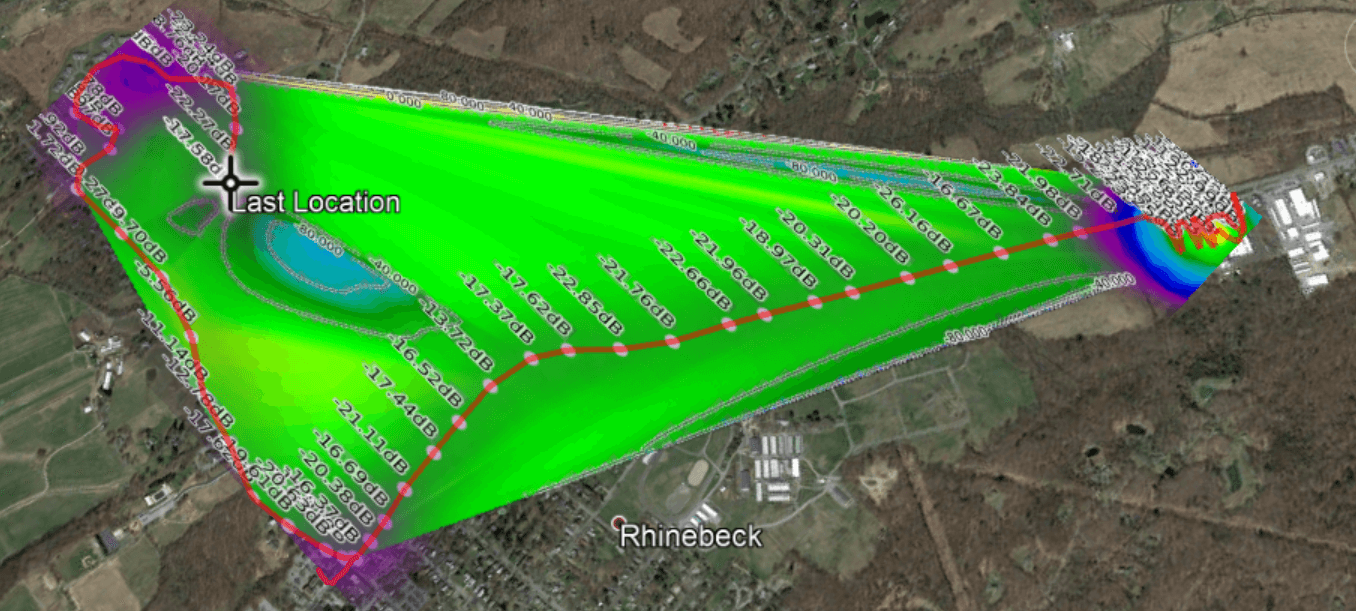
On the Lilacsat page for LONGJIANG-2 if you scroll down you can also see reports from several other amateur radio operators who have managed to receive the satellite with RTL-SDR dongles and other radios. Below is an image of an example for SP5ULN who was able to receive and decode the JT4G signal with an RTL-SDR, LNA, and 19-element Yagi.

Example of LONJIAN-2 being received with an RTL-SDR by SP5ULN as noted on the LilacSat website.
Ho Decodificato Segnali dalla LUNA! | Decoding a Satellite Orbiting the Moon (JT4G)

Receiving GOES Weather Satellite HRIT with an SDRplay and 2.4 GHz WiFi Grid Antenna

Over on the SDRplay forums member RSP2user has posted a new tutorial, this time showing how to receive weather satellite images from GOES satellites with an RSP2 and cheap 2.4 GHz WiFi grid antenna

GOES 15/16/17 are geosynchronous weather satellites that beam back high resolution weather  images and data. In particular they send beautiful high resolution 'full disk' images which show one side of the entire earth. As the satellites are in geosynchronous orbit, they are quite a bit further away from the earth. So compared to the more easily receivable low earth orbit satellites such as the NOAA APT and Meteor M2 LRPT satellites, a dish antenna, good LNA and possibly a filter is required to receive them. However fortunately, as they are in a geosynchronous orbit, the satellite is in the same position in the sky all the time, so no tracking hardware is required.

In the tutorial RSP2user notes that he's been using a $16 2.4 GHz WiFi grid dish antenna and the NooElec SAWbird LNA. In the past we've also seen GOES reception from Pieter Noordhuis who used a 1.9 GHz grid antenna from L-Com which seems to be a better match to the 1.7 GHz GOES frequency. However, 2.4 GHz WiFi grid antennas are much more common and therefore much cheaper. In the past there has been debate on whether or not these cheaper WiFi antennas would be good enough for GOES, so it's good to see that the cheaper option is confirmed to work, at least for the satellite elevations found in the RSP2user's part of the USA.

The SAWBird is a 1.7 GHz LNA which is required to improve SNR by reducing system noise figure, and to filter any interfering out of band signals. The SAWbird is currently not available for public sale, but NooElec have noted that it is due to be released soon. RSP2user also notes that the polarization of the dish is important, so the dish may need to be rotated, and also that flipping the secondary reflector significantly increases the gain at 1.69 GHz.

For software the XRIT demodulator from USA-Satcom for a small fee is used together with the SDRplay RSP2. As seen by Pieter Noordhuis' results, it's also possible to receive these signals with an RTL-SDR and Pieters free software. So it may be possible to reduce the costs of a GOES reception system by using an RTL-SDR, SAWBird and 2.4 GHZ WiFi grid antenna. With those components the total cost would be well under $100.

As a bonus, in later posts on his forum thread, RSP2user shows that the system can also be used to receive HRPT images from the low earth orbit NOAA 19 satellite by hand tracking the antenna as the satellite passes over.

RSP2users GOES Receiver: SDRplay, SAWBird LNA, 2.4 GHz WiFi Grid Antenna

SDR-Remote: A Physical Tuning and Control Knob for SDR#

Recently Maxim who runs his small company "ExpElectroLab" wrote in and wanted to share a new product that he's developed called "SDR-Remote v2.0". This is a physical tuning knob that connects to your PC, and can be used with programs like SDR#. Apart from the knob, there are also several buttons for volume control, presets, and various other functions. He writes:

Heart - ARDUINO NANO V3.0, buttons, encoder and software. Sketch wrote to order a professional programmer.

Implemented by:

  • tuning the reception frequency with a multiplicity of 1 kHz, 100 kHz, 1 mHz (additionally 50 Hz)
  • volume control
  • Mute the sound (mute)
  • FM mono / stereo switching
  • switching of modulation types
  • turn on / off the noise
  • adjustment of the threshold of noise
  • adjustment of the width of the strip
  • switching ranges 160m, 80m, 40m, 25m, 13m.10m, FM, AVIA, 2m, 70cm

It appears that Maxim doesn't have a full store, but rather sells the devices on VK Markets, which is a Russian clone of Facebook. Also at the moment only SDR-Remote V1.0 is available for sale, but V2.0 seems to be due to go on sale soon. Version 1.0 sells for 2,650 Rub, which is equivalent to around US$42. His store also contains various other home brew SDR related products such as upconverters, LNA's, filters and a fractal antenna. The video below in in Russian, but shows V2.0 being unboxed and demonstrates it working with SDR#.

Maxim has noted that you can contact him at [email protected] if you are non Russian and are interested in his products.

SDR-Remote V1.0
SDR-Remote V1.0
SDR-Remote V2.0 или валкодер для SDR Sharp

A Car Based SDR Station for ADS-B, ATCS, P25, DMR, POCSAG and more

Over on YouTube user Corrosive has uploaded a video where he takes us on a tour or his very nicely set up mobile SDR station that is built into his car. His setup includes several antennas on his car's roof which cover multiple bands, a BCD780XLT scanner, an RTL-SDR, an Android head unit that is capable of running multiple SDR apps and also a Windows tablet that is used to run more CPU heavy SDR apps.

Later in the video he shows himself running SDR Trunk on the tablet and receiving and decoding the local P25 police department signal, and then running dump1090 for monitoring aircraft ADS-B, and Gpredict for tracking satellites.

RTL SDR Mobile Car Station | Receive ADS-B ATCS P25 DMR POCSAG and More on the Go!

Tutorial on using RS to Decode and Plot Radiosondes

A radiosonde is a small weather sensor package that is typically attached to a weather balloon. As it rises into the atmosphere it measures parameters such as temperature, humidity, pressure, GPS location etc, and transmits this data back down to a receiver base station using a radio signal.

Zilog's RS is a free open source radiosonde decoder for Linux and it supports a wide range of radiosonde protocols. Together with an RTL-SDR it is possible to receive radiosonde signals, and decode them using RS.

Over on his website, happysat has recently uploaded a tutorial that shows how to use RS with an RTL-SDR, CubicSDR or GQRX, and FoxtrotGPS, a GPS plotting program for visualizing the location of the radiosonde. The tutorial covers some tricky points like setting up audio piping in Linux, and getting the GPS data into a virtual COM port to use with FoxtrotGPS.

Alternatively, there are also Windows GUI based sonde decoders that can be used with the RTL-SDR such as SondeMonitor which costs 25 Euros, but also covers a wide range of sonde protocols, and RS41 Decoder which is a GUI for the RS41 sonde protocol only. If you are interested we have a tutorial on setting up radiosonde decoding in Windows with SondeMonitor available here.

Plotting the Sonde Location with an RTL-SDR, GQRX, RS and FoxtrotGPS.

An Opensource Mini-Whip Antenna and Upconverter Design for RTL-SDRs

Thank you to Igor Yatsevich for submitting news about an open source Mini-Whip and Upconverter design that he's created and released for free on GitHub. An upconverter converts HF frequencies into VHF frequencies so that they can be received by RTL-SDRs in their quadrature mode, and a Mini-Whip is a small active antenna for receiving HF signals.

The designs include the PCB Gerber files for manufacturing, the components list and assembly and usage guides. Also both through-hole and SMD designs are provided.

The Mini-Whip design has a frequency range of 10 kHz - 30 MHz and to power it you'll need a 5 - 13V bias tee. You will need to install it up high and preferably away from the house as Mini-Whips are quite susceptible to local noise pickup. Another very important point is that Mini-Whips need to have a good ground connection. The upconverter is based on the ADE-1 mixer, and uses a 125 MHz local oscillator.

Igor's documentation on the project is excellent, and is a good read for getting more information about upconverters and Mini-Whips. He has noted that he is sending us some samples of units that he's built, so when we receive them we'll post again with test results. It looks as if he's put a lot of research into these designs so we're looking forward to seeing how well they work. 

Diagram on how to ground a miniwhip connected to a metal mast.
Diagram from Igor's documentation about how to properly ground a Mini-Whip connected to a metal mast.

Video Tutorial on Receiving ISS Astronaut Amateur Radio Conversations with RTL-SDR

Over on his YouTube channel Crazy Danish Hacker has posted a new video that shows how to pick up amateur radio voice signals from the International Space Station (ISS).

Often astronauts on the ISS will schedule times to chat with schools via amateur radio frequencies. This provides an opportunity to learn about radio whilst at the same time allowing kids to talk directly to an astronaut.

If you live in an area that can 'see' the ISS at the same time as the school then you can easily pick up the downlink (astronaut to ground) portion of the conversation while the ISS passes over. The downlink signal is fairly strong, so only a simple antenna is required. In his video Crazy Danish Hacker uses a telescopic whip attached directly to his RTL-SDR which is placed outside with a view of the sky.

International Space Station - Software Defined Radio Series #29

Tutorial on Setting up OP25 for P25 Phase 2 Digital Voice Decoding

Most police departments is the USA have now upgraded or are in the process of upgrading their radio systems to P25 Phase 2 digital radio. The frequencies can easily be received with an RTL-SDR, but a decoder is required to be able to actually listen to the voice. Software like SDRTrunk and DSDPlus can decode P25 Phase 1, but at the moment the only software that is capable of decoding P25 Phase 1 AND 2 is a program called OP25. However, OP25 has a reputation of being fairly difficult to set up as it does not have a simple to use GUI, and requires Linux.

Over on John's Tech Blog, John has uploaded a very helpful step by step tutorial that should help with those trying to get OP25 to work. The tutorial assumes that you have Ubuntu 18.04 already installed, and then starts from downloading and installing OP25. The next steps involve setting up OP25 for the particular system in your area, which mostly involves just editing a spreadsheet to input frequency data from radioreference.com. John also mentions that he's been able to get OP25 running perfectly on a Raspberry Pi 3 B+ as well, with less than 40% CPU usage.

OP25 Running
OP25 Running

In the video below John reviews some of the steps, and shows OP25 running and decoding voice.

OP25 Tracking 2 Control Channels