Tagged: rtl2832

GridTracker: A WSJT-X Mapping Program

Thanks to RTL-SDR.com reader Henry for letting us know about the release of a new piece of Windows software by Tag Loomis (N0TTL) called GridTracker. GridTracker is a live mapping program for WSJT-X which is a software decoder for low power weak signal ham communications modes such as FT8, JT4, JT9, JT65, QRA64, ISCAT, MSK144 and WSPR. Although these are low power modes, the protocols are designed such that even weak signals can potentially be received from across the world. Mapping the received signals can be interesting as it may give you an idea of current HF propagation conditions.

GridTracker is a Windows (XP or above) companion program for WSJT-X. It listens to WSJT-X or JTDX decodes and displays them on a map.

A great way to visualize communicating amateurs around the world!

Display on a large second monitor in your amateur radio club, hamfest or as a demonstration in a classroom. Everyone gets excited when they can see what you’re doing!

You can also load your ADIF log files from WSJT-X, Qrz.com, LoTW, PSKReporter and others to get a visual view of ‘stations worked’, stations that can hear you and more!

It might be an interesting project to set up a permanent GridTracker display using an RTL-SDR V3 in direct sampling mode, or RTL-SDR with upconverter. Low cost x86 single board PCs that can run Windows 10 such as the LattePanda, UP board or Udoo might be possible candidates for host hardware.

Henry warns us that the software is still new, so it may be a little buggy.

GridTracker Mapping out Weak Signal Communications.

Improving HRPT Reception + A Free HRPT Decoder

Back in December Tysonpower showed us  how he was able to receive HRPT weather satellite images with a 80cm and 1.2m satellite dish, LNA and Airspy Mini. 

If you didn't already know, HRPT signals are a little different to the more commonly received NOAA APT or Meteor M2 LRPT images which most readers may be more familiar with. HRPT images are more difficult to receive as they are broadcast in the L-band at about 1.7 GHz and so receiving them requires a dish antenna (or high gain Yagi antenna), L-band dish feed, LNA and a high bandwidth SDR such as an Airspy Mini. The result is a high resolution and uncompressed image with several more color channels compared to APT and LRPT images.

In the last video Tysonpower was successful with receiving HRPT images with his setup. But recently over on his YouTube channel and on his blog Tysonpower has shown how he has improved his HRPT reception by first optimizing the feed and adding in a copper matching line which helps improve the impedance matching of the feed. He also added an L-Band filter tuned to the HRPT signal which he notes made the biggest improvement, and he also moved all the components into a watertight box for permanent outdoor mounting. With these changes he's now able to consistently pull in some very nice imagery. All the images are still received by hand tracking the satellite dish as the satellite passes over, but he notes that he plans to experiment with motorized trackers in the future.

Note that the video shown below is narrated in German, but English subtitles are provided if you turn on YouTube captions.

[EN subs] HRPT - optimierungen und sehr gute Bilder

A sample HRPT image received by Tysonpower.

In addition to the above Tysonpower also writes that he has created a free HRPT decoder for the HRPT signals originating from NOAA satellites. He writes regarding HRPT decoders:

I found it quite complicated to find a decoder for HRPT when i started and there is still no one that you can just Download.

The only free Decoder is the gr-noaa example in gnu radio that has a depricated wx GUI and uses a input from a specific SDR. I used that gr-noaa example and created a decoder that uses the modern QT GUI and has a clean interface. You just put in a wav IQ file from SDR# for example and it will decode the Data into the file you entered. It is not the best one out there in form of signal processing, but a good start i would say.

The decoder can be downloaded from tynet.eu/hrpt-decoder. Below is a second YouTube video where Tysonpower explains how to use the decoder.

[EN subs] Kostenloser HRPT Decoder (GNU Radio) - Und wie man ihn nutzt

RTL-SDR Module for the VCV Rack Modular Synthesizer

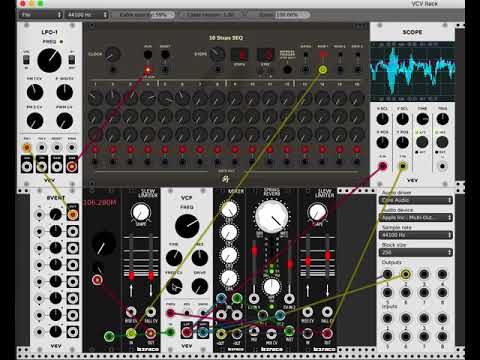
VCV Rack is an open source virtual modular synthesizer, which is software that can be used to create synth music or sounds. The interface is modeled after physical synthesizers called Euroracks. Recently, Jon Williams has ported rtl_fm to the VCV Rack plugin system which allows him to include live FM music in the synthesizer output. This can be used to create some interesting sounds which he demonstrates on the video that is shown below. The frequency tuning is 'voltage controlled', which simply means that it can be adjusted with a knob in the software.

The code is available on GitHub and is fully open source.

How an LNA can Improve VHF Reception with an RTL-SDR

Over on his YouTube channel Adam 9A4QV has uploaded a video showing how an LNA work to improve signal SNR on VHF, as long as the LNA is placed close to the antenna. Adam is the manufacturer and seller of the popular LNA4ALL low noise amplifiers.

On UHF and high frequencies an LNA can help by reducing the system noise figure, but on VHF this effect is small. But if the LNA is placed near the antenna then the LNA can still help significantly by overcoming any losses in the coax cable, filters, switches or any other lossy components in the signal path. It might also help create a better SWR match for the dongle and antenna. The video has some sound issues in during the demonstration part, but on his Reddit thread Adam writes:

Well, monitoring the beacon signal on 144.478 Mhz the S/n without LNA was just 10dB and cannot improve with decreasing the gain. Inserting the LNA in line, close to the antenna, through the Bias-T the S/n improve from 10dB to 23dB.

To meet the most of the user's conditions I was using the RTL-SDR dongle and the 20 meters of RG-6 coaxial cable with F-connectors.

It is obvious that using the LNA on the antenna can improve your reception even on the VHF band. Using the proper bandpass filter instead of a single FM stop filter will give much better results.

LNA4ALL on the VHF close to antenna effect

Upcoming Book “Inside Radio: An Attack and Defense Guide”

Unicorn team are information security researchers who often also dabble with wireless security research. Recently they have been promoting their upcoming text book titled "Inside Radio: An Attack and Defense Guide".

Judging from the blurb and released contents the book will be an excellent introduction to anyone interested in today's wireless security issues. They cover topics such as RFID, Bluetooh, ZigBee, GSM, LTE and GPS. In regards to SDRs, the book specifically covers SDRs like the RTL-SDR, HackRF, bladeRF and LimeSDR and their role in wireless security research. They also probably reference and show how to use those SDRs in the  chapters about replay attacks, ADS-B security risks, and GSM security.

The book is yet to be released and is currently available for pre-order on Amazon or Springer for US$59.99. The expected release date is May 9, 2018, and copies will also be for sale at the HITB SECCONF 2018 conference during 9 - 13 April in Amsterdam.

The blurb and released contents are pasted below. See their promo page for the full contents list:

This book discusses the security issues in a wide range of wireless devices and systems, such as RFID, Bluetooth, ZigBee, GSM, LTE, and GPS. It collects the findings of recent research by the UnicornTeam at 360 Technology, and reviews the state-of-the-art literature on wireless security. The book also offers detailed case studies and theoretical treatments – specifically it lists numerous laboratory procedures, results, plots, commands and screenshots from real-world experiments. It is a valuable reference guide for practitioners and researchers who want to learn more about the advanced research findings and use the off-the-shelf tools to explore the wireless world.

Authors:
Qing YANG is the founder of UnicornTeam & the head of the Radio Security Research Department at 360 Technology. He has vast experience in information security area. He has presented at Black Hat, DEFCON, CanSecWest, HITB, Ruxcon, POC, XCon, China ISC etc.

Lin HUANG is a senior wireless security researcher and SDR technology expert at 360 Technology. Her interests include security issues in wireless communication, especially cellular network security. She was a speaker at Black Hat, DEFCON, and HITB security conferences. She is 360 Technology’s 3GPP SA3 delegate.

This book is a joint effort by the entire UnicornTeam, including Qiren GU, Jun LI, Haoqi SHAN, Yingtao ZENG, and Wanqiao ZHANG etc.


A Homemade Magnetic Loop Antenna used with RTL-SDR Direct Sampling

Over on our forums user "SandB"  has submitted his designs for a homemade magnetic loop antenna with preamp that he uses together with his RTL-SDR in direct sampling mode. The antenna looks like an interesting build so we are resharing it here. He writes:

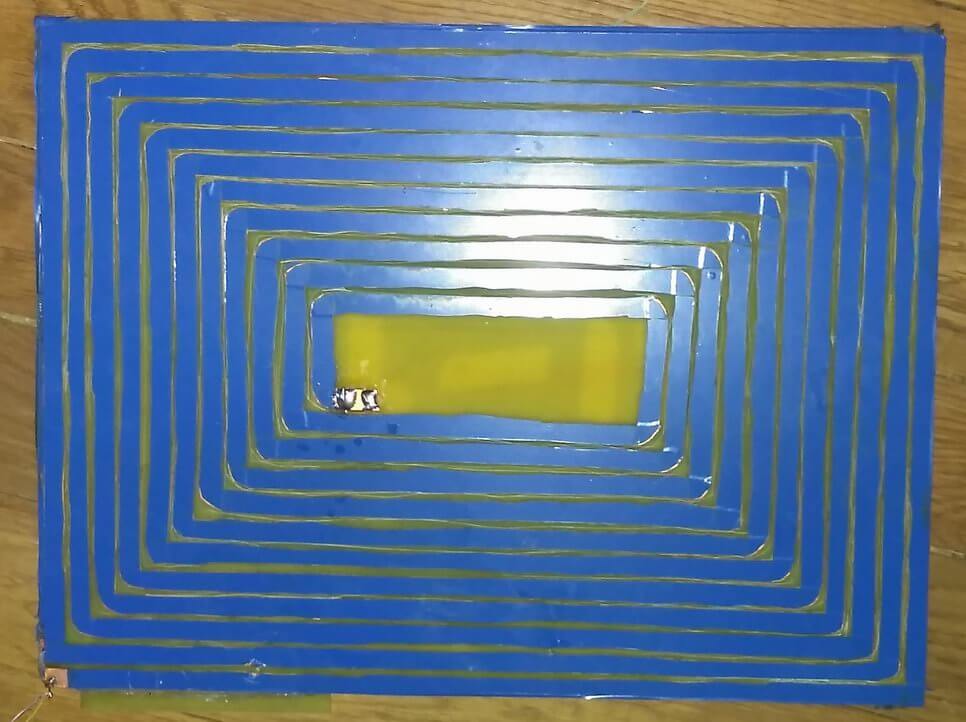
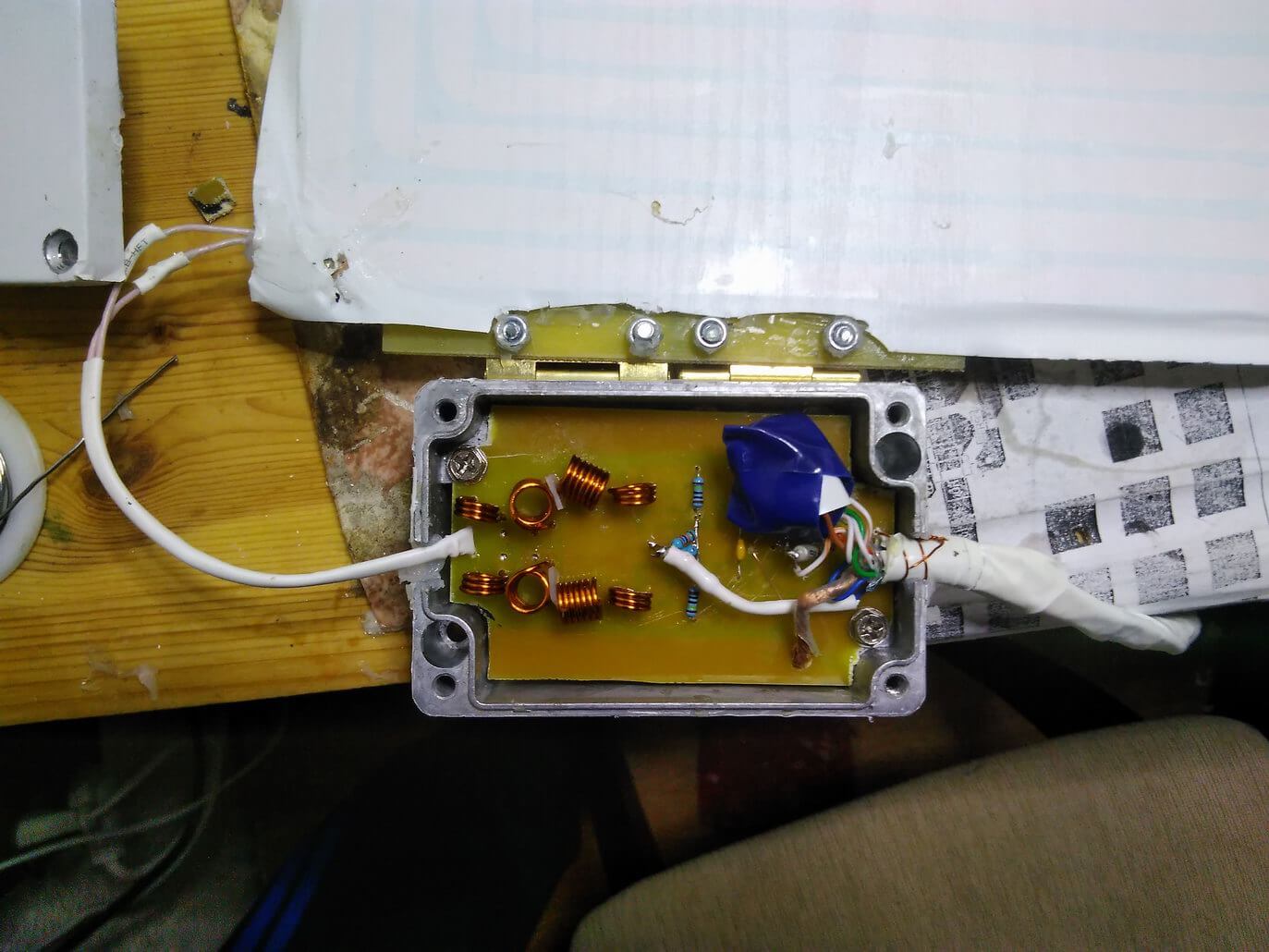
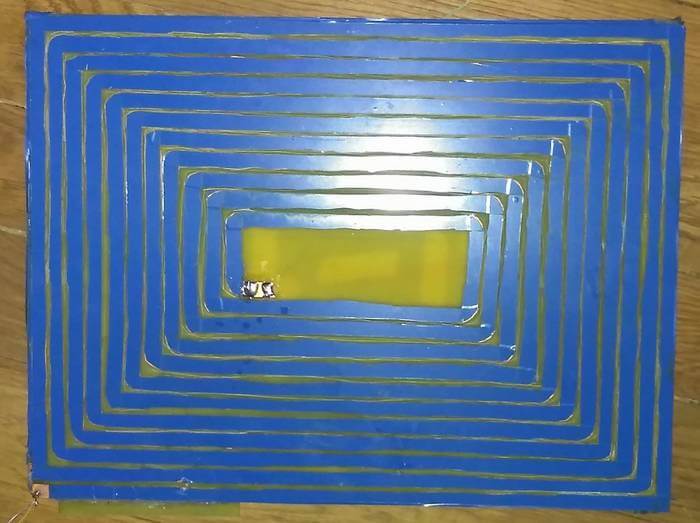
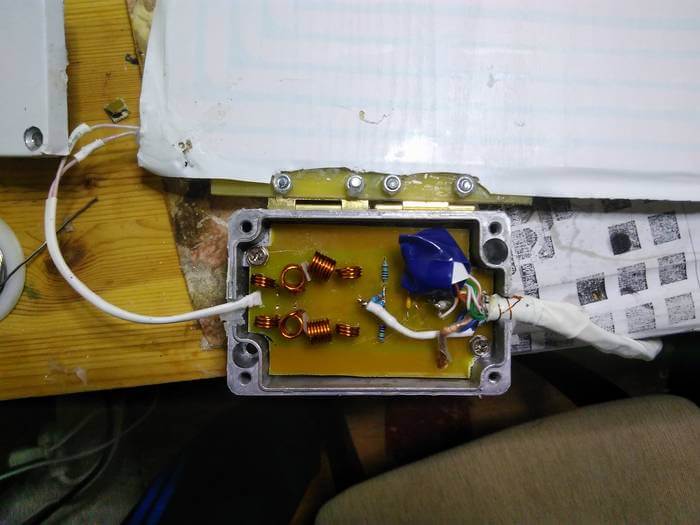
So, antenna itself represents as handmade on-PCB winding made of two-side-foiled fiberglass size of 30x40 cm. Both 'windings' connected in the middle and thus winded to 'continue' each other.

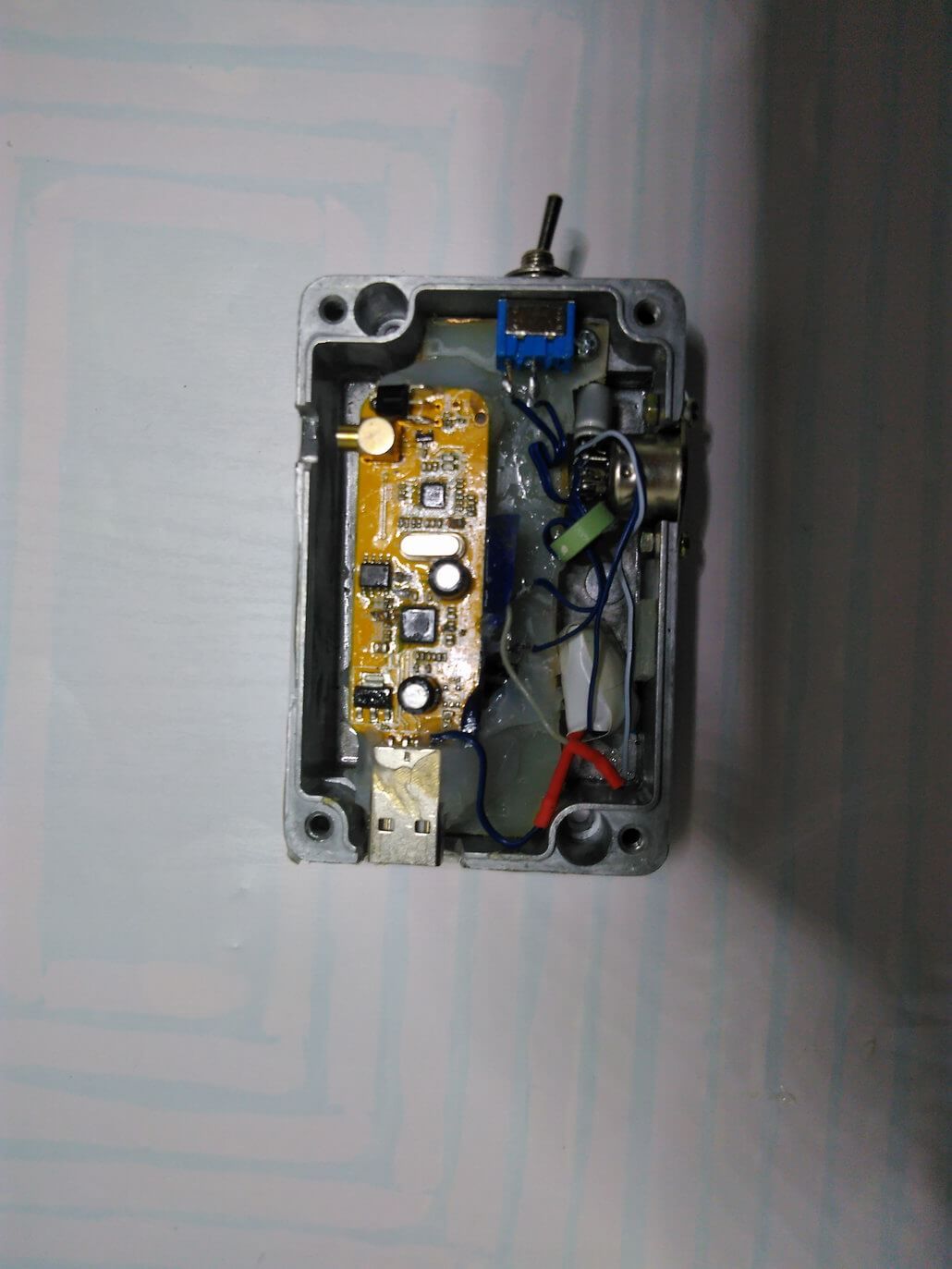
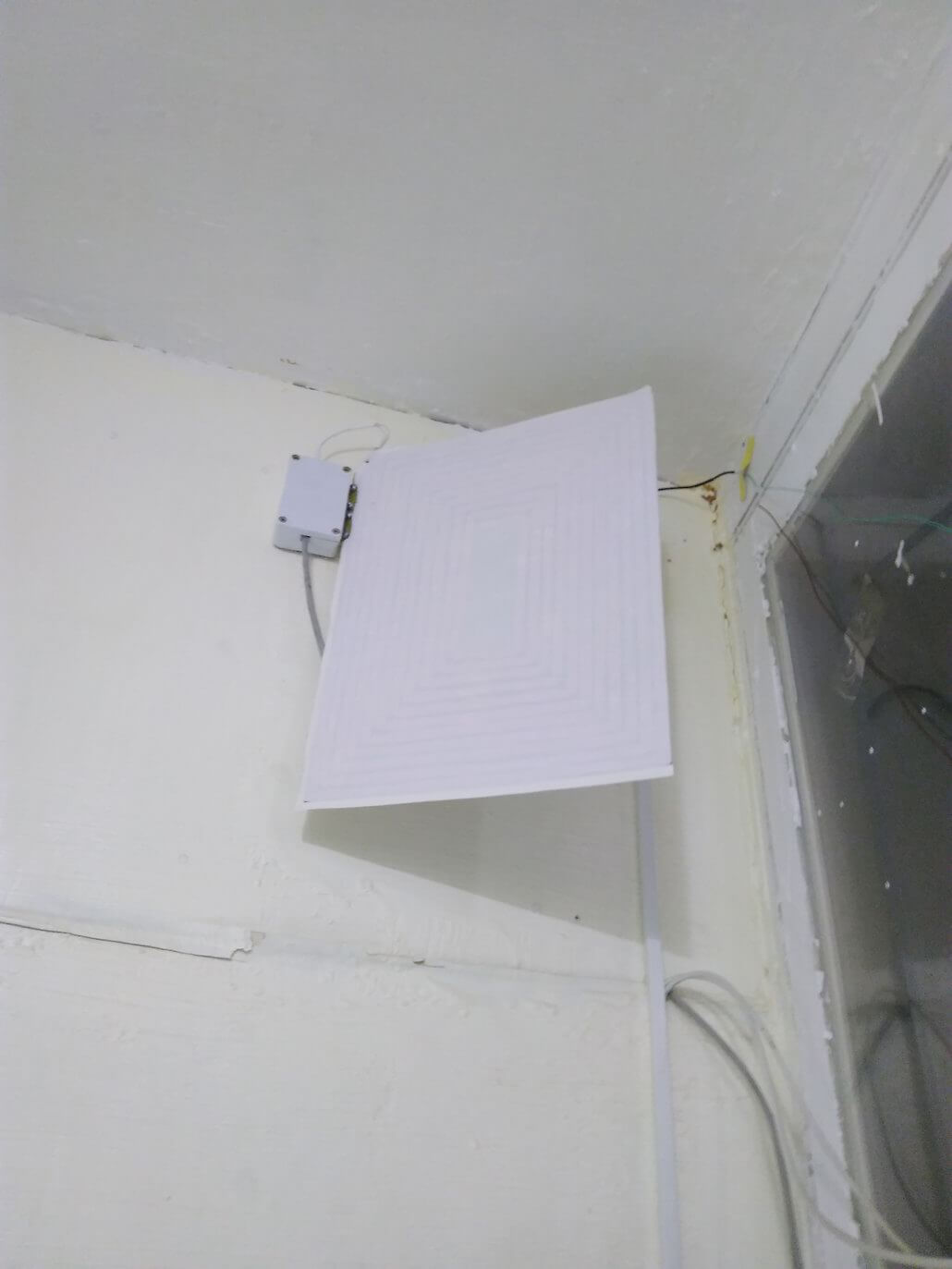
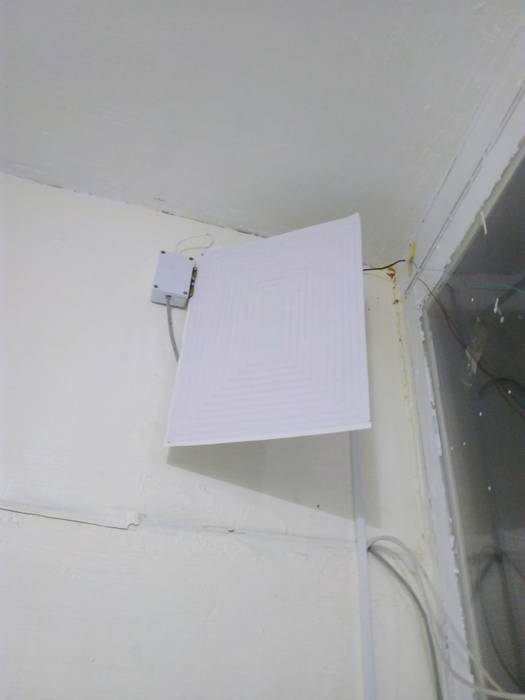
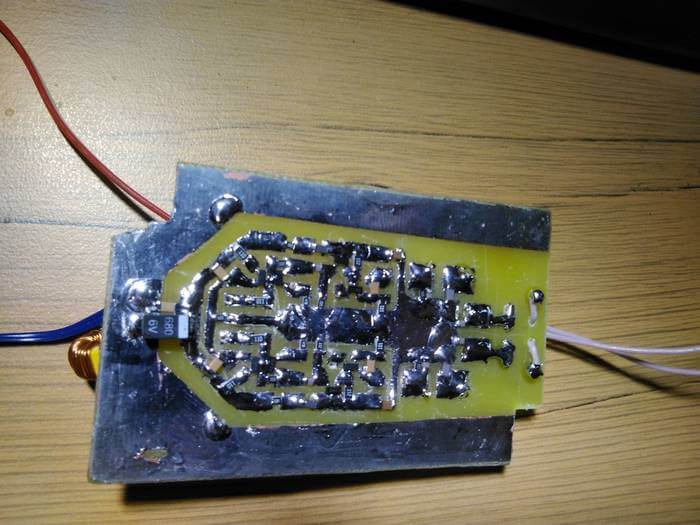
Preamp located in metal box attached to antenna and connected via 1.5m S/FTP cable to another box with RTL stick. Note that some transistors soldered on PCB in upside-down - dot on layout means base.

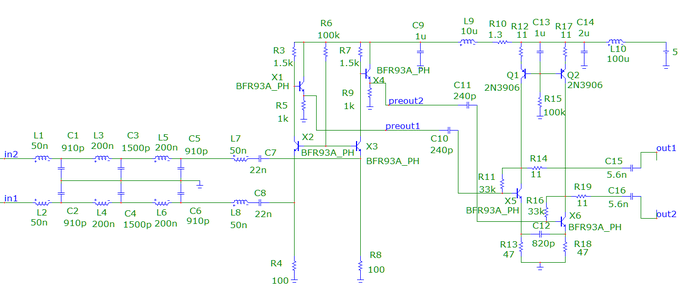
Electrically preamp made as 3-stages balanced signal amplifier with low-input impedance and low-pass filter before input with cut-off at 15MHz. Such complications were required to reduce interferences and intermodulations. Antenna itself is more effective on long-medium waves, so preamp has higher gain on short waves (gain varies from 45db at 200KHz to 68 db at 10MHz - see attached freq responce pic). Getting more flat responce at lower frequencies is possible by increasing C10/C11/C12 to 22nF.

My implementation has some additional elements to make possible to adjust preamp's gain in few db's. But seems its quite useless so that details not included in this post. Anyway, its possible to reduce gain by increasing R6 to 500K.

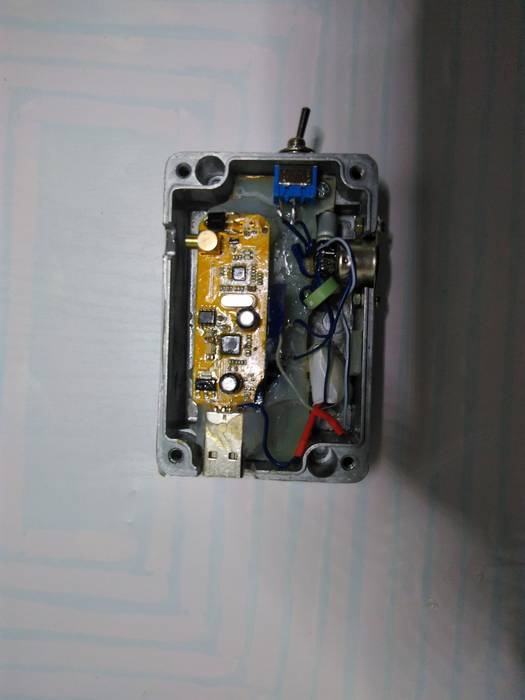
Box with RTL SDR: I put both signal wires as 3 windings via ferrite ring with high permeability just before RTL chip. This noticeable reduced stray interference, that induced in that cable but doesn't affect differential signal.

GridTracker: A WSJT-X Mapping Program

Thanks to RTL-SDR.com reader Henry for letting us know about the release of a new piece of Windows software by Tag Loomis (N0TTL) called GridTracker. GridTracker is a live mapping program for WSJT-X which is a software decoder for low power weak signal ham communications modes such as FT8, JT4, JT9, JT65, QRA64, ISCAT, MSK144 and WSPR. Although these are low power modes, the protocols are designed such that even weak signals can potentially be received from across the world. Mapping the received signals can be interesting as it may give you an idea of current HF propagation conditions.

GridTracker is a Windows (XP or above) companion program for WSJT-X. It listens to WSJT-X or JTDX decodes and displays them on a map.

A great way to visualize communicating amateurs around the world!

Display on a large second monitor in your amateur radio club, hamfest or as a demonstration in a classroom. Everyone gets excited when they can see what you’re doing!

You can also load your ADIF log files from WSJT-X, Qrz.com, LoTW, PSKReporter and others to get a visual view of ‘stations worked’, stations that can hear you and more!

It might be an interesting project to set up a permanent GridTracker display using an RTL-SDR V3 in direct sampling mode, or RTL-SDR with upconverter. Low cost x86 single board PCs that can run Windows 10 such as the LattePanda, UP board or Udoo might be possible candidates for host hardware.

Henry warns us that the software is still new, so it may be a little buggy.

GridTracker Mapping out Weak Signal Communications.

Improving HRPT Reception + A Free HRPT Decoder

Back in December Tysonpower showed us  how he was able to receive HRPT weather satellite images with a 80cm and 1.2m satellite dish, LNA and Airspy Mini. 

If you didn't already know, HRPT signals are a little different to the more commonly received NOAA APT or Meteor M2 LRPT images which most readers may be more familiar with. HRPT images are more difficult to receive as they are broadcast in the L-band at about 1.7 GHz and so receiving them requires a dish antenna (or high gain Yagi antenna), L-band dish feed, LNA and a high bandwidth SDR such as an Airspy Mini. The result is a high resolution and uncompressed image with several more color channels compared to APT and LRPT images.

In the last video Tysonpower was successful with receiving HRPT images with his setup. But recently over on his YouTube channel and on his blog Tysonpower has shown how he has improved his HRPT reception by first optimizing the feed and adding in a copper matching line which helps improve the impedance matching of the feed. He also added an L-Band filter tuned to the HRPT signal which he notes made the biggest improvement, and he also moved all the components into a watertight box for permanent outdoor mounting. With these changes he's now able to consistently pull in some very nice imagery. All the images are still received by hand tracking the satellite dish as the satellite passes over, but he notes that he plans to experiment with motorized trackers in the future.

Note that the video shown below is narrated in German, but English subtitles are provided if you turn on YouTube captions.

[EN subs] HRPT - optimierungen und sehr gute Bilder

A sample HRPT image received by Tysonpower.

In addition to the above Tysonpower also writes that he has created a free HRPT decoder for the HRPT signals originating from NOAA satellites. He writes regarding HRPT decoders:

I found it quite complicated to find a decoder for HRPT when i started and there is still no one that you can just Download.

The only free Decoder is the gr-noaa example in gnu radio that has a depricated wx GUI and uses a input from a specific SDR. I used that gr-noaa example and created a decoder that uses the modern QT GUI and has a clean interface. You just put in a wav IQ file from SDR# for example and it will decode the Data into the file you entered. It is not the best one out there in form of signal processing, but a good start i would say.

The decoder can be downloaded from tynet.eu/hrpt-decoder. Below is a second YouTube video where Tysonpower explains how to use the decoder.

[EN subs] Kostenloser HRPT Decoder (GNU Radio) - Und wie man ihn nutzt

RTL-SDR Module for the VCV Rack Modular Synthesizer

VCV Rack is an open source virtual modular synthesizer, which is software that can be used to create synth music or sounds. The interface is modeled after physical synthesizers called Euroracks. Recently, Jon Williams has ported rtl_fm to the VCV Rack plugin system which allows him to include live FM music in the synthesizer output. This can be used to create some interesting sounds which he demonstrates on the video that is shown below. The frequency tuning is 'voltage controlled', which simply means that it can be adjusted with a knob in the software.

The code is available on GitHub and is fully open source.

How an LNA can Improve VHF Reception with an RTL-SDR

Over on his YouTube channel Adam 9A4QV has uploaded a video showing how an LNA work to improve signal SNR on VHF, as long as the LNA is placed close to the antenna. Adam is the manufacturer and seller of the popular LNA4ALL low noise amplifiers.

On UHF and high frequencies an LNA can help by reducing the system noise figure, but on VHF this effect is small. But if the LNA is placed near the antenna then the LNA can still help significantly by overcoming any losses in the coax cable, filters, switches or any other lossy components in the signal path. It might also help create a better SWR match for the dongle and antenna. The video has some sound issues in during the demonstration part, but on his Reddit thread Adam writes:

Well, monitoring the beacon signal on 144.478 Mhz the S/n without LNA was just 10dB and cannot improve with decreasing the gain. Inserting the LNA in line, close to the antenna, through the Bias-T the S/n improve from 10dB to 23dB.

To meet the most of the user's conditions I was using the RTL-SDR dongle and the 20 meters of RG-6 coaxial cable with F-connectors.

It is obvious that using the LNA on the antenna can improve your reception even on the VHF band. Using the proper bandpass filter instead of a single FM stop filter will give much better results.

LNA4ALL on the VHF close to antenna effect

Upcoming Book “Inside Radio: An Attack and Defense Guide”

Unicorn team are information security researchers who often also dabble with wireless security research. Recently they have been promoting their upcoming text book titled "Inside Radio: An Attack and Defense Guide".

Judging from the blurb and released contents the book will be an excellent introduction to anyone interested in today's wireless security issues. They cover topics such as RFID, Bluetooh, ZigBee, GSM, LTE and GPS. In regards to SDRs, the book specifically covers SDRs like the RTL-SDR, HackRF, bladeRF and LimeSDR and their role in wireless security research. They also probably reference and show how to use those SDRs in the  chapters about replay attacks, ADS-B security risks, and GSM security.

The book is yet to be released and is currently available for pre-order on Amazon or Springer for US$59.99. The expected release date is May 9, 2018, and copies will also be for sale at the HITB SECCONF 2018 conference during 9 - 13 April in Amsterdam.

The blurb and released contents are pasted below. See their promo page for the full contents list:

This book discusses the security issues in a wide range of wireless devices and systems, such as RFID, Bluetooth, ZigBee, GSM, LTE, and GPS. It collects the findings of recent research by the UnicornTeam at 360 Technology, and reviews the state-of-the-art literature on wireless security. The book also offers detailed case studies and theoretical treatments – specifically it lists numerous laboratory procedures, results, plots, commands and screenshots from real-world experiments. It is a valuable reference guide for practitioners and researchers who want to learn more about the advanced research findings and use the off-the-shelf tools to explore the wireless world.

Authors:
Qing YANG is the founder of UnicornTeam & the head of the Radio Security Research Department at 360 Technology. He has vast experience in information security area. He has presented at Black Hat, DEFCON, CanSecWest, HITB, Ruxcon, POC, XCon, China ISC etc.

Lin HUANG is a senior wireless security researcher and SDR technology expert at 360 Technology. Her interests include security issues in wireless communication, especially cellular network security. She was a speaker at Black Hat, DEFCON, and HITB security conferences. She is 360 Technology’s 3GPP SA3 delegate.

This book is a joint effort by the entire UnicornTeam, including Qiren GU, Jun LI, Haoqi SHAN, Yingtao ZENG, and Wanqiao ZHANG etc.


A Homemade Magnetic Loop Antenna used with RTL-SDR Direct Sampling

Over on our forums user "SandB"  has submitted his designs for a homemade magnetic loop antenna with preamp that he uses together with his RTL-SDR in direct sampling mode. The antenna looks like an interesting build so we are resharing it here. He writes:

So, antenna itself represents as handmade on-PCB winding made of two-side-foiled fiberglass size of 30x40 cm. Both 'windings' connected in the middle and thus winded to 'continue' each other.

Preamp located in metal box attached to antenna and connected via 1.5m S/FTP cable to another box with RTL stick. Note that some transistors soldered on PCB in upside-down - dot on layout means base.

Electrically preamp made as 3-stages balanced signal amplifier with low-input impedance and low-pass filter before input with cut-off at 15MHz. Such complications were required to reduce interferences and intermodulations. Antenna itself is more effective on long-medium waves, so preamp has higher gain on short waves (gain varies from 45db at 200KHz to 68 db at 10MHz - see attached freq responce pic). Getting more flat responce at lower frequencies is possible by increasing C10/C11/C12 to 22nF.

My implementation has some additional elements to make possible to adjust preamp's gain in few db's. But seems its quite useless so that details not included in this post. Anyway, its possible to reduce gain by increasing R6 to 500K.

Box with RTL SDR: I put both signal wires as 3 windings via ferrite ring with high permeability just before RTL chip. This noticeable reduced stray interference, that induced in that cable but doesn't affect differential signal.

Wirelessly Activated Facial Recognition with a Raspberry Pi, Camera and RTL-SDR Dongle

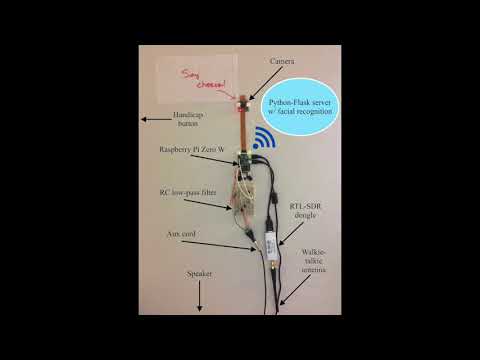
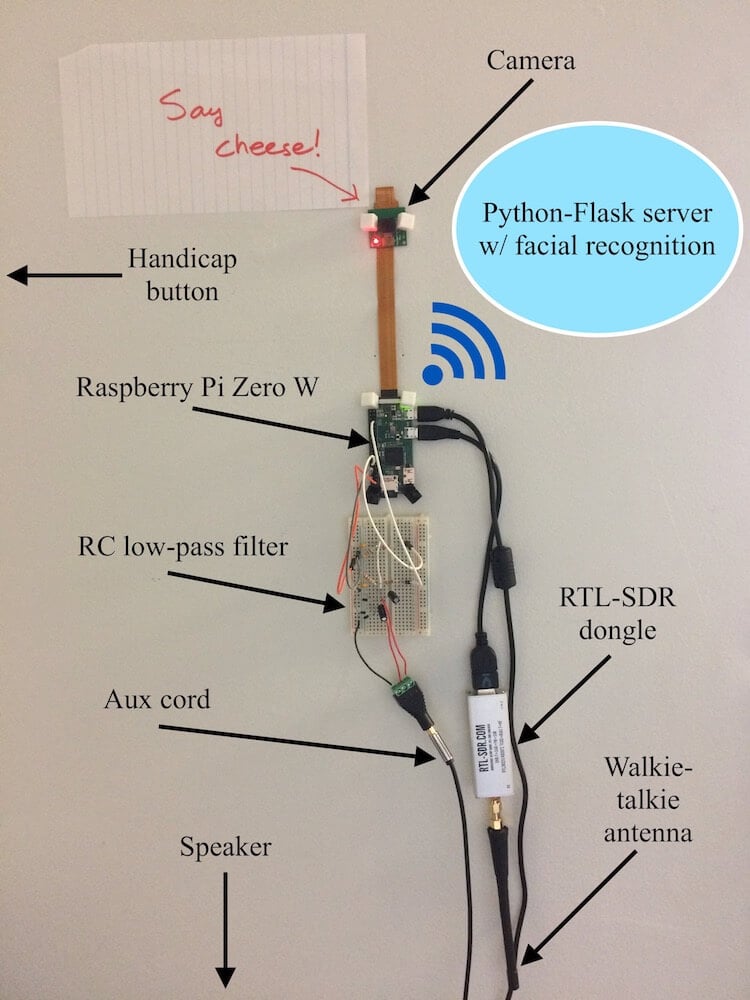
Over on his blog and YouTube channel Trevor Phillips has shown us how he's created a wirelessly activated facial recognition system using a Raspberry Pi Zero, Raspberry Pi camera, wireless button and RTL-SDR dongle.

He uses a handicap door button with wireless transmitter that transmits at 300 - 390 MHz, and uses the RTL-SDR on the Raspberry Pi Zero to detect whenever the button is pressed. The button detection algorithm simply looks for an increase in RF energy via an FFT transform. Once a button press is detected by the RTL-SDR and Raspberry Pi the camera and facial recognition software on the Pi activate, and a text to speech algorithm asks the button presser to face the camera for identification. If the face is recognized in the database the speech to text welcomes the user.

Facial recognition for less than $80

TETRA Decoder Plugin for SDR# Now Available

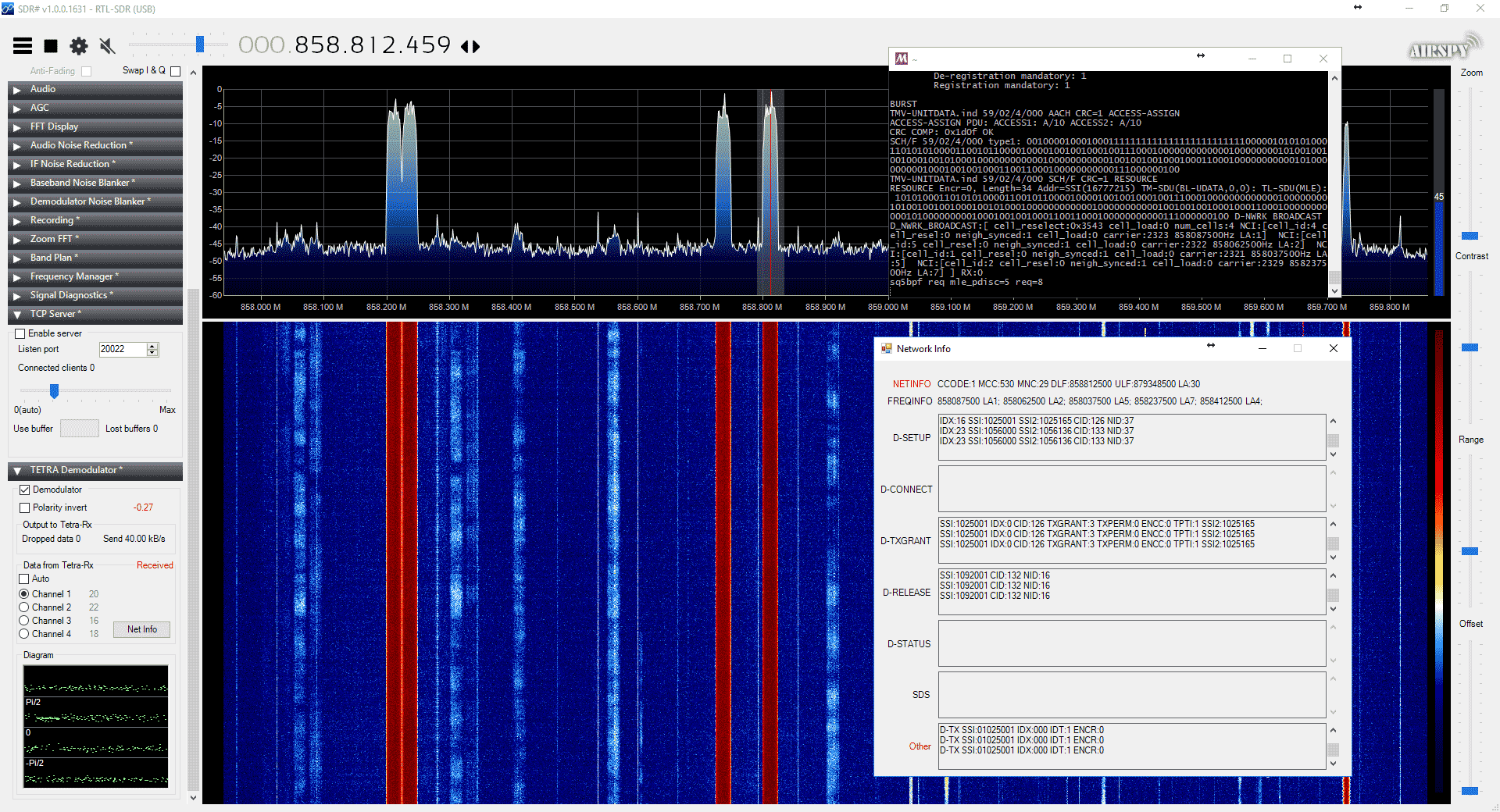
Back in 2016 cURLy bOi released a Windows port of the Linux based "Telive" TETRA decoder. Now the latest development in TETRA decoders is that a TETRA decoder plugin for the SDR# software has been released. This makes setting up a TETRA decoder significantly simpler than before.

The plugin doesn't seem to be officially released anywhere, but we did find it thanks to @aborgnino's tweets on Twitter, and he found it on a Russian language radio scanner forum. The plugin is available as a direct download zip from here, but we suggest browsing to the last few posts in the forum thread to find the latest version.

Installing the plugin is a little more difficult that usual, as you first need to install MSYS2 which is a compatibility layer for Linux programs. The full installation instructions are included in the README.TXT in the zip file. One clarification from us: you need to copy the files in the msys_root/usr/bin folder from the zip file into the /usr/bin folder that is in your MSYS2 installation directory. 

We tested the plugin and found it to work well without any problems. With the plugin turned on you just need to simply tune to a TETRA signal in WFM mode, and you will instantly be decoding the audio.

TETRA is a type of digital voice and trunked radio communications system that stands for “Terrestrial Trunked Radio”. It is used heavily in many parts of the world, except for the USA. If you have unencrypted TETRA signals available in your area then you  can listen in on them with an appropriate SDR like an RTL-SDR and decoder software like the aforementioned plugin.

SDR# TETRA Plugin Running