Category: Amateur Radio

IGate2: An RTL-SDR Compatible APRS iGate for Android

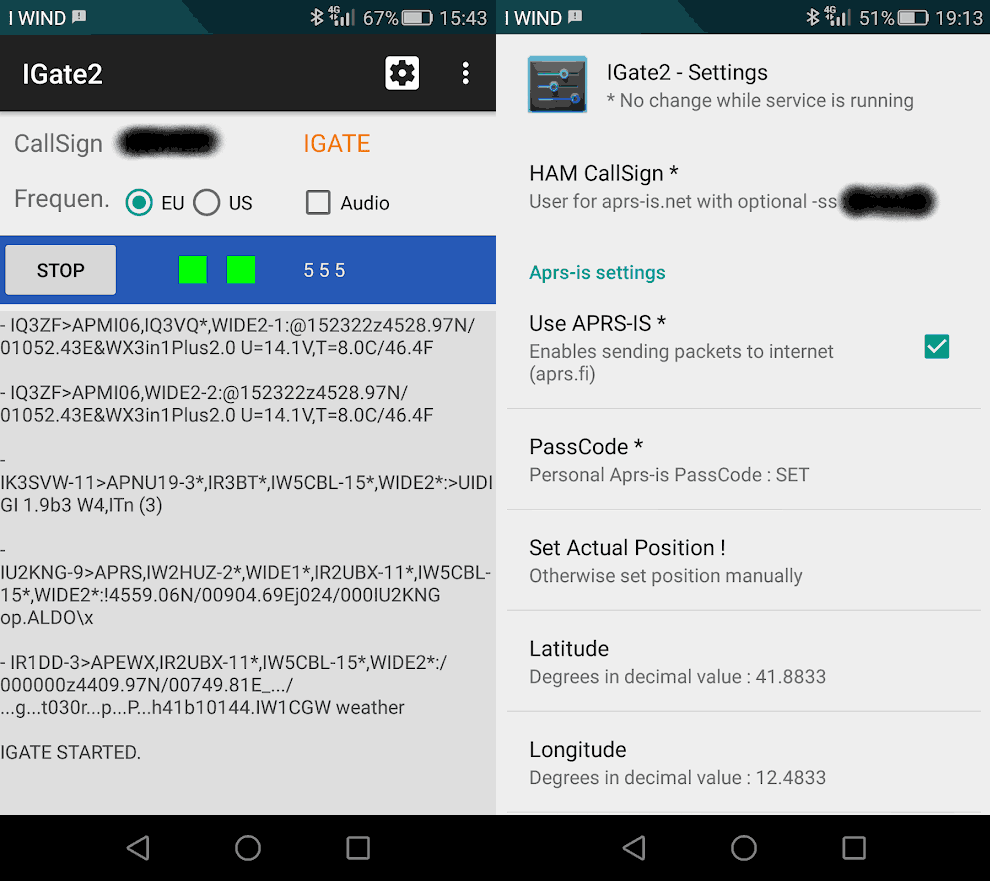
Thank you to Agrosi Luciano for submitting news about his new RTL-SDR compatible Android App called "IGate2". IGate2 is a receive only APRS IGate written for Android devices. There is a free and paid version of the app. The free version is limited to 100 packets forwarded per session. The paid version costs US$3.49 and has unlimited packet forwards. The description of the app is pasted below:

The RTL-SDR dongle tuner (cost starting from 10 €) and its antenna, receives the information contained in APRS packets transmitted from HAM radio stations, and then a phone device, with IGate2, forwards them to the world wide web using its internet connection (WiFi or 3G).

IGate2 acts as a Software Defined Radio Demodulator, a TNC Modem and an Internet Gate.

It needs the installation of a driver (Martin Marinov’s driver) for the SDR dongle that you can find in: https://play.google.com/store/apps/developer?id=Martin+Marinov.

If you already own an unused cellular phone or tablet, IGate2 represents a very cheap, compact and easy-to-use solution for suppling an IGATE service to radio amateur community.

Raw data contained in radio packets are visible on the phone screen and may be routed (if you check this option) to the APRS-IS network. All data convoyed and shared in APRS-IS network can be seen in maps and bulletins on particular websites, for example: http://aprs.fi/ .

To be authorized to send data to APRS-IS you must have a HAM CallSign and a PassCode. See aprs-is.net. If you are not a radio amateur, you may only use your equipment in receive only mode.
The app has an audio monitor useful for tuning the parameters of the Sdr receiver (it may not work well in old devices with low memory). In the main page there is a frequency switch, a hub with the text of received packets, two indicator lights: one for the Sdr connection and one for the Aprs-Is connection, three counters reporting the number of: received, forwardable and forwarded packets. When you leave the main page while the IGate is running, the app service will continue working in the background, you can recall the main page by tapping the service icon in the android status bar.

Since the device and the Sdr dongle drains much power from the phone battery, it is recommended to use the phone charger or a power bank. You will need an OTG power cable. It is not easy to find a working cable, maybe you can do it yourself. The reception quality of the IGate depends, above all, on the antenna connected to the Sdr dongle. With very strong FM broadcasts in your area, it may be helpful to manually adjust the gain of the receiver or use a band-stop filter.

If you weren't already aware, Automatic Packet Reporting System (APRS) is a digital VHF mode used in amateur radio. It allows for packets of data to be sent to receiving nodes over a local area via RF. Typical uses for it are vehicle tracking, weather station telemetry, text messages, announcements and other wireless device telemetry like high altitude balloons. An IGate is an internet connected node which receives local APRS RF signals and uploads them to the internet, to be seen on sites like aprs.fi. TX capable IGates may also broadcast to the local RF network messages from APRS transmitters on the other side of the world.

IGate2: Android App that turns your phone and RTL-SDR into an APRS IGate.


Look4Sat: An Android App for Tracking and Predicting Amateur Radio and Weather Satellite Passes

Thank you to Arty Bishop for submitting news about his recently released Android App called Look4Sat. Look4Sat is a satellite tracker and pass predictor with a focus on amateur radio and weather satellites. The app is free, ad free, and open source on GitHub.  Arty writes that he's programmed this as a learning exercise and notes:

I always wanted to have an offline and not bloated satellite tracker on my phone, as carrying the laptop at all times is kinda not too handy.

The app uses predict4java library under the hood and is written in Kotlin. The TLE files are from Celestrak and the transmitters info is from SatNOGS and once they are  ownloaded the app doesn't need an internet connection.

The app creation and design is hugely inspired by Gpredict which is an absolutely brilliant piece of software. Thank you, Alexandru!

Obviously there is no ads and it's totally free. Hope more people find Look4Sat useful.

The features include:

  • Calculating satellite passes for up to one week (168 hours)
  • Calculating passes for the current or manually entered location
  • Showing the list of currently active and upcoming satellite passes
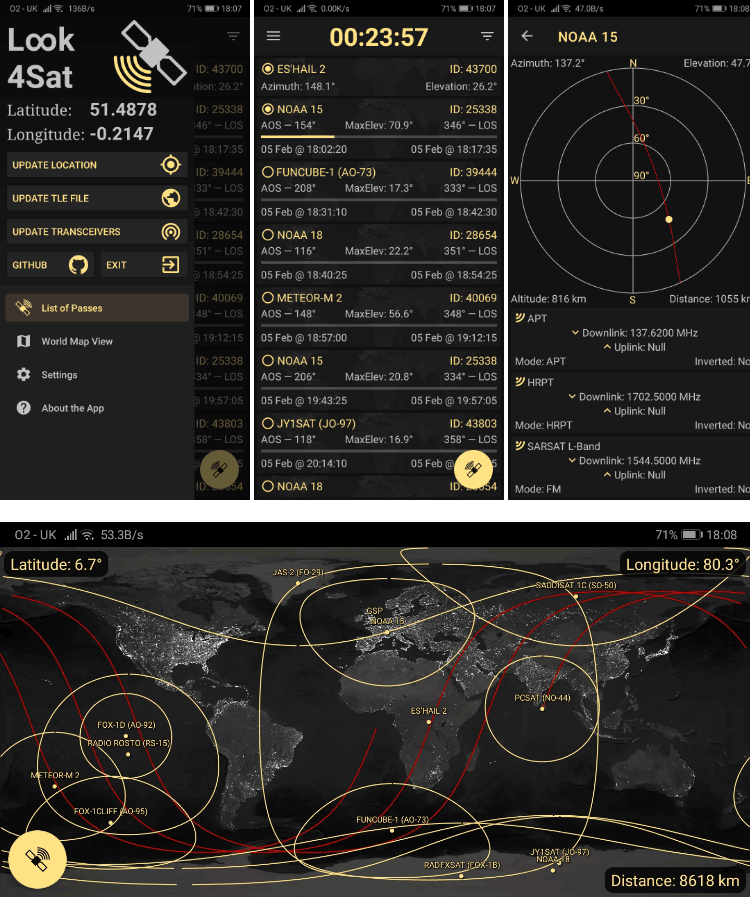
  • Showing the active pass progress, polar trajectory and transceivers info
  • Showing the satellite positional data, footprint and ground track on a map
  • Offline first: pass prediction is done offline. It's up to you to decide when
    to update the TLE file and the transceivers DB. (Updates once a week are recommended)
Look4Sat Android App Screenshots

PyPacket: An APRS iGate For Your RTL-SDR

[Pypacket] was developed by GitHub user [cceremuga] and allows you to take advantage of a Linux computer (such as a Raspberry Pi) and an RTL-SDR to quickly and easily build your own APRS iGate.

For those not familiar with APRS, it stands for the [Automatic Packet Reporting System] and is used by amateur radio operators for applications like transferring messages and location data over RF networks and the internet. The internet connection is where an iGate comes into play. An iGate is used to connect an APRS RF network to the internet, so that many isolated RF APRS networks can communicate worldwide. Furthermore this software can be configured as a “SatGate”, which like an APRS iGate will take messages from APRS satellite’s and route them over the internet.

For example, you could have an amateur radio vehicle continually transmitting it’s location via RF to an APRS iGate. The vehicles position can then be viewed online on an APRS aggregation site like aprs.fi, or it could be re-transmitted over RF elsewhere in the world.

An iGate is usually accomplished by using a ham radio tuned to the local APRS frequency (or sat frequency) and then special PC software is configured to gate the messages.  However, with the release of PyPacket the amount of work and cost required to setup an iGate has been cut drastically. 

Astrophiz Podcast Interviews Steve Olney: Capturing the 2019 Vela Pulsar Glitch with an RTL-SDR

Back in May 2019 we posted about Steve Olney's HawkRAO amateur radio astronomy station which was the only station in the world to capture the 2019 Vela Pulsar "glitch" which he did so using his RTL-SDR as the radio. The astronomy focused podcast "Astrophiz" recently interviewed Steve in episode 95 where he talks about his amateur radio background, his home made radio telescope, his RTL-SDR and software processing setup, and the Vela glitch.

A pulsar is a rotating neutron star that emits a beam of electromagnetic radiation. If this beam points towards the earth, it can then be observed with a large dish or directional antenna and a radio, like the RTL-SDR. The Vela pulsar is the strongest one in our sky, making it one of the easiest for amateur radio astronomers to receive.

Pulsars are known to have very accurate rotational periods which can be measured by the radio pulse period. However, every now and then some pulsars can "glitch", resulting in the rotational period suddenly decreasing. Glitches can't be predicted, but Vela is one of the most commonly observed glitching pulsars.

The HawkRAO amateur radio telescope run by Steve Olney is based in NSW, Australia and consists of a 2 x 2 array of 42-element cross Yagi antennas. The antennas feed into three LNAs and then an RTL-SDR radio receiver. 

Astrophiz 95: Steve Olney: From Ham Radio to Radio Astronomy - "The 2019 Vela Glitch" 

Feature Interview: This amazing interview features Steve Olney who has established the Hawkesbury Radio Astronomy Observatory in his backyard. Steve has constructed a Yagi antenna array, coupled it with a receiver and observed a pulsar 900 LY away and generated data that has enabled him to be the only person on the planet to observe Vela’s 2019 glitch in radio waves as it happened.

If you're interested in learning more about Vela, Astrophiz podcast episode 93 with Dr. Jim Palfreyman discusses more about the previous 2016 Vela glitch and why it's important from a scientific point of view.

QRUQSP – Receiving Weather Sensors via RTL-SDR and Sharing over APRS

Thank you to Andrew Rivett for writing in and sharing news about his project called "QRUQSP" which is aiming to provide an easy to set up system for allowing amateur radio operators to put weather sensors on the APRS network and log the weather data. Andrew writes:

For that last 2 years I've been working on QRUQSP.org, a system to receive weather sensors via a RTL-SDR.com V3 on a Raspberry Pi and then beacon that data over Amateur Radio APRS. I've also developed a dashboard that can be used on iPad 1 and old tablets, and soon will have the ability to sync data between Pi's and to the cloud.

For more information, please check out https://qruqsp.org/ , we have roadmaps under Software and Hardware.

The QRUQSP website also explains:

Amateur Radio offers many opportunities to receive digital messages, decode them and make use of the data contained within those messages. Our primary goal is to store and organize those messages in a database in a way that improves the operator's ability to analyze, assess importance, and relay messages as appropriate for his or her amateur radio service.

The service makes use of his hardware kits that are currently available for preorder on his website, with the basic kit starting at $80. Purchasing a kit or $10 monthly subscription to the cloud service software allows you to participate in the closed beta, which is currently only available for amateur radio operators.

The QRUQSP Hardware
The QRUQSP Hardware

In terms of software Andrew has also created a web application that can be used to collect and display the weather data collected over APRS or rtl_433. The service can be hosted directly on the systems Raspberry Pi, or online on the cloud via the QRUQSP subscription service.

QRUQSP Dashboard and Weather Data Log Display

International Space Station SSTV Event Scheduled for October 9 and 10

The International Space Station (ISS) periodically schedules radio events where they transmit Slow Scan Television (SSTV) images down to earth for listeners to receive and collect. This time they have scheduled SSTV images for October 9 09:50 - 14:00 GMT and October 10 08:55-15:15 GMT.

With an RTL-SDR and a simple V-Dipole from our RTL-SDR V3 antenna kit it is possible to receive these images when the ISS passes over. ISS passes for your city can be determined online, and the SSTV images can be decoded with a program like MMSSTV.

AMSAT-UK writes:

Russian cosmonauts are expected to activate Slow Scan Television (SSTV) image transmissions on 145.800 MHz FM from the International Space Station on Wednesday/Thursday, October 9/10.

This is the schedule for the planned activation of the MAI-75 SSTV activity from the ISS.
• Oct 9 09:50-14:00 GMT
• Oct 10 08:55-15:15 GMT

Transmissions will be sent on 145.800 MHz FM in the SSTV mode PD-120. Once received, images can be posted and viewed by the public at http://www.spaceflightsoftware.com/ARISS_SSTV/index.php

ISS SSTV uses a Kenwood TM D710E transceiver which is part of the amateur radio station located in the Russian ISS Service Module.

Please note that SSTV events are dependent on other activities, schedules and crew responsibilities on the ISS and subject to change at any time. You can check for updates regarding planned operation at:
ISS Ham https://twitter.com/RF2Space
ARISS Status https://twitter.com/ARISS_status
ARISS SSTV Blog https://ariss-sstv.blogspot.com/
AMSAT Bulletin Board http://www.amsat.org/mailman/listinfo/amsat-bb

Read the MagPi article Pictures from space via ham radio
https://www.raspberrypi.org/magpi/pictures-from-space-via-ham-radio/

ISS SSTV info and links https://amsat-uk.org/beginners/iss-sstv/

Using a PlutoSDR to compare FreeDV Digital Voice with other Modes

Over on YouTube user Adrian M has uploaded a video where he compares the HF amateur radio digital voice mode known as FreeDV against other common voice modes such as USB, AM, FM and QPSK. To perform the test he uses a PlutoSDR, a GNU Radio program and a GUI called qradiolink.

FreeDV is an open source amateur radio digital voice mode that uses Codec2 compression. It's designed to compress human voice and works with narrow bandwidths and with weak signal power.

In the demonstration Adrian reduces the TX power slowly for each mode, so you can see what the voice sounds like at high and low signal power. The FreeDV mode is not high fidelity in terms of audio quality, but the voice remains able to be copied at low power when the other modes could not.

Transmit and receive FreeDV 1600 and 700C with SDR hardware

Reviews of the Low Cost MLA-30 Wide Band HF Magnetic Loop Antenna

Recently Chinese manufacturers have begun producing a low cost wide band (100 kHz - 30 MHz) magnetic loop HF antenna known as the MLA-30. The loop can be found on eBay for under US$45 with free shipping. In the past wide band HF loop antennas have not been cheap, normally costing $300+ dollars from manufacturers like Wellbrook.

RF signals are electromagnetic waves that consist of an electric and magnetic component.  A magnetic loop antenna mostly receives the magnetic portion of the wave. This is useful as most unwanted interference from modern electronic devices is generated in the electric component only.  So, a magnetic loop antenna may be preferable in city and suburban environments over other antennas like wires and miniwhips. Magnetic loops are also directional, and can be rotated to avoid interference.

One of the biggest costs to a magnetic loop antenna is the shipping, because a large hula hoop sized piece of metal needs to be sent. The MLA-30 cuts costs on shipping by providing a folded up thin loop wire and no physical support for the loop. You are expected to provide your own support, or simply hang the loop wire on something. If you like you can also replace the included loop wire with a larger loop.

The MLA-30 comes with 10m of RG174 coax, is bias tee powered, and comes as a set with a bias tee injector that is powered over 5V USB. We tested our own unit with the RTL-SDR Blog V3, Airspy and SDRplay bias tee's and found that they all worked well instead of the included bias tee. So if you have one of those SDRs using the loop is as simple and neat as plugging it in and turning on the bias tee.

In terms of build quality, the unit is sturdy and the PCB is fully potted and protected against rain/weather. It is yet to be seen how the external screw terminals holding on the loop will age over a longer period of time however.

So how does the very cheap MLA-30 compare to higher end magnetic loop antennas? Below are some reviews by various hams and SWLs. The general consensus is that it works well for the price, but as you'd expect, falters on handling very strong signals and produces a higher noise floor compared to the more expensive loops, especially in the higher HF bands. But overall we'd say that it's probably still better than using a miniwhip, especially in suburban/city environments, and is probably the best compact HF antenna that you can get on a budget.

What's included in the MLA-30 set. Photo from David Day's Review.

MLA-30 Magnetic Loop Antenna Review and Comparison by David Day (N1DAY)

In this review David compares the MLA-30 against a 30-ft ground loop and a Wellbrook ALA1530-LF. His results show that while the loop is capable of receiving the same signals that the two comparison loops can, the SNR is much lower. He also notes that the much thinner loop wire used on the MLA-30 seems to result in a much deeper null, and that IMD was a problem for him.

Inside the MLA-30 Active Loop Antenna by Matt (M0LMK)

This post is a complete teardown of the antenna. As the PCB is fully potted Matt had to boil down the epoxy in order to get to the actual PCB. He notes that the PCB is a simple single amplifier design with the exposed pot working as a gain control.

Cheap Chinese Magnetic Loop Antenna (MegaLoop aka MAGALoop) MLA-30 by John

In this review John compares the MLA-30 against a $345 W6LVP and Wellbrook ALA1530LN. His findings are very favorable concluding that it is an adequate performer, perfect for cash strapped SWLs.

First hour battle of the antennas W6LVP loop VS MLA 30 loop test by OfficialSWLchannel

This is a YouTube video where OfficialSWLchannel compares his MLA-30 against a W6LVP loop. He notes that his initial testing shows that the MLA-30 performs as well as the W6LVP loop.

First hour battle of the antennas W6LVP loop VS MLA 30 loop test

MLA-30 Loop vs 80M EFHW by Matthew Payne

In this YouTube video Matthew compares his MLA-30 against a 80M end fed halfwave antenna with an SDRplay RSP1a. 

MLA-30 Magnetic Loop Modifications by Scanner and Sdr Radio

In this video the Scanner and Sdr Radio YouTube channel uses an RSPduo to compare the MLA-30 against a Wellbrook loop. His results show that the MLA-30 definitely has a higher noise floor compared to the Wellbrook, but still receives signals decently although chasing weak signals it's not good enough. He also shows how to improve the MLA-30 by replacing the cheap coax that it comes with, noting that the modification reduced his noise.

MLA-30 Magnetic Loop Modifications