Category: Applications

YouTube Satellite Decoding Series

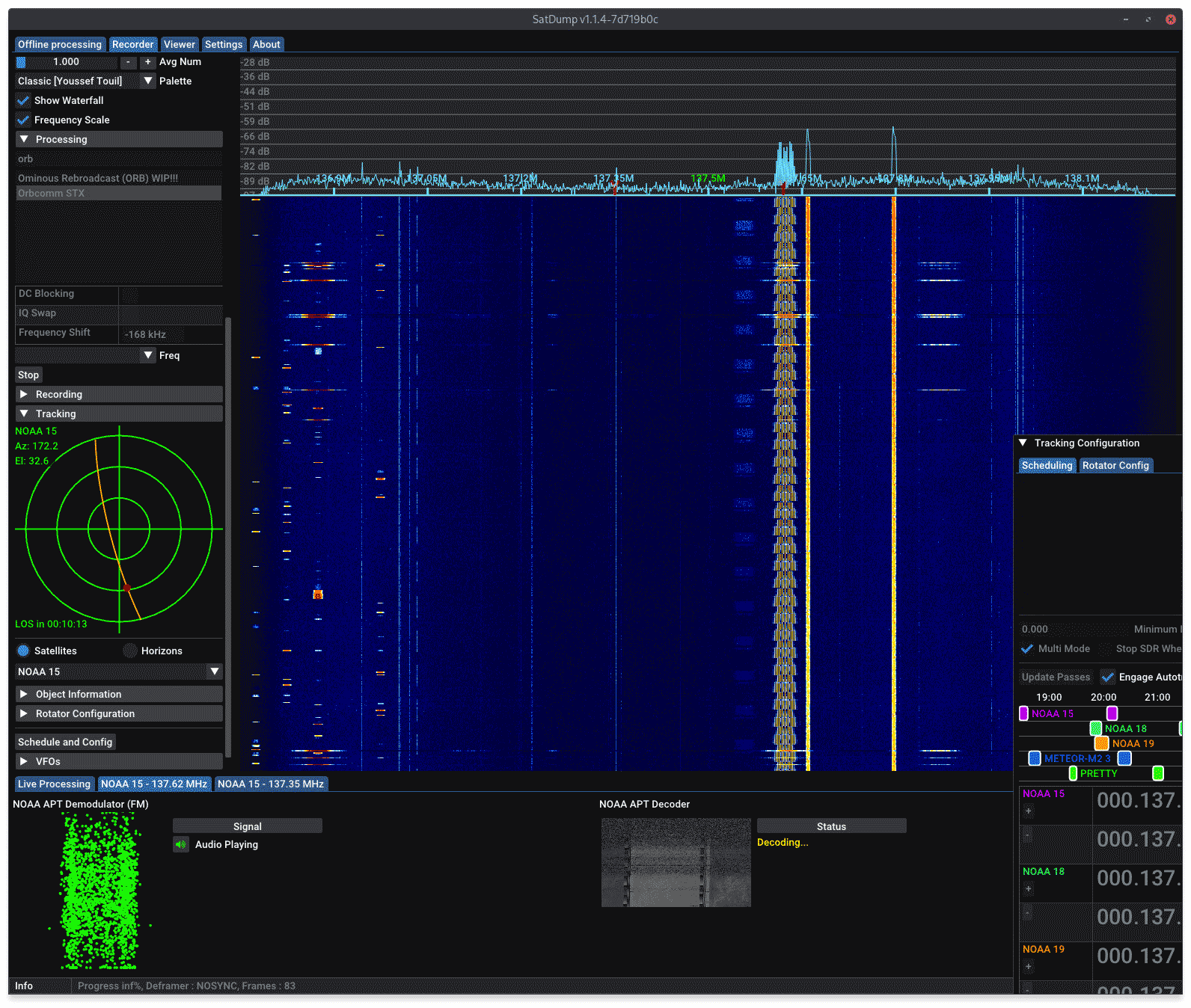
Over on YouTube @dereksgc has been putting together a comprehensive video series on weather, amateur and other satellite reception. His series starts with receiving images from NOAA APT satellites, then Meteor M2, as then goes on to talk about low cost V-Dipole satellite antennas, how satellite dishes work, and recently how to use Ku-band LNBs with a satellite dish.

If you're getting started with RTL-SDR and satellite reception, this video series may be a good introduction for you.

SIGpi: A Signal Intelligence Focused Linux “Go-Kit”

Thank you to Joe NE2Z for sharing his Linux distribution called SIGpi. SIGpi is an installable Linux distribution for Ubuntu and Raspberry Pi 3/4 that focuses on providing multiple open source SDR programs that can be used for signal intelligence. Support for RTL-SDR and other SDRs is included.

The distro is actually created via a bash script that installs all the programs automatically on a fresh OS install. It also provides a system for easily upgrading software as developers work on them.

For a full list of the software that comes with SIGpi check out their Wiki.

SIGpi is a "go-kit" for Signal Intelligence (SIGINT) enthusiasts with emphasis on capabilities in the VHF, UHF, and SHF spectrum. For completeness, HF spectrum related software is included for optional install. This (bash) shell script builds SIGINT tools on the following platforms:

  • Raspberry Pi4 4GB RAM or Raspberry Pi 400 with 32GB microSD card running Raspberry Pi OS Full (64-bit)
  • Ubuntu 22.04 LTS on arm64 and amd64

A headless server only install (Node Install) can be performed on Raspberry Pi3 B+ with 32GB microSD card running Raspberry Pi OS Full (64-bit)

A possible hardware setup with SIGpi

SDRangel Now Available on Android: Mobile ADS-B, AIS, APT, Digital Voice, POCSAG, APRS, RS41 Radiosonde Decoders

SDRangel is a free open source software defined radio program that is compatible with many SDRs, including RTL-SDRs. SDRAngel is set apart from other programs because of it's huge swath of built in demodulators and decoders.

Thank you to reader Jon for writing in and noting that SDRangel has recently been released for Android as a free Google Play download. This is an amazing development that could open up many doors into portable decoding setups as the Android version supports almost every decoder implemented on the desktop version. Jon writes:

It includes most of the functionality of the desktop version of SDRangel, including:

  • AM, FM, SSB, Broadcast FM and DAB, AIS, ADS-B, Digital Voice (DMR, dPMR, D-Star, FreeDV), Video (DVB-S, DVB-S2, NTSC, PAL), VOR, LoRa, M17, Packet (AX.25), Pager (POCSAG), Radiosonde (RS41), Time signal (MSF, DCF77, TDF and WWVB) modems.
  • RTL SDR, Airspy, Airspy HF, LimeSDR, HackRF and SDRplay support via USB OTG as well as networked SDRs
  • 2D and 3D signal analysis in both time and frequency domain with statistical measurements of SNR, THD, THD+N, SINAD, SFDR and channel power
  • Satellite tracker, star tracker, maps and rotator controller

It should work on Android 6 and up. It’s a straight port of the desktop application, so although it will run on a phone, probably best used on a large tablet with a stylus or mouse.

SDRangel on Android
SDRangel on Android

The SDRSharp ListenInfo Plugin

SDR# is a popular software defined radio program that is compatible with RTL-SDR, Airspy and several other SDR devices. One feature is the ability for third parties to develop plugins for the software.

One recently released plugin that is gaining popularity is the "ListenInfo" plugin. The ListenInfo plugin uses a publicly available database of shortwave stations to display frequency station info for the LW, MW, SW bands within the SDR# spectrum display.

If you've ever been browsing the shortwave bands and wondered where a station is broadcasting from, and what it's transit power, beam direction and transmit schedule are like, then this will be a very useful plugin for you.

SDR# ListenInfo Plugin

AntRunner: Testing A Low Cost Satellite Antenna Rotator

Weather satellites that transmit HRPT give you high resolution uncompressed images of the earth. With an SDR, L-band feed, 60 cm or larger satellite dish and LNA+filter these images can be received by anyone. Derek OK9SGC has the definitive HRPT reception tutorial available here. However, as these are low earth orbit satellites, the user is required to find a way to track the satellite as it moves across the sky. With some skill and experience, hand tracking can work, but a motorized solution is really what is desired. Other applications such as ham satellite communications as well as radio astronomy projects may also benefit from motorized tracking .

Antenna rotators that rotate in azimuth and elevation can be used to track satellites moving across the sky. The problem is that antenna rotators are typically very expensive, or are a major task to DIY, involving circuit construction and 3D printing of parts.

Recently on Tindie we came across the "AntRunner" which is a relatively low cost portable antenna rotator from China coming in at US$325 with free shipping to most countries (VAT is added for the EU as $50 in shipping fees).

AntRunner is based on two geared stepper motors, a motor controller PCB and an open frame. AntRunners code is open source, as well as some partial hardware schematics.

It can be interfaced via a USB serial connection or through WiFi via it's onboard ESP32 chip, and it relies on the Hamlib 'rotctl' software library running on either the controlling PC, or another intermediary device like a Raspberry Pi. Once setup, software like Gpredict on the PC or Look4Sat on Android devices can be used to control the rotator.

The AntRunner: Low cost antenna rotator

AntRunner Tests

We ordered an AntRunner for testing with our own funds. Our setup involved a USB connection from the AntRunner to a Raspberry Pi, 12V plug pack and a 60cm dish. We installed hamlib on the Raspberry Pi, and used Gpredict (PC) and Look4Sat (Android) on networked devices to send the desired elevation and azimuth commands to hamlib on the Raspberry Pi for particular satellites.

(Note that if you are installing hamlib for the AntRunner, you should do so from source as the packages in Ubuntu 22.04 appear to be out of date. And the older version of hamlib installed via Ubuntu does not support the AntRunner).

Overall the AntRunner works as expected and was easily able to follow HRPT satellites across the sky. It was also great for easily pointing and switching between geostationary satellites like GOES and GK-2A. It easily held and moved a 60cm dish and feed which weighs about 3 kg. The specs of the AntRunner indicate 5 kg max load (although the GitHub specs note 10kg), so it should be able to hold larger diameter dishes as well.  

However we did have an issue with the advertised WiFi connection which is an alternative to the USB serial connection. When connected to WiFi the connection would always drop after a single movement command was sent, and it would never reconnect unless rebooted twice. For this reason we abandoned WiFi and only used the USB serial connection, and communicated wirelessly via the Raspberry Pi. There is also a WiFi web interface available for testing movement commands and setting up the WiFi connection, but it is only in Chinese.

It's possible that RF noise from the motors was causing the WiFi disconnection, but on the frequencies that L-band satellites operate at, we did not notice any motor interference.

The AntRunner is advertised as a portable rotator, so that means it is not suitable for use in poor weather as it has no cover to protect the motor circuit board and motors themselves from rain. However, it is certainly small and light enough to be portable. You just need a portable 12V power supply as well. 

Another issue is that when power is lost, the motors will spin freely, resulting in the antenna coming crashing down fast. So care must be taken when powering down with someone there to hold the antenna. The user is also required to physically hold the antenna level at 0 degrees elevation before powering up the AntRunner, so that it will reference 0 degrees elevation. Once powered the antenna holds in place.

There are also no limit switches on the device, so if an erroneous command is sent, it could send the motors into a position that could damage something.

AntRunner (Image from Tindie)
AntRunner (Image from Tindie) (NOTE: The tripod stand is not included)

Conclusion

Overall if you want something cheap and pretty much ready to use out of the box for tracking HRPT or other LEO satellites, the AntRunner is a good budget choice if you intend to only setup temporary stations. It is not suitable for permanent satellite receiver setups, at least not without some modifications.

A similar product is the SATRAN MK3 which was a 3D printed kit costing 175 Euros + shipping, but unfortunately this product appears to no longer be sold.

The ultimate in low cost rotators is probably the SatNOGS V3 rotator, but as mentioned this is a DIY project that requires a significant time commitment as it involves 3D printing multiple parts, sourcing components, building PCBs and constructing everything together. We have found one company offering a SatNOGs hardware kit, containing all of the parts required for US$445.

A commercial option might be the Yaesu G-5500DC which goes for US$759.95 on HRO, however you also need the GS-232 Rotator Computer Controller for computer control which is an additional US$589.95. Update: We've been informed that there are also cheaper third party computer controllers for Yaesu rotators, such as the CSN Technologies S.A.T Rotator Controller which sells for US$278.

Tech Minds: Testing a Radiosonde Decoder Plugin for SDR++

In one of his latest YouTube videos, Matt who runs the Tech Minds YouTube channels has posted a demonstration of the Radiosonde decoder plugin for SDR++ called sdrpp_radionsonde.

SDR++ is a software defined radio receiver program that is compatible with almost every SDR, including the RTL-SDR. Like other SDR programs, is has plugin capability, allowing third parties to develop additional features like decoders.

In the video Matt first shows how to install the plugin, demonstrates it being used with an example RS-41 radiosonde, and then shows how to use the log file outputs like the GPX track file on a free GPX map plotting website.

Radiosonde Decoder Plugin for SDR++

A radiosonde is a small sensor and radio package normally attached to a weather balloon. Meteorological agencies around the world typically launch two balloons a day from several locations to gather data for weather prediction. With an RTL-SDR, appropriate antenna and decoding software it is possible to decode the telemetry signal and gather the weather data yourself. You can also use the GPS data to chase and collect the fallen radiosonde package. We have an alternative tutorial on setting up a basic radiosonde decoder in Windows here.

Real Time Speech to Text from Radio Speech via DragonOS, SDR4Space, Mosquitto and WhisperCPP

Real time high quality speech to text is now possible with OpenAI's WhisperCPP, a high-performance and open source automatic speech recognition model.

In his latest video on YouTube, Aaron demonstrates how to use his latest DragonOS image to transcribe audio from a radio voice channel that is received with an RTL-SDR. He makes use of SDR4Space as the command line receiver, WhisperCPP as the AI transcriber and Mosquitto for monitoring WhisperCPP outputs and displaying the text to the terminal.

Here's a short video showing exactly how to setup and run SDR4space in such a way that real time IQ captures are demodulated and feed to WhisperCPP (High-performance inference of OpenAI's Whisper automatic speech recognition (ASR) model) for transcribing.

The latest DragonOS FocalX R28 comes w/ everything needed to do exactly what I show in this video, to include a sample tiny model.

You'll noticed in the video that jobs are placed in a queue for continued captures and results are also sent over to Mosquitto MQTT where a client can see messages as they are created.

I chose to use an RTLSDR v3 dongle for the capture, but it's possible to configure SDR4space to use a variety of soapy supported SDRs.

In his first video Aaron shows how to get setup with the system on DragonOS. Shortly after uploading his first tutorial, Aaron noticed that recompiling WhisperCPP on the local system yielded a significant decrease in the processing time of the AI. After recompiling locally the transcribing then became near real time. In the second video Aaron briefly demonstrates the real time transcription. 

DragonOS FocalX Capture and Transcribe IQ w/ SDR4space/WhisperCPP/Mosquitto (RTLSDR, OpenAI)

DragonOS FocalX Captured IQ to Text Faster w/ SDR4space/WhisperCPP/Mosquitto (RTLSDR)

In the past we posted a similar project that was based on the Amazon Transcribe cloud service. However WhisperCPP runs on a local machine, is open source and seems to be at least as good as Amazon Transcribe. So this appears to be a significant leap in transcribing ability and we could see it being used to automatically create text logs and alerts based on various radio channels.

Tech Minds: Running the SDR++ Multiplatform Server on MacOS, Windows and Raspberry Pi

SDR++ is an open source receiver program compatible with most software defined radios including the RTL-SDR that has been going through rapid development making it now one of the top software choices. In runs on almost every platform, including Windows, Linux, MacOS and Android.

One feature that SDR++ has is it's remote server. This is similar to applications like rtl_tcp which allow an SDR on a remote device like a Raspberry Pi to be accessed over a network.

Over on YouTube, Matt from Tech Minds has uploaded a video showing how to run the SDR++ Server on MacOS, Windows and Raspberry Pi platforms.

SDR++ Multi-Platform SERVER