Category: Applications

SDR++ Version 1.0.0 Released

SDR++ is an open source, cross platform, C++ based GUI general receiver program for various SDRs including the RTL-SDR. Since it's alpha release in mid 2020, it has undergone huge amount of development, and is quickly becoming the main program of choice for many users due to it's efficiency, cross platform and multi-SDR hardware support and increasing feature set. And with an easy GUI very similar to that of SDR#, it's easy for most users to learn.

Recently version 1.0.0 of the SDR++ software has recently been released. This is the first non-beta stable version, so represents a major milestone in development. Over on Reddit programmer u/xX_WhatsTheGeek_Xx summarizes the latest developments.

After over a year of work, I'm proud to released version 1.0.0 of SDR++!

For those who don't know, SDR++ is a crossplatform (Windows, Linux, MacOS, BSD) and open-source (https://github.com/AlexandreRouma/SDRPlusPlus/releases) general purpose receiver software meant to be simple and easy to use. It has advances features like multi-vfo and uses a fully custom DSP making it very efficient.

Here are the following additions compared to the last version:

  • Support for the SpyServer protocol
  • Support for all SDRplay devices
  • Support for all BladeRF devices
  • Support for all LimeSDR devices
  • Optional IQ correction
  • Optional Decimation
  • Broadcast FM Stereo
  • Frequency manager to create lists of frequency and optionally display them directly on the FFT/Waterfall
  • Network sink to stream the audio output via TCP or UDP
  • Options to set the FFT framerate, FFT size and FFT window.
  • Theming with Dark and Light themes supplied by default
  • RigCTL server module to control SDR++ from, for example, gpredict.
  • A bunch of keyboard shortcuts (see wiki on the github page)
  • SNR meter
  • More info when hovering a VFO
  • Colored VFOs to easily identify which is which at a glance
  • Meteor M2 demodulator compatible with LRPTOfflineDecoder and Satdump
  • Ability to resize VFOs by directly dragging the sides on the FFT and waterfall
  • Module manager to easily add or remove any module on the fly without having to restart or edit the config manually
  • File dialogs to select directories in the recorder or files in the file source (instead of having to type in the path)
  • Ability to disable modules that support it (Radio and Meteor M2 demodulator) with one click (to save CPU power or just if they're not needed)
  • Lots of performance improvements
  • Ludicrous amounts of bugfix :)

I'd like to thank the many contributors, patrons and companies (SDRplay, Airspy, Nuand, LimeMicro) who helped make this project possible!

If you have any issue with the software, please open a github issue or contact me directly on the SDR++ discord (see readme on github)

I hope this software comes in useful to at least some of you ;)

We also wanted to highlight the fact that SDR++ runs smoothly with about 50% CPU usage on a Raspberry Pi 4 with an RTL-SDR.

Also according to @cemaxecuter who created DragonOS, if rtaudio is installed on Linux , then an easy to use virtual audio sink becomes usable from SDR++, allowing audio to be easily passed to other programs such as WSJT-X just like on Windows.

A ready to use zip file for Windows is available on the GitHub Releases page, as well as amd64 .deb and .pkg install files for Ubuntu, Debian and MacOS systems. For other systems the compilation instructions are available on the readme or Git main page.

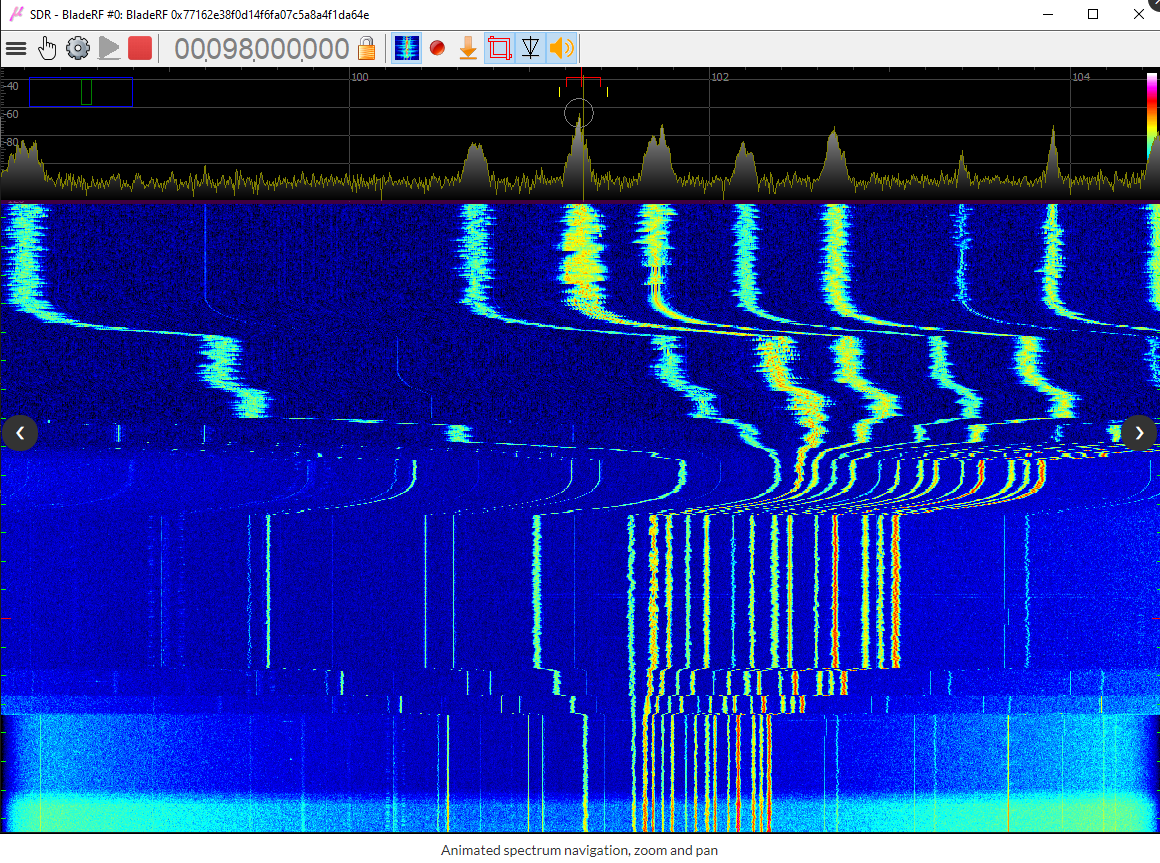
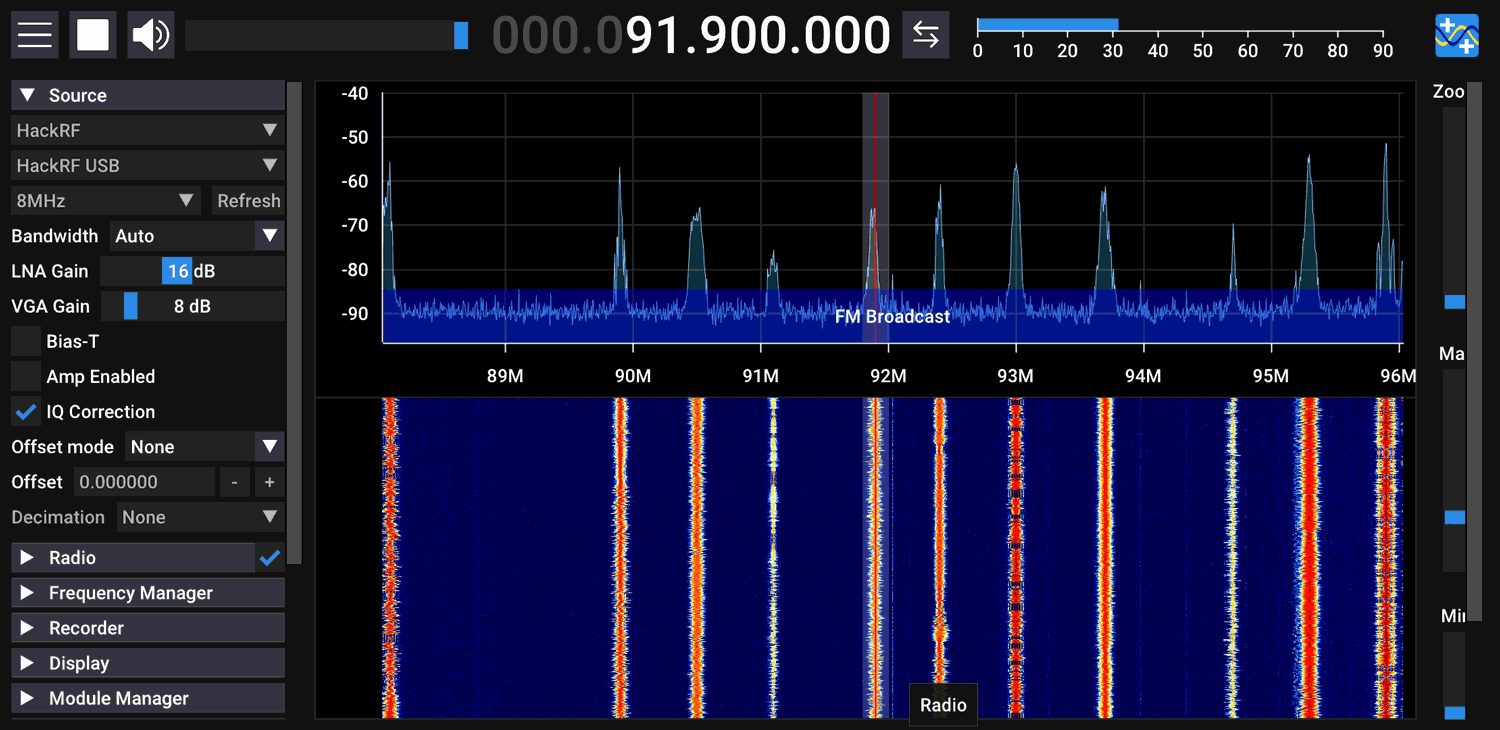
SDR++ V1.0.0 Screenshot

BSides Talk: Hacking RF Breaking what we can’t see

Over on YouTube the BSides Halifax channel has uploaded a recent talk given by Security Engineer Grant Colgan titled "Hacking RF Breaking what we can't see". In the talk Grant first shows the various bits of wireless devices that he tests, as well as the receiver equipment that he uses which includes a HackRF and RTL-SDR dongles. He goes on to show various live demos.

An often overlooked aspect of security is what happens when information is moving magically from one device to another with no wires. We know this as (usually) Wifi or Bluetooth and any attacks are usually based on these technologies. However when you widen the scope to RF wireless communication, A lot more tools become available. In this talk I will be talking about the attack and doing live demos.

Elektro-L3 Geostationary Weather Satellite: Easy to Receive LRIT Signal Being Tested

Back in September 2020 we posted about the release of an X-Band decoder for the Elektro-L2 and Elektro-L3 Russian geostationary satellites. These satellites are receivable from Europe, the Middle East, Asia, Africa, South America and Australia. Unlike the HRIT and LRIT L-band transmissions from other geosynchronous satellites like GOES and GK-2A, the X-band Elektro signal is quite difficult to receive, requiring a large dish and more expensive hardware.

However we've recently seen exciting news on Twitter that a new L-band LRIT transmission has been activated on Elektro-L3. Like the Korean GK-2A satellite, this L-band LRIT transmission at 1691 MHz should be much easier to receive requiring only a WiFi dish, SAWBird GOES LNA and an RTL-SDR. We haven't yet confirmed if like GK-2A, the smaller 600 x 400 mm WiFi dish is sufficient, or if Elektro requires the larger 600 x 1000 mm dish size. (See our GOES satellite and GK-2A tutorial for information about the hardware being discussed in this paragraph.)

We note that the Elektro-L3 signal appears to be in testing, and the transmission could be turned on and off, or even turned off permanently. The transmission schedule is also not yet clear although in this recent tweet @HRPTEgor has mapped out some current transmission times for Eletro-L3.

It is hoped that LRIT will also eventually be activated on Elektro-L2, and perhaps even HRIT will be activated too. It is also exciting that more Elektro-L satellites are planned to be launched from 2022 onwards and we expect those to have hopefully LRIT and HRIT transmissions as well. To add further excitement, it is hoped that the L3 LRIT activation means that a LRIT or HRIT signal will be activated on the high elliptical orbit (HEO) northern hemisphere Arctic monitoring ARKTIKA-M1 satellite launched in Feb 2021, as this satellite is derived from the Elektro-L design.

The LRIT activation of Elektro-L3 hopefully means that Europeans should finally have access to a geostationary weather satellite that can be easily received with modest low cost hardware. The current coverage map from Orbitron of the two Elektro satellites is shown below (note that Elektro-L2 LRIT does not appear to have been activated yet).

Elektro-L2 and Elektro-L3 Coverage (Currently only Elektro-L3 LRIT transmissions have been discovered)

Over on Twitter @aang254 has noted that he has already updated his satdump software, adding support for Elektro LRIT decoding, and adding support for all of the available channels and for color. Satdump is available as a binary for Windows, and on Linux can be built from source. Experimentally, Satdump can also be built and run on Android.

The Tweet from @aang254 provides a nice sample image of what can be received.

EZNEC Pro Antenna Modelling Software will be free from 2022

EZNEC is a popular antenna modelling program created by W7EL which is based on the "Numerical Electromagnetics Code" or NEC. With a NEC based antenna modelling program it is possible to design antennas by modelling their geometry and connections, and then simulating parameters like radiation pattern gain and VSWR. You can also determine the effects of height, roof angles, nearby objects and more.

Originally the pricing was $99 for EZNEC, $149 for EZNEC+, $525 for EZNEC Pro/2 and $675 for EZNEC Pro/4. W7EL is retiring and from Jan 1 2022 EZNEC Pro/2 and EZNEC+ will be made free, and EZNEC Pro/4 will be discontinued. The source code will not be released, and no support will be provided.

If you're after a free NEC based antenna modeler today, 4NEC2 is a similar program that is already free. There is also the recently released and more modern CENOS, which is free for hobbyist use.

The EZNEC Software

Dump1090 now Available as an Android App

The company ebcTech who makes AIS Share for Android has recently come out with a new app which is an Android App version of Dump1090. Dump1090 is a popular command line based ADS-B decoder for RTL-SDR dongles which allows you to receive and plot the locations of nearby aircraft on a map.

The app directly accesses the RTL-SDR via a USB OTG connection and provides a list of aircraft with planespotters.net image lookup, and a Google map display. The app is free however there is a message limit on received aircraft which can be unlocked via a low cost in-app purchase.

The author also wrote in and wanted to make a note about a special feature "In the app you can add Airport layers – This consist now 4480 Airports – most of them with corresponding homepage address / or Wikipedia link."

Dump1090 Android App

Frugal Radio: HFDL HF ACARS Decoding Tutorial

In Rob's latest episode of his excellent aviation communications series on his Frugal Radio YouTube channel he shows how to decode aircraft HF ACARS (HFDL) using a software defined radio. HFDL is short for "high frequency data link", and is a method aircraft use for sending text and data communications to ground stations. It is an alternative to VHF or satellite ACARS communications methods.

In the video he shows how he's been able to receive HFDL from all over the world using a simple HF dipole antenna and an Airspy HF+ Discovery. He goes on to show how to find HFDL signals, and how to decode signals using SDR# and the PC-HFDL software. Finally he shows examples of aircraft received, and how to interpret some of the information being received, including location information.

How to decode HF ACARS (HFDL) free with your SDR - Monitoring Aviation Communications Episode 8

Using an RTL-SDR in Dual-Comb Spectroscopy using Diode Lasers

Thank you to Antonio from the Polytechnic University of Madrid, Department of Photonic Technology and Bioengineering for writing in and sharing with us his teams latest research titled "Dual-Comb Spectrometer Based on Gain-Switched Semiconductor Lasers and a Low-Cost Software-Defined Radio". The research involves the use of an RTL-SDR Blog V3 dongle in place of an expensive digital oscilloscope for measuring the output of a dual-comb spectrometer. The abstract of the paper reads as follows:

Dual-comb spectroscopy has become a topic of growing interest in recent years due to the advantages it offers in terms of frequency resolution, accuracy, acquisition speed, and signal-to-noise ratio, with respect to other existing spectroscopic techniques. In addition, its characteristic of mapping the optical frequencies into radio-frequency ranges opens up the possibility of using non-demanding digitizers.

In this paper, we show that a low-cost software defined radio platform can be used as a receiver to obtain such signals accurately using a dual-comb spectrometer based on gain-switched semiconductor lasers.

We compare its performance with that of a real-time digital oscilloscope, finding similar results for both digitizers. We measure an absorption line of a H13C14N cell and obtain that for an integration time of 1 s, the deviation obtained between the experimental data and the Voigt profile fitted to these data is around 0.97% using the low-cost digitizer while it is around 0.84% when using the high-end digitizer.

The use of both technologies, semiconductor lasers and low-cost software defined radio platforms, can pave the way towards the development of cost-efficient dual-comb spectrometers.

The paper can be freely accessed on IEEE Access which is open access.

We note that in the past we've also seen an RTL-SDR used as part of a low cost Ozone spectrometer experiment, and and Airspy used in an optical FM spectroscopy experiment.

Dual-comb Optical Spectroscopy setup with an RTL-SDR Blog V3

Receiving pH Readings from a Wireless Medical Implant with RTL-SDR

Over on Hackaday we've learned about an interesting investigation by James Wu who was recently implanted with a stomach pH (acidity) monitoring device called the "Medtronic Bravo Reflux Capsule". Whilst inspecting the patient demo capsule James noted that the device transmitted data wirelessly via a very small low power transmitter, in particular noticing a telltale "433" written on a component on the device, indicating that it uses the 433 MHz ISM band.

Back at home he pulled up the FCC filing for the device, which unveiled that it is OOK-PWM modulated, and operates at 433.92 MHz. The rest of the filing also had information noting that the implant transmits a 59-bit data packet every 12 seconds, and contained a nice breakdown of the packet structure, making it easy for decoding.

With all the information about the device's wireless transmissions now known, James grabbed his RTL-SDR and fired up SDR# to confirm that the signal was indeed transmitting every 12 seconds at 433.92 MHz. Next he was able to decode the data from the device by inputting the protocol information learned from the FCC filing into an rtl_433 command line string.

After a bit of further work James discovered that the pH data was actually two readings in one data string. At this stage he finally had the pH reading, however it was represented as an 8-bit ADC reading with a value between 0 to 255. James plotted the relationship between the 8-bit raw ADC reading, and the pH value shown on the official Medtronic receiver. With this he was able to determine a linear relationship between the ADC reading and real pH reading, but notes that there may be a more accurate calibration curve required for actual medical use.

Decoding pH readings from a stomach implant with an RTL-SDR

If you're interested in wireless medical devices, in the past we've seen how SDRs could be used to not only receive data coming from Minimed Insulin pumps, but to maliciously control them with a HackRF too. We've also seen that data could possibly be received from implanted heart defibrillators as well.