Over on YouTube Aaron has uploaded a video showing how he is using the SDR4Space.lite package in DragonOS to do some interesting experiments with automated spectrum analysis using a PlutoSDR or RTL-SDR. As a reminder, Aaron is responsible for DragonOS which is a Linux OS with many SDR software programs preinstalled (including SDR4Space.lite).
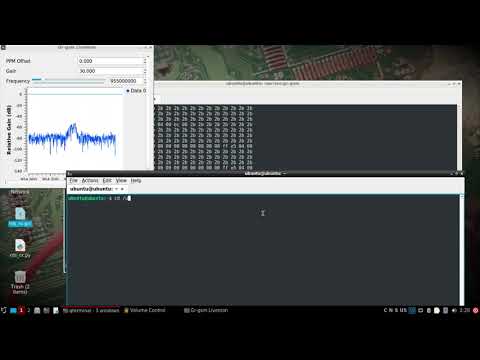
This video shows how to use the RTLSDR/PlutoSDR with some of the prebuilt SDR4space.lite javascript examples preinstalled in DragonOS Focal.
I start out showing the new IQ recording script w/both the RTLSDR or the PlutoSDR. After a recording is triggered, the saved file can be looked at with inspectrum, SigDigger, etc. The javascript itself can be modified to produce desired results, but by default it's setup to record POCSAG.
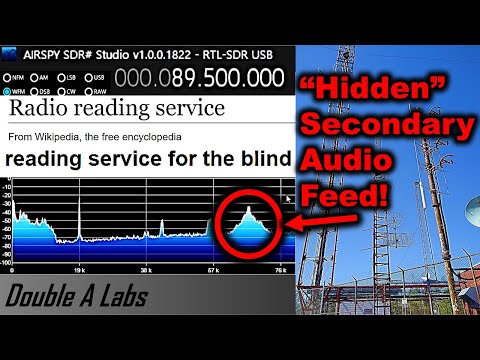
The second half of the video shows how to use the wide spectrum analysis javascript to look at 88-108Mhz. The script produces a graphical representation of the RF spectrum along with a spreadsheet containing the corresponding RF information.
Any of these scripts can be modified, new ones can be built, and cron jobs or other scripts could call upon them as needed. I hope to do more videos once I figure out how to take the data and put it into some sort of database.
DragonOS Focal Automate Spectrum Analysis + IQ recording w/ SDR4space.lite (RTLSDR, PlutoSDR) part 1
Thank you to Jean Marie (F5VLB) who has written in and wanted to share an invitation to their Facebook group where they are discussing ways for beginners to get into low cost 10 GHz (SHF) experiments. The 10 GHz band is generally considered tough to break into due to the precision required at these frequencies, however Jean notes how they are making use of readily available TV LNBs, RTL-SDRs and free software for their experiments. Jean writes:
I would like to present to you here about a Facebook group that addresses (only) radio enthusiasts, whether it is SWL or loose amateur radio and are interested in the high bands (SHF). On my life of Ham Radio I have never found a site that explains clearly, without big expenses, how to explore these bands.
The purpose of this FB group is to gently take you to this world, reserved for the experts, and yet accessible with reasonable means, with facilities found in the TV SAT store from the corner of the street. For some 50$ you will be ready with a dish, a lnb, a tx module.
The site begins. In 3 weeks 116 members came to join us. We go slowly, step by step.
The result ? It will listen to a satellite at 36000km, listening to tags everywhere around you, emit (if you have the license) on these mythical bands of 10 and 5.7 GHz.
This is aimed at young people aged 7 to 77, without special knowledge.
Want to know more ?
So come on https://www.facebook.com/groups/bzh10ghz this site is for you. And for others who are far in front of us, do not hesitate to bring your comments, simple, kind and taking into account that this site is made for newbies.
10 GHz Equipment and Group (Images provided by Jean Marie F5VLB)
Mark Jessop (@vk5qi) has recently been experimenting with a LED based hardware vehicle heads up display (HUD) that he has created to be used together with our KerberosSDR. The KerberosSDR combined with four antennas in a circular array determines the bearing towards a transmitter, and then the HUD displays this bearing visually on a circle.
The HUD is cleverly designed so that the LEDs reflect on the windshield of the car, allowing for the lights to be safely seen on the windshield while driving. More videos of the HUD being developed and used can be seen on his Twitter feed.
In the video below Mark also shows how he combines KerberosSDR bearing data with his Chase Mapper software, which he uses for tracking down radiosonde weather balloons.
For the last few months I've been piecing together a radio direction finding (also known as 'fox-hunting') system using a RTLSDR-Blog Kerberos-SDR, a custom-made antenna array, and my 'ChaseMapper' software. I have also recently added a 'heads up display' (HUD) box which displays the direction-of-arrival and SNR data from the Kerberos-SDR software.
I hope to put together a longer video showing how the system goes together sometime in the future, but this short clip shows how the system is used in the final approach to a radio transmitter (in this case, a 144 MHz transmitter from one of the Amateur Radio Experimenters Group organised night fox-hunts).
The antenna array consists of two 4-element nested arrays, one with 200mm antenna spacing for the 70cm band, and another with 425mm antenna spacing for the 2m band. The array is mounted to my car roof-racks, with phase-matched coax entering the car through a window-mounted bulkhead.
The red lines on the map indicate a bearing line produced by the Kerberos-SDR software. As we drive around the fox location, bearings are plotted, and we look for where they cross. There are always some inaccurate bearings due to multi-path issues, and misalignment between bearing acquisition time and the position/heading of the car, but it works well enough to be able to allow navigation to the transmitter location. The display can get fairly busy, so there are options to threshold by signal quality, and to 'age out' bearings over time.
The beeping noise you hear in the video is the signal from the radio transmitter, in this case a 144.390 MHz beacon which transmits short CW 'pips'. We were listening to the signal with an Icom IC-705 attached to an omnidirectional antenna so we knew when the transmitter started and stopped (and hence when to trust any bearings produced by the DoA system).
Towards the end of the video you can see the HUD in action, with the blue lights showing the estimated signal arrival direction, relative to the front of the car. As I slowly drive past the transmitter location (which I could see out the side of the car), the bearings swing to the right, and the SNR shows as being very strong. This is exactly what the display was intended for - it's not about getting hyper-accurate bearings, but more knowing when you need to turn left/right, or get out of the car!
Thanks to Will Anthony for capturing the video while I was driving!
Finding a Radio Fox using a Kerberos-SDR + ChaseMapper
KerberosSDR is our 4-channel phase coherent capable RTL-SDR unit that we previously crowdfunded back in 2018. With a 4-channel phase coherent RTL-SDR interesting applications like radio direction finding (RDF), passive radar and beam forming become possible. It can also be used as four separate RTL-SDRs for multichannel monitoring.
KerberosSDR is soon to be replaced with the upgraded KrakenSDR, which will begin crowd funding on Crowd Supply later this year. Be sure to sign up on the Crowd Supply page to be updated once the campaign releases as due to long supply chain crisis related lead times, only a limited amount of stock will be initially available.
On on YouTube on the SignalsEverywhere channel Sarah has uploaded a new video where she gives a hands on overview of the SDR++ software. Last week we posted about the release of SDR++ V1.0.0, which is an open source, cross platform, C++ based GUI general receiver program for various SDRs including the RTL-SDR.
In the video Sarah shows it's basic usage in action and highlights many of the great features that SDR++ has. Overall Sarah notes that she is very impressed with SDR++, praising it as one of the best SDR applications released in a while, and we agree.
SDR++, The Cross-Platform bloat-free SDR software | A Hands on Overview
Thank you to Jason for writing in and letting us know that OpenWebRX Version 1.1.0 has been released on August 03. OpenWebRX is an open source program that allows users to make RTL-SDRs, KiwiSDRs and other SDRs accessible over the internet via a web browser. It is is currently available as a Raspberry Pi SD card image, in the Debian + Ubuntu repositories, as a docker image, or for manual installation.
The latest version adds an AMBE voice data decoder, new decoders and metadata displays for NXDN and D-Star, and crisper SVG graphics.
Since we last posted about OpenWebRX updates in early 2020, there has also been support added for the Perseus-SDR, RadioBerry 2, Hermes HPSDR, Funcube Dongle Pro+ software defined radios. New decoders and support for external decoders such as JS8Call, FreeDV, Wideband FM, DREAM DRM, FST4, FST4W, Q65 and M17 digital voice have been added.
There is also now a site called Receiverbook.de that aggregates a list of publicly available OpenWebRX receivers.
The script is a Windows batch file that downloads FIRMS data from the internet every 12 hours, then converts that data into a format that can be processed by goestools. Once converted the resulting JSON file is uploaded to the Raspberry Pi running goestools. A custom goestool process is then used to layer the data onto the received images.
The result is accurate red polygons on the satellite image in areas where fires have been recorded. With this data visualized it is easy to see where smoke seen on the satellite images is coming from. For example, the image below shows the location of wildfires in the Western USA and the resulting smoke trailing across the continent.
Carl has also tested the fire data layer with GK-2A and Himawari-8 and notes that it works well with images from those satellites as well.
Fires data in Western USA layered on top of received GOES satellite images.
Over on YouTube Sarah is back this week with a new video on her channel SignalsEverywhere. In this video she shows how to decode HF WEFAX (weather fax) images using an Airspy HF+ Discovery software defined radio with a YouLoop antenna. HF weather faxes are daily weather chart images transmitted as an analogue signal over the HF bands by coastal stations. They are mostly used by ships at sea.
First Sarah shows where to find a lists of WEFAX frequencies and schedules for her area, and then goes on to demonstrate a WEFAX signal being received and decoded using SDR#, VB-Audio Cable and the FLDIGI decoder.
Decoding HF WEFAX Weather Fax with SDR Software Defined Radio | Airspy HF Discovery
Thankyou to M.Khanfar for submitting news about his latest project which involves running an RTL-SDR dongle on a QNAP NAS (network attached storage). Running a dongle on a NAS machine might be useful if you need to record large amounts of IQ data, or need fast network speeds. Khanfar writes:
In this video , I will show you step by step how to make QNAP NAS Recognize and Running SDR Dongle and connected directly via USB and then launching rtl-sdr tools by installing dependencies tool to run like rtl_tcp.
The tools we need to install its calling QPKG. QNap Nas has it's own operating system called QTS, and NAS it mean ( Network Attached storage ) and I'm successfully implementing dependencies and make QNAP Recognize my SDR Dongle Stand alone.
The QPKG it's like. exe in windows, but its special extensions for qnap operating system QTS .
The two qpkg (software) we will install them from third party delevopper for qnap , not from official qnap store, and I will install them inside my QNAP and you will see step by step how it's easy to turn your QNAP NAS to SDR Server without any pc needed !
And the advantage is the qnap is stand alone, and it has a high speed gigabit LAN speed, and it have SSL certificate that I buy it from qnap store for secure connection from outside and it has like fix up adrress it's called qnap Id.
So I can easy running my sdr# from my work directly TCP to my SDR dongle ! using qnap Id with plus port number for TCP like 1234.
If you have +3mbps internet speed for uploading in your home, you can easy access and making connection to rtl_tcp from different country, and secured with ssl and qnap I'd ! I will post in future video for WAN Access secure and fast to rtl_tcp from outside.
The two QPKG we need :
1-Entware-3x-std: its install many dependencies packages to use in terminal like OPKG tool that we need it to install rtl-sdr package! . 2-Gotty : its terminal emulator I use it inside qnap to install commands. follow my video for understanding!
My qnap model in this video: QNAP TS-228
The command I use after install all dependencies: opkg install git rtl-sdr