Category: HF

Decoding HFDL ACARS with a WebSDR and PC-HFDL

In the previous episode Rob from the Frugal Radio YouTube channel showed us how to decode HF ACARS using PC-HFDL and an HF capable SDR such as the Airspy HF+. In that episode he mentioned that it is possible to decode HF ACARS using a WebSDR as well.

In this weeks episode, Rob shows us how to do just that, making use of WebSDR receivers and the PC-HFDL software. Like the previous episode we see how to plot the aircraft HF ACARS position data on Google Earth and how to read and interpret some example messages received.

Decoding HFDL ACARS with a WebSDR and PC-HFDL

Frugal Radio: HFDL HF ACARS Decoding Tutorial

In Rob's latest episode of his excellent aviation communications series on his Frugal Radio YouTube channel he shows how to decode aircraft HF ACARS (HFDL) using a software defined radio. HFDL is short for "high frequency data link", and is a method aircraft use for sending text and data communications to ground stations. It is an alternative to VHF or satellite ACARS communications methods.

In the video he shows how he's been able to receive HFDL from all over the world using a simple HF dipole antenna and an Airspy HF+ Discovery. He goes on to show how to find HFDL signals, and how to decode signals using SDR# and the PC-HFDL software. Finally he shows examples of aircraft received, and how to interpret some of the information being received, including location information.

How to decode HF ACARS (HFDL) free with your SDR - Monitoring Aviation Communications Episode 8

Frugal Radio: Turning Scrap Wire into an Effective HF Dipole

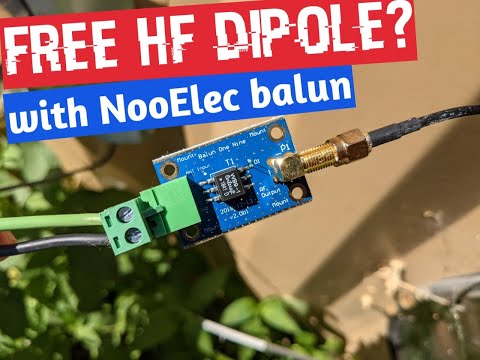
In this weeks video Rob from his Frugal Radio YouTube channel shows us how he's turned an old piece of scrap electrical extension cord into an effective HF antenna for his Airspy HF+ SDR. The scrap wire is combined with a US$15 NooElec 9:1 balun which helps improve the impedance match of the antenna. He then stretches the dipole out through his backyard and then hooks it up to his Airspy HF+.

The results show good reception across the 20m, 80m, 40m amateur radio bands, as well as on HF ATC aircraft communications, US coast guard weather information broadcasts and the AM broadcast band.

I made an HF Dipole for free! Reception was good on my AirSpy HF+ Discovery SDR!

A Hi-Z to 50 Ohm Impedance Matching Transformer for Improving HF/SW Reception

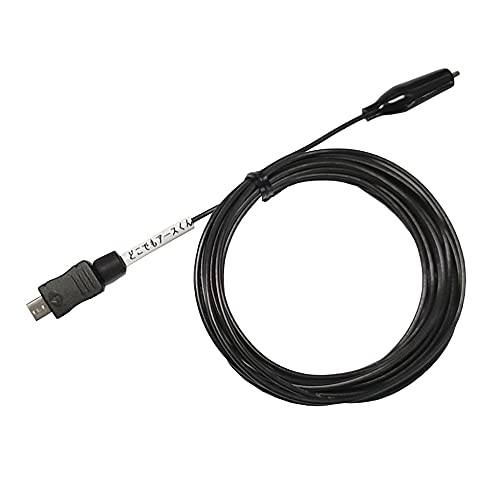
Thank you to Mitsunobu for writing in and sharing news about the release of his new product which is a Hi-Z (high impedance) to 50 Ohm matching transformer. This transformer allows you to use small antennas such as short telescopic whips for HF/SW reception on software defined radios.

Generally for HF reception you would want to use a full sized antenna, which can be many meters long and certainly not portable. However, by using an high impedance transformer it becomes possible to use smaller portable antennas. Reception with a small antenna and transformer will still be suboptimal compared to a full sized HF antenna, however, if the signals are strong enough the transformer will allow you to receive them decently.

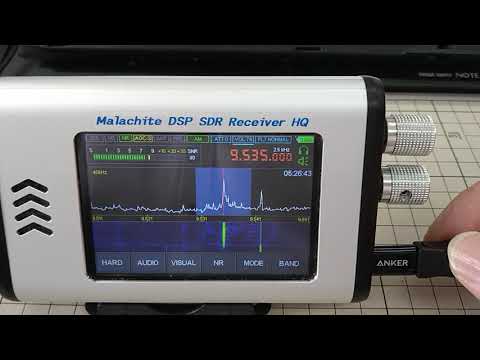
In the tests shown on his blog (in Japanese, use Google Translate) he shows how the transformer adapter can be connected to a small telescopic whip and Malachite DSP SDR for portable use. Later he also shows how the adapter can make our Dipole Kit antenna work well for HF on a RTL-SDR Blog V3 with direct sampling.  

The product is only available via Amazon in Japan. However, Mitsunobu notes that Amazon.jp offers international shipping. He offers the transformer by itself, and a version including a short telescopic whip antenna.

Hi-Z to 50 Ohm Antenna Transformer for HF/SWL

Frugal Radio: Monitoring HF Aviation Voice Communications with your SDR Radio or a WebSDR

Rob from Frugal Radio has recently uploaded the next episode in his excellent YouTube series on Aviation monitoring. In this episode Rob covers HF aviation communications. Rob writes:

Whether you are using a Software Defined Radio (SDR), an old school HF receiver, or utilizing a WebSDR, there is plenty to monitor when you know where to look.

This video will give you the basics of where to find the Aviation Communications that take place from 3-30 MHz (HF / Shortwave).

This episode covers VOLMET broadcasts, the Major World Air Route Areas (MWARA), and Military Nets like the US Global Communications System (HFGCS).

Remember, these signals travel thousands of miles. It can be quite exciting to receive them over such great distances. When editing this video I was listening to a VOLMET station in Auckland, New Zealand - a distance of over 7500 miles (12,200km) away!

Monitoring HF Aviation Voice Communications with your SDR Radio or a WebSDR

STARWAVES DRM SoftRadio: A new Android DRM Decoder for RTL-SDR, Airspy, SDRPlay

A new RTL-SDR compatible DRM decoding Android app called "STARWAVES DRM SoftRadio" has recently been released on the Google Play store for US$5.49, and on Amazon DE for EUR4.49. The author notes that a Windows version will also be published soon. Digital Radio Monodial (DRM) is a type of digital audio shortwave radio signal that is used by some international shortwave radio broadcasters.

The STARWAVES DRM SoftRadio allows you to conveniently enjoy any DRM live radio broadcast on your Android smartphone or tablet. No Internet connection required. All you need is an SDR RF dongle or receiver connected to your device via USB.

DRM or Digital Radio Mondiale is the global digital radio standard used for all digital international transmissions as well as for national and local services in many countries. To learn more about DRM and its features visit www.drm.org.

The STARWAVES DRM SoftRadio is designed for ease-of-use and supports all core features of the DRM standard:

  • Listener-centric and easy to navigate app design and user interface
  • Multiple user interface languages. Currently supported: English, German, Simplified Chinese
  • Convenient frequency tuning and DRM Service selection
  • DRM Service labels and graphical service logos
  • Full service metadata: programme/app type, language, country of origin, etc.
  • All standardized DRM audio codecs incl. xHE-AAC with optimized tune-in performance for a quick start of audio playback
  • Journaline, DRM’s advanced text application, allows to interactively browse through latest news, sports and weather updates, programme background information and schedules, distance learning/RadioSchooling text books, travel information, and much more
  • Full Journaline feature set including hot-button interactivity, geo-references and embedded/linked images
  • Convenient and fast Journaline information access with update notifications for page-content (and automatic updates for menus), as well as persistent caching for instant content access when switching between DRM services
  • DRM text messages incl. DL+ support
  • Slideshow images
  • Unicode support for all textual elements: service labels, text messages, Journaline
  • DRM EWF – Emergency Warning Functionality within the DRM transmission: in case of an emergency alarm signal, automatically re-tunes from the current service to the emergency programme; presents the emergency audio along with multi-lingual Journaline content to provide in-depth instructions with interactive access and to serve non-native speakers or hearing impaired users

In addition, STARWAVES DRM SoftRadio is designed for maximum tuning flexibility and performance:

  • Free tuning to any DRM broadcast frequency
  • Supports all DRM frequency bands – from the former AM bands (LW/MW/SW) to the VHF bands (including the FM band), depending only on RF dongle functionality
  • Supports all DRM robustness modes (A-E), modulation parameters and on-air signal bandwidths
  • Optimized frequency tuning and re-sync performance
  • Graphical spectrum view to check the signal on the tuned frequency

For live reception, an SDR RF dongle must be connected to the device’s USB port (with USB host functionality). The following SDR RF dongle families are currently supported, along with a range of specifically tested models:

  • Airspy HF+ family: Airspy HF Discovery, Airspy HF+ (Dual Port). (Note: Airspy Mini and R2 are NOT supported.)
  • SDRplay family: SDRPlay RSP1A, SDRPlay RSPdx, SDRPlay RSPduo, SDRPlay RSP1, SDRPlay RSP2, SDRPlay RSP2pro, MSI.SDR Panadapter (Note: SDRPlay family support on Android is currently limited to the 32-bit version of this app.)
  • RTL-SDR family: The experimental support for RTL-SDR based RF dongles requires that you manually start the following separate tool before opening this app (on standard port '14423'): The app 'SDR driver' can be installed from the Google Play Store and other Android app stores.
Starwaves DRM Decoder App Screenshots

Receiving Shortwave Radiograms with an RTL-SDR and MultiPSK

Shortwave Radiogram's are digital broadcasts of images, text and sometimes HTML files that are regularly broadcast on two shortwave radio stations, WRMI in Florida and WINB in Pennsylvania. The transmissions are produced and presented by Dr. Kim Andrew Elliott, and a schedule can be found on the Shortwave Radiogram website.

Over on his blog Jeremy Clark has been experimenting with receiving shortwave radiograms with an RTL-SDR and upconverter. To do this he notes the transmission schedule on the shortwave radiogram website, and uses SDR# and MultiPSK in MFSK mode to receive and decode the data. Jeremy's post explains the MFSK transmission mode and shows a few examples of radiograms that he's received including a video posted below showing live reception and decoding.

RTL-SDR for Shortwave Radiogram

WSJTX Introduces Q65: Best Weak Signal Performance QSO Mode

WSJTX is a popular program for various digital amateur radio protocols such as FT8 and WSPR which are designed for making contacts with very weak and low power signals on HF. With some of these protocols contacts can be made all over the world in poor conditions with very low transmit power. If you're interested we have a tutorial on how you can use the direct sampling mode on a RTL-SDR Blog V3 dongle to set up a super low cost monitor for FT8, WSPR etc on a Raspberry Pi.

Recently WSJTX have introduced a new mode called "Q65" which claims to have the best weak signal performance amongst all modes implemented in WSJTX. As explained in the Q65 quickstart guide (pdf) they note:

Q65 is particularly effective for tropospheric scatter, rain scatter, ionospheric scatter, and EME on VHF and higher bands, as well as other types of fast-fading signals.

Q65 uses 65-tone frequency-shift keying and builds on the demonstrated weak-signal strengths of QRA64, a mode introduced to WSJT-X in 2016.

If anyone has tested reception of this mode with an RTL-SDR please let us know in the comments. It will be interesting to see what sort of distances can be achieved.

WSJTX Receiving Q65